The Short Answer
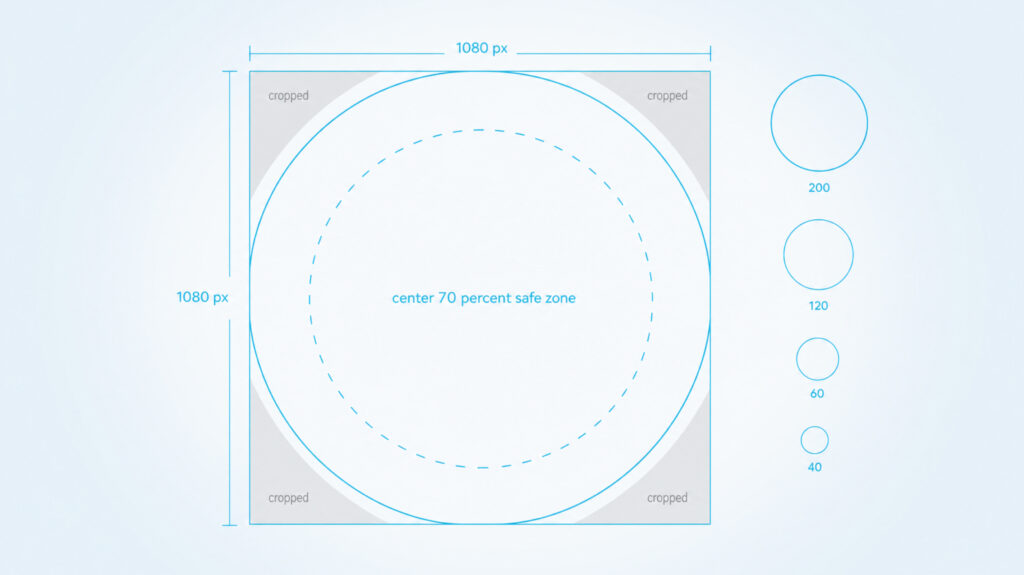
TikTok crops every profile picture into a circle. That circle gets shown as small as 40 by 40 pixels next to a comment, so the strongest PFPs are simple, high contrast, and centered. Pick a picture that still reads at thumbnail size and you have already beaten most accounts.
TikTok PFP Specs At A Glance
Before you pick the visual, know the box your image has to fit into. These are the numbers TikTok uses today.
| Minimum upload | 20 by 20 pixels. Technical floor only, do not actually use this. |
| Recommended upload | 400 by 400 to 800 by 800 pixels. Square, 1 to 1. |
| Aspect ratio | 1 to 1 square. TikTok crops it into a circle for display. |
| File format | JPG or PNG for photos. MP4 or MOV for video PFPs. |
| Max file size | 5 MB. Keep it under 2 MB for faster loading. |
| Display sizes | Profile page 200 px, video player 120 px, For You feed 60 px, comments and DMs 40 px. |
| Safe zone | Keep important detail inside the center 70 percent of the square. The corners get cropped. |
| Video PFP | Up to 6 seconds, square, MP4 or MOV. Once set, your photo PFP is hidden. |
12 TikTok PFP Ideas That Read Well In A Circle
These twelve concepts all share one thing in common. They survive the circle crop and the 40 by 40 display in a comment thread. Pick the one that fits your content, your face, and how often you want to repost.
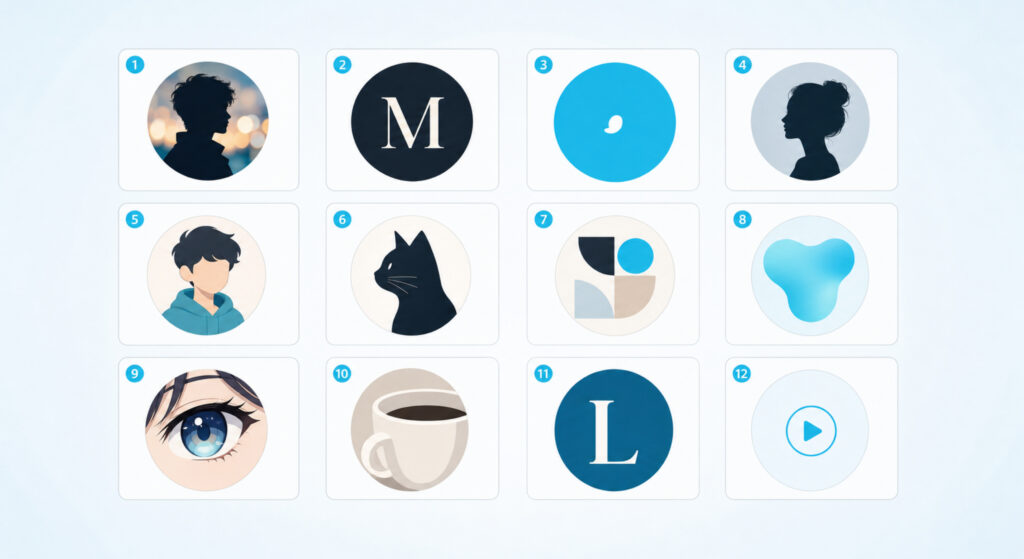
1. Sharp Portrait With A Blurred Background
A clean head and shoulders shot with the background blurred out. Your face stays sharp, the background gives depth, and the eye lands on you. Use portrait mode on your phone, or apply a soft blur in any editor.
Best for: personal brand and creator accounts.
2. Monogram Or Initials
One or two letters in a confident font on a single color block. Reads at 40 by 40, scales forever, and survives every redesign you ever do. The cleanest possible PFP.
Best for: newsletters, agencies, and anyone who hates being on camera.
3. Bold Solid-Color Avatar
A flat solid color with a single icon or shape on top. The color does the work. Pick one that contrasts with TikTok’s white UI so your circle does not disappear when someone scrolls past.
Best for: brand accounts that already own a color.
4. Silhouette Against A Single Color
You in profile, cut out as a silhouette, on a flat colored background. Looks intentional, hides the no-good-lighting problem, and reads instantly at thumbnail size.
Best for: lifestyle, travel, and faceless accounts.
5. Illustrated Cartoon Of Yourself
A drawn version of you, custom or generated. Looks friendlier than a photo, never has a bad hair day, and travels across every other platform you join later.
Best for: storytelling accounts and creators who want consistency.
Skyrocket Your TikTok
Supercharge your account with premium engagement. Real followers, likes, and views — fast.
6. Pet Or Mascot Close-Up
A close shot of a pet, a mascot drawing, or a stylized animal head. Cuteness scales. A small dog face fills a 40 px circle better than your whole living room ever will.
Best for: pet accounts and humor pages.
7. Niche Logo Mark
A small logo, monogram-shaped, that signals what you do. A camera outline for a photographer, a fork for a food account, a tiny ball for a sports take account. Subtle but unmistakable.
Best for: businesses, shops, and topic-specific creators.
8. Abstract Gradient Shape
A smooth gradient circle with no figure inside. It feels modern, sits well on dark and light backgrounds, and pairs beautifully with a clean bio.
Best for: design-led accounts, agencies, and music creators.
9. Anime-Style Avatar
A stylized anime or manga illustration of you or a character you choose. The look pulls in viewers with the same taste before they even tap.
Best for: fan accounts, gaming, edits, and storytelling.
10. Single-Object Close-Up
One object filling the circle. A coffee cup, a microphone, a paint tube, a single flower. The object becomes the brand and removes any pressure to put your face on camera.
Best for: food, beauty, and product-led accounts.
11. Color-Block Letter PFP
A single large letter inside a colored circle. Like a monogram, but the letter is the whole point. Pair it with a matching bio color and your profile feels designed.
Best for: new accounts that want presence on day one.
12. Looping Video PFP
A short looping video, up to six seconds, in MP4 or MOV. The motion catches the eye in a feed of still circles. Keep it slow and subtle, not flashing, and remember the loop point matters.
Best for: creators with a signature look or movement.
Match Your PFP To Your Niche
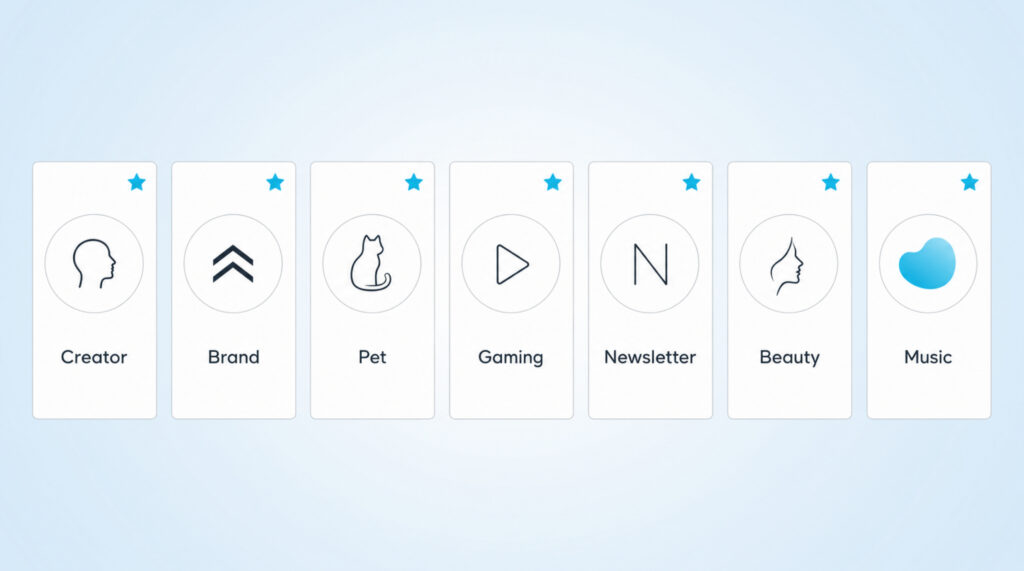
Most people pick the wrong PFP because they pick what they like, not what their niche expects. Here is a quick pairing table. It is a starting point, not a rule.
| Creator and personal brand | Sharp portrait with a blurred background |
| Business and shop | Niche logo mark |
| Gaming and edits | Anime-style avatar or game character |
| Beauty and fashion | High-contrast portrait close-up |
| Food and cooking | Single-object close-up of the ingredient or tool |
| Comedy and memes | Color-block letter or bold cartoon avatar |
| Lifestyle and travel | Silhouette against a single landscape color |
How To Change Your TikTok PFP
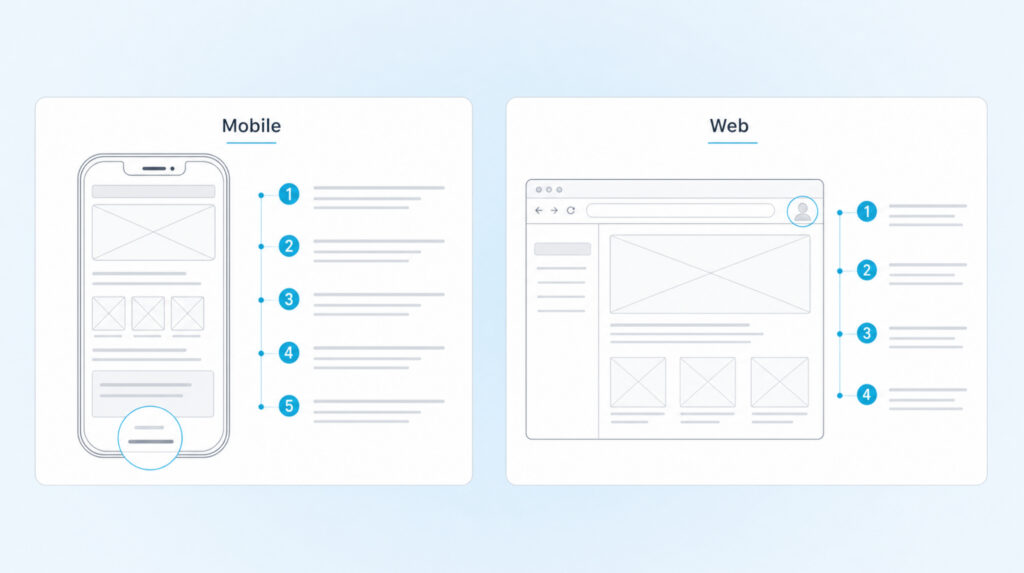
Once you have picked a picture, swapping it in takes about a minute. Steps are slightly different on the app versus the web. The web path is the only one that lets you upload a transparent PNG without TikTok adding a white background.
On the app:
- Tap Profile in the bottom right of TikTok.
- Tap Edit profile.
- Tap Change photo, or tap Change video if you are setting a looping clip.
- Take a new photo, upload one from your gallery, or pick a video up to six seconds long.
- Crop with the circular overlay so your subject sits centered, then tap Save.
On the web at tiktok.com:
- Click your profile avatar in the top right corner.
- Click View profile, then click Edit profile.
- Hover your current PFP and click the Change button.
- Upload a square image, pinch to position inside the circle, then click Apply.
| Tip: Setting a video PFP hides your photo PFP everywhere on TikTok until you remove the video. If you want both, decide which one is your main profile face before you upload. |
The PFP Mistakes That Cost You Profile Visits
Most weak PFPs share the same handful of problems. Run your pick past this list before you upload.
- Important detail sitting outside the center 70 percent of the square, so the circle crop chops it off.
- A low resolution upload that looks soft on retina screens and search results.
- A white background that disappears into TikTok’s white UI and leaves your PFP looking like a floating face.
- Tiny text on the image that no one can read at the 40 by 40 comments size.
- A busy collage that turns into colored noise the moment it shrinks to thumbnail.
- Changing your PFP every week, which kills recognition before anyone remembers you.
FAQs About TikTok Profile Pictures
What size should my TikTok profile picture be?
TikTok displays profile pictures as small as 40 by 40 pixels in comments, but it will accept a square upload as small as 20 by 20 pixels. Aim for a 400 by 400 or 800 by 800 pixel JPG or PNG so it stays sharp from your profile page all the way down to the For You feed avatar.
Can I use a video as my TikTok profile picture?
Yes. Tap Edit profile, then Change video, and pick a clip up to six seconds long in MP4 or MOV format, sized 1 to 1 square. Once a video PFP is set, your photo PFP is hidden everywhere on TikTok until you remove the video.
How often should I change my TikTok PFP?
As rarely as you can. Recognition is the whole point. Most creators leave a PFP in place for at least six months, and only refresh when their brand or content style shifts in a way the old picture no longer reflects.
Does TikTok support transparent PFPs?
TikTok will not strip a white background for you, but a true transparent PNG works if you upload it from the web instead of the app. Open tiktok.com in a desktop browser, change your PFP there, and the alpha channel is preserved.
Does my PFP affect my reach on the For You feed?
TikTok does not rank videos based on the profile picture itself, but the PFP heavily affects click-through from comments, the For You feed avatar, and search results. A PFP that reads at 40 pixels can move profile visits and follows even when the algorithm stays neutral.
Pick a picture that still reads in a circle at 40 pixels, keep it long enough for people to memorize, and you have done more than most TikTok accounts ever do with their profile.