Instagram has become one of the most influential social media platforms in the world. With over a billion users engaging daily, understanding how your audience interacts with your content is crucial for any business, creator, or personal account. One of the most essential metrics on Instagram is interactions, a term that refers to the various ways users engage with your content. From likes and comments to shares and saves, interactions help you gauge your content’s effectiveness, reach, and overall impact.
This article explores what interactions mean on Instagram, how to track them using Instagram Insights, the key differences between personal and professional accounts, and why these metrics are essential for building a robust social media strategy.
Build influence with followers, comments, and live views that show your content is valuable, authentic, and worth engaging with consistently.
Interactions Mean on Instagram
At its core, interactions on Instagram refer to any action users take to engage with your posts, stories, or videos. These actions can include:
- Likes: The number of times someone taps the heart icon on your individual posts.
- Comments: Text responses that users leave on your posts. These provide valuable qualitative feedback.
- Shares: When users share your content with other accounts, either through direct messages or to their own Instagram Story.
- Saves: When someone saves your post to view later, showing strong interest in your content.
- Replies on Stories: Direct messages or emoji responses received from your story interactions.
- Sticker Taps: Engagement with interactive elements on stories, such as hashtags, mentions, polls, or product stickers.
Monitoring these interactions provides valuable insights into what type of content resonates with your audience and drives meaningful engagement.
Interactions on Individual Posts
Each post on Instagram allows multiple types of content interactions:
Likes:
Likes are a simple yet powerful indicator of your content’s popularity. While they don’t tell the whole story, a high number of likes can help boost your content’s reach.
Comments:
Comments provide more depth. They indicate that users are willing to invest time to share their thoughts. Comments can also spark further engagement, as replies to comments create a conversation, increasing visibility on the Instagram app.
Shares:
Shares reflect your content’s ability to influence users to spread it to others. They are a crucial metric for understanding how your posts perform in comparison to other brands or accounts in your niche.
Saves:
A save is a strong signal that your content is considered valuable by your audience. Tracking saved posts helps content creators identify compelling content worth reusing or expanding upon.
Step-by-Step: How to Check Instagram Interactions
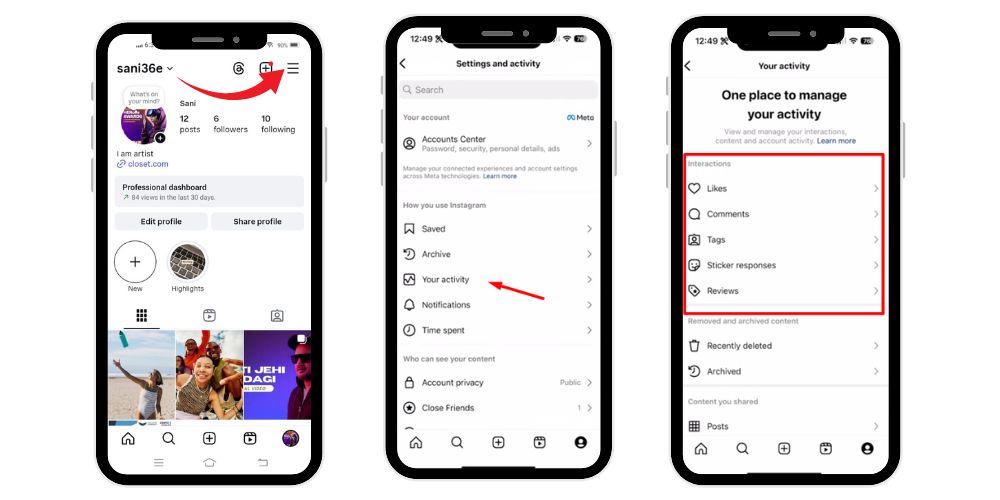
Instagram keeps track of all your activities — from likes and comments to story interactions and tags. Checking your interactions helps you understand how you engage with others and manage your account activity more effectively. Whether you want to revisit posts you’ve liked, see where you’ve been tagged, or review your story sticker responses, Instagram’s “Your Activity” section makes it easy to find and manage everything in one place.
Step 1: Open the Instagram App
- Launch the Instagram app on your mobile device.
- Make sure you’re logged in to your account.
Step 2: Go to Your Profile
- Tap on your profile icon at the bottom right corner of the screen.
- This will open your personal profile page.
Step 3: Open Settings and Activity
- Tap the three horizontal lines (☰) at the top-right corner of your profile.
- From the menu that appears, select “Your activity.”
Step 4: Explore the “Your Activity” Section
The Your Activity section shows all your past actions on Instagram in one place.
You’ll see several options here. Tap each one to view detailed interactions:
- Time spent – shows how much time you’ve spent on Instagram.
- Photos and videos – lets you see, delete, or archive your posts.
- Interactions – this is the main section for your likes, comments, and story replies.
- Account history – shows changes you’ve made to your account.
- Recent searches – displays your recent search history.
- Links you’ve visited – shows websites you’ve clicked from Instagram.
- Archived – for archived posts and stories.
Step 5: Tap on “Interactions”
- Inside Your Activity, tap “Interactions.”
- You’ll now see several options related to your engagement on Instagram.
Step 6: Check Specific Interaction Types
You can view and manage different types of engagement here:
- Likes: Tap “Likes” to see all the posts, reels, and videos you’ve liked. You can unlike any post directly from this list if you want.
- Comments: Tap “Comments” to view every comment you’ve made on posts. You can delete or edit your comments here.
- Tags: Tap “Tags” to see posts where other users have tagged you.
- Sticker responses (Story Interactions): Tap “Story replies” or “Reactions” (depending on your app version) to view replies or emoji reactions you’ve sent to stories.
Story Interactions and Insights
Instagram Stories are a powerful way to connect with your audience in real-time. The platform tracks story interactions, which include:
- Replies: Direct responses from users who view your Instagram Story.
- Sticker Taps: Taps on interactive elements like hashtags, mentions, polls, or shopping stickers.
- Next Account’s Story: Swipes to skip your story for the next story in someone’s feed, indicating lower engagement.
- Forward and Backward Taps: Users can tap to move forward or backward through your story slides, providing insight into which media type keeps their attention.
Using stories analytics in professional accounts or business and creator accounts, you can track which types of stories lead to higher engagement and profile visits, helping refine your content strategy.
Related: What Does It Mean to Subscribe on Instagram?
How to Track Interactions Using Instagram Insights
Instagram Insights is the platform’s native analytics tool for business or creator accounts. By switching to a professional account, you gain access to unique accounts and actions taken on your content. Some key features include:
- Accounts Engaged: The number of unique users who engaged with your content during a specific time frame.
- Accounts Reached: The total number of unique users who have seen your content.
- Profile Activity: Including profile visits, clicks on your profile bio, or taps on your profile picture.
- Content’s Performance: Detailed metrics for each post, story, or video, showing how your target audience engages with your content.
- Audience Demographics: Information such as gender breakdown, top locations, and age ranges of your followers or users engaging with your content.
- Follower Count and New Followers: Track your growth alongside other metrics to understand how content impacts your total follower count.
By monitoring interactions via Instagram Insights, content creators and businesses can make data-driven decisions for improving their Instagram presence.
Key Differences Between Personal and Professional Accounts
Personal accounts allow users to share content but provide limited data on content interactions and audience engagement. On the other hand, business and creator accounts offer a comprehensive solution for analyzing performance.
Key differences include:
| Feature | Personal Account | Business/Creator Account |
|---|---|---|
| Insights | Limited | Full Instagram Insights |
| Ads | No access | Can run ads and promotions |
| Contact Options | None | Email, phone, or directions |
| Metrics | Only likes/comments | Content interactions, reach, story interaction, and accounts engaged |
| Content Strategy | Basic | Data-driven decisions for social media strategy |
Switching to a professional account is essential for anyone looking to track, analyze performance, and grow an Instagram presence effectively.
Why Interactions Are Important
Tracking interactions goes beyond vanity metrics. Here’s why they matter:
- Understanding Audience Behavior: Interactions reveal what your audience engages with most. By analyzing which posts receive high engagement, you can tailor personalized content to your followers’ preferences.
- Evaluating Content’s Performance: High engagement indicates compelling content, while low interaction can suggest that your content strategy needs adjustment. Use content interactions and other metrics to refine your approach.
- Building Engagement and Community: Encouraging comments, shares, and direct messages fosters a sense of community around your brand or content creator identity. Engaged followers are more likely to advocate for your content or services.
- Informing Social Media Strategy: Tracking unique users, story interactions, and other metrics helps shape a social media strategy that prioritizes what works. Brands can make data-driven decisions to boost overall performance.
💡 Pro Tip: Buy live views to make your streams more engaging and attract organic audiences effectively.
Types of Interactions to Monitor
- Likes and Comments: Indicate immediate engagement on individual posts.
- Shares and Saves: Show how valuable your content is to users for future reference.
- Story Interactions: Includes replies, taps, and swipes on Instagram Stories, next story engagement, and sticker taps.
- Profile Visits: Visits to your profile page show curiosity about your brand or personal content.
- Live Videos: Interactions during live broadcasts include comments, reactions, and viewer count.
- Direct Messages: Responses to story interactions or posts through DMs provide insight into user interest.
Monitoring these allows you to create a comprehensive solution for growing your Instagram presence and boosting engagement across all social channels.
How to Analyze Performance Using Insights
Using Instagram Insights, content creators can examine:
- Date Range: Select a specific time frame to track performance over days, weeks, or months.
- Media Type: Compare photos, videos, or stories to see which format yields higher content interactions.
- Top Locations and Age Ranges: Understand your audience demographics for better-targeted personalized content.
- Accounts Engaged vs. Accounts Reached: Analyze if your content is resonating with existing followers or attracting non-followers.
- Other Metrics: Includes profile activity, clicks on links in the profile bio, and reactions to Instagram ads or promotions.
Regular analysis enables content creators and brands to adjust their content strategy, focus on quality, and grow engagement metrics effectively.
Creating Compelling Content to Drive Interactions
Creating content that encourages interaction is critical. Strategies include:
- Interactive Stories: Use polls, quizzes, or sticker taps to prompt responses.
- Call-to-Actions: Encourage users to comment, share, or save your post.
- Relevant Media Types: Mix videos, photos, and carousels to maintain interest.
- Consistent Posting: Keep your audience engaged with a reliable posting schedule.
- Collaborations: Partner with other brands or influencers to increase reach and accounts engaged.
The goal is to produce content that drives measurable interactions and increases profile visits, follower count, and overall Instagram presence.
Related: What Does FNF Mean on Instagram?
Leveraging Interactions for Business Growth
Businesses and content creators can use interactions to:
- Refine social media strategy based on data-driven decisions.
- Identify top-performing content interactions to inform content strategy.
- Track new followers, total followers, and engagement over a time frame.
- Understand audience demographics like age ranges, gender breakdown, and top locations.
- Compare performance across social channels and other brands.
This approach ensures your Instagram presence remains relevant and effective.
Using Interactions to Track Campaign Success
For business accounts, measuring interactions is essential when running ads or promotions. High engagement often correlates with improved brand awareness and sales. Using stories analytics, post metrics, and insights allows for comprehensive solutions to maximize ROI on campaigns.
Conclusion
Understanding what does interactions mean on Instagram is essential for anyone serious about growing their Instagram presence. By tracking likes, comments, shares, saves, replies, sticker taps, and other metrics, content creators and businesses can gain valuable insights into their target audience, content’s performance, and overall engagement. Using Instagram Insights in business or creator accounts enables data-driven decisions that improve content quality, drive interactions, and grow your follower count effectively.
Whether you are a brand, content creator, or individual looking to improve your social media strategy, analyzing interactions is a key step toward creating compelling content and building a thriving Instagram presence.
💡 Pro Tip: Strong views equal strong growth. Boost your videos to attract audiences and build trust faster.
FAQs
1. What does interactions mean on Instagram Story?
On Instagram Stories, interactions refer to all actions viewers take, such as replies, emoji reactions, sticker taps, link clicks, and profile visits. These metrics show how actively your audience engages with your story content and help measure engagement, relevance, and storytelling effectiveness within your Instagram Insights.
2. What does interactions mean on Instagram Followers?
Interactions among Instagram followers represent how your followers engage with your posts or stories—through likes, comments, shares, saves, and replies. High interaction levels from followers indicate strong audience engagement, meaningful connections, and effective content that resonates with your existing follower base and encourages continued audience growth.
3. What does interactions mean on Instagram Likes?
On Instagram, interactions related to likes measure how many users tapped the heart icon on your post. Likes are one of the simplest engagement indicators, showing how appealing your content is to your audience and contributing to your post’s visibility and overall performance on the platform.
4. What does interactions mean on Instagram App?
Within the Instagram app, interactions encompass every engagement action users perform on your content—likes, comments, shares, saves, story replies, sticker taps, and profile visits. Tracking these metrics helps users and brands evaluate content effectiveness, audience preferences, and overall engagement rates directly through Instagram Insights tools.
5. What does interactions mean on Instagram Reels?
Interactions on Instagram Reels include likes, comments, shares, saves, and plays that indicate viewer engagement. These actions reflect how well your short videos capture audience interest. Monitoring Reels interactions helps creators optimize content style, audio choices, and trends to improve visibility, engagement, and follower growth.