Wondering what does CFS mean on Instagram? CFS stands for Close Friends Story — a feature that lets you share private stories with a select group of trusted followers. It’s ideal for posting personal updates, exclusive content, or behind-the-scenes moments without showing them to everyone.
🚀 Ready to grow your Instagram faster? Get instant engagement with Instagram Auto Likes, real Instagram Followers, and Story Views. Prefer to test it first? Try free Instagram Likes today and see the difference for yourself!
👉 Don’t wait — start growing now!
CFS Stands For ‘Close Friends Story’
Looking to build a deeper connection with your followers? Use the Close Friends Story feature to share updates with your trusted circle only. This gives you more control over your content while keeping things real and meaningful.
What is the CFS meaning?
CFS means Close Friends Story, a feature within the Instagram app that allows users to post private stories visible only to selected people from their Close Friends list. This is unlike regular Instagram stories, which can be viewed by all your followers or the public (depending on your profile privacy settings).
The green ring around a user’s profile picture indicates that the content is shared only with Close Friends — a visual cue that you’ve been included in a trusted circle.
The Evolution of the Close Friends Story Feature
Launched in 2018, the Close Friends Story feature was Instagram’s answer to the increasing need for selective sharing. Social media can feel performative — the CFS feature brought it back to meaningful interactions.
- It encouraged users to share personal moments without the pressure of their entire follower list watching.
- Over time, users began using it for inside jokes, romantic interest updates, and even as a tool for content creators to give exclusive content to loyal followers.
How to Create a Close Friends List
Creating a Close Friends list is straightforward, but maintaining it smartly is key to using the CFS feature effectively.
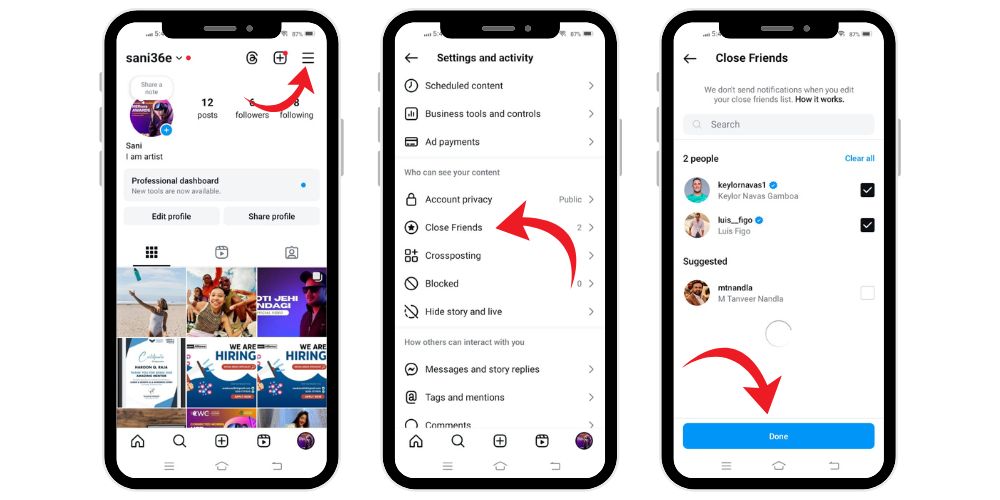
Step 1: Access Your Settings
- Open your Instagram profile
- Tap the three horizontal lines (☰) in the top right corner
- Scroll down and Tap “Close Friends” under “Who can see your content”
Step 2: Add People
- Use Instagram’s suggestions based on interaction
- Tap the checkbox next to users to include them in your Close Friends list
- Use the search bar for those not listed
Step 3: Save Your List
- Tap Done
- Your list is now active. No one is notified if you add or remove them — perfect for quiet updates.
How to Post a CFS on Instagram
A Close Friends Story is posted just like a regular story, but with one extra tap.
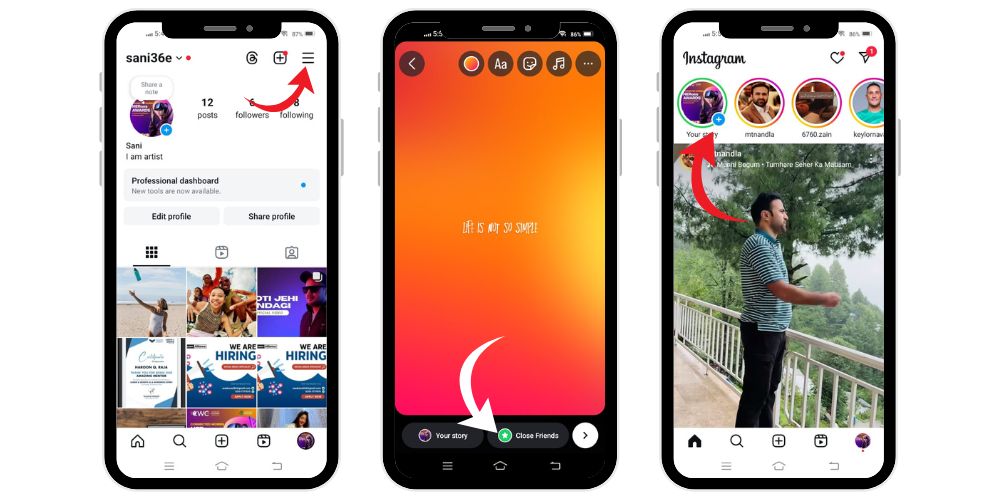
- Open Instagram, tap the + icon or swipe right
- Select “Story” and capture or upload your content
- Tap the “Close Friends” option (green star)
- Post your story — it will be marked with a green ring in the stories tray
Your Close Friends will see it first, as CFS posts are prioritized and moved to the front of their feeds.
What to Post on Your Close Friends Story (CFS)?
Unlike public content designed to impress a wider audience, your Close Friends Story (CFS) serves as a private space for genuine expression. It’s where your trusted friends can see the real, unfiltered version of you. Here’s what works well when sharing to your CFS:
1. Confidential Life Updates
Your CFS is the perfect place to break major news before going public. Whether you’re expecting a baby, celebrating a new relationship, announcing an engagement, or sharing a job promotion, these life milestones feel more meaningful when revealed to a select group. You get to enjoy the joy of sharing without the pressure of having all your followers watch your every move.
2. Sensitive Location Updates
Sharing your location in real time can be risky, especially on a public platform. CFS lets you share your whereabouts only with people you trust. Whether you’re attending a private event, traveling solo, or simply hanging out somewhere you’d rather keep off the radar, using CFS helps you maintain safety while still enjoying social media interactions.
3. Funny, Embarrassing, or Relatable Moments
Everyone has their awkward moments, but not all of them belong on a public feed. From disastrous dates and wardrobe malfunctions to cringe-worthy karaoke performances, these hilarious snapshots of life are best kept within your inner circle. CFS allows you to be your goofy, honest self without worrying about judgment from a wider audience.
4. Romantic Interest Updates
Soft-launching a new romance? CFS is the subtle way to do it. Whether you’re posting date night selfies, teasing hidden hand-holding shots, or sharing flirty quotes, CFS keeps the mystery alive while giving your close friends an inside peek. It’s also perfect for those in committed relationships who want to share cute moments without overexposing their partner.
5. Personal Reflections and Thoughts
When you’re going through something personal — emotionally, mentally, or spiritually — CFS gives you a quiet, supportive space to share. You might use it like a digital diary, expressing your thoughts on growth, challenges, or mental health check-ins. It’s ideal for those moments when you need to vent, reflect, or seek quiet validation from your loyal followers.
6. Brand or Influencer Sneak Peeks
If you’re a creator, influencer, or entrepreneur, CFS becomes a powerful tool for audience segmentation. Use it to give your most engaged followers early access to upcoming launches, product tests, behind-the-scenes content, or unpolished updates. It’s a great way to reward your most loyal supporters with exclusive content while building hype and trust.
Related: What Does “NFS” Mean on Instagram?
Managing Your CFS List
Your Close Friends list should evolve just like your real-world connections. Keeping it updated ensures you’re sharing with the right people and maintaining boundaries online. Here’s how to manage it smartly:
1. Update Regularly
Regularly revise your Close Friends list to reflect your current relationships. Add people you trust more, and remove those you’ve grown distant from. Tailor your list based on what you’re sharing — whether it’s romantic moments, work updates, or inside jokes.
2. Silent Updates
Instagram does not notify users when you add or remove them from your Close Friends list. Use this to your advantage by quietly curating your audience without any awkward conversations or explanations. It’s a low-pressure way to maintain control.
3. Handle Questions Tactfully
If someone questions why they’re not on your list, respond kindly. You can mention it’s nothing personal, just about being selective. Or deflect casually with “I barely use that feature,” to avoid making it a big deal.
4. Think Strategically
Use your Close Friends list with intention. It’s not just for fun — it can be a great way to share exclusive content with clients, top followers, or collaborators. Keep your list short and focused to avoid oversharing.
Can You Go Live on Close Friends Story?
Yes, you can now go live on Instagram exclusively with your Close Friends list — a feature designed for private, real-time sharing with your trusted circle. Whether you’re hosting a personal chat, a small Q&A, or simply connecting more intimately, it’s the perfect way to engage without broadcasting to all your followers.
To go live with Close Friends:
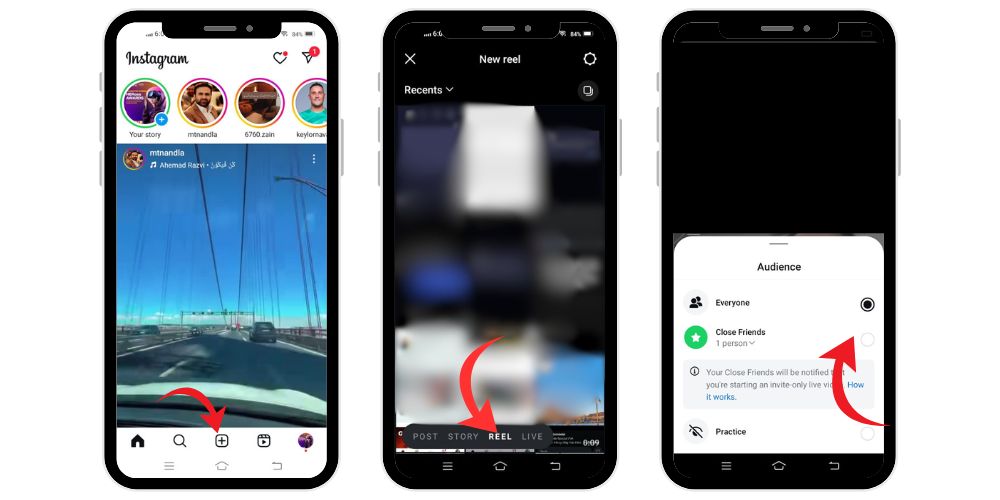
- Open Instagram
- Tap the “+” icon at the bottom
- Choose “Live”
- Tap the audience dropdown (usually says “Everyone”)
- Select “Close Friends”
- Hit the white button to go live
You can also invite up to three other users to join your live session. It’s ideal for private events, mini hangouts, or sharing updates with only your inner circle.
Can You Change a Story from Close Friends to Public?
Yes — but timing matters. You can change a story’s visibility before or during the posting process, but not after it’s been published.
Why You Might Want to Switch:
- You started with Close Friends, but realized the post is suitable for a wider audience
- The story received great reactions from your CFS, so you want to share it publicly
- You used CFS to test the post first before going public
How to Change Visibility:
- Tap your existing CFS story
- Select the green “Close Friends” icon
- Switch to “Your Story” or “Public”
- Re-share the story
Important: You can’t edit the audience of a story after it’s been posted. If you want to make it public later, you’ll need to re-upload the content manually and post it again with the new visibility setting.
Private Story Name Ideas for CFS Highlights
Your CFS can be more fun if you assign it a catchy name. So if you’re curating highlights or sharing temporary content, here are some themed naming ideas:
Creative and Personal
- “BFF Chronicles”
- “My VIP Circle”
- “Inner Circle Diaries”
- “Just Us Club”
For Influencers and Creators
- “Sneak Peeks”
- “Beta Content”
- “Test Zone”
- “Brand Lab”
For Emotional Sharing
- “Late Night Feels”
- “Mindful Moments”
- “Heart Talks”
- “Vibe Check”
For Humor and Relatable Content
- “Shhh…Don’t Judge”
- “Cringe Central”
- “Unfiltered AF”
- “Finsta Feels”
These names help categorize your exclusive content and enhance the user experience on your Instagram profile.
Why Instagram Users Love the CFS Feature
- Greater Privacy: Avoid oversharing by keeping sensitive content limited to trusted friends. The Close Friends list offers a safe space for sharing without exposing personal updates to your full follower list.
- Builds Loyalty: Adding someone to your CFS makes them feel valued. It encourages stronger engagement and helps build lasting loyalty among your closest and most interactive Instagram followers.
- Custom Audience Control: Share specific stories with different groups without managing multiple accounts. Ideal for creators, influencers, and brands wanting to segment their content for different audiences strategically.
- Encourages Authenticity: Users feel comfortable being their true selves. CFS allows for unfiltered, real-life sharing which supports better mental health, more honest expression, and stronger connections online.
Final Thoughts
Instagram’s CFS feature isn’t just a technical tool — it’s a reflection of how social media interactions are changing. Users crave authenticity, intimacy, and more control over their personal space online. By using Close Friends Stories, you can safely share Instagram stories with only the people who matter most.
Whether you’re a casual user sharing candid updates, or a brand offering exclusive content, afterall the Close Friends feature is a versatile way to build stronger bonds in a digital world full of noise.
FAQs
Does Instagram notify users when you screenshot a Close Friends Story (CFS)?
No, Instagram does not send a notification if someone takes a screenshot of your Close Friends Story. While the feature offers privacy, it does not alert you when someone saves your story content by screenshotting it.
How can I turn off the Close Friends feature on Instagram Stories?
Currently, Instagram does not offer a way to disable the Close Friends feature entirely. You can only manage who’s on your list by manually adding or removing people through your story settings before posting.
How many people can I add to my Close Friends list?
There’s no official limit set by Instagram, but most users keep their list under 50 people. A smaller list helps maintain intimacy and encourages more personal, high-quality engagement from your most trusted followers.
Can I have multiple Close Friends lists for different groups?
No, Instagram allows only one Close Friends list per account. However, you can manually update the list before posting each story, helping you target different groups based on content type or relevance.
Will someone know if I remove them from my Close Friends list?
Instagram doesn’t inform users if they’ve been removed from your Close Friends list. However, they may notice if your Close Friends stories suddenly stop appearing for them. Instagram keeps all list changes completely private.
Can I see who viewed my Close Friends Story?
Yes, you can see exactly who viewed your Close Friends Story. Simply swipe up while the story is still active, and Instagram will show a list of all viewers from your selected Close Friends list.