Instagram has become one of the world’s most popular social platforms, enabling users to share posts, stories, reels, and ads while maintaining meaningful engagement. However, with more followers and interactions comes the responsibility of protecting accounts from spam, bots, and inappropriate activity. To achieve this, Instagram uses a flagged for review feature, which allows suspicious followers, posts, comments, and requests to be temporarily held for moderation. This system ensures that Instagram’s community guidelines are upheld while offering users the ability to fix potential issues.
Stand out by combining saves, followers, and automatic likes to maintain consistent growth and create a strong presence effortlessly.
Flagged for Review Mean on Instagram
When your account activity is flagged for review, it means Instagram has detected unusual or suspicious behavior. Instead of instantly deleting content or blocking followers, Instagram temporarily holds the activity for closer evaluation. This can include followers, comments, posts, or even ads that don’t seem to comply with community guidelines.
For example:
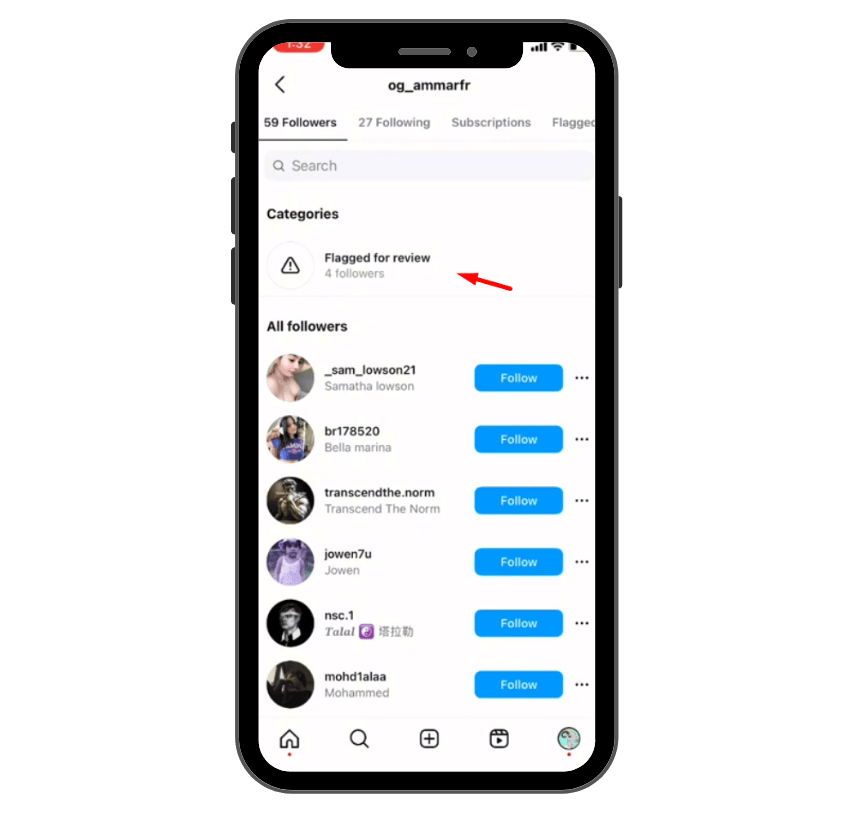
- If you gain more followers suddenly in just a few days, some of them may be flagged followers for review.
- If your posts or comments are reported by other users, they may be flagged until moderators determine whether they violate policies.
- If your account shows spam-like behavior, such as sending too many follow requests or comments, Instagram may restrict it.
Being flagged doesn’t always mean you’re guilty of violating rules—it’s often a precaution to protect and maintain the quality of engagement across the platform.
Related: What Does Unt Unt Mean on Instagram?
Common Reasons Why Content Gets Flagged for Review
There are a few ways your account or activity can trigger this feature:
- Rapid Follower Growth: If your account suddenly gets more followers than usual, Instagram may flag these requests to verify if they are real users or bots.
- Spam-like Activity: Excessive likes, comments, or follow requests in a short time can appear automated, leading to flagged actions.
- Reported Content: Posts, videos, or comments reported by users may be flagged until moderators determine whether they breach rules.
- Use of Banned Hashtags or Language: Certain hashtags or words are associated with spam or harmful activity. Using them may cause your content to be flagged.
- Policy Violations in Ads: If you run Instagram ads that don’t follow ad guidelines, they can be flagged for review before being shown.
- Browser or Device Issues: Logging in from multiple devices, especially through a browser or Android apps with cookies disabled, can sometimes trigger review checks.
- Mistakes in Automated Detection: Instagram’s system isn’t perfect, and sometimes real followers or quality posts may be flagged by mistake.
How to Check If Your Content Has Been Flagged for Review
Instagram notifies users whenever an account activity has been flagged. You might receive a notification in your Activity tab or inside your profile settings. Depending on the case, Instagram may:
- Ask you to verify your account to prove you’re not a bot.
- Inform you that a post, comment, or video is under review.
- Temporarily limit your ability to follow, share, or continue posting until the review is completed.
To check flagged items:
- Open your profile and tap the three-line menu.
- Select Settings → Account.
- Choose Account Status to learn if any of your content is flagged.
- Visit your Activity tab to see flagged requests or followers.
How to Resolve a “Flagged for Review on Instagram” Issue
Fixing flagged content depends on the type of issue. Here are a few ways to address it:
- Wait a Few Days: Instagram often resolves flagged cases automatically after review. If it’s a temporary issue, you’ll be notified when the review is done.
- Appeal the Decision: If your content was flagged by mistake, you can submit an appeal within the notification. Moderators will re-check the action and may remove the flag.
- Verify Your Identity: For flagged accounts, Instagram may ask you to confirm your phone number, email, or upload an ID.
- Remove or Edit Content: If a post, video, or comment violates guidelines, the best fix is to delete or update it according to Instagram’s standards.
- Block or Report Fake Followers: If flagged followers are spam accounts, you can manually remove or block them.
- Check Your Engagement Practices: Avoid overusing automated tools or posting too frequently in ways that look unnatural.
💡 Pro Tip: Automatic likes provide instant engagement on new posts, ensuring your content never goes unnoticed.
How to Prevent Getting Flagged for Review on Instagram
To maintain a healthy Instagram account, you should follow certain practices to avoid unnecessary flags:
- Post high-quality content that aligns with community guidelines.
- Avoid spam-like actions such as mass-following or copy-pasting the same comments.
- Don’t use banned hashtags or inappropriate language.
- Ensure that all ads comply with Instagram’s advertising policies.
- Keep your profile complete and authentic (name, photo, bio).
- Use trusted apps and avoid suspicious third-party tools.
By taking these steps, you reduce the chances of your account being flagged.
Why Do Followers Get Flagged?
Followers are a core part of engagement on Instagram, but sometimes new ones are automatically marked as flagged for review. Reasons include:
- They were gained too quickly in a short time.
- They show bot-like behavior (fake profiles, no posts, spam comments).
- They were purchased in bulk from unsafe sources.
- Instagram needs to determine whether they’re real accounts or spam.
This review doesn’t always mean removal; sometimes flagged followers are eventually accepted after Instagram confirms their legitimacy.
How to Toggle “Flag for Review” on Instagram
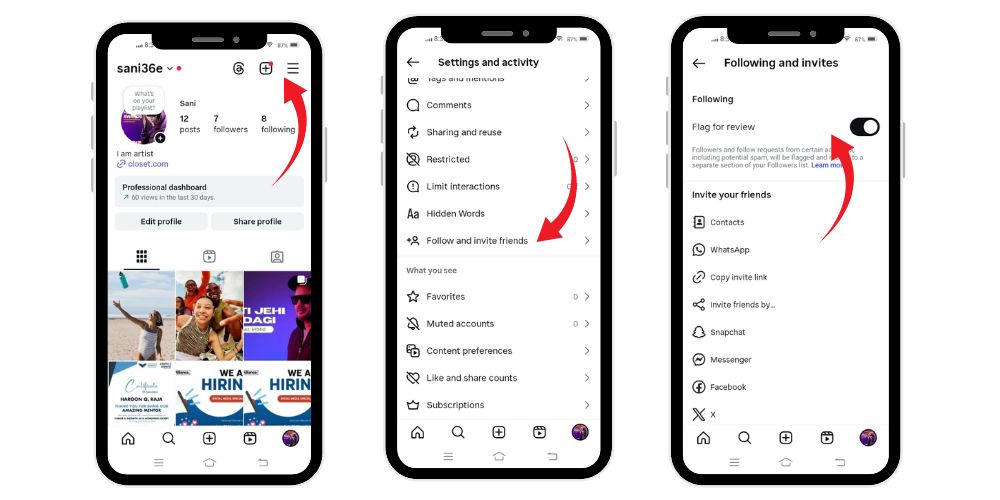
- Open the Instagram app, go to your Profile.
- Tap the Menu (three lines) → Settings and activity (or “Settings & privacy”)
- Find Follow and invite friends
- There should be an option called “Flag for review”
- If ON, new followers/accounts flagged as suspicious will go into your “Flagged” tab and you’ll have to manually approve them.
- If you want followers to be added automatically, toggle OFF.
- If ON, new followers/accounts flagged as suspicious will go into your “Flagged” tab and you’ll have to manually approve them.
Related: What Does TMO Mean In Instagram?
What We Review on “Flagged for Review on Instagram”
Instagram checks flagged items to determine if they follow rules. This can include:
- Followers and requests.
- Posts, stories, reels, or ads.
- Comments or messages.
- Account details like names, profile pictures, and links.
Their goal is to protect users, maintain engagement quality, and ensure the platform stays safe.
Conclusion
Being flagged for review on Instagram may feel frustrating, but it’s a protective feature designed to keep the platform safe from spam, bots, and harmful content. Whether it’s flagged followers, posts, or ads, Instagram uses this system to verify activity and maintain trust among users worldwide.
Remember:
- You’ll be notified if something is flagged.
- You can appeal, delete, or fix flagged items.
- Following Instagram’s community guidelines is the best way to prevent issues.
By understanding how flagged for review works, you gain the ability to manage your account better, avoid mistakes, and continue growing your followers and engagement safely.
💡 Pro Tip: Strengthen your Instagram presence with likes that improve your posts’ reach, ranking, and social proof effectively.
FAQs
What happens if my post is flagged?
Your post will be reviewed, and you’ll be notified if it violates policies. You can edit, appeal, or delete it.
How long does a review take?
Usually a few days, depending on the type of flagged activity.
Can I turn off flagged for review?
Instagram automatically applies reviews, and while some options can be adjusted in settings, you cannot fully turn off moderation.
Will flagged followers disappear?
Sometimes they are accepted, sometimes removed. You will not always be directly notified of the final decision.
What if Instagram made a mistake?
You can submit an appeal or reach out through support to fix the issue.