Instagram has become more than a social app — it’s a platform for connection, creativity, and communication. Among its many interactive features, tagging is one of the most powerful tools that helps users connect people, brands, and ideas within a single post. Whether you’re uploading a photo, video, or story, tagging lets others know who is featured and makes your content discoverable to a wider audience.
Understanding what it means to tag someone on Instagram is essential for everyone — from regular users and friends sharing daily moments to businesses looking to enhance engagement. This article will explain the meaning of tagging, how to use it, privacy controls, and professional tips for better visibility and security.
Drive engagement through impressions, likes, and saves that keep your content visible and relevant in the Instagram algorithm longer.
Understanding What Tagging Means on Instagram
Tagging is Instagram’s built-in way to identify and connect a person, brand, or business within your shared content. When you tag someone, their username becomes clickable, linking directly to their Instagram profile. This connection brings attention to the tagged account and helps others discover new people or brands easily.
A tag differs from a mention. Mentions use the “@username” format within captions or comments, while tags are typically added to the photo or video itself. When someone views your post, they can see the tagged usernames usually displayed near the bottom left corner of the image or by tapping the “View Tagged People” option.
Tagging is a subtle but powerful way to give credit, involve others in your content, and expand your reach across the Instagram community.
How to Tag Someone on Instagram
Tagging someone on Instagram is a great way to connect, give credit, or notify another user that they’re featured in your content. Whether you’re posting a photo, video, or story, Instagram makes it simple to tag other users. Below is a detailed, step-by-step guide on how to tag someone in a new post, an existing post, or a story.
Related: What Does It Mean When Someone Mentions You on Instagram Live?
Tagging Someone in a New Post
When you upload a new photo or video to Instagram, you can tag people directly before publishing the post. Here’s how to do it:
- Open Instagram: Launch the Instagram app on your phone and tap the “+” icon at the bottom or top of your screen to create a new post.
- Select a Photo or Video: Choose the image or video you want to upload from your gallery, or take a new one using the camera feature.
- Edit Your Content: Apply filters, crop the image, or make adjustments as you like, then tap Next.
- Add a Caption: In the caption field, you can type @ followed by the person’s username (for example, @username). Instagram will show suggestions as you type — simply tap on the correct profile.
- Use the “Tag People” Option: Alternatively, tap Tag People below the caption field.
- Tap the Photo: After selecting “Tag People,” tap on the area of the photo where you want the tag to appear.
- Enter the Username: Type the person’s Instagram handle and select them from the list that appears.
- Save the Tag: Tap Done to confirm your tags.
- Share Your Post: Once everything looks good, tap Share to publish your post. The tagged users will receive a notification that they’ve been tagged.

Tagging Someone in an Existing Post
If you’ve already shared a post and forgot to tag someone, you can easily add tags afterward. Follow these steps:
- Go to Your Profile: Tap on your profile icon at the bottom right of the screen to access your posts.
- Select the Post: Scroll to find the post where you want to add a tag.
- Open the Options Menu: Tap the three dots (•••) at the top-right corner of the post.
- Choose “Edit”: From the menu, select Edit.
- Tap “Tag People”: This option appears on the bottom left of your image or video.
- Tag the User: Tap the spot where you want the tag, enter the username, and select them from the suggestions.
- Save Changes: Once done, tap Done (iPhone) or the checkmark (Android). The tagged user will now appear in your post.
💡 Pro Tip: Buy live views to make your streams more engaging and attract organic audiences effectively.
Tagging Someone in an Instagram Story
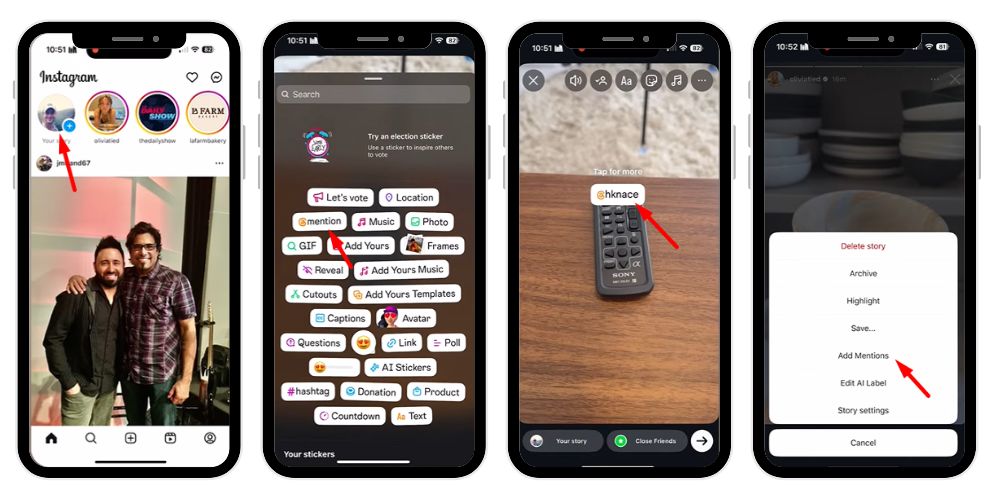
Instagram Stories allow you to mention users directly in your content. Here’s how to tag someone in a story:
- Start a New Story: Swipe right from your home feed or tap your profile picture to begin a new story.
- Upload or Capture Content: Choose an existing photo/video or take a new one.
- Tap the Screen: This opens the text tool.
- Type the @ Symbol: Type “@” followed immediately by the username — for example, @friendname.
- Select the User: From the dropdown list, tap on the correct username.
- Adjust the Tag: You can move, resize, or change the color of the mention text.
- Share Your Story: Tap Your Story or Close Friends to publish it. The tagged person will receive a direct mention notification.
- Edit Story: You can Add more people by clicking on add members.
Managing Tags and Privacy Settings
Instagram provides flexible options for managing how others tag you. To find these, open your profile, tap the three dots or menu in the top-right corner, go to Settings > Privacy > Tags.
Here, you can:
- Allow tags from everyone, people you follow, or no one.
- Manually approve tags before they appear on your profile.
- Remove yourself from unwanted tagged photos or posts.
If someone tags you but you’ve blocked them, that tag won’t appear on your profile. You can also view all tagged content in the “Tagged” section of your profile screen.
Being selective about tags ensures your feed remains professional, private, and spam-free.
Tagging for Businesses and Creators
For brands and creators, tagging is far more than just a social feature — it’s a strategic marketing tool that strengthens online presence and engagement.
- Promote partnerships and collaborations: Businesses use tags to highlight their collaborations with influencers, creators, or partner brands, making posts more authentic and relatable.
- Enhance product visibility: Instagram’s product tagging feature allows business accounts to link products directly in posts, helping customers discover and purchase items easily.
- Build audience trust: When a fashion brand tags a model wearing its outfit or a food blogger tags a restaurant in a review, it establishes credibility and encourages followers to engage.
- Drive engagement and traffic: Tagging increases reach by notifying tagged profiles and their followers, bringing more eyes to your content.
- Encourage collaboration: Influencers often tag brands they love, creating organic exposure that benefits both sides.
- Maintain brand professionalism: Always choose relevant tags, respect privacy, and ensure all tagged content aligns with your brand values and visual identity.
- Use tagging as a conversion tool: By tagging products, services, or event pages, businesses can guide users toward purchase or action directly within the Instagram app.
Common Tagging Problems and Solutions
Even though tagging is simple, users sometimes face minor issues.
- Forgetting to Tag Someone: If you forget to tag a person, simply edit the post using the dots icon and select Edit > Tag People.
- Tag Not Appearing: This may occur if the tagged person has restricted tagging or you have a weak internet connection. Reopen the app and try again.
- Tagged in Spam or Irrelevant Posts: If someone tags you in spam, open the post, tap the three dots, and choose Remove Me from Post or Report.
- Not Getting Tag Notifications: Check your notification settings. Go to Settings > Notifications > Tags and ensure they are enabled.
Instagram continues to enhance tag visibility and safety, ensuring users have control over where their names appear.
Related: What Does the Blue Envelope Mean on Instagram?
Security and Privacy Tips for Tagging
Your security on Instagram should always come first. Follow these tips to stay safe:
- Review all tagged photos before allowing them on your profile.
- Avoid engaging with spam accounts that tag you randomly.
- Use the manual approval setting for tags to prevent misuse.
- Don’t click on suspicious links shared through tagged content.
Tags can be misused for scams or to spread unwanted promotions, so it’s best to keep your tagging settings private and controlled.
Advanced Tagging Features and Tools
Instagram keeps evolving, introducing new tools to make tagging smarter and more interactive.
- Location Tags: Add a place to your post, increasing local reach.
- Multiple User Tags: You can tag several people in one post.
- Tag in Captions and Hashtags: Combine tags with hashtags in the caption for maximum reach.
- Collaborative Posts: Invite another user to share ownership of a post, showing it on both profiles.
Such features improve how your content performs in the feed, reaching both your audience and that of the tagged accounts.
The Impact of Tagging on Engagement and Visibility
When you tag someone, your post gets more eyes on it. Tagged users’ followers might discover your content, resulting in higher likes, comments, and follows.
Tagging relevant people helps the algorithm understand relationships between accounts and increases the chance of your post appearing in others’ feeds or search results. In other words, tagging is a free and effective way to expand visibility, bring attention to your brand, and grow your community organically.
Tag Etiquette and Best Practices
Tagging responsibly keeps your profile respected and prevents being flagged as spam.
Here are a few tips:
- Only tag users who are related to your content.
- Don’t over-tag — limit to relevant friends or collaborators.
- Ask for permission before tagging someone in a photo.
- Keep tags aligned with your post’s theme or note.
- Avoid tagging random accounts just to gain reach.
Following good tag etiquette ensures that your posts remain authentic, professional, and well-received.
Editing, Removing, and Managing Old Tags
Sometimes, you might want to make changes after uploading. Instagram makes it easy to edit or remove tags.
To edit a tag:
- Tap the three dots on your post.
- Select Edit and choose Tag People.
- You can add, remove, or reposition tags.
To remove a tag:
- Open the tagged photo.
- Tap your username, then select Remove Me from Post.
If a person deletes their account, the tag becomes inactive but remains visible in your post.
These options give you control over how your posts appear and who they’re connected with.
Useful Tagging Tips for Better Reach
Tagging is a skill — and using it strategically can make your profile grow faster.
- Tag business pages or brands you collaborate with.
- Use a mix of mentions, hashtags, and tags for layered engagement.
- Place tags in visible but non-distracting parts of your photo.
- Keep captions short and include the tag near related text.
- Combine tags with location for targeted discovery.
These small adjustments can boost your engagement rate and help your posts appear in relevant sections of Instagram’s explore tab.
Key Differences Between Tagging and Mentioning:
- Placement: Tags are placed directly on the photo or video, while mentions appear in text fields such as captions or comments.
- Visibility: Tags are more permanent and visible on both profiles; mentions only trigger notifications.
- Purpose: Tagging is used for crediting or linking people in visual content, while mentioning is used for communication or engagement.
- Impact: Tags help build collaboration networks, while mentions help start or maintain conversations.
Use tagging for:
- Collaborative photos or videos
- Brand partnerships and influencer content
- Events, team projects, or multi-person posts
Use mentioning for:
- Comments, shoutouts, and community interaction
- Highlighting brands or users in your caption
- Responding to followers or encouraging discussions
Both tagging and mentioning are essential Instagram tools that work together to build stronger connections, increase engagement, and ensure your posts reach the right audience.
💡 Pro Tip: Boost your visibility by getting reposts that spread your content wider, attract new audiences, and strengthen credibility across Instagram.
Final Thoughts
So, what does it mean to tag someone on Instagram? It means creating a connection — linking your post with another profile to share attention, credit, or engagement. Tags simplify communication, expand your visibility, and make your posts, stories, and videos more interactive.
Whether you’re tagging friends, businesses, or collaborators, do it thoughtfully. Always keep your settings secure, respect privacy, and avoid overuse. With smart tagging and attention to details, your profile becomes more engaging, professional, and discoverable. Tagging isn’t just a feature — it’s a way to build relationships, share stories, and leave a meaningful mark on Instagram’s vibrant digital landscape.
FAQs
What happens if I tag someone on Instagram?
When you tag a person in a photo, it appears in the “Tagged” section of their profile. However, tagging within a caption acts as a mention — it doesn’t show on their tagged tab but sends them a notification that they’ve been tagged or mentioned.
What happens if you tag @followers?
Tagging @followers increases your post’s visibility by notifying active followers and encouraging engagement. It can lead to more likes, comments, and shares, improving overall reach and impressions. This strategy helps ensure your post gains maximum attention and interaction within your Instagram community.
What is the difference between tag and untag?
On Instagram, tagging links another user’s profile to your post, making their name visible and clickable. Untagging means removing that link or connection, so the post no longer appears under their tagged section. It allows users to control their visibility and remove unwanted or irrelevant tags.
What is the meaning of being tagged?
Being tagged means someone has identified or included your username in their post, photo, or story. It connects the content directly to your profile, alerting followers that you’re featured. Outside social media “tagged” can also mean marking something, such as graffiti or digital labels.