If you’ve ever seen a green circle around someone’s profile picture on Instagram and wondered what it means, you’re not alone. Many users are curious about how Instagram’s features reflect different levels of connection, privacy, and exclusivity. The green visuals—whether it’s a green circle, green ring, or even the green button on someone’s profile page—are all related to a single, powerful feature: Close Friends.
Whether you’re trying to build a loyal audience or simply curious if you’re on someone’s Close Friends list, this article covers everything you need to know.
Take your Instagram content to the next level with trusted services from BuySocialMediaMarketing — get more real Instagram followers, authentic likes, and reels views.
Close Friends Feature (Green Circle) on Instagram Explained
Instagram introduced the Close Friends feature as a way for users to share private stories with only a select group of followers. When you see a green circle around someone’s profile picture in the stories list, it signals that the story you’re viewing was shared with that person’s Close Friends list.
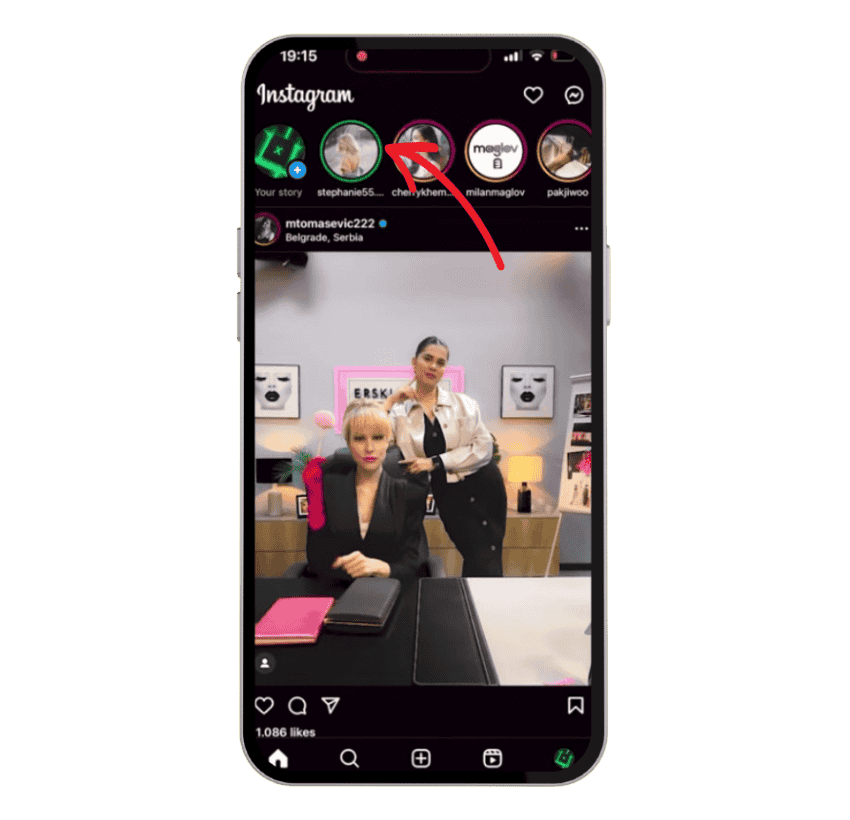
This feature is designed to help users maintain more private interactions and share content that might not be suitable for their broader followers. It creates a more intimate space within the Instagram app—something between a public post and a direct message.
Ever seen the term HMJ pop up on Instagram but didn’t know what it stood for? Our article on What Does HMJ Mean on Instagram breaks down this abbreviation
How to Use the Close Friends Feature on Instagram
The Close Friends feature isn’t just about privacy—it’s a useful way to segment your audience, especially if you’re a creator, influencer, or brand. Here’s how to set it up.
1. Open the Instagram App
Start by launching the Instagram app on your smartphone. Make sure you’re logged in to the account where you want to manage your Close Friends list.
2. Go to Your Profile
Tap the profile icon in the bottom right corner of the screen. This will take you to your profile page.
3. Access the Menu
Look for the three horizontal lines in the top right corner of your screen. Tap it to open the menu.
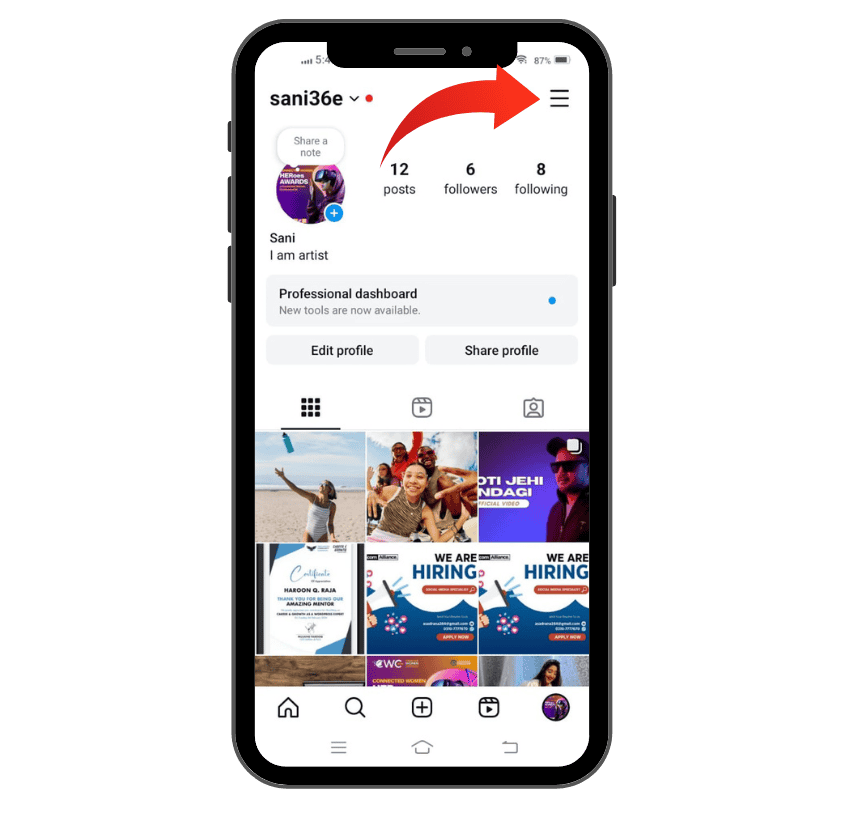
4. Select “Close Friends”
From the menu, find and tap the option labeled “Close Friends.” This opens the section where you can manage your list.
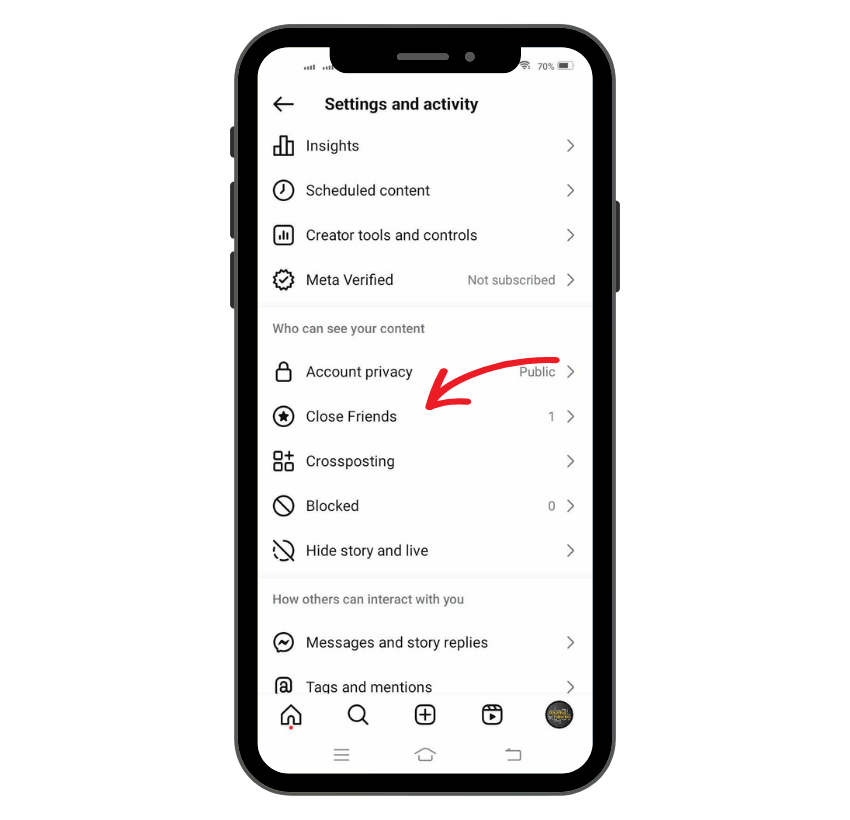
5. Add Friends
Instagram automatically suggests people you frequently interact with. You can also use the search bar to look up specific usernames. Tap “Add” next to the people you want on your list.
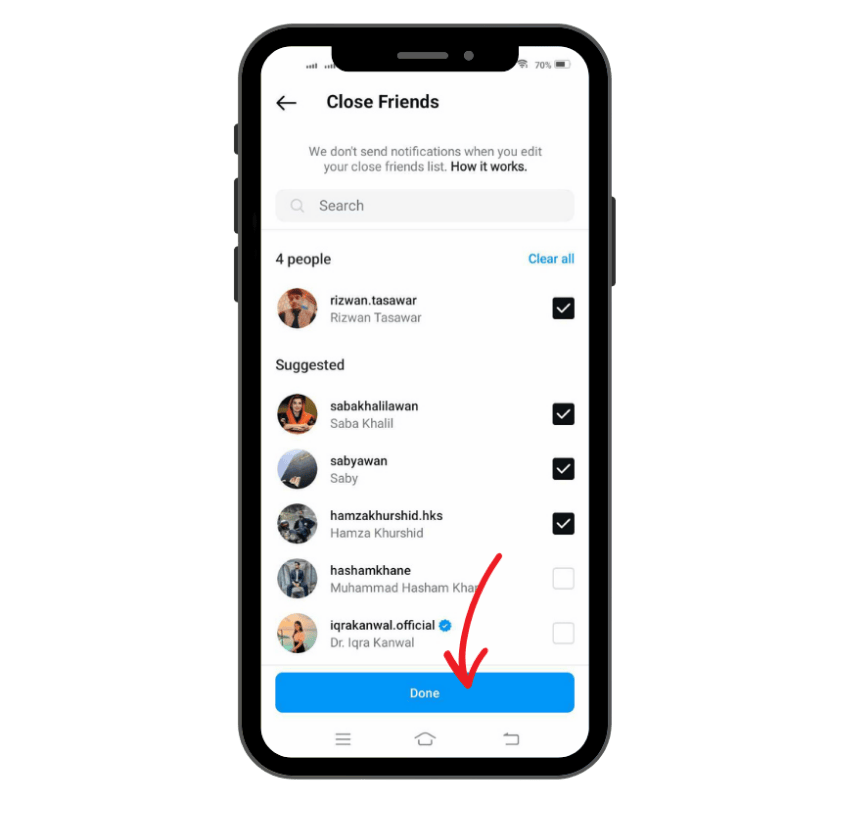
6. Create Your List
Once you’ve selected your desired users, tap “Done.” Your own Close Friends list is now ready.
7. Share Private Stories
When you’re about to post a story, you’ll see a green star icon labeled “Close Friends” at the bottom. Tap this to share private stories only with people on your list.
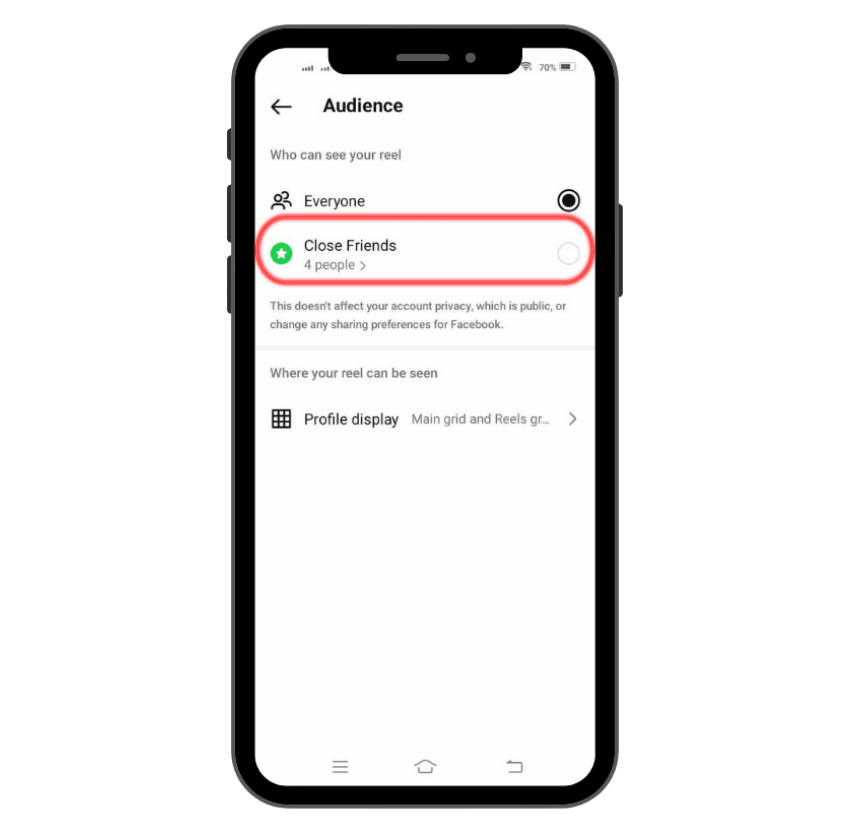
Note: Instagram doesn’t notify users when they are added to or removed from your Close Friends list, making it a safe space to manage your audience without awkward conversations.
Why the Green Circle Matters for Social Media Marketing
So why does the green circle matter? It’s more than just a visual cue—it’s a feature that enhances how users interact, build communities, and test content. Let’s look at its significance in the context of digital strategy.
1. Building Exclusive Communities
Brands and creators can use the Close Friends feature to offer early access or behind-the-scenes looks to their most loyal followers. By treating the green circle like a VIP badge, you foster exclusivity and deeper connection.
2. Promoting New Products or Services
Use private stories to tease product launches, limited-time offers, or beta programs. People are more likely to engage when they feel part of a select group.
3. Engaging with Loyal Followers
Your Close Friends list can include high-engagement followers. Reward them with exclusive content to keep them invested.
4. Testing Content
Creators often use Close Friends to test memes, designs, or feedback before posting them to a broader audience. It acts like a mini focus group on your Instagram app.
For just $2.99, you can get 10 random authentic comments that boost visibility and encourage real interaction.
How to Know If You Are on Someone’s Close Friends List
Instagram doesn’t directly notify users when they’re added to or removed from someone’s Close Friends list, but there are subtle visual cues that help you figure it out.
Here’s how to tell if you’ve been added:
Look for the Green Ring:
- If you see a green circle (or green ring) around a user’s profile picture in the stories list, it means the Instagram story you’re viewing was shared with their Close Friends list.
- This green ring appears instead of the usual pink circle or multi-colored gradient ring that surrounds regular Instagram stories.
Appearance in Stories Feed:
- These green-rimmed stories are generally displayed at the top of your Instagram feed, just like regular stories, but with a distinctly different color indicating exclusivity.
Private Stories Indication:
- When a story is shared with only a select group, it often feels more personal—whether it’s a candid video, inside joke, or behind-the-scenes update.
- This sense of intimacy is one of the key reasons the green circle matters for understanding social dynamics on Instagram.
No Notifications Sent:
- Instagram maintains privacy by not sending notifications when you’re added or removed from a Close Friends list.
- This allows users to adjust their own Close Friends list without concerns about hurting someone’s feelings.
Not a Guarantee of Permanence:
- Seeing the green circle once doesn’t mean you’re permanently on someone’s list.
- If it disappears in the future, you might have been removed, or the person simply hasn’t posted a Close Friends story lately.
Story Still Disappears After 24 Hours:
- Like all Instagram stories, Close Friends stories vanish after 24 hours, regardless of the green circle or audience type.
Why the Green Following Button Is Important
Alongside the green circle, some users may also notice a green “Following” button on certain profiles. While not universally available, this feature plays a symbolic role in Instagram’s evolving features.
- Indicates Close Friends Status: The green “Following” button signals that you’re on the user’s Close Friends list, giving you access to their private stories.
- Visual Cue for Exclusivity: It serves as a subtle, visual marker showing a closer connection between you and the person you follow.
- Still in Limited Rollout: This feature is part of a limited test and may not be available to all users across the Instagram app.
- Changes Based on List Status: If you’re removed from the person’s Close Friends list, the green button typically turns back to the standard blue Following button.
- Reinforces Community and Trust: The green button helps build a sense of exclusivity and loyalty, enhancing how users interact within smaller, more trusted groups.
Wondering how story engagement works? You’ll definitely want to read What Does Forward Mean on Instagram Story.
Differences Between Regular Following and Close Friends Following
| Feature | Regular Following | Close Friends Following |
|---|---|---|
| Story Circle Color | Pink or gradient | Green circle |
| Visibility | Public or followers-only | Only a select group |
| Notification | None | No notification of being added or removed |
| Content Type | General posts and stories | Exclusive private stories |
| Community Engagement | Broad and varied | Targeted and more personal |
The green circle means the story was meant just for the eyes of a specific few—typically your friends, family, or trusted followers.
Impact of the Green Following Button on Instagram’s User Experience
The visual addition of the green button or green ring around Instagram stories has a psychological effect. It signals a sense of belonging and privilege to the viewer. For the user sharing the story, it’s a way to speak more openly without the pressure of public scrutiny.
It’s a way Instagram makes its massive platform feel more intimate—something especially valuable in an era where feed posts are often overlooked and direct communication becomes more meaningful.
Common Issues and How to Resolve Them
Even though the Close Friends feature is simple to use, users occasionally run into problems.
1. The Green Button Doesn’t Appear
- Cause: Not all accounts have the experimental green following button feature.
- Solution: Focus on whether you see the green circle in Instagram stories instead. That’s the more reliable indicator.
2. Can’t Add People to Close Friends
- Cause: Instagram app not updated, bugs, or limited account permissions.
- Solution:
- Ensure your Instagram app is updated to the latest version.
- Restart the app or log out and back in.
- If the problem persists, report the issue through Direct Messaging or the Help Center.
Green Circle vs. Pink Circle
A green circle typically means you’re viewing a Close Friends story. The pink circle (or gradient) indicates a regular story. When the pink circle turns gray, it means you’ve already viewed the story.
Understanding the difference helps users know which content is public and which is more private. It’s especially helpful when managing multiple types of stories for different audiences.
Final Thoughts
The green circle, green button, and related visual cues on Instagram represent more than just design elements—they’re tools for creating more intimate, focused, and meaningful connections. Whether you’re a regular user, a content creator, or a brand, the Close Friends feature allows you to control your audience, test content, and reward loyalty—all while keeping it private.
Using the Instagram app wisely means understanding these features, and the green circle is among the most impactful ones for emotional connection and smart content sharing.
FAQs
What does the green circle on Instagram mean?
The green circle around someone’s profile picture in Instagram Stories means you’ve been added to that person’s Close Friends list. This indicates that the story was shared privately and is visible only to a select group—not the person’s entire follower base.
What does it mean on Instagram if the following is green?
If the “Following” button appears green on someone’s profile, it may indicate that you are part of their Close Friends list. While this feature is not always active for all users, Instagram has tested the green following button as a visual cue for exclusive story sharing.
What Determines the Order of Someone’s Following List?
The order of a user’s following list is influenced by how frequently you engage with or view those accounts. People you interact with most often—through likes, comments, views, or DMs—typically appear higher in the list. However, Instagram has not fully disclosed the exact algorithm used for this ranking.
How Do I Remove Someone from My Close Friends List?
To remove someone from your Close Friends list, go to your profile page, tap the three horizontal lines in the top right corner, and select “Close Friends.” Use the search bar or scroll to find the person, then tap “Remove.” Once removed, if they had a green following button, it will revert to the regular blue button.