In one glance
- Your Instagram handle is your unique at address. It is the same thing as your username, and it is different from your display name.
- Rules: 1 to 30 characters, only lowercase letters, numbers, periods, and underscores. No spaces, no emoji, no dashes.
- A period cannot start or end your handle, and two periods in a row are not allowed.
- You can change your display name only twice in any 14-day window. Username changes are lightly rate-limited too.
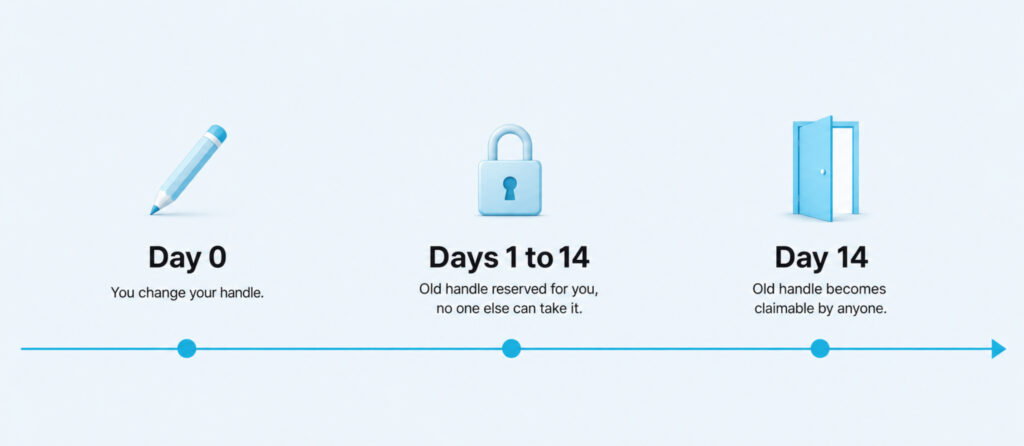
- After a change, Instagram holds your old handle for you for 14 days. After that, anyone can claim it.
- To change: Profile, Edit Profile, tap the Username field, type the new handle, tap Done. Same path on iPhone, Android, and desktop.
Boost Your Instagram Presence
Make your Reels go viral. Get premium followers, likes, and comments in minutes.
Your Instagram handle is the tiny piece of text that decides how anyone tags you, links to you, or types your name into a search bar. Almost everyone who has used Instagram has one, and almost nobody knows the exact rules Instagram enforces on it. That is why so many people try to change theirs and either get stuck on an error, break every external link that pointed to them, or lose reach in the days after the switch.
This guide covers what a handle actually is, the hidden rules most people miss including the period cases, the exact steps to change it on any device, and what breaks the moment you do. It also covers the 14-day reservation window that lets you undo the change if you regret it.
What A Handle Actually Is And Why It Is Not Your Display Name
An Instagram handle is the unique at address that points to your profile. It always starts with an at symbol when you tag someone or link to them, though the raw handle stored on your account does not include the at sign. Handles are the way Instagram tells one account apart from every other account on the platform, which is why no two accounts can share the same handle.
The word handle is Instagram’s casual name for the field the app labels as Username in the Edit Profile screen. They are the same thing. If a guide or setting talks about your username, it is talking about your handle, and vice versa. There is no separate handle field to fill in.
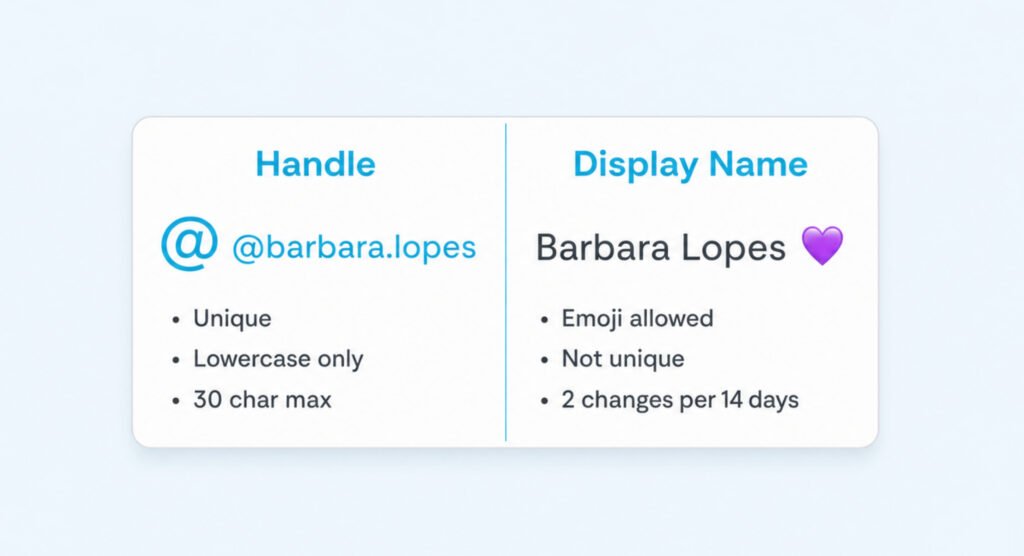
Your display name is the second name field just above Username in Edit Profile, and it works very differently. It is the friendly name that shows in bold at the top of your profile page and next to your posts in feed. It does not have to be unique, so several accounts can share the same display name. It accepts spaces, emoji, capital letters, and most punctuation, which is why so many creators put a stylised display name fonts choice or a small emoji next to their real name to stand out in the feed.
The practical distinction: the handle is the address people use to reach you, and the display name is the name they see once they arrive. When you tag someone, you use their handle. When you read someone’s profile, you see their display name first.
The Rules Instagram Enforces On Every Handle
Instagram is quiet about the exact rules on the handle field, which is why so many people run into an inline error and have no idea why their choice was rejected. The rules below cover everything the app currently enforces.
Length And Allowed Characters
- Length: 1 to 30 characters. Anything longer is silently truncated in the input field.
- Letters: only lowercase a through z. If you type capitals, Instagram converts them to lowercase behind the scenes.
- Numbers: 0 through 9 in any position.
- Periods and underscores are the only two special characters allowed.
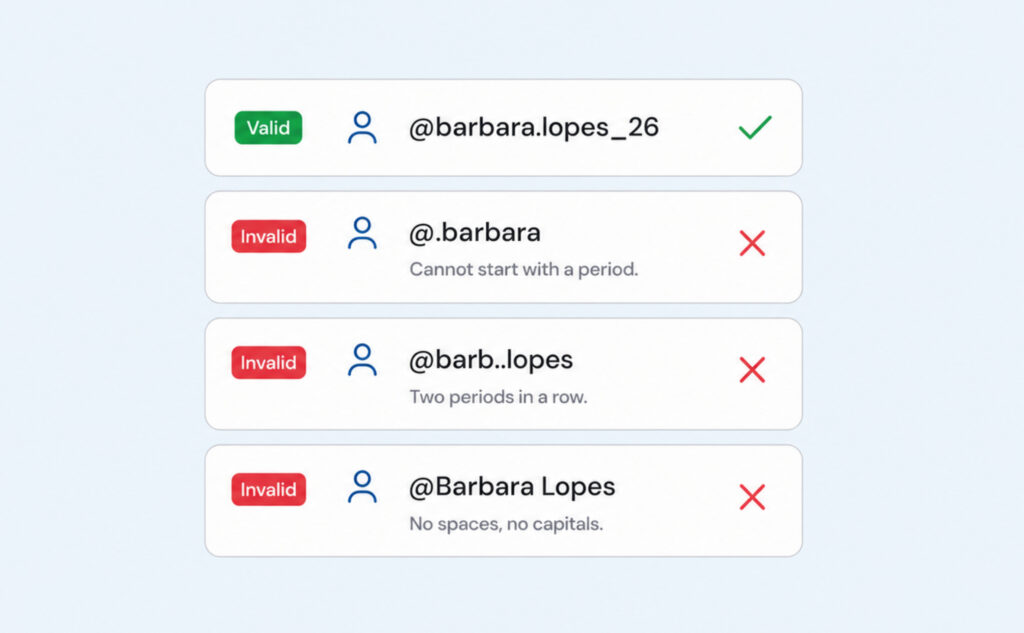
- No spaces, no dashes, no emoji, no other punctuation, no accented characters.
The 30-character ceiling is the same one Instagram applies to the display-name field, but the two are counted separately. You can have a 30-character handle and a 30-character display name on the same profile.
The Period Rules Most Guides Miss
Periods have two quiet limits that account for most rejected handle changes when nothing else looks wrong:
- A period cannot be the first character or the last character of your handle. So .barbara and barbara. both fail. Only barbara.lopes works.
- Two periods in a row are not allowed anywhere in the handle. So barb..lopes fails. Only barb.lopes works.
These rules apply retroactively too. If a handle you had long ago used to satisfy an older ruleset and now falls outside these rules, Instagram will not let you re-take it during a future change.
How Handles Differ From Display Names
The display name is where most of the flexibility lives. It also has a 30-character limit, but it accepts spaces, emoji, capital letters, and punctuation that the handle rejects. The catch is a frequency limit: you can change your display name only twice in any 14-day window. Instagram counts each save even if you revert immediately, which is why testing display-name variants back-to-back is a bad habit.
Handle changes are lightly rate-limited in a similar way. Instagram no longer publishes a hard number for username changes, but frequent back-and-forth on the same day triggers a temporary block message. Treat both the handle and the display name as changes you decide on first, then save once.
Changing Your Handle On iPhone, Android, And Desktop
The path is the same on every surface. Instagram consolidated Edit Profile a while back so the username field lives in the same spot regardless of device. The only differences are the small icons around the field.
- Open Instagram and tap or click your profile photo to open your profile.
- Tap Edit Profile. On desktop click the button directly under your bio. On iPhone and Android the button sits below your profile stats.
- Tap the Username field. Instagram highlights the entire current handle so you can either replace it in one shot or edit it in place.
- Type the new handle. Instagram checks availability while you type: a small check appears if the handle is free, and an inline error appears if it is taken or breaks a rule. You cannot save until the check shows.
- Tap Done at the top right. On desktop click the Submit button at the bottom of the panel. Instagram saves the change immediately.
If Instagram refuses your handle without showing a specific reason, the usual causes are the period rules covered earlier, a hidden case mismatch with an existing account, or a rate-limit block from too many recent changes. Wait a full day and try again, or pick a different variation.
What Actually Breaks When You Switch Handles
A handle change is one tap but the consequences run for weeks. The change ripples out through every place your old handle was written down, and Instagram does almost nothing to help you fix any of it.
- Every at-mention of your old handle in someone else’s caption, comment, or story keeps the raw text of the old handle but stops linking to your profile. Existing tags do not update automatically.
- Every external URL that pointed to instagram.com/oldhandle stops resolving unless you re-take the old handle within 14 days. If your bio link on another platform used your Instagram profile URL breaks along with it.
- QR codes generated from your old profile stop working. Anyone who scans an old flyer or business card lands on a not-found page.
- Link-in-bio tools, ManyChat flows, Shopify tag automations, and creator platforms that stored your old handle break silently until you edit each one. Nothing sends you a warning.
- Search results inside Instagram update quickly, usually within a day, but external search results such as Google can take a week or more to catch up.
The 14-day reservation is the safety net that makes a handle change survivable. From the moment you switch, Instagram holds your old handle for you and blocks anyone else from taking it for 14 days. If your new handle turns out to be a mistake, you can switch back inside that window and every broken link starts working again. After 14 days the old handle drops into the general pool and any other account can claim it.
That window is the strongest argument for treating a handle change as a project, not a whim. Save the change on a day when you can spend an hour updating your bio link, your link-in-bio, your other social profiles, and any tool that uses your old handle. Doing it in one sitting keeps the loss of reach to a single small dip instead of a long slow drag.
Making Your Handle Do Real Work
The handle is a name and an address at the same time. As a name, it is the shortest way for anyone to describe your account in a caption, a group chat, or on another platform. As an address, it is the routing string that decides whether new followers actually reach you when they hear about you. Both roles matter, and the best handles do well at both.
If you are picking a first handle, spend the extra ten minutes on picking a memorable username that reads well out loud and does not depend on tricky punctuation. Handles that stack too many periods or underscores read like passwords, get typed wrong when someone hears them on a podcast, and cost you follows every time someone gives up and searches for a display name that is not unique. Short, lowercase, and pronounceable beats clever every time.
If you are considering a change, the biggest question is whether the improvement is worth the fourteen-day scramble. A rebrand, a name change in real life, or a shift in what your account is about are all valid reasons. Chasing a slightly better handle you saw available yesterday usually is not. Every change costs you a small amount of recognition, and the accounts that keep the follower audience you built over years are usually the ones that pick a handle they can live with and leave it alone.
The exception is when the old handle actively hurts you. A handle that suggests the wrong topic, a leftover joke handle from a decade ago, or a handle tied to an old business you no longer run are all worth changing. Combine the change with a quiet audience cleanup of accounts that no longer fit, and the new handle stops feeling like a fresh start and starts feeling like the account you meant to have all along.
Want your Instagram to actually take off?
Real accounts. Real engagement. No bots, no shadowbans, ever.
See our Instagram servicesQuestions People Ask About Instagram Handles
Is my Instagram handle the same as my username?
Yes. Instagram uses handle in casual language and username in the settings screen, but they refer to the same field. There is only one unique at address per account, and that is your handle.
Can I use capital letters in my handle if I type them that way?
No. Instagram silently converts anything you type to lowercase before saving. Your handle is always stored in lowercase, and searches for it are case-insensitive. Capital letters only work in the display name field.
What happens to my old handle after I change it?
Instagram holds the old handle for you for 14 days. During that window no one else can take it, and you can switch back to it if you want. After 14 days the handle becomes available for any other account to claim.
Why does Instagram say my desired handle is taken when nobody uses it?
The account that owns it may be private, deactivated, or removed. Deactivated accounts still hold their handle in reserve for 30 days, and removed accounts hold theirs longer. If a handle has been used at any point in the last month, it is probably still off the market. You can try minor variations with a period or an underscore.
Can I get my old handle back after 14 days?
Only if no other account has taken it. The moment the reservation window closes, the handle is available on a first-come basis. If you think you will want the old handle back, take it back inside the 14 days rather than betting on it still being free later.
Do my old tags and mentions still link to me after the switch?
No. Existing at-mentions keep the raw text of your old handle in the caption or comment they were written in, but they no longer route to your profile. The person who wrote the tag would need to edit their post and re-tag your new handle for the link to work. This is the main reason handle changes cost reach in the short term.