Instagram has become one of the most engaging platforms in the world, where billions of users interact daily through likes, comments, shares, and stories. The platform is full of unique icons—from the magnifying glass icon used for search, to the heart icon for likes, the bookmark for saving posts, and the arrow. But many people often ask: What does the arrow mean on Instagram posts?
The arrow icon is a powerful feature that helps you interact with content, connect with followers, and share posts with others. It appears in different sections of the Instagram app, including feeds, profiles, stories, and even direct messages. Its functionality may vary depending on where you see it, but the arrow always represents a way to send, forward, or share content.
More followers, more saves, and automatic likes create long-term growth that helps you build authority and attract organic engagement faster.
Identifying the Arrow Icon
The arrow on Instagram is represented by a paper airplane symbol. You’ll find it to the right of the heart (like) and speech bubble (comment) icons below every post. Its placement makes sense—it sits alongside the other key engagement actions. While a like shows appreciation and a comment sparks conversation, the arrow allows you to take things a step further by actively sharing content.
At its core, the arrow means “send” or “share.” It’s a simple tool with multiple uses, designed to help content travel beyond the original feed. Whether you want to show a post to a friend, reshare it publicly on your story, or send it outside of Instagram, this icon is your gateway.

When you tap the arrow, Instagram presents you with multiple sharing options. Each one serves a unique purpose depending on your goal.
1. Sharing to a Direct Message (DM)
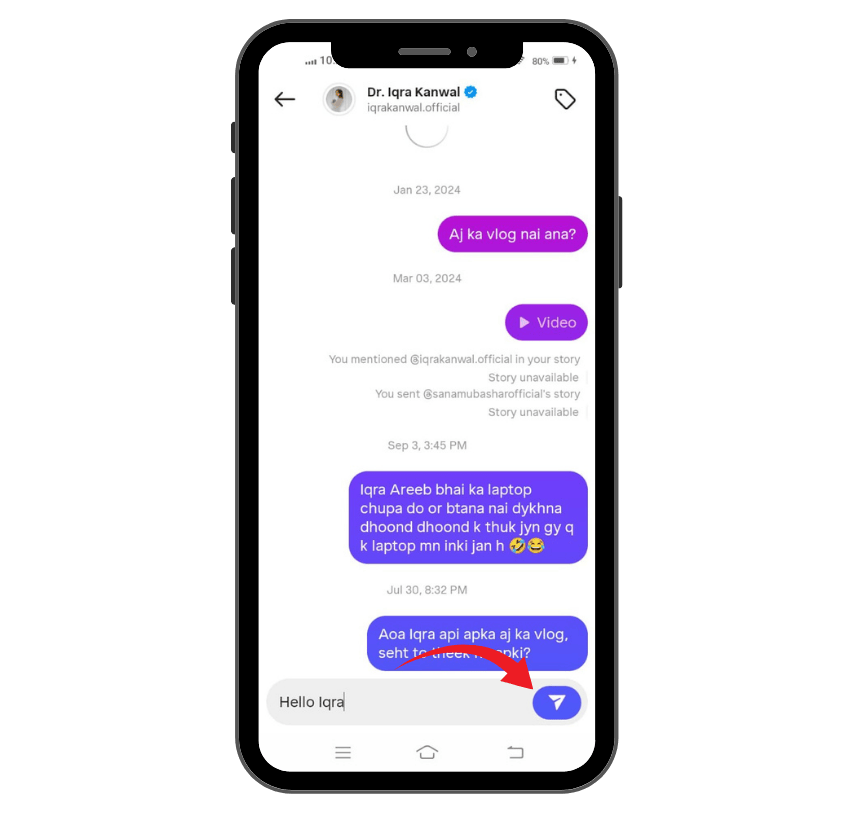
The most common use of the arrow is to send a post directly to someone in your messages. When you tap the paper airplane, a list of your most recent contacts appears. You can choose a single friend, a group chat, or search for a specific person.
This method is private—the original poster is not notified when you share their content through DMs. It’s perfect for:
- Sending a meme to your best friend for a quick laugh.
- Showing a family member a product you think they’d like.
- Sharing a travel photo with a friend you’re planning a trip with.
The benefit of DM sharing is that it creates a personal interaction. Instead of broadcasting to all your followers, you’re selectively showing content to someone you know will appreciate it.
Related: What Does “Story Unavailable” Mean on Instagram?
2. Sharing to Your Instagram Story
Another popular option is sharing a post directly to your story. When you tap the arrow, you’ll see an option labeled “Add post to your story.” Selecting this allows you to repost the content in your own story feed for 24 hours.
When you share this way, the original creator is notified that you reshared their post. Plus, you can customize the story with text, stickers, drawings, polls, or GIFs. It’s a fun way to add your personality while boosting someone else’s content.
Examples of when you might use this:
- Sharing a motivational quote that resonated with you.
- Amplifying an announcement from a brand, influencer, or friend.
- Highlighting a cause or piece of news you believe your followers should know.
This method is great for public endorsement. Unlike a private DM, a story reshare shows your followers that you found the content valuable enough to recommend it publicly.
3. Sharing to Other Apps
The arrow also works beyond Instagram. After tapping the share icon, you’ll see an option to share a link to the post through other apps installed on your phone. This could include:
- Text messages
- Facebook Messenger
- Even apps like Twitter or Snapchat
When you share this way, you’re sending a direct link that leads back to the original Instagram post. This is especially useful if you want to share something with someone who doesn’t use Instagram actively or if you want to spread the content across multiple platforms.
💡 Pro Tip: Keep your brand active by increasing story views that improve engagement and profile authority effectively.
Why Sharing Matters — The Impact on Engagement
The arrow isn’t just a small button; it’s a powerful engagement tool that plays a big role in Instagram’s ecosystem.
For users, sharing allows them to:
- Strengthen connections by showing friends content they’ll enjoy.
- Participate in conversations around trending memes or news.
- Add value to their own stories by curating posts from others.
For content creators, shares are gold. While likes and comments are helpful, a share often carries more weight. Why? Because a share means the content was compelling enough for someone to recommend it to others. This kind of organic distribution expands reach far beyond the creator’s own follower base.
In fact, Instagram’s algorithm often views shared posts as higher-quality content, which can increase their visibility on feeds and the Explore page. A single share has the potential to spark a chain reaction that takes a post viral.
A Quick Guide to Using the Arrow
If you’re new to Instagram or haven’t used the share feature much, here’s a simple step-by-step guide:
- Tap the share arrow icon (the paper airplane) below the post.
- Choose your method of sharing:
- Select a friend or group to send it via Direct Message.
- Tap “Add post to your story” to share it publicly.
- Pick “Share to…” to send it outside Instagram.
- Complete the action:
- For DMs, tap “Send.”
- For stories, customize with text, stickers, or GIFs, then post.
- For other apps, select the app and contact, then send.
That’s it—a quick and seamless way to keep content moving across your social circles.

The Role of Icons in the Instagram App
Before understanding the arrow, it’s important to realize how icons work on Instagram. Each icon in the app has a specific purpose:
- The magnifying glass icon leads to the Explore page, where you can discover new content.
- The heart icon shows interactions, such as likes, follows, and comments.
- The bookmark allows you to save a post to your collection for future reference.
- The arrow allows you to share or send photos, videos, and posts directly to other users or to your story.
These symbols make the platform easier to navigate, ensuring that anyone can quickly log in, create, edit, or interact with content without confusion.
Arrow in Instagram Stories
The arrow icon isn’t limited to the main feed—it also plays a key role in Instagram stories. When you view a story, tapping the arrow provides several options that enhance your ability to interact:
- Send the story directly to another account or group via direct messages.
- Reply with a message or emoji to engage with the story’s creator.
- Report inappropriate or harmful content, helping maintain a safe community.
This makes stories more than just temporary photos or videos. The arrow transforms them into an interactive tool, allowing quick sharing, personal responses, and community moderation—all with a single tap.
Related: What Does Other Mean On Instagram Insights?
Arrow in Direct Messages
Now we see how arrow works in direct messaging.
Quick Forwarding Made Simple
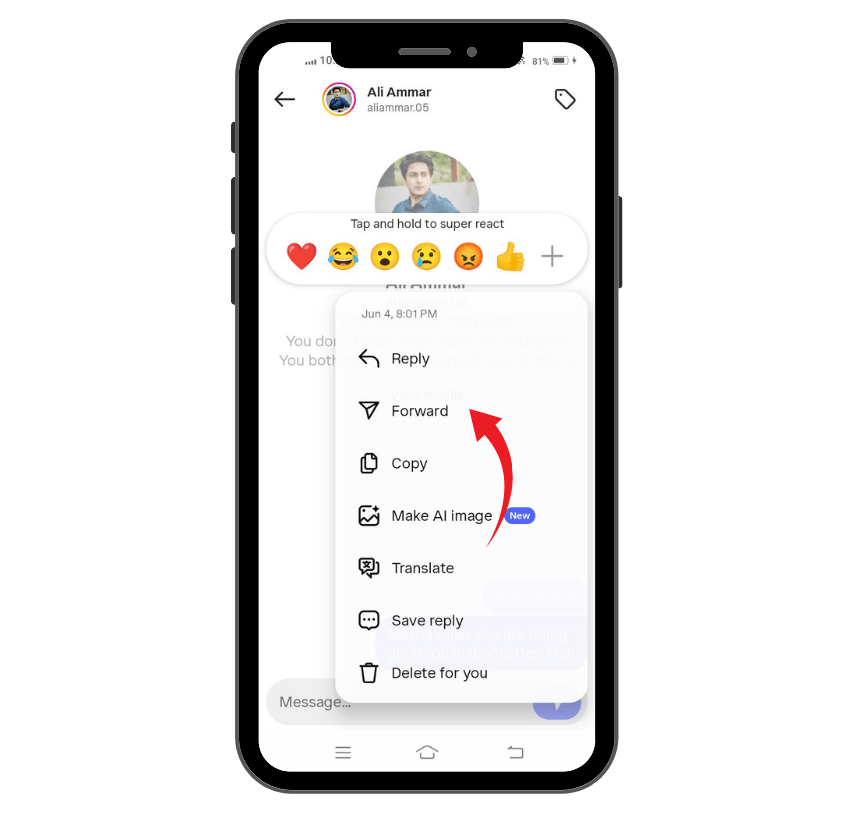
The arrow icon in direct messages (DMs) allows you to instantly forward messages, photos, videos, or even a link to another user or group chat. With just a single tap, you can share content without copying or re-uploading it.
Saves Time and Effort
Instead of going through extra steps like downloading, editing, or re-uploading, the arrow makes the process effortless. This is especially useful when you want to share an interesting post or photo in the moment.
Enhancing Interactions Between Users
The arrow adds speed and convenience to conversations. Whether it’s a funny video, a meaningful text, or a trending post, forwarding with the arrow ensures smoother interactions between users.
A Key Part of DM Functionality
Overall, the arrow is more than just a sign—it enhances the functionality of DMs by keeping communication quick, interactive, and seamless.
Instagram Posts Arrow and Content Creators
For content creators, the arrow icon plays a critical role in building reach and engagement. Here’s why it matters:
- Boosts Reach and Visibility: When followers tap the arrow to share a photo, video, or post, it extends the content beyond the creator’s original feed, reaching new users and potential followers.
- Acts as Free Promotion: Every share is a form of organic forwarding, spreading the creator’s work without any paid advertising.
- Provides Valuable Insights: Through Instagram’s data and insights, creators with a professional account can track how many people shared their posts. This helps them identify what type of content is most engaging.
- Strengthens Business Opportunities: High share counts can attract brand partnerships, as companies often prioritize creators who generate meaningful interactions over just likes or comments.
- Builds Credibility: Frequent sharing shows that the creator’s content resonates, helping to establish authority and trust in their niche.
- Supports Long-Term Growth: By increasing distribution and audience reach, the arrow becomes a key tool in the overall functionality of content strategy.
💡 Pro Tip: Comments attract more attention. Buy them to show your profile is active and engaging consistently.
Instagram Arrow – Business Benefits
The arrow icon on Instagram is not only useful for personal sharing—it holds significant value for business accounts as well. When customers and followers use the arrow to share a brand’s post, photo, or video, it creates organic exposure that paid ads can’t always replicate. Below are the main business benefits of the Instagram arrow:
- Expands Brand Reach: Every time a post is forwarded, it introduces the brand to new users and potential customers, increasing visibility beyond the immediate feed.
- Drives Customer Engagement: Shared content tends to spark more interactions, whether through comments, likes, or further shares. This builds stronger connections with the audience.
- Free Word-of-Mouth Promotion: When people use the arrow to send a brand’s content, it works as authentic recommendations, similar to personal referrals.
- Valuable Data Insights: Businesses with professional accounts can track how many people used the arrow to share their content. This data helps refine marketing strategies.
- Supports Campaigns and Offers: Brands can encourage followers to share limited-time offers, discounts, or events via the arrow, amplifying reach without extra cost.
- Strengthens Brand Credibility: High share counts signal that content is interesting and trustworthy, helping businesses establish authority in their niche.
In short, the arrow is more than a simple icon—it’s a powerful tool that helps businesses increase visibility, build credibility, and generate organic growth.
Conclusion
The arrow on Instagram posts is more than just a small icon—it represents a wide range of features that allow users to interact, forward, and share content across the app, stories, direct messages, and even platforms like WhatsApp or Threads.
From sending a photo to followers, to checking data on how many people shared your post, the arrow is one of the most important tools for boosting engagement. Whether you’re a casual user in the UK, an influencer seeking to get verified, or someone simply looking to discover interesting photos and videos, the arrow plays a central role in shaping your Instagram experience.By learning how to tap, use, and explore the arrow’s functionality, you can make your account more engaging, increase visibility in the feed, and strengthen connections with your followers.
FAQs
What is the new feature arrow on Instagram?
The new feature arrow, also called the Repost icon (two arrows forming a square), lets users reshare any public Reel or post. When you tap it, you can add a short note for context. The repost then appears in your followers’ feed and on your profile’s dedicated Reposts tab, making resharing easier and more engaging.
What does the little arrow on IG post mean?
The little arrow under an Instagram post represents the Share option. It looks like a paper-plane or Telegram icon. By tapping it, you can share a post directly with friends via DMs or to external apps like WhatsApp, email, or Messenger. It’s Instagram’s official way to distribute content beyond your profile to maximize visibility.
What do two arrows mean on Instagram?
Two arrows forming a square on Instagram represent the new Repost button. This feature allows you to easily share someone else’s post or Reel directly to your own feed. It gives full credit to the original creator, helps maintain consistent posting, boosts engagement, and reduces the need for constantly creating fresh content from scratch.
What do two arrows on an icon mean?
Outside Instagram, such as in Windows 10, two small blue arrows on a desktop icon mean the file or folder has been compressed to save disk space. Compression reduces storage usage but doesn’t change functionality. You can remove this by disabling compression in the file properties. It’s a system-level space optimization indicator, not a social feature.