Instagram is a visual world where millions of users share their favorite moments, thoughts, and updates through posts, stories, and live videos. However, not every moment you post needs to be visible to everyone who follows you. The Hide Your Story feature gives you control over who sees your temporary content. Whether it’s about maintaining privacy, avoiding awkward interactions, or simply keeping certain moments personal, Instagram allows you to hide your story from specific individuals without blocking or removing them.
This article explains what does hide your story mean on Instagram, how it works, the difference between mute and hide, step-by-step instructions for Android and iPhone users, and the reasons you might want to use it.
Stand out by combining saves, followers, and automatic likes to maintain consistent growth and create a strong presence effortlessly.
“Hide Your Story” Means on Instagram
When you choose to hide your story on Instagram, it means that selected users on your followers list won’t be able to see your Instagram stories or live videos. It’s a privacy feature that gives you full control over who can view the moments you share on your profile.
The stories you post still appear to everyone else — only the people you have hidden your story from will not have access to those temporary updates. They won’t be notified that you’ve hidden your story from them; to them, it will simply seem like you haven’t posted a story.
For example, if you have 500 followers but you choose to hide your Instagram story from 20 specific people, only the remaining 480 followers can view your stories and live sessions.
Difference Between Hiding and Muting Stories
It’s common for users to confuse the hide story and mute stories features. Both affect visibility, but they work differently and serve different purposes.
1. Hiding Your Story
When you hide your story from someone, they cannot view any of your future stories or live videos. You choose this option from settings or directly from their profile. This doesn’t affect their ability to see your posts or send you messages unless you choose to block them.
2. Muting Stories
When you mute stories, it applies to the stories you see, not the ones you share. This means you won’t see that person’s story appear at the top of your feed. The mute feature helps you declutter your Instagram feed without unfollowing someone.
So, if you’re tired of seeing someone’s endless stories but don’t want to hurt their feelings by unfollowing, mute their stories.
If you don’t want someone to view your stories, use hide your story.
Related: What Does It Mean When You Mute Someone on Instagram
How to Hide Your Instagram Story on Android
If you’re an Android user, Instagram’s interface makes it easy to manage who sees your stories. Follow these steps:
- Open the Instagram app on your Android device.
- Log into your account.
- Tap your profile picture at the bottom-right corner of the screen.
- Tap the More button (three horizontal lines) at the top right corner.
- Tap Settings and Privacy.
- Scroll to the story and location section.
- Tap Hide Story from.
- Select the people you want to hide your story from.
- Tap the done at the top-right to save your settings.
Once you complete these steps, the selected people won’t see any new stories or live videos you post.
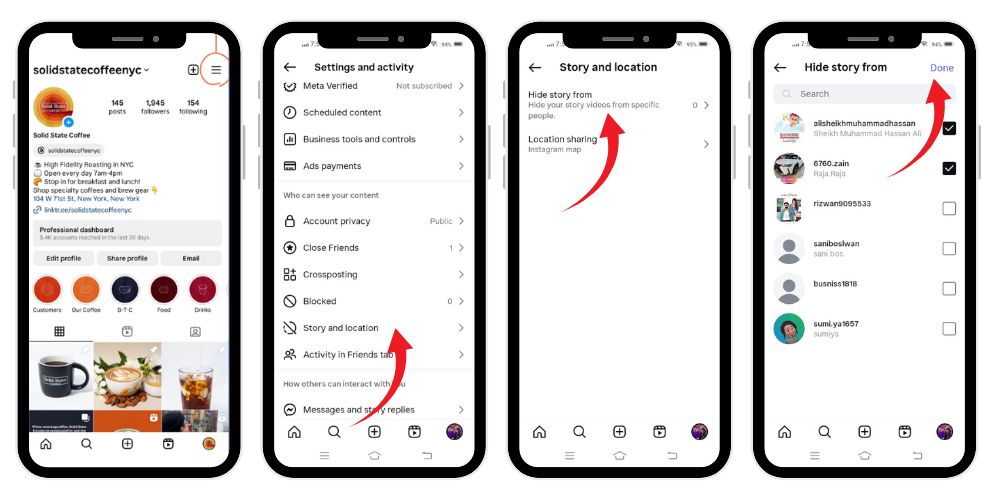
How to Block People from Instagram Stories Using Story Settings
Instagram also lets you hide your story directly from the story camera page, which some users find quicker. Here’s how to do it:
- Open the Instagram app on your Android or iPhone.
- Log into your account.
- Tap the plus (+) icon at the top-right to create a new story.
- Tap Story.
- Tap the gear icon (⚙️) at the top-left corner to open Story Settings.
- Under Story, tap Hide Story From.
- Tap People under Hide Story From.
- Select the usernames of people you want to hide your story from.
- Tap Done on iPhone or the back arrow on Android.
You can always unhide your story later by revisiting the same page and unselecting names from the list.
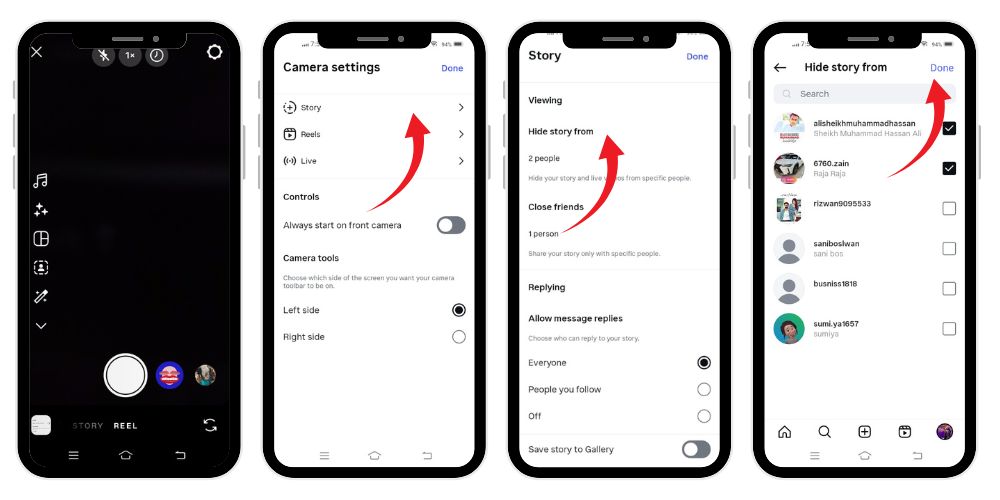
Why You May Want to Hide or Mute Instagram Stories
There are many reasons why users prefer to hide their Instagram story or mute others’ stories. Let’s explore the most common scenarios.
1. To Maintain Privacy
Sometimes you want to share moments with a smaller audience — maybe just close friends. You may not want coworkers, clients, or distant relatives to view your stories. The hide your story option keeps your privacy intact while allowing you to continue posting freely.
2. To Prevent Awkward Situations
You might post something personal, emotional, or just humorous that certain people may misunderstand. Instead of deleting the content, you can simply hide your story from those specific individuals.
3. To Manage Your Public Image
Influencers and brands often use this feature to separate personal and professional content. You can hide your Instagram story from your followers who are business contacts while keeping it visible to your friends.
4. To Avoid Overexposure
Posting frequent stories can be fun, but not everyone in your followers list needs to see every moment. Hiding some of your updates helps keep your profile balanced.
5. To Focus on Engagement
Sometimes, reducing your story’s visibility to a smaller group of followers improves engagement. You can test content ideas privately before showing them to your full audience.
6. To Limit Access Temporarily
Maybe you want to prevent certain people from viewing your stories for a short time — perhaps during a trip or special event. You can always unhide them later when you’re ready to share again.
💡 Pro Tip: Boost your visibility by getting reposts that spread your content wider, attract new audiences, and strengthen credibility across Instagram.
How to Hide Your Story from Someone’s Profile Directly
Instead of opening Settings, you can hide your Instagram story directly from a person’s profile:
- Go to the profile of the person you want to hide your story from.
- Tap the three dots icon at the top right corner.
- Tap Hide Your Story.
- Confirm by tapping Hide again.
This is useful when you’re already on their profile and want a quick way to manage your privacy options.
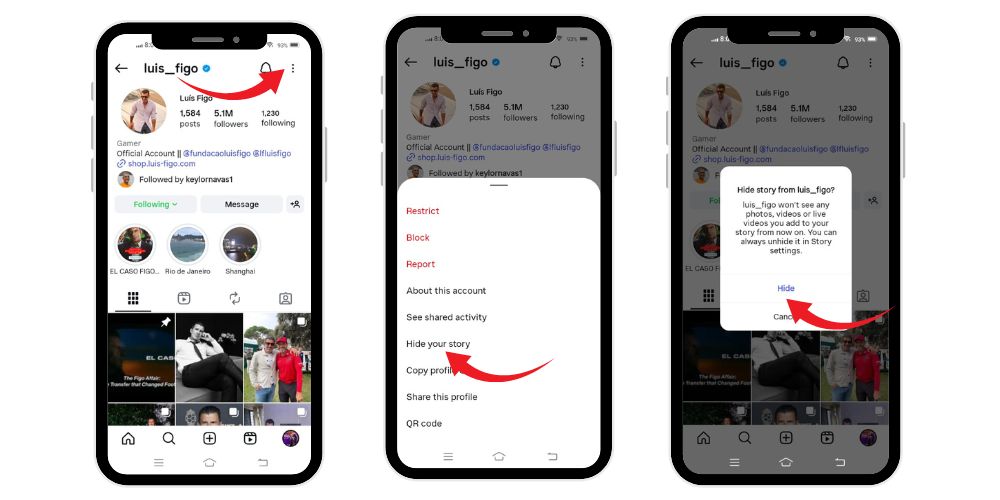
How to Unhide Your Story on Instagram
If you later change your mind and want to make your stories visible again:
- Go to your profile and tap the top right corner menu.
- Select Settings and Privacy.
- Tap Hide Story and Live.
- Tap Hide Story and Live From.
- Unselect the names of people you want to give access back to.
- Tap the back arrow to save your changes.
Now those users can once again view your stories and live videos.
What Happens When You Hide Your Story
When you hide your story, several things happen in the background that enhance your privacy and control:
- The selected people won’t see your story icon appear around your profile picture in their feed.
- They won’t receive any notification that they’ve been restricted.
- They can still view your posts, profile, and comments unless you block them.
- You can still view their stories unless you choose to mute or block them as well.
- If they search your username, they will see your profile, but your story circle will not be visible.
Essentially, hiding is a silent privacy option that ensures you can continue posting freely while managing your audience.
Hiding Live Videos on Instagram
Instagram allows you to hide live videos from certain people too. When you go live, only the users you haven’t hidden your story from can join your live session. This means if you’ve already hidden your story from someone, they automatically cannot view your live broadcast.
To customize this:
- Go to Settings and Privacy.
- Tap Hide Story and Live.
- Under Hide Live From, choose specific individuals you don’t want to see your live videos.
- Tap Done or use the back arrow to save.
Using the Close Friends Feature as an Alternative
Instead of hiding your story from many people, Instagram also offers the Close Friends feature — an alternative way to share stories only with selected followers.
Here’s how to set it up:
- Tap your profile icon at the bottom-right corner.
- Tap the menu icon (three horizontal lines).
- Go to Close Friends.
- Select the people you want to include.
- Tap Done.
When you post a story for Close Friends, only they can see it. This is a great way to share personal moments while keeping your main audience limited.
Related: What Does ‘Followed By’ Mean on Instagram
How Hiding Differs from Blocking or Removing Followers
It’s important to understand that hiding your story is not the same as blocking or removing someone:
- Hiding your story: The person remains your follower but can’t view your stories or live videos.
- Blocking: The person loses all access to your profile, posts, and stories.
- Removing a follower: They won’t see your private posts, but can still search and follow you again.
The hide your story feature offers a softer, less permanent privacy option.
How to Know If Someone Hid Their Story from You
Instagram doesn’t officially notify you if someone has hidden their story from you. However, you might notice signs like:
- You can’t see their story circle on their profile picture.
- You don’t see their stories in your feed for a long time.
- Mutual friends mention a story you didn’t see.
These are indirect hints, but there’s no direct feature to confirm it — this ensures everyone’s privacy remains protected.
The Importance of Story Privacy in Today’s Instagram Trends
As Instagram continues to evolve, story privacy options like hide your story and mute have become essential tools for users. With social trends changing rapidly and more people joining the platform, managing your content visibility helps maintain your digital comfort zone.
Whether you’re a casual user sharing daily updates or a creator managing hundreds of followers, your ability to control who views your stories makes your experience more positive and secure. The feature also ensures you can enhance your interactions, protect your location or personal moments, and avoid oversharing.
Tips to Use Hide Story Feature Effectively
- Review your list regularly — especially after gaining new followers.
- Hide stories from inactive or unknown accounts for better privacy.
- Use Close Friends for trusted people instead of hiding manually each time.
- Combine mute and hide strategically — mute stories you don’t want to see, hide stories you don’t want others to view.
- Revisit your settings whenever Instagram updates its features.
- Test new content privately by hiding it from most of your followers first.
- Keep your privacy settings consistent with how you manage your posts and profile visibility.
💡 Pro Tip: More saves build stronger credibility. Increase them to improve reach and growth on Instagram.
Final Thoughts
The Hide Your Story feature is one of the simplest yet most powerful privacy tools on Instagram. It allows you to manage who sees your temporary content, live videos, and personal moments — all without needing to block or remove anyone.
By understanding what does hide your story mean on Instagram and how it differs from mute stories, you can tailor your experience, improve your online boundaries, and continue using the app comfortably. With just a few taps in your settings, you gain total control over your stories — ensuring your privacy, maintaining your image, and keeping your Instagram account a space that truly reflects you.
FAQs
1. How do you know if someone is hiding their story from you on Instagram?
Instagram doesn’t notify you when someone hides their story. However, if you no longer see their story updates but others can, or their story circle doesn’t appear around their profile picture, it’s a sign they may have hidden it from you.
2. Is it better to mute or hide a story on Instagram?
It depends on your goal. Mute is for managing what you see—muting someone hides their stories from your feed. Hide is for privacy—it prevents others from viewing your stories.
3. Can I hide that I viewed an Instagram story?
No, Instagram automatically shows your username in the viewer list when you watch someone’s story. You can only avoid this by viewing from an anonymous account or before posting expires.
4. What happens when you hide your story from someone on Instagram?
That person won’t see your stories or live videos. They aren’t notified, and they still can view your posts and profile.
5. Can I unhide my story later?
Yes. Go to “Settings and Privacy,” open “Hide Story and Live,” unselect names from your list, and your story becomes visible again.