Muting someone on Instagram hides their updates from you while you keep following them. Their posts stop showing up in your Feed, their stories leave the row at the top of your screen, and you can silence their messages and calls as well. Instagram’s help page on muting says it “won’t let them know you muted them”, and nothing about your account changes on their side. It’s a private filter on what you see, not a message to the other person.
| What you stop seeing | What stays the same for them |
| Their posts in your Feed | They still see your posts and stories |
| Their stories in the row at the top | They can still message and call you |
| Message and call alerts, if you mute those | They get no notification of the mute |
| Their notes, only if you mute notes too | You both still follow each other |
Boost Your Instagram Presence
Make your Reels go viral. Get premium followers, likes, and comments in minutes.
What Muting Changes, Switch by Switch
Mute isn’t one setting. It’s a set of separate switches, and each one covers a different part of the app. You can turn on one, two or all of them for the same person, which is why two people who “muted” someone can end up seeing quite different things.
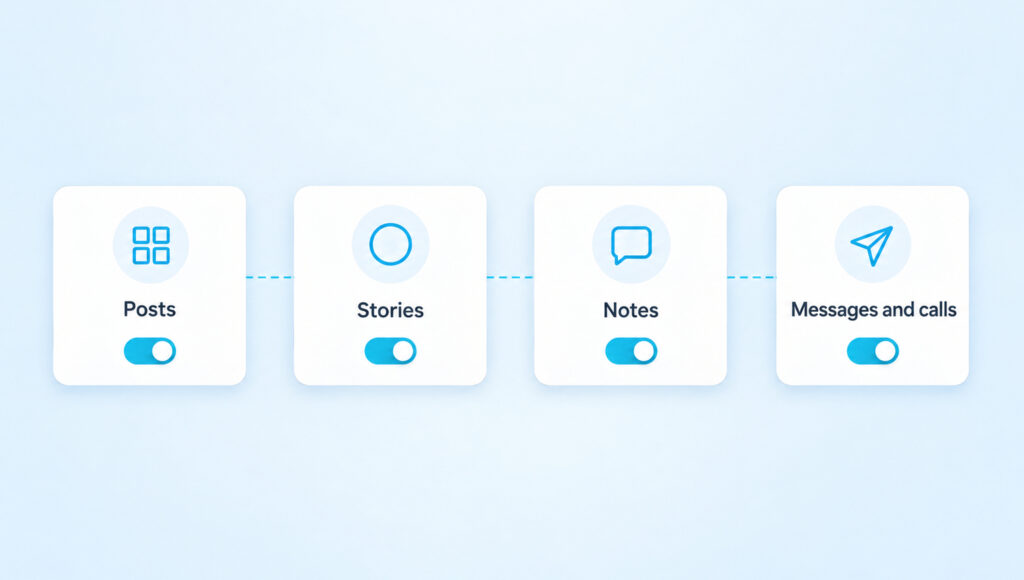
Posts. Their photos, carousels and videos stop appearing in your Feed. They aren’t gone, though. Instagram’s announcement of Mute says “you can still see posts on their profile page”, so visiting their profile shows everything as usual.
Stories. Their stories leave the row at the top of your Feed and stop playing when you tap through other people’s stories. You can still watch them on purpose by opening their profile and tapping their profile picture.
Notes. Notes have their own switch. Instagram’s help page is clear that muting someone’s “messages, posts or stories will not apply to notes they share”, so if their notes keep appearing above your inbox, you need to mute those separately.
Messages and calls. Instagram’s guide to restrict, mute and block says muting messages “removes notifications” from a chat. The messages still arrive, and you’ll find them in the conversation whenever you open it. You just stop getting pinged for each one.
What the Other Person Sees
Nothing changes on their side. Mute is one-way, so it filters what reaches you and leaves everything that goes from you to them untouched. They still see your posts in their Feed and your stories in their row, they can still like and comment, and they can still message you. Instagram’s announcement puts it simply: “The accounts you mute will not be aware that you’ve muted them.”
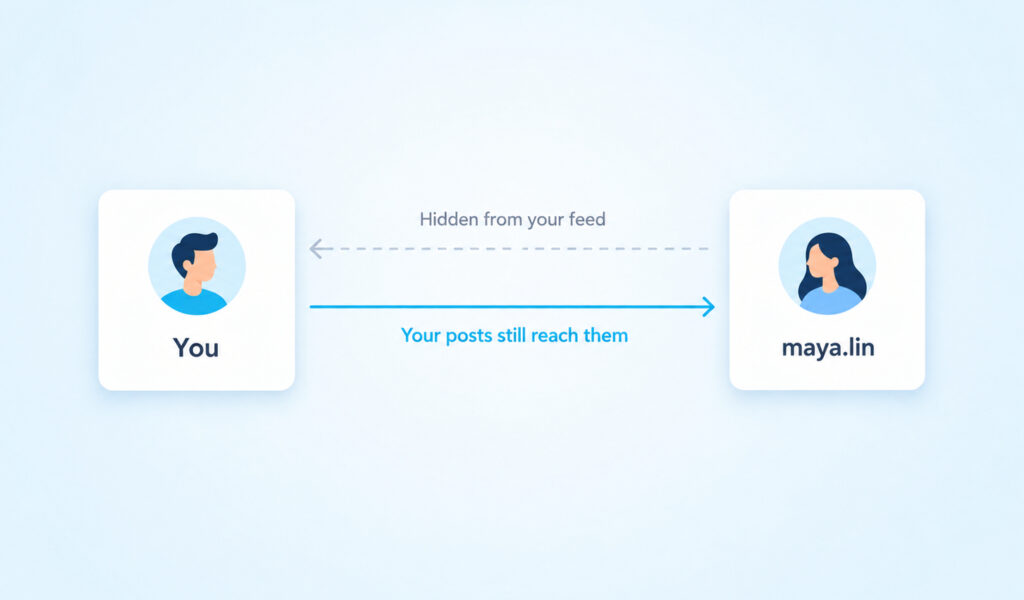
There’s also no list anywhere of who has muted you. The only hints are indirect ones. If you used to like everything someone posted and suddenly stop, or you drop out of their story viewers, they might wonder. But people stop engaging for many reasons, from a busy week to the order in which Instagram shows stories, so a drop in likes or views proves nothing on its own. If someone suspects they’ve been muted, the only reliable way to know is to ask.
How To Mute Someone on Instagram
You can mute from three places in the app, and they all lead to the same switches. Muting posts and stories is an app feature. Instagram’s page on muting stories says “this feature isn’t available on computers”, so use your phone for anything other than messages.
From Their Profile
This is the route that shows every switch at once.
- Open the profile of the person you want to mute.
- Tap Following below their bio.
- Tap Mute.
- Turn on Posts, Stories or both, and Notes if you see it.
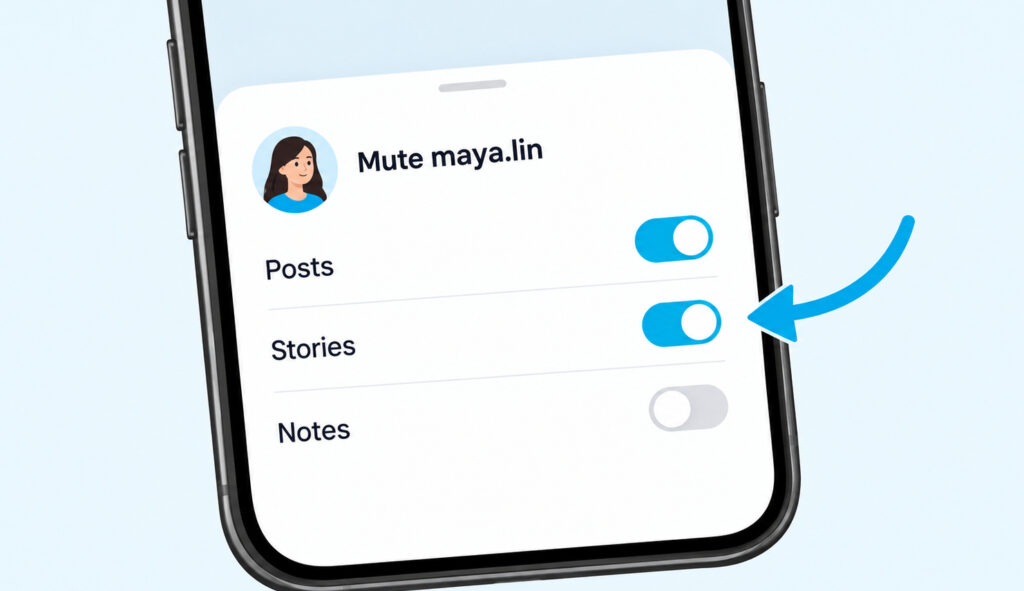
The change takes effect straight away. You can come back to the same screen to adjust the switches later.
From a Post or Your Story Row
When a post in your Feed is the reason you want a break, tap the three-dot menu in the corner of that post and choose Mute. Instagram’s announcement says you can then pick whether to mute posts, or posts and stories together. For stories, press and hold the person’s profile picture in the row at the top of your Feed, then choose Mute.
Mute Their Messages or Calls
Open the chat with that person and tap their name at the top of the screen. Turn on Mute messages, Mute call notifications or both. This is the one kind of mute Instagram also documents on a computer: on instagram.com, open Messages, select the chat, click the information icon and switch on the same settings.
Group chats work the same way. Instagram’s group chat help says that when you mute one, “you’ll still be included in the conversation but won’t get notifications from it”. Muting isn’t the right tool for every chat, though. On a professional account, the orange flag in Instagram DMs is a better way to set aside a chat you still mean to answer.
Want your Instagram to actually take off?
Real accounts. Real engagement. No bots, no shadowbans, ever.
See our Instagram servicesWhat Muting Doesn’t Do
Muting is narrower than many people think. It doesn’t unfollow the person, so they stay on your Following list, and it doesn’t change anything they can see of you. It also has no setting for comments, so if they comment on your posts, those comments still show up for you and everyone else.
You’ll also still hear from them in some cases. According to Instagram’s announcement, when you mute an account you still “get notified about comments or posts you’re tagged in”. A tag or a mention will reach you even while their Feed posts don’t.
Muting also doesn’t make anyone’s stories disappear for good, so when a story says it’s unavailable, something other than your mute is behind it. A muted story still plays normally once you open it from the person’s profile.
Mute, Unfollow, Restrict, Hide Story or Block
Instagram gives you several tools that sound alike, and each one answers a different need. The quickest way to choose is to decide what you actually want to change.
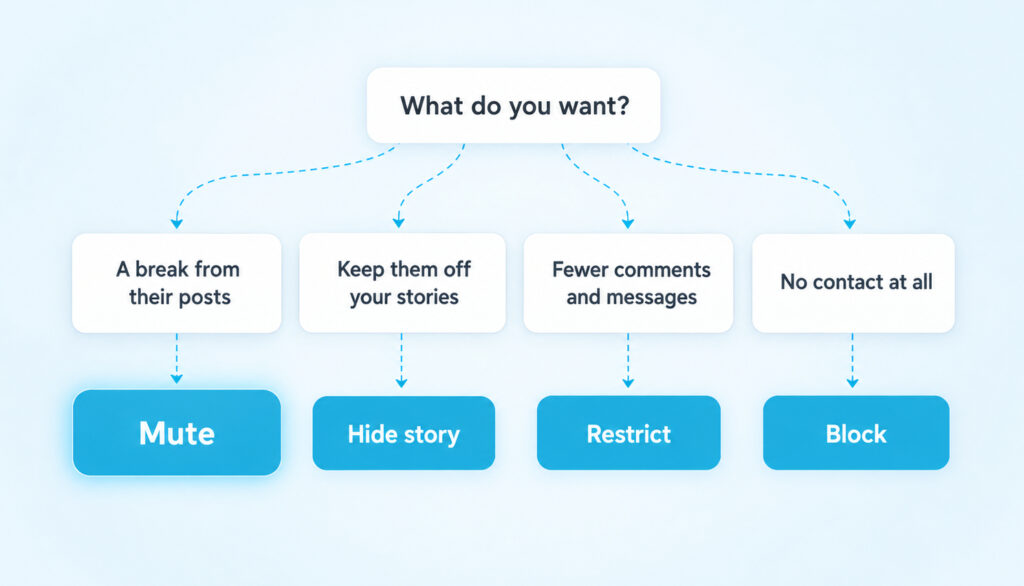
Unfollow takes the person off your Following list entirely. They can notice if they check their followers, and if their account is private, you lose access to their posts and stories until they approve you again. Mute gets you the same quiet Feed without that trace.
Restrict is built for comments and messages rather than your Feed. Instagram’s guide says the restricted person “won’t see when you’re online, and you won’t receive notifications for their comments”. They also “can’t tag or mention you or remix your content”, which covers the tagging that muting lets through.
Hide story is the mirror image of muting stories. Muting stops you from seeing their stories, while hiding your story stops them from seeing yours. Instagram notes that this “doesn’t prevent them from seeing your profile and posts”.
Block is the full stop. A blocked person “can no longer search for your profile, view your content, or send you messages”, and Instagram says people aren’t notified when you block them.
When Mute Isn’t Enough
Mute is for a break from someone’s content, and it does nothing about how they treat you. If they leave hurtful comments or send messages you don’t want, Restrict or Block is the better tool. If your account is private and you’d rather they stopped seeing your posts altogether, you can remove a follower without blocking them. And if you only want to keep your stories to yourself, hide your story from them and leave everything else as it is.
How To See and Undo Your Mutes
Instagram keeps a list of everyone you’ve muted. In recent versions of the app, open your profile, tap the menu, go to Settings and privacy and look for Muted accounts under What you see. Tap a name to reopen that person’s switches.
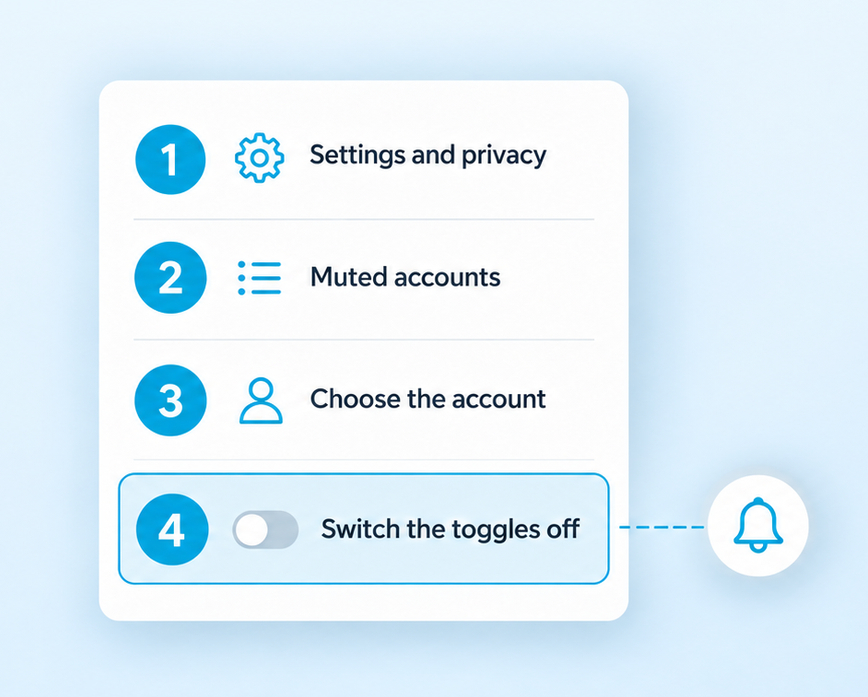
You can also undo a mute from their profile by tapping Following, then Mute, and switching off whatever you turned on. For messages, open the chat and turn off Mute messages or Mute call notifications. Unmuting is just as silent as muting, so nobody gets a notification when their posts start showing up in your Feed again.
Questions About Muting on Instagram
Will someone know if I mute them on Instagram?
No. Instagram doesn’t send a notification, and there’s no list that shows people who muted them. Apps that promise to reveal who muted you run into the same wall as apps that claim to show who stalks your Instagram, because Instagram doesn’t share that data with anyone.
Can I still watch their stories after muting them?
Yes. Open their profile and tap their profile picture, and the story plays as normal. Muting only stops it from appearing in the row at the top of your Feed.
Does muting someone stop them from seeing my stories?
No. Muting only changes what you see. If you want to keep your stories from someone, add them to Hide story and live from in your story settings, and they’ll still see your posts.
Can I mute a group chat?
Yes. Open the group chat, tap its name and turn on Mute messages. You stay in the conversation and can read everything, but new messages won’t send you notifications.
Treat Mute as a Pause
Mute works best as a short break rather than a permanent setting you forget about. It’s worth opening your Muted accounts list every few months. Some of those names will be people you muted during a busy season, a trip or a heated moment, and unmuting them is quiet and takes a second.
If you notice that you keep a mute on because someone makes you uncomfortable, it may be time for a clearer tool. Restrict limits how they can reach you, and Block ends contact entirely. Mute is kind to both of you when it’s a pause, but it’s not meant to carry a problem that needs a firmer answer.