Understanding how can you see who viewed your video on Facebook is a common question for anyone who uploads Facebook videos—whether through the News Feed, Facebook Stories, Reels, or Live streaming. Facebook offers a variety of video formats, but each format has different viewer visibility rules, and this leaves many Facebook users confused. You may have a video post on your profile and want to know exactly who watched it, or maybe you’re using a business page and need deeper video metrics, analytics, and audience insights.
The truth is that Facebook does allow you to see who viewed certain types of videos, but not all. Some formats show individual viewers, while others only display the total number of views, view count, viewer count, or broader audience data. That’s why this topic has a few different answers—because the platform treats video content differently depending on where and how it was uploaded.
Expand your reach with video views, reposts, and saves to ensure your content spreads across Instagram and attracts new audiences.
Can You See Who Viewed Your Facebook Video?
The short answer: sometimes.
Whether you can see who viewed your Facebook video depends entirely on the type of video:
| Video Type | Can You See Individual Viewers? | Can You See View Count? |
|---|---|---|
| Facebook Story | ✔ Yes | ✔ Yes |
| Facebook Reel | ✖ No | ✔ Yes |
| Regular News Feed video (personal profile) | ✖ No | ✔ Yes |
| Facebook Live (during the stream) | ✔ Yes | ✔ Yes |
| Facebook Live (after the stream ends) | ✖ No | ✔ Yes |
| Business Page video | ✖ No | ✔ Detailed analytics only |
Facebook does this to protect user privacy, which is why only temporary content like Facebook Stories reveals all the profiles of your viewers.
Let’s break down each format in-depth.
How to See Who Viewed Your Facebook Story Video
If you posted a video as a Facebook Story, you can see exactly which Facebook users watched it. This is the only Facebook format—other than Live videos while streaming—that shows individual viewers.
How to Check Facebook Story Viewers (Mobile App)
- Open Facebook.
- At the top of the Feed, go to the Stories row.
- Tap Your Story.
- Look at the lower left corner—you’ll see the viewer count.
- Tap the number to view the full list of people who viewed your Facebook Story.
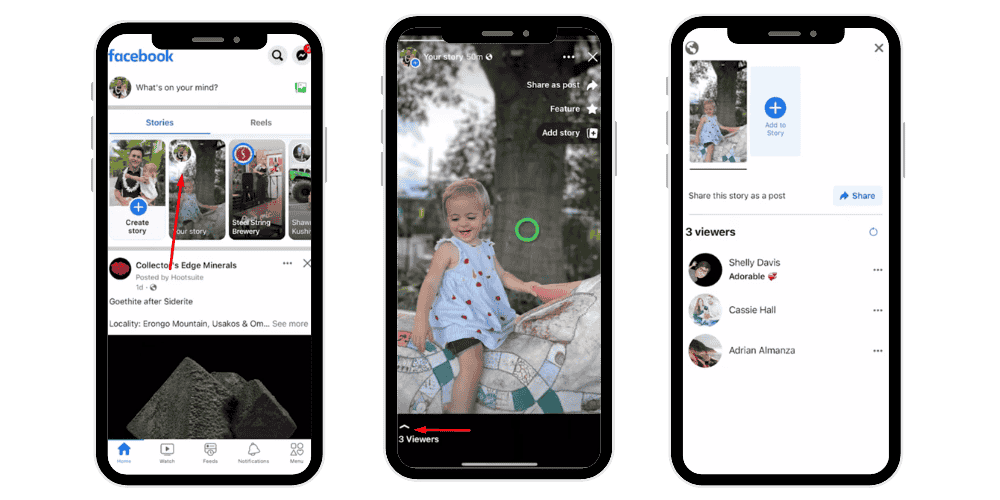
You can scroll through all the profiles, see who watched, and even check if the viewer is a friend, follower, or someone from your general location, depending on their privacy settings.
How to Check Story Viewers on a Desktop Computer
- Open Facebook in your browser.
- Click Your Story.
- Select the viewer count at the bottom.
- Facebook will open a panel with all the profiles who viewed your video.
Why Stories Allow You to See Your Viewers
Stories are temporary and designed for more personal sharing. Since they last only 24 hours, Facebook includes the viewer log to give creators more transparency and engagement information.
Related: What Does TDY Mean on Instagram?
How to See Who Viewed Your Facebook Reel?
Facebook Reels behave differently. You can see the number of views, but not the individual viewers.
To check Reel view count:
- Go to the Reels tab or search for your specific video.
- Under the video, Facebook displays how many people watched it.
- You may also see likes, comments, and shares.
Reels do not reveal the names of viewers, even if the viewer is your friend. The only information provided is:
- The view count
- Engagement (likes, comments, shares)
- Any new followers gained
Can You See Who Viewed a Regular News Feed Video?
If you upload a video as a normal News Feed video, also known as a standard video post, you cannot see who watched it. You can only see:
- The total number of views
- The number of people who watched
- Engagement (comments, reactions, shares)
Where to Find the View Count
On a desktop computer:
- Go to your Facebook profile.
- Click the Videos tab (often labeled “Videos” or sometimes under “More”).
- Open the specific video you uploaded.
- The number of views appears on the right side under the description.
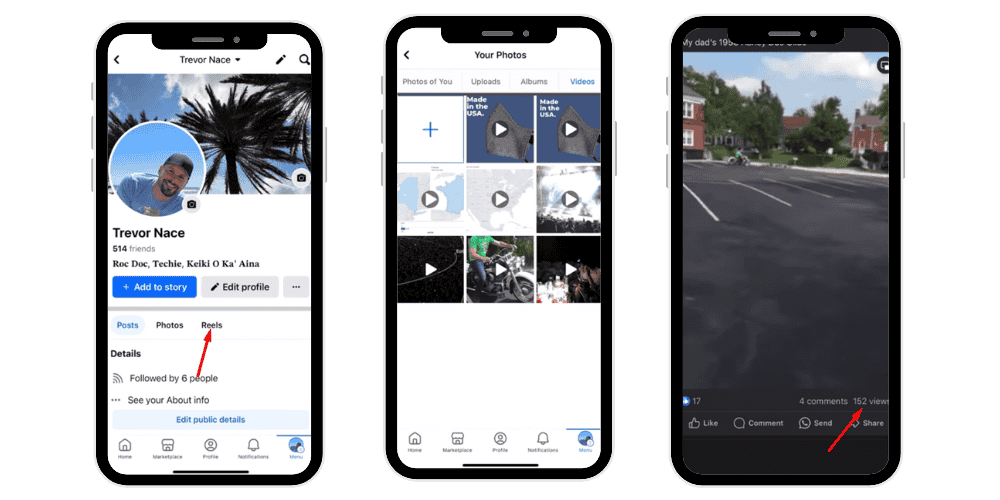
Important Notes About News Feed Videos
- If the video is older, the view count might not appear due to settings or privacy.
- Only videos watched for at least 3 seconds count as views.
- You cannot see other viewers—only total views.
Facebook hides individual viewer identities for privacy, especially because many users scroll past news feed videos, generating views without intending to engage.
💡Pro Tip: More video views mean more credibility. Increase Instagram views to improve ranking and grow influence.
How to See Viewers During a Facebook Live Stream
When you’re live streaming, Facebook shows exactly who is watching in real time.
What You Can See During a Live Event
- A list of people watching
- A real-time viewer count
- New viewers when they join
- Comments and emoji reactions from viewers
Facebook displays the names of viewers because Live video is interactive and public by design.
What Happens After the Live Ends
Once the live stream finishes:
- The video becomes a normal news feed video.
- The list of viewers disappears permanently.
- You can only see the total view count, not who watched.
- Comments and likes remain visible.
If you’re trying to track who watched after the event, you can sometimes estimate based on:
- Comments during or after the stream
- Shares
- Reactions
But the exact viewer list is unavailable after the stream ends.
Why Doesn’t Facebook Show You Who Viewed Normal Videos?
The reason is simple: privacy.
Facebook wants users to feel safe watching video content without fear that the uploader will see their identity.
Technical & privacy reasons include:
- Auto-play behavior: Many news feed videos auto-play while users scroll. A viewer may be counted even if they watched a clip for only a few seconds.
- User anonymity preferences: Not all users want their full name and profile to be associated with every video they watch.
- Accidental views: Video playback can start unintentionally. Facebook avoids revealing viewer identities in these cases.
- Privacy laws: Facebook’s global user base means complying with privacy regulations in many countries.
Only voluntary actions—liking, commenting, sharing—are public.
How to View Video Analytics on a Facebook Business Page?
If you manage a business page, you get access to much deeper video analytics, but still—not individual viewers. You can only see aggregated data.
How to Access Insights
- Tap your profile picture and select the Page you manage.
- From the left menu, click Insights.
- Then click Content in the left menu.
- Select the specific video to see detailed analytics.
Although you won’t see names of viewers, you’ll be able to view:
Available metrics include:
- Total number of views
- Unique vs. repeat viewers
- Viewer retention
- Average watch time
- People watched
- Clicks on your video
- General location of viewers
- Engagement (reactions, comments, shares)
- Demographics (age/gender ranges)
Using Creator Studio or Meta Business Suite on a desktop computer gives a smoother, more complete analytics experience.
Related: What Does Sticker Taps Mean on Instagram Story
Understanding Video Metrics: What They Mean
Video metrics play a crucial role in helping creators and business pages evaluate the performance of their Facebook videos. Although Facebook does not show individual viewers, these analytics offer valuable insights into how audiences interact with your content.
Total Number of Views
This metric shows how many times your video was played for at least three seconds. Even if users scroll past quickly, the moment the video plays for three seconds, it counts as a view. This helps you understand your video’s reach and initial audience interest.
Video Engagement
Engagement reflects how viewers interact with your content. It includes likes, comments, reactions, and shares. Higher engagement signals that your video resonates with the audience, improving its chances of appearing more frequently in the News Feed.
Viewer Retention
Viewer retention shows how long viewers continue watching before scrolling away. Strong retention indicates compelling content, while drops point to areas where viewers lose interest. This helps you understand which parts of your video perform best.
Average Watch Time
Average watch time measures the typical amount of time viewers spend watching your video. Higher watch time increases your video’s visibility in Facebook’s algorithm, signaling valuable and engaging content.
Unique Viewers
This metric reveals how many actual people viewed your video, excluding repeated views from the same user. It helps determine the size of your real audience.
Traffic Sources
Traffic sources show where viewers discovered your video—whether through the News Feed, Stories, Search results, shared posts, or Page recommendations. Understanding these sources helps you optimize content placement and distribution strategies.
These metrics collectively guide content improvement and overall performance analysis.
Why People Want to Know Who Viewed Their Facebook Video
Many users want to know:
- Whether friends watched their video
- Whether their audience is interested in the content
- If strangers or non-friends are interacting
- How well their content is performing
But because Facebook’s priority is user privacy, this feature is intentionally restricted.
How to Increase Video Views and Engagement on Facebook
Whether you’re a casual user or running a business, better overall engagement leads to more exposure. Here are methods to boost your video views.
- Adjust Your Posting Time: Post when your audience is most active; this data is in Insights.
- Improve Your Video Editing: Clean visuals, clear audio, and shorter clips perform better.
- Engage in the Comments: Replying increases exposure in the algorithm.
- Share Your Video Across Facebook
Share to:
- Groups
- Stories
- Your Page
- Relevant communities
- Use Better Thumbnails: A compelling thumbnail increases clicks and watch time.
- Host Giveaways or Contests: People engage more when incentives are involved.
- Consider Buying Facebook Video Views: Some creators boost exposure by purchasing views to increase: Social proof, Reach, Explore page visibility
This can help your content appear in more News Feed videos, Stories, and search results.
💡 Pro Tip: More comments equal stronger social proof. Improve your post visibility and build authenticity quickly.
Final Thoughts
Facebook offers several types of video content, and each provides different levels of viewer insight. Facebook Stories and Live streaming (during the broadcast) are the only formats that show individual viewers. For everything else—Reels, News Feed videos, uploaded videos, and Page videos—you can see only the number of views and various video analytics, but not the exact people who watched.
This design helps protect user privacy while still giving creators enough data to improve their content, measure performance, and track engagement.
If you’re interested in growing your video presence, focus on understanding your metrics, improving content quality, optimizing posting time, and using the tools available in Facebook’s Insights, Videos tab, and Creator Studio.
FAQs
How can you see who viewed your video on Facebook mobile?
You can only see viewers if the video was posted as a Story. Open Facebook mobile, tap Your Story, and check the viewer list in the lower-left corner. Regular videos only show total views, not individual viewers.
How can you see who viewed your video on the Facebook app?
Open the Facebook app, go to Stories, tap Your Story, and check the viewer count to see who watched it. For Reels and standard videos, Facebook only shows the number of views, not the names of specific viewers.
How can you see who viewed your video on Facebook Messenger?
Messenger videos don’t provide viewer lists. You can only see if the message containing the video was “Seen” by a person or group. This indicates they opened the chat, not necessarily that they watched the full video.
Can you see who watched your Reels on Facebook?
No. Facebook Reels only show the total number of views and engagement like likes, comments, and shares. You cannot see the names of people who watched your Reel, even if they are your friends.
Can you see who watched your Story on Facebook?
Yes. Open Your Story and tap the viewer count at the bottom to see the full list of people who viewed it. Facebook Stories are the only video format that shows individual viewer names.
Can you see who viewed your video on Instagram?
You can see viewer names for Instagram Stories but not for regular videos or Reels. Standard posts and Reels only display total views and engagement, not the identities of individual viewers.