Understanding sticker taps on your Instagram story is key to unlocking how your audience truly interacts with your content. While likes and views reveal surface-level popularity, sticker taps offer deeper insights into user behavior. They represent deliberate actions—users physically tapping on specific elements within your story, such as polls, mentions, or location tags.
When someone taps a sticker on your story, it indicates interest. Whether they’re exploring your tagged location, responding to a poll, or visiting a profile you’ve mentioned, every tap tells a story about what catches your audience’s attention. To analyze these actions effectively, you can explore your Instagram Stories Analytics under your Professional Dashboard.
Drive engagement through impressions, likes, and saves that keep your content visible and relevant in the Instagram algorithm longer.
Why Sticker Taps Matter for Story Performance
Sticker taps are not just vanity metrics—they are engagement metrics that show how interactive your content truly is. Within Instagram Insights, sticker taps are recorded as story interactions, helping creators and business accounts understand how their content resonates with unique accounts and other users.
Audience Insights
Sticker taps help identify what your target audience finds appealing. If a poll sticker receives many taps, it suggests that your followers like sharing their opinions. Similarly, location stickers with high engagement indicate local interest or brand recognition in that area.
Conversion Potential
For e-commerce brands, sticker taps hold conversion power. A tap on a product photo, location tag, or mention sticker could lead to a profile visit, link click, or even a purchase. The number of times users interact with such stickers often correlates with real-world actions.
Content Optimization
Analyzing sticker taps allows you to fine-tune your content strategy. When you know which stickers draw the most interest, you can replicate successful elements in your next story. Over time, this helps you produce compelling stories that continually attract engagement.
Enhanced Engagement
Every sticker—be it polls, emoji sliders, countdowns, or music—is designed to prompt action. Strategic use of these stickers keeps your audience engaged longer, reducing speed tapping through your stories and increasing total story interactions.
Related: What Does TDY Mean on Instagram?
Types of Stickers and What Their Taps Mean
To dive deeper into how sticker taps shape your story performance, it helps to understand each sticker type and its role in engagement.
1. Location Stickers
Location stickers let you tag a specific place in your story. When users tap the sticker, they’re directed to that location’s page within the Instagram app, where they can view posts tagged with the same location tag.
- Ideal for business profiles, events, or local promotions.
- Drives discoverability and foot traffic.
- Boosts visibility among users near that area.
- Trackable through Instagram analytics and stories analytics.
Example: A coffee shop tagging its café in a morning story might see several sticker taps—each representing a user interested in visiting that place.
2. Hashtag Stickers
Hashtag stickers function similarly to hashtags in Instagram posts but are more interactive. When someone taps a hashtag sticker, they’re taken to a feed showing all public posts using that hashtag.
- Useful for branded campaigns (#SummerSale, #MyBrandJourney).
- Encourages user participation and content discovery.
- Helps gauge campaign reach and visibility.
Sticker taps here indicate curiosity about the hashtag or participation in your broader marketing campaign.
3. Mention Stickers
Mention stickers allow you to tag another Instagram account directly in your story. When a viewer taps the sticker, it redirects them to that account’s story or profile.
- Excellent for collaborations, influencer partnerships, or other brands.
- Boosts accounts engaged and profile visits.
- Strengthens cross-promotion strategies.
High mention sticker taps indicate your followers are interested in learning more about the account or product featured in your story.
💡 Pro Tip: Build trust and engagement by boosting reposts that make your content appear popular and worth sharing naturally.
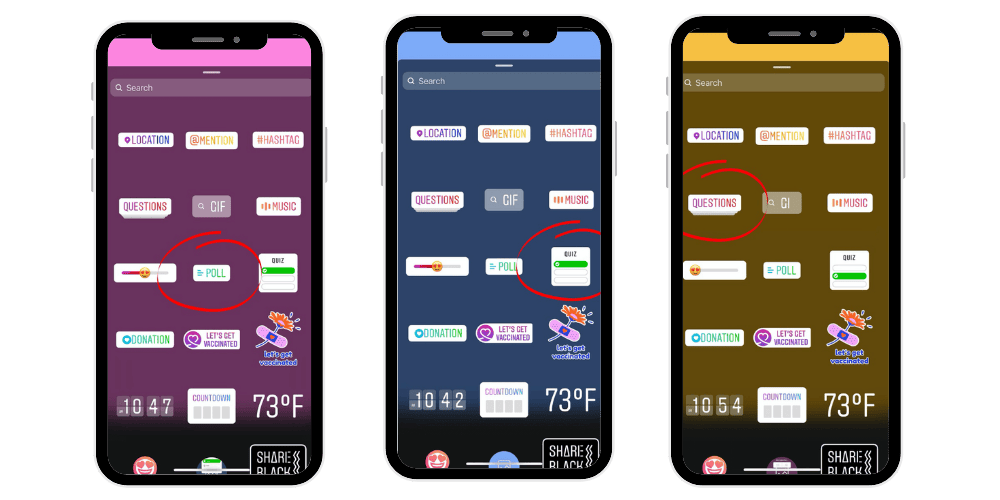
4. Interactive Stickers (Polls, Quizzes, Emoji Sliders)
Interactive stickers—such as polls, quizzes, and emoji sliders—transform passive viewers into active participants.
- Poll stickers let users vote between two options.
- Quizzes test knowledge or opinions about a topic.
- Emoji sliders measure emotional reactions to visuals or text.
Each tap provides valuable insights into audience’s interest and preferences. For business accounts, analyzing these metrics through Instagram Insights reveals what kind of content resonates most.
5. Music and GIF Stickers
Music stickers allow you to attach songs to your stories, while GIF stickers add motion and creativity. Both boost storytelling appeal and keep current followers entertained.
Sticker taps on these elements often represent appreciation for your creative choice. A viewer might tap a song title out of curiosity or to hear more.
6. Countdown Stickers
Countdown stickers are perfect for building anticipation around an upcoming product drop, sale, or event.
- Every tap on a countdown sticker often signals genuine excitement.
- Users can even set reminders, amplifying engagement and reach.
- Great for launches, webinars, or limited-time offers.
Sticker taps here measure audience’s attention and future engagement intent.
How to View Sticker Taps in Instagram Stories Analytics
Accessing sticker tap data is straightforward.
- Open the Instagram app.
- Go to your profile and tap the three horizontal lines in the top right corner.
- Select Professional Dashboard or Insights.
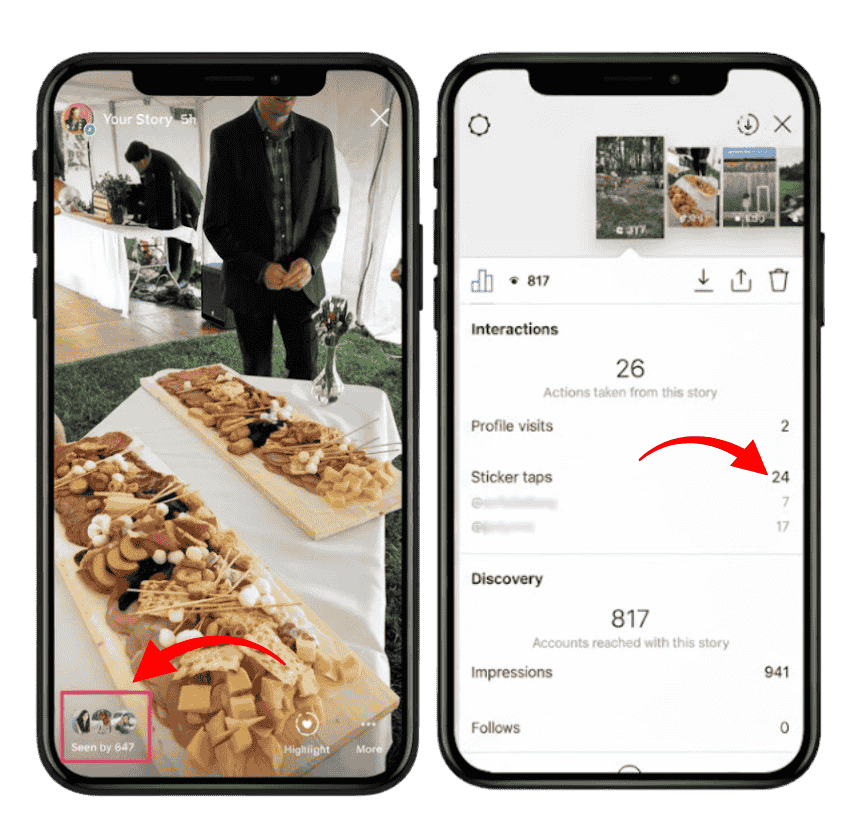
- Navigate to Content You Shared → Stories.
- Choose the particular story you want to analyze.
- Tap View Insights at the bottom.
Here, you’ll find detailed metrics including accounts reached, accounts engaged, forward taps, next story taps, sticker taps, and more.
By checking how many users tapped a specific sticker, you can identify your most engaging stories and make data-backed adjustments.
How Sticker Taps Differ from Other Story Metrics
Instagram tracks multiple story metrics, each offering different perspectives:
- Sticker Taps: Number of times users interact with a specific sticker.
- Forward Taps: How often users tap to skip to the next story.
- Next Story Taps: Indicates users moving to the next account’s story.
- Replies/Direct Messages: Reflects conversations started through your story.
- Exits: When users leave your story entirely.
Together, these analytics give a holistic view of story performance and audience engagement behavior.
If your story gets many sticker taps and few next story taps, it means users are actively engaging rather than skipping. Conversely, too many taps forward could indicate your content didn’t capture their attention.
Related: What Does S4S Mean on Instagram?
How to Increase Sticker Taps on Your Stories
Boosting sticker taps requires a balance between creativity and data-driven strategy.
1. Be Strategic
Choose stickers aligned with your content goal. For example:
- Use location stickers when promoting an event.
- Add polls to spark quick interaction.
- Tag other users or collaborators using mention stickers.
2. Stay Relevant
Each sticker should match the tone and purpose of your specific story. Overusing or placing irrelevant stickers can dilute your message and reduce story interactions.
3. Encourage Interaction
Prompt viewers to tap. Ask questions, invite opinions, or tease upcoming content. For example:
- “Which product do you prefer? Tap below to vote!”
- “Guess what’s launching next—tap the quiz!”
4. Monitor Instagram Insights
Use Instagram analytics regularly to measure progress. Look at the number of times users interact with stickers, profile visits, or link clicks from stories.
This helps you fine-tune your approach, understanding what content style generates more engagement.
5. Maintain Visual Appeal
A clean layout makes your stickers pop. Avoid cluttering your story with too many visual elements.
Position stickers where they’re noticeable but not obstructing key visuals.
Using Location Stickers for Business Growth
For business accounts, location stickers play a critical role in driving story performance. Tagging a physical location increases discoverability among Instagram users searching for that area.
Why It Works
- Location tags appear in local discovery feeds.
- They attract nearby users who might visit or purchase.
- They can boost visibility even outside your current followers.
How to Measure
Through Instagram Reports or Stories Analytics, you can see the number of times users tapped your location tag. High tap counts suggest strong regional interest—valuable for brick-and-mortar stores, event organizers, and local brands.
Understanding Interactive Elements in Story Engagement
Interactive elements go beyond stickers—they define the Instagram experience. Story taps, swipe ups, and direct messages collectively represent your story’s engagement ecosystem.
Story Taps and Swipe Ups
Each tap indicates whether users are engaging (tapping stickers) or skipping (tapping forward). Swipe ups—available to eligible business profiles—can direct users to websites, product pages, or blog posts.
Measurable Impact
Instagram insights provide valuable data on how your audience interacts:
- How many users tapped stickers.
- The number of times they advanced or exited.
- Which stories led to link clicks or new followers.
These details reveal which interactive elements keep the audience hooked.
💡 Pro Tip: Buy live views to strengthen your live broadcasts, increase attention, and improve interaction effortlessly.
Using Sticker Taps for Content Strategy
Every tap tells a story about what content resonates. The goal isn’t just to post stories—it’s to post compelling content that inspires interaction.
Data-Driven Creativity
Review your sticker analytics weekly. Look for trends such as:
- Which sticker type receives the highest taps.
- What time of day your stories get most views.
- Which individual posts lead to more accounts engaged.
Applying Insights
If your emoji sliders consistently perform well, make them a recurring feature. If mention stickers drive profile visits, collaborate more frequently.
Testing & Optimization
Treat each story like an experiment. Adjust your visuals, sticker placement, or story stickers based on feedback. Over time, these small tweaks can significantly improve your engagement metrics.
Measuring Overall Success Through Analytics
A successful story isn’t just one that looks good—it’s one that drives action.
To measure that success, review your Instagram Stories Analytics regularly.
Key Metrics to Track
- Sticker Taps: User interactions with stickers.
- Profile Visits: Number of people who visited your profile from your story.
- Link Clicks: Total clicks on embedded links or CTAs.
- Forward and Next Story Taps: Indicators of retention or drop-off.
- Replies/DMs: Signs of strong connection and curiosity.
Benchmarking Performance
Use Instagram Reports to track performance trends over time. Compare how different story types perform, and note which stories generate the most meaningful actions.
By combining these engagement metrics with follower count growth and accounts reached, you gain a holistic view of your story performance.
How Sticker Taps Benefit Brands and Influencers
For E-Commerce Brands
Sticker taps are a goldmine for e-commerce brands promoting products online. Each tap can reveal purchase intent, interest in a specific story, or curiosity about a product photo.
Tracking these metrics helps brands optimize their content strategy for sales.
For Influencers
Influencers can use sticker tap data to show brands how engaged their audience truly is. A high tap rate demonstrates that followers are not passive—they’re responsive and invested in the content.
Final Thoughts
The answer lies in understanding that sticker taps are more than numbers—they’re windows into your audience’s mind. They show what people care about, how they react, and what makes them act.
By leveraging Instagram analytics, studying stories metrics, and applying those findings to your next story, you can build a more engaging content strategy.
Whether you manage a business profile, a personal brand, or a growing online store, tracking sticker taps can help you craft compelling stories that capture your audience’s attention, encourage interaction, and drive meaningful growth.
FAQs
How to Check Who Sticker Taps on Instagram?
You can’t see who tapped your sticker, only how many users did. Go to your story, tap “View Insights,” and check “Sticker Taps.” It shows the total tap count per sticker but not the usernames.
Can You See Who Sticker Taps on Instagram?
No, Instagram doesn’t reveal which users tapped your stickers. It only provides analytics data showing the number of times each sticker was tapped. You’ll know the total engagement, but not the individual accounts that interacted.
How to Give Sticker Taps on Instagram?
To give a sticker tap, open a story and tap on an interactive sticker like polls, quizzes, mentions, or location tags. Each tap registers as an interaction, helping creators measure story engagement through Instagram Insights.
What Do the Stickers on Instagram Stories Mean?
Stickers on Instagram stories are interactive elements that enhance engagement. They include polls, quizzes, music, GIFs, mentions, and location tags. Each serves a purpose—collecting opinions, showcasing creativity, or driving traffic to profiles, websites, or tagged locations.