Facebook is a social media platform where the users make social connections through Facebook features. Facebook has privacy settings that must be carefully managed. When you post on Facebook, there are various options about the post if you’ve enabled privacy settings.
You can make a comment, like the post and can even share it with your friends. If you want to know How to Find Liked Videos on Facebook then you are at the right place. If you regularly post videos and want them to gain quick traction, you can also get more Facebook video views to boost visibility and encourage more organic engagement.
How To Find Liked Videos On Facebook in 5 Steps :
Step 1: Open your Facebook and go to Menu.
Step 2: Scroll down the screen and tap on Settings and Privacy.
Step 3: From there, click on the Privacy Shortcuts.
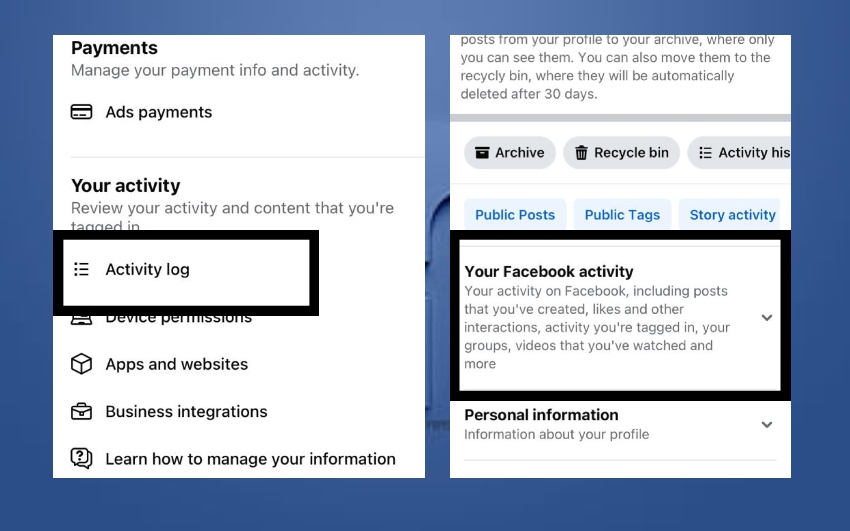
Step 4: Scroll down to the Activity Log and tap on Your Facebook Activity.
Step 5: In the last step, Filter out the activity by clicking on Comments and Reaction to find your Liked Videos.
Get the best deals to buy Facebook page likes, increase post likes, and more comments at reasonable prices!
How To See the Posts That You Have Liked On Facebook :
Facebook is one of the most popular social media platforms, offering many features to help users interact. Beyond chatting, you can post photos, videos, and reels, and even create Pages or Community Groups for business or personal purposes.
When it comes to liking videos or posts, you can only like them if the owner allows it through their privacy settings. If you’re wondering how to find the videos you’ve liked on Facebook, you’re in luck—there are several ways to do it. Let’s explore all the options!
1. By Using Facebook Activity Log :
The simplest and the most frequently used method is to find your liked videos by using Activity Log. The activity log allows you to filter all your activities and reach to the videos that you’ve recently liked. All these things take place when you have a Facebook account. Step by step guide is right below ;
STEPS :
Step 1: Connect your phone to the internet and Login to your Facebook account.
Step 2: When you have logged in, tap on the Menu at the bottom right of the screen.
Step 3: By scrolling down the screen, get to the ‘Settings and Privacy’
Step 4: Further a list of options will appear on the screen. Tap on ‘Privacy Shortcuts’
Step 5: Scroll down the screen to avoid unnecessary options and go to the ‘Activity Log’

Step 6: Click on ‘Your Facebook Activity’
Step 7: Below all the activity that you had done will be shown. Tap on ‘Comments and Reaction’ to see your Likes.
Step 8: Tap on ‘Likes and Reactions’ to see all the videos that you’ve liked.
If you know the steps, it will be much easier for you to find the Liked Videos just within seconds, and you can also purchase Facebook reactions to gently enhance engagement.
2. Using Facebook Saved Videos :
Facebook has introduced another feature where you can save the videos or posts that you like. In order to get access to the Liked videos on Facebook through Saved videos, few things need to be considered. You can only find the liked videos in saved items if you have saved it while you liked the video. Otherwise, there will not be any liked video in the saved videos.
STEPS :
Step 1: Login to your Facebook account.
Step 2: Click on Menu at the bottom right corner of the screen.

Step 3: Tap on Saved. It has a Bookmark icon.
Step 4: You will see all the collections and saved videos that you liked and saved at the same time.
These two have been the simplest ways. And you can carry out these methods through simpler clicks from your own Facebook Menu.
3. Facebook Watch History :
This is the third method. Just in case, you do not know about the two methods explained above then this is the last one to know. Carefully understand the steps below;
STEPS :
Step 1: Open your Facebook Account.
Step 2: Search for the Watch History in the search bar or simply open your posts from your activity. It will enable you to see which videos you’ve interacted recently.
Step 3: From there tap on the watched videos history and get to know your liked videos.
4. Using Facebook Search Bar :
The last method is to look for the liked videos through a little hustle. You have to give it a little more time in comparison to the others. The steps to be followed are ;
STEPS :
Step 1: Open your Facebook and navigate to the search bar of your account.
Step 2: Type the keyword related to the video that you are looking for.

Step 3: Choose the filter from the options above and select Videos.
Step 4: Scroll down to find your Liked Videos on Facebook.
So these are all the methods that help you to answer how to find liked videos on Facebook. This is the easy job to do, just make sure you know the steps very well.
Conclusion :
Facebook is an engagement platform where millions and billions of users interact with each other on a daily basis. You come across hundreds of videos, every kind of video is shown depending upon how much it is. Sometimes, by mistake you like the videos that you really did not want to. So, in order to unlike those videos, first you have to find them. This article is all about how to find liked videos on Facebook.
FAQs
How can I hide my Liked Videos on Facebook?
To hide your liked videos from others, adjust your privacy settings. Go to your Activity Log and select the videos you want to hide. You can change the privacy setting to “Only Me” to keep them private.
Can I find videos I liked from a specific time frame?
Yes, you can filter your Activity Log by date to find videos you liked within a specific time range. This is useful if you remember when you liked the video but not exactly which one.
Why can’t I find the video I liked?
If you can’t find a video you liked, it could be because the video has been deleted or the privacy settings of the post have been changed. If the post was set to “Friends” or more restricted privacy, it might not be visible to you anymore.
Can I see videos liked by my friends?
You can only see the videos liked by your friends if they are public or shared with you. If they have set their posts to a private setting, you won’t be able to see their liked videos.
How do I manage my Facebook Watch History?
You can manage your Facebook Watch History by going to Settings, selecting Your Facebook Information, and clicking Activity Log. From there, you can delete specific videos or clear your entire watch history.
Is there any way to find my liked videos if I forgot to save them?
If you didn’t save the videos you liked, you can still try searching through your Watch History or Activity Log. Unfortunately, if the videos were not saved and you didn’t interact with them afterward, it might be harder to retrieve them.