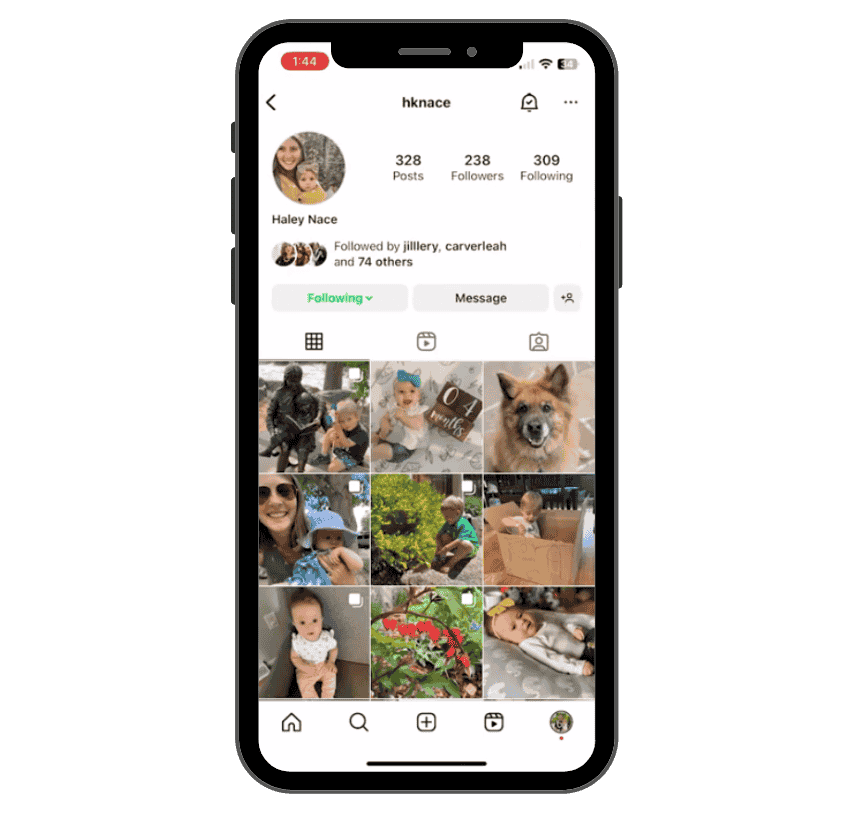
When the following button turns green on someone’s Instagram profile, it signals something different from regular follow behavior. This green following indicator reflects that you are part of that person’s close friends list — a select group chosen by the user to share more personal content with.
Instead of a regular grey “Following” button, you’ll see a green button that sets your connection apart, especially in terms of how you see their Instagram Stories, posts, and interactions. Think of it as a VIP badge in the world of Instagram — not everyone gets it.
Want to grow a close circle of engaged followers just like Instagram’s Close Friends feature?
Get Instagram followers and boost your Instagram likes for more intimate engagement that drives loyalty.
What is the Close Friends Feature?
The close friends feature is designed to let users build a custom audience for their stories and updates. Instead of broadcasting to every follower, users can share content with only a select group — their close friends list.
This encourages more personal content sharing, emotional authenticity, and protection of privacy. Whether someone wants to showcase daily life, personal rants, or candid moments, the feature enables complete control over who sees what.
Related articles:
- What Does the ‘Green Dot’ Mean on Instagram?
- What ‘Green Circle’ Means on Instagram? Close Friends Explained
“Close Friends” List
If someone has added you to their close friends list, it means they trust you with content they don’t wish to share with their entire follower base. You’re now part of an exclusive group who can view their green ring stories and interact more intimately with their content.
This inclusion allows them to share specifically tailored content — such as personal moments, behind-the-scenes insights, or emotionally vulnerable updates — with users they feel comfortable with. It’s a nod to both trust and digital intimacy.
How to Add Someone to Your Close Friends List
Adding someone to your own close friends list is seamless. Instagram ensures this process is both intuitive and discreet. The people you add won’t be notified that they’re on your list — they’ll only find out through visual cues like the green ring or green status.
Step-by-Step Process to Add Close Friends on Instagram
Here’s a step-by-step guide to add users to your close friends list:
- Open the Instagram app and go to your profile page by tapping the bottom right corner icon.
- Tap the three horizontal lines (also known as the hamburger menu) in the upper right corner.
- Select “Close Friends” from the menu.
- Use the search bar to find people you want to add.
- Tap “Add” next to their names.
- Tap “Done” once your list is complete.
This step by step process gives you complete control over who gets to see your private stories.
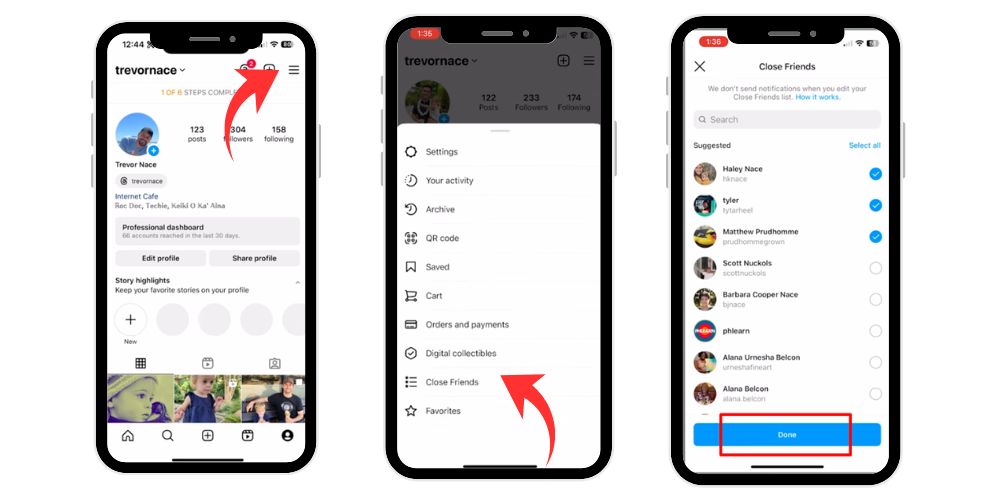
How to Know If You Are on Someone’s Close Friends List
If you spot a green ring around someone’s profile picture in Instagram Stories, it’s a clear signal that you’re on their close friends list. Unlike normal stories with purple-orange rings, these green circles indicate exclusive content tailored only for a few.
Another subtle hint is the green following button on their Instagram profile, letting you know your relationship on the platform has an extra layer of intimacy. However, you won’t get a direct message notification or alert — the design is discreet yet meaningful.
Understanding the Green Following Button on Instagram
This unique green following button isn’t just aesthetic; it serves as a communication signal in the Instagram app. Instagram rolled out the close friends feature to give users more control over their social media game, offering a layer of personalized content for selected individuals.
Unlike the standard “Follow” or “Following” interactions, the green hue offers subtle clarity that you’re seeing content others might not. It’s a reflection of your elevated status on that user’s Instagram profile.
Differences Between Regular Following and Close Friends Following
The distinction between regular following and close friends following is significant. Regular following allows you to view public posts and stories. However, if you’re on someone’s close friends list, you get access to more personal moments, green ring stories, and personal content that remains hidden from their broader audience.
It’s essentially a tiered sharing structure: public vs. select group. The green following button is your visual proof that you belong to the latter.
The Impact of the Green Following Button on Instagram’s User Experience
The feature enriches how users interact on the app. It fosters intimacy, privacy, and intentional sharing. The green status encourages people to be vulnerable in a controlled environment, making the Instagram space more emotionally engaging.
For many users, it reduces the performative aspect of social media by enabling authentic moments without fear of judgment from the wider public.
Common Issues and How to Resolve Them
Although the green following indicator and the close friends feature enhance the Instagram experience, some users may encounter functionality or display issues. Here are five frequent problems and how to fix them effectively.
1. Green Following Button Not Showing Up
Issue:
You’re following someone and suspect you’re on their close friends list, but the green button doesn’t appear on their profile.
Possible Causes:
- Weak or unstable internet connection
- App not updated
- Temporary server lag from Instagram
- The person may have removed you from their close friends list
Solution:
- Check and improve your internet connection (Wi-Fi or mobile data).
- Restart the Instagram app.
- Update to the latest version from your device’s app store.
- Log out and log back in to refresh your account data.
- Wait a few hours; sometimes updates take time to reflect.
2. Unable to Add Someone to Close Friends
Issue:
You try to add someone to your own close friends list, but they don’t appear in the search, or tapping “Add” doesn’t work.
Possible Causes:
- Temporary app glitch
- Account restrictions (private/professional account setting mismatch)
- Blocked user
- Shadowban or soft block from Instagram
Solution:
- Switch from business to personal profile (if applicable).
- Refresh the list by pulling down the screen.
- Clear cache or storage for the Instagram app.
- Try adding them from their profile by tapping the three dots and selecting “Add to Close Friends.”
- If all else fails, uninstall and reinstall the app.
3. Green Ring Not Appearing Around Stories
Issue:
You’re on someone’s close friends list, but their stories show the regular color instead of the green circle.
Possible Causes:
- You’re viewing an old story shared with everyone, not close friends.
- They haven’t posted to their close friends — only public stories.
- App delay or bug in displaying story rings correctly.
Solution:
- Wait until they share something to their close friends specifically.
- Restart the app and check again after a while.
- Try viewing from another device to see if the issue is local to yours.
4. Close Friends Stories Not Showing Up in Feed
Issue:
You know someone frequently posts close friends stories, but you’re not seeing any from them in your story feed.
Possible Causes:
- You’ve muted their stories.
- Instagram algorithm isn’t surfacing their content.
- You may have been removed from their close friends list recently.
Solution:
- Visit their profile page, tap “Following” → “Mute”, and ensure “Stories” is toggled off.
- Turn on notifications for their stories.
- Interact more with their content to encourage the algorithm to show you their stories again.
- If you’re still unsure, ask them directly (if appropriate).
5. Can’t See or Access the Close Friends Option
Issue:
The “Close Friends” menu option is missing from the settings or doesn’t appear on your profile.
Possible Causes:
- Using an outdated version of Instagram
- Not available in your region yet
- Device compatibility issues
Solution:
- Ensure your Instagram app is updated to the latest version.
- Switch from desktop to mobile app, as the close friends feature works best there.
- Try logging into a different device.
- If the issue persists, report the problem via Settings → Help → Report a Problem.
How Does the Green Following Button Work?
The green following button is automatically applied by Instagram when a user adds you to their close friends list. You cannot turn it on or off yourself — it’s based entirely on the actions of the other party.
It’s seamlessly integrated into the app interface and appears instantly once you’ve been added to someone’s list. It also disappears if they remove you from their user’s close friends list.
Benefits of the Green Following Button for Content Creators
For content creators, the green following button is more than just a visual cue — it’s a strategic tool that enhances how they share content with a select group of followers. This unique feature enables creators to build deeper, more authentic connections by offering personalized content that isn’t meant for the general public.
Share Behind-the-Scenes Content
Creators often use the close friends feature to post behind-the-scenes videos or moments that provide insight into their daily life, creative process, or business operations. These more personal moments help users interact with the creator on a human level, fostering relatability and trust.
Provide Product Previews
The green ring is often a sign that a follower is getting early access to exclusive content such as product launches or new service announcements. Creators can offer sneak peeks, making their loyal customers feel valued and involved in their brand journey.
Offer Special Deals to Loyal Followers
By using the close friends list, creators can provide limited-time offers, discount codes, or private sale access to their most supportive fans. This selective approach encourages brand loyalty and builds a sense of being part of an exclusive group.
Host Intimate Q&A Sessions
Using Instagram Stories, creators can invite their close friends to participate in private Q&A sessions. This kind of personal content feels less formal and more like a conversation, which boosts engagement and helps strengthen community bonds.
Share Time-Sensitive Content
Whether it’s a countdown, a quick tip, or a temporary update, the green following indicator is a perfect way to share time-sensitive or limited-time content with people who are most likely to act on it. This ensures the message reaches the right audience, increasing effectiveness.
Why It Works for Creators
The green button adds an air of exclusivity and intimacy to interactions. Since only users on the creator’s close friends list can see these posts, it creates a feeling of being “chosen.” This can significantly boost:
- Engagement rates
- Brand trust
- Customer loyalty
- Conversions and sales
By targeting a select audience, creators gain more control over how their Instagram presence is perceived and how their social media game is played.
Moreover, this tactic aligns perfectly with the trend toward more personal content and authenticity, giving followers something more meaningful than mass-shared posts.
Interpreting the Green Following in Conversations
The green following button also affects how users interpret social interactions. If someone sees the green tag during direct messages or on your profile, it signals a closer relationship.
Real-Time Responses
People tend to reply faster when they know content was shared with them selectively. The green tag increases urgency and emotional value in responses.
Casual Engagement
It promotes relaxed, friendly exchanges, often leading to natural conversations that feel more personal and spontaneous.
User Privacy and the Green Following Indicator
Instagram has designed the feature with user privacy at its core. While the green button provides transparency, it still keeps the list private — only the list owner knows who’s included.
This allows users to maintain boundaries while offering personal content in a controlled way.
- Opting Out of Green Following: If you no longer want to be on someone’s close friends list, you can’t remove yourself directly. However, you can mute their stories or unfollow them, limiting their presence on your feed.
- Respecting User Choices: If someone hasn’t added you to their list, don’t take it personally. Users have complete control over whom they include and exclude.
- Respecting Boundaries in the Digital Space: Digital respect means understanding that the green following is a personal decision. Honor that privacy without pressuring users or making assumptions.
- Encouraging Transparent Communication: If you’re unsure why you were added or removed, open a respectful conversation. Sometimes, a quick chat can clarify intentions and avoid misunderstandings.
Conclusion
The green following button may seem like a small addition to the Instagram app, but it carries immense weight in user interaction and privacy. By signifying inclusion in someone’s close friends list, it marks a digital bond — more than just a follow request or a casual like.
For both everyday users and creators, it unlocks a new layer of Instagram where personalized content, privacy, and authenticity thrive. Whether you’re using the green status to connect with friends, manage loyal customers, or express real stories to a select group, it’s a feature that enhances the social media game.
FAQ’s
Why is the following on Instagram green?
The green “Follow” button means you’ve been added to someone’s Close Friends list. This exclusive feature allows users to share more personal or private stories and posts with selected followers. If you see this green button, it signals access to limited content not shown to the general audience.
Does green mean close friends?
Yes, green typically signifies Close Friends on Instagram. When you see a green circle around someone’s Stories or Reels, it means you’re on their Close Friends list. This feature helps users privately share content with a specific group instead of their entire follower base, maintaining selective visibility.
Why is someone’s profile green on Instagram?
A green circle around someone’s profile picture indicates they’ve added you to their Close Friends list. When they post a story visible only to Close Friends, their profile picture displays this green ring. It’s Instagram’s way of highlighting exclusive content meant just for that carefully chosen audience.
What does the green icon mean on Instagram?
The green dot icon on Instagram shows that a user is currently online or recently active. It appears next to their name in Direct Messages, letting friends know they’re available to chat. This feature enhances real-time interaction by showing presence and helping users connect more efficiently through messaging.
How do I remove the green from Instagram?
To remove the green activity dot, open Instagram, go to your profile, tap the three horizontal lines, then select Settings → Privacy → Activity Status. Toggle off “Show Activity Status.” This disables the green icon, ensuring others no longer see when you’re active or online in the app.