In the fast-moving world of Instagram Stories, every tap matters. Whether it’s a swipe forward, a tap back, or an exit, these subtle viewer actions offer powerful insights into how your audience interacts with your content. But among these, the “back” tap stands out — signaling a user’s intent to revisit something they found interesting. In this guide, we’ll break down exactly what the “back” action means on Instagram Stories, how it fits into your navigation metrics, and how you can use it — along with other Instagram Stories analytics — to fine-tune your content strategy for maximum engagement and performance.
Want to increase replays, back taps, and overall story engagement? Supercharge your presence by buying Instagram Story Views, Instagram likes and Instagram followers and turn casual views into loyal fans.
Navigation metrics are Instagram’s way of helping you analyze how users move through your Stories. These metrics include:
- Back taps – when someone rewinds to a previous Story
- Forward taps – when someone skips ahead to the next Story in your sequence
- Next story swipes – when someone swipes to another account’s Story
- Exit story taps – when someone exits Stories altogether
Understanding these Instagram story navigation metrics gives content creators and businesses a detailed look into viewer behavior, enabling you to adjust pacing, style, and message delivery in your Stories.
Let’s break down the four main Instagram navigation metrics:
1. Back Taps
Indicate that viewers want to see the Story again — a strong indicator of engagement.
2. Forward Taps
Mean that a viewer is skipping ahead to the next Story in your sequence. This might mean they’ve absorbed the content quickly — or that it’s not engaging enough.
3. Next Story Swipes
When a user swipes left, they’re skipping to the next account’s story. This could signal content fatigue or lack of interest in your Stories.
4. Exit Story Taps
These occur when viewers leave Stories entirely. It could mean they got bored, found the content irrelevant, or were simply done viewing for now.
Forward taps are often confused with next story swipes, but they’re quite different:
- Forward Tap: The viewer is still engaged with your story, simply tapping to move ahead to the next slide within your current story sequence.
- Next Story Swipe: The viewer performs a left swipe to skip your remaining stories and start watching another account’s story instead.
- This distinction is critical in measuring content relevance and retention.
A high number of forward taps may suggest that viewers are interested but moving quickly, possibly due to fast reading or impatience.
In contrast, frequent next story swipes often signal viewer disinterest or lack of engagement with your content.
By understanding these behaviors, you can better assess what keeps viewers watching — and what drives them away.
💡 Pro Tip: Increase your save count now Purchase 500 Instagram saves for $4.99 and tell Instagram your content deserves more reach
To truly understand how your audience is interacting with your Instagram Stories, it’s essential to know where to find your navigation insights. These insights are part of the Instagram analytics tools available to professional, creator, and business accounts. Here’s how you can access them:
- Open the Instagram app on your mobile device.
- Make sure you’re using a professional or creator account — personal accounts don’t have access to detailed story metrics.
- Tap on your profile picture to view your most recent story.
- While the story is playing, swipe up on the screen.
- You’ll be taken to the “Insights” tab for that specific story.
- Tap “View Detailed Metrics” or scroll down to access Instagram Story insights.
Here, you’ll see a breakdown of your Instagram story navigation data, which includes:
- Back – Taps to go back to the previous story
- Forward – Taps to skip to the next story in the sequence
- Next Story – Swipes to leave your account’s story and view someone else’s
- Exit – Taps or swipes that close out of Instagram Stories entirely
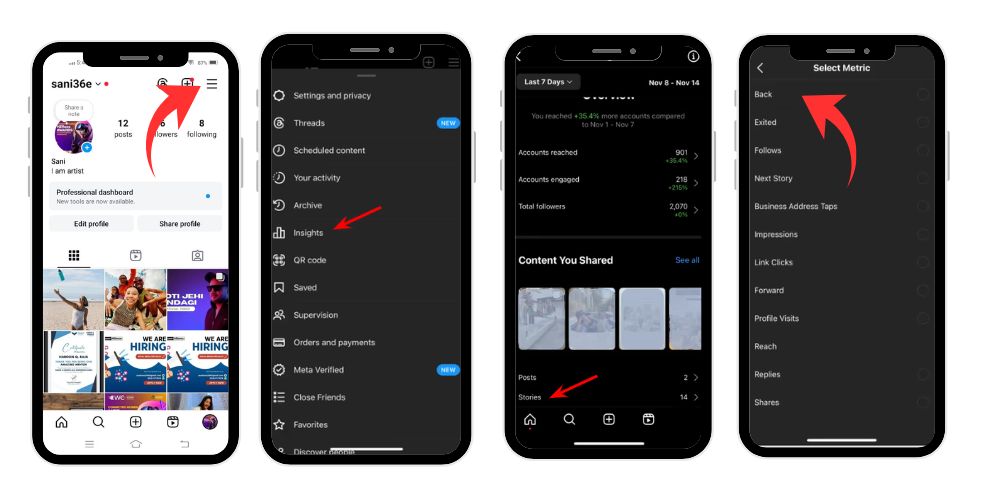
These navigation metrics give you a clear picture of how viewers interact with your content — whether they’re engaged enough to go back, skipping through, losing interest, or leaving the story experience altogether. By regularly monitoring these stats, you can identify what kind of content holds attention and what may need improvement.
Reach vs. Impressions: What’s the Difference?
In Instagram Stories analytics, two of the most commonly misunderstood metrics are reach and impressions. While they might sound similar, they track very different aspects of your story’s performance — and both are essential for understanding audience behavior.
- Reach refers to the number of unique accounts that have seen your story. Each person is only counted once, no matter how many times they watch your story.
- Impressions, on the other hand, are the total number of times your story was viewed — including replays and repeated views by the same user.
If your story has a reach of 500 and impressions of 900, that means some users watched your story multiple times.
This difference matters because:
- A higher impressions-to-reach ratio usually indicates that your content was compelling enough to be rewatched, possibly due to back taps, a fast-paced slide, or detailed content worth reviewing.
- It can also mean that users are engaging deeply, rather than just skipping through or exiting.
In short, reach shows how wide your content spreads, while impressions reveal how engaging or rewatchable your content really is. Both metrics combined give a more complete picture of your Instagram Stories performance.
Related: What Does Forward Mean On Instagram Story?
Understanding Story Completion Rate
Story completion rate is a valuable metric that tells you how many viewers stayed with your story sequence from start to finish. In other words, it shows the percentage of people who began watching your stories and continued through to the last slide.
A high completion rate indicates that your Instagram content is holding attention and encouraging viewers to keep watching until the end. This is often a sign that your storytelling, pacing, and visuals are well-structured and engaging.
Completion rate becomes even more meaningful when analyzed alongside other navigation metrics such as:
- Forward taps – suggesting fast-paced viewing or minor interest
- Exit taps – hinting at drop-off points or disengagement
- Next story swipes – signaling that viewers skipped your content in favor of another account’s story
When used together, these insights help you understand what content resonates, where viewers lose interest, and how you can improve your Instagram Stories performance.
Tracking Engagement: Swipe-Ups, Replies, and Sticker Taps
Engagement goes beyond navigation. Other key Instagram stories analytics include:
- Swipe-Ups (now Link Clicks): Useful for driving traffic to external pages — only available for creator and business accounts.
- Replies: Show direct audience interaction and are a great engagement signal.
- Sticker Taps: Taps on hashtags, mentions, polls, quizzes, or location stickers — showing viewers interacted with your story elements.
Navigation metrics are some of the most powerful tools in your Instagram analytics dashboard. They go beyond just showing how many people viewed your stories — they reveal how viewers actually interacted with them. When you understand these actions, you can fine-tune your content to increase retention, engagement, and performance.
Here’s why they matter:
- Identify Which Story Slides Hold Attention: By looking at where back taps occur, you can figure out which slides caught your audience’s eye. These are the moments people wanted to see again, showing high interest or fast pacing.
- Know When Viewers Lose Interest: A spike in forward taps, next story swipes, or exit story taps helps you spot weak points in your story sequence. These actions often indicate the viewer became bored, confused, or disinterested.
- Track What Sparks Replays or Returns: When users tap back or rewatch your story multiple times (as shown by higher impressions than reach), it’s a clear signal that your content was either engaging, valuable, or visually appealing.
- Adjust Your Story Pacing: If viewers consistently tap forward quickly, your content may be too slow or not visually stimulating. If they tap back, it might be too fast or information-dense. Navigation metrics help you find the right rhythm.
- Understand Viewer Interaction Patterns: Different story formats — such as video, text, polls, or stickers — perform differently. Navigation data shows which formats hold attention and which ones lead to skips or exits.
In short, Instagram story navigation metrics are not just numbers — they are direct feedback from your audience. When used correctly, they help you shape a more effective content strategy, improve engagement, and create stories that people actually want to watch.
💡 Pro Tip: Make your video stand out instantly Get 2500 Instagram views for $5.99 and increase audience watch time
Your Instagram story insights are more than just numbers. They offer clear direction on how to adjust your content for better results.
Here’s how:
- High Back Taps: Consider using the same style or topic again — it performed well.
- High Forward Taps: Try to shorten or make your content more engaging.
- Next Story Swipes: Change your story pacing or visual format to re-engage viewers.
- Exit Taps: Watch for where exits occur — is the story too long or unrelated?
Understanding these patterns helps fine-tune your strategy, especially if you’re using a professional account or business account with access to full insights.
- Use Strong Hooks in your first few story slides — retain attention early.
- Pace your content — don’t overcrowd slides or flash through visuals too fast.
- Prompting viewers with calls-to-action (“Tap for more!”, “Don’t miss this!”) boosts engagement.
- Mix up content types: videos, images, polls, and quizzes.
- Include location stickers and relevant hashtags to broaden reach and improve discovery.
Related: What Does ‘Active Today’ Mean on Instagram?
Conclusion
Back taps might seem like a small gesture, but they’re a powerful navigation insight in your Instagram Stories analytics toolbox. Along with forward taps, next story swipes, and exit taps, they reveal how your audience interacts with each particular story. By closely tracking these important metrics and adjusting your content accordingly, you can enhance your Instagram stories performance, boost engagement, and make smarter content decisions. Whether you’re managing a personal account, creator account, or business profile, navigation stats matter — because every tap tells a story.
FAQ’s
What does it mean when it says “back” on Instagram?
A “back” on Instagram means the viewer tapped the left side of the screen to rewatch your current story or return to the previous one. It’s often a sign that your content was interesting or too fast to process.
What is back in story navigation?
In story navigation, a back tap happens when someone taps left to revisit a story slide. It may signal engagement, curiosity, or a missed detail. It’s generally positive, suggesting viewers found your content worth seeing again or more closely.
How do you know if someone is checking you out on Instagram?
Check who views your Instagram Stories. If someone watches regularly—especially those who don’t follow you—it may indicate they’re keeping an eye on your profile. Frequent views from non-followers can be a sign of quiet interest or curiosity.
How to see the most viewed story on Instagram?
Open your Instagram story, tap the “Insights” button or swipe up. Under “Content You Shared,” locate the story with the highest number of views. This is your most-viewed story, providing insight into what your audience finds most appealing.
How to see if someone is stalking you?
Possible signs include someone repeatedly showing up where you are, sending unwanted messages or gifts, or making threatening comments. Consistent, unwanted attention—online or offline—can signal stalking behavior and should be taken seriously for your safety.