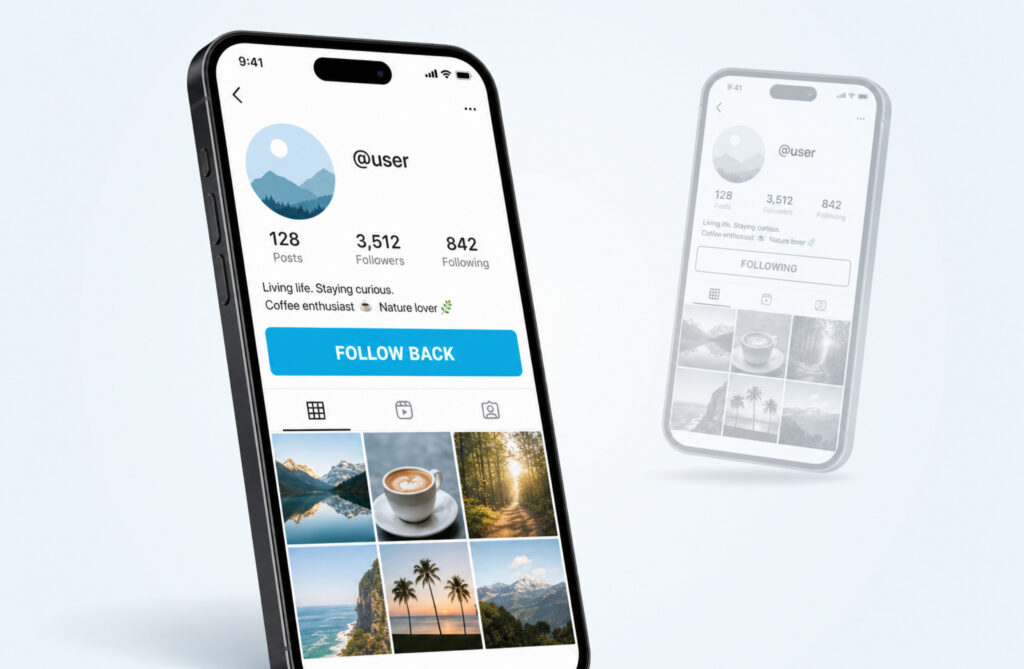
Short answer first. Follow Back is the blue button Instagram shows on a profile when there is a one-way connection between you and that account that you can complete. Most people think it only means a new person followed you. It actually has two meanings, and missing the second one is how a lot of friendships and follower counts get quietly hurt.
The Short Version, In Plain Words
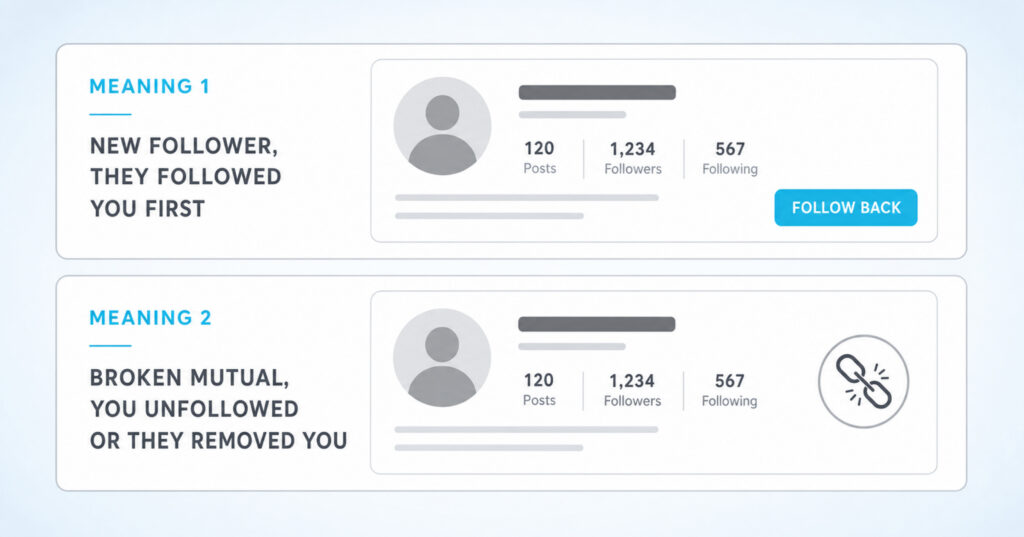
The Follow Back button appears in two different situations. Reading the signal correctly tells you what just happened in your network:
- Meaning 1 (the friendly one): a new person started following you, and you have not followed them back yet. The button is asking you to complete a fresh mutual connection.
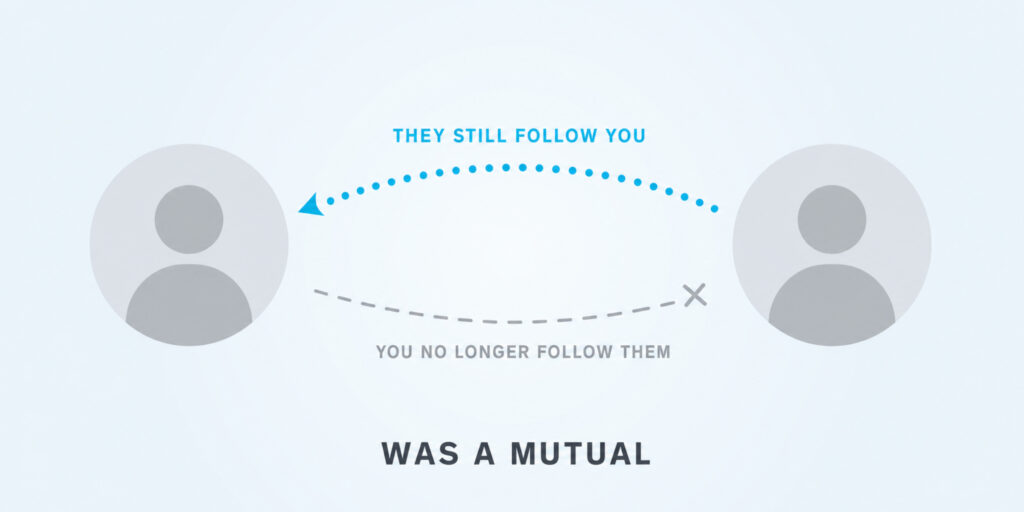
- Meaning 2 (the awkward one): that account still follows you, but you no longer follow them. Either you unfollowed them, or they removed you as a follower from their side. The button is asking you to repair a broken mutual.
Same blue button, very different stories. The rest of this guide breaks down how to tell which is which, when to tap it, and when to leave it alone.
Meaning 1: They Followed You, You Have Not Followed Them Back
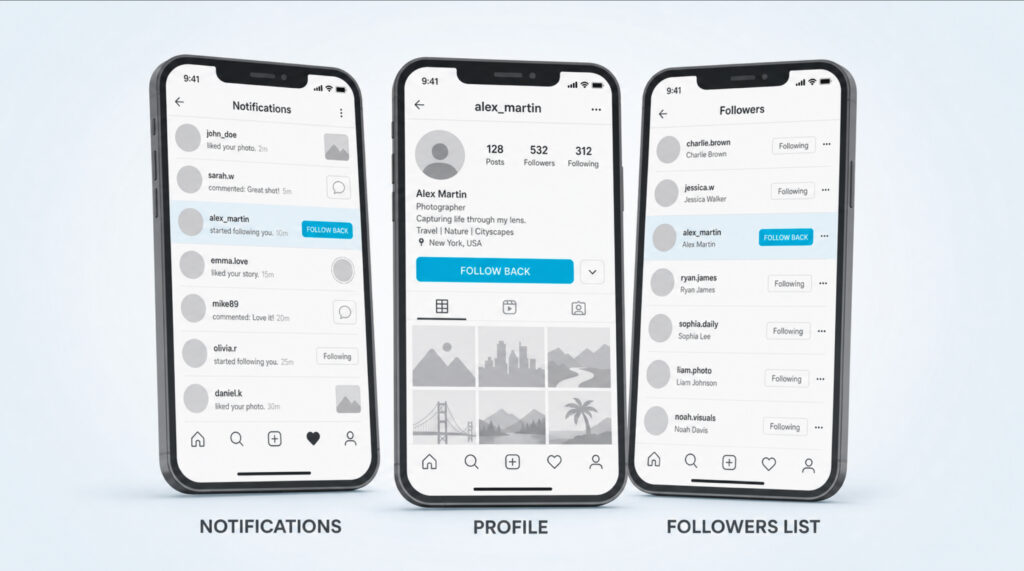
This is the standard case and the one most articles describe. Someone you do not currently follow tapped Follow on your profile. Instagram shows that action in two places. First, in your notifications: a row that reads “<username> started following you” with their avatar. Second, on their profile: the blue button below their bio shows Follow Back instead of the usual Follow.
Tapping the button creates a mutual connection. Their posts, reels, and stories start appearing in your feed. You appear in each other’s Followers and Following lists. Instagram’s algorithm starts treating you as a warmer pair (it surfaces your content to them more often, and theirs to you).
| Quick check: Open the profile and look at the small label under their username. If you see the gray text “Follows you” plus a blue Follow Back button, this is meaning 1, a new one-way follower waiting on a reciprocal tap. |
Get Likes Automatically On Every New Post
Activate once and your Instagram posts start receiving likes without manual orders.
Start Auto LikesMeaning 2: A Broken Mutual You Did Not Notice
This one trips people up. You visit a friend or a creator you thought you followed for years and the button under their bio reads Follow Back, not Following. That label is Instagram telling you something specific: this account still follows you, but the follow from your side is gone.
There are only two ways that gap opens up:
- You unfollowed them at some point (sometimes by accident, sometimes through a bulk unfollow tool).
- They removed you from their followers list, which only kills the direction from you to them. Their follow on you stays in place.
Instagram never sends a notification for a removed-as-follower action. The blue Follow Back button is the only visible hint that the connection broke. If the account is set to public, you can tap Follow Back to reconnect instantly. If it is private, tapping sends a new follow request that the other person needs to approve.
How to Tell Which Meaning You Are Looking At
The clue is in two places on the profile. Check both before you tap.
- Open the profile in question.
- Look just under their username for a small gray label. If you see “Follows you”, they currently follow you. (If you do not see that label, they do not follow you and the button you are seeing is just Follow, not Follow Back.)
- Now check your own Following list. Open your profile, tap Following, and search for their username. If you find them in your list, you are looking at meaning 1 (something is just out of sync, refresh the app). If you do not find them, you are looking at meaning 2 (the mutual is broken).
- Cross-check helps confirm: open your Followers list and search for them. If they appear there, the follow from their side is intact. Combined with their absence from your Following list, that is meaning 2.
Mutual, Follower, Following: The New Vocabulary
Instagram and its users now use a small set of words to describe these connection states. Knowing them prevents confusion in DMs and comments.
| Term | What it means | Where you see it |
| Follower | An account that follows you | Your Followers list |
| Following | An account you follow | Your Following list |
| Mutual | You both follow each other (two-way connection) | In your Followers list, accounts that are also in Following |
| One-way follow | You follow them, they do not follow you | Their profile shows Following (gray) but no “Follows you” label |
| New follower (Follow Back state) | They follow you, you do not follow them yet | Their profile shows the cyan Follow Back button and “Follows you” label |
| Broken mutual | They still follow you, you no longer follow them | Same cyan Follow Back button, often unexpected on accounts you thought you followed |
When someone in a DM or comment writes “are we mutuals?”, they are asking if both directions of the follow are live. The blue Follow Back button is what flips a one-way relationship into a true mutual.
Should You Tap It? A Quick Decision Framework
Following back is never an obligation. Instagram has no rule that says you must reciprocate. But the decision is not random either. Use this short test before you tap:
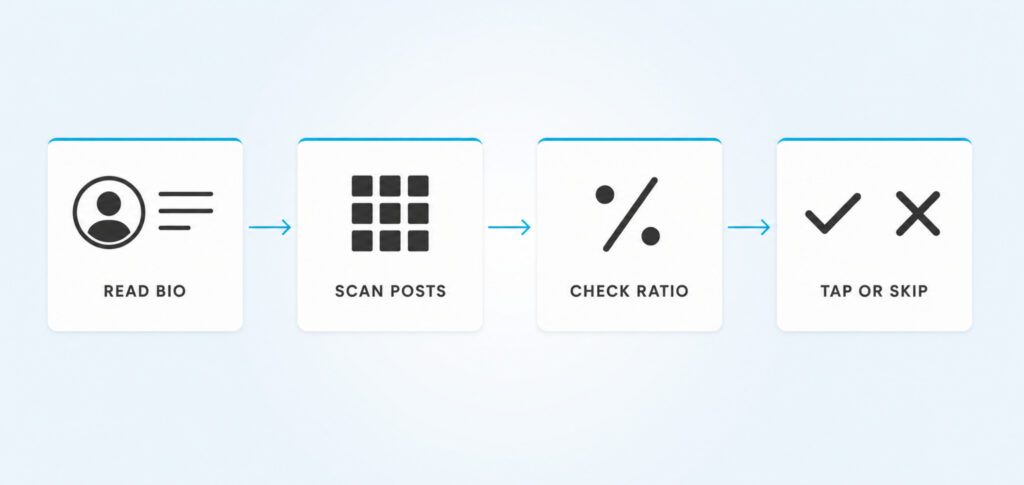
- Skim their bio. Does it say anything about who they are, what they post, or why you would want them in your feed? An empty or generic bio (“coffee • dreams • ✨”) is a soft red flag, not a deal breaker.
- Look at the last six posts. Do you actually want to see this content tomorrow morning? A follow back is a vote for your future feed.
- Check their follower to following ratio. If they follow 7,000 accounts and 50 follow them back, that is the classic mass-follow pattern. They will likely unfollow you within a week.
- Decide: tap Follow Back if you genuinely want their content in your feed, ignore if you do not. There is no third option called “follow back to be polite” that does not cost you something.
| The hidden cost of polite follow backs: Every account you follow dilutes your feed and your engagement rate. If you follow people just to be nice and never engage with their content, Instagram quietly downranks your future posts because your audience looks less interested. A small, high-signal Following list out-performs a big polite one almost every time. |
What a Realistic Follow Back Rate Looks Like
If you are following accounts hoping they will tap Follow Back, your method changes the numbers a lot. Real-world rates collected from creators in 2026:
| How you approach the account | Typical follow-back rate | Why |
| Cold follow (no interaction before) | 5 to 10 percent | Looks like a bot, easy to ignore |
| Like 2 to 3 recent posts, then follow | 25 to 45 percent | Signals you are a real person who actually looked at their content |
| Watch their story, react with one emoji, then follow | 40 to 60 percent | Story interactions land as a notification, highest visibility |
| Mass follow with a bot or unfollow tool | Under 5 percent + account warning | Instagram throttles and shadow-restricts accounts that follow too fast |
The lesson is simple: the warmer the interaction before you follow, the more likely the follow back. The cold-follow approach burns through your daily follow limit (about 150 to 200 follows per 24 hours) for almost no return.
How to Actually Tap Follow Back, Step by Step
From a new follower notification
- Open Instagram and tap the heart icon at the top right of the home tab to see your Activity feed.
- Find the row that reads ” started following you” and tap the cyan Follow Back button next to it.
- Done. The button flips to Following. You are now mutuals.
From a profile you stumbled on
- Open the profile.
- Look under their bio. If the button reads Follow Back in blue, tap it.
- Optional but powerful: send a short genuine reply to their most recent story or leave a real comment on their newest post. Following without engaging tells Instagram you do not actually care about this account.
From your Followers list
- Open your profile and tap Followers.
- Scroll the list. Every row that shows the cyan Follow Back button is an account that follows you but is not in your Following list.
- Tap Follow Back to reciprocate, or just scroll past to ignore. There is no penalty either way.
Follow Back Etiquette People Actually Care About
Most of the social tension around Follow Back comes from misread expectations. A few rules of thumb that hold up in practice:
- Not following back is not rude. It is your feed. If their content does not fit, leaving the button blue is fine.
- Asking for a follow back in a DM is mostly fine if you have something genuine to say with it. Demanding one (“follow back or I unfollow”) is not.
- Follow-for-follow groups feel like easy growth and they tank engagement faster than almost anything else. The followers you get from them do not engage, so the algorithm flags your posts as low-interest.
- If you follow someone and they do not follow back within a week, do not follow and unfollow them in a loop. Instagram detects that and will action-block you for hours or days.
- On private accounts, a Follow Back tap sends a request the other person has to approve. Do not double-tap or spam the action if it does not go through immediately.
If You See Follow Back on Someone You Thought You Followed
This is the “broken mutual” case from earlier. The right move depends on who broke the link and how close the relationship is.
- If it is a close friend: tap Follow Back and move on. Do not message them about it. Removal is sometimes accidental (a long-press, a curation session, a bulk-cleanup app) and bringing it up creates awkwardness for nothing.
- If it is an old acquaintance: assume they tidied their following list. Tap Follow Back only if you genuinely want their content back.
- If it is an ex, a former colleague, or anyone who removed you on purpose: respect the boundary. Do not refollow.
- If you are the one who removed someone by accident: you cannot undo a removal from your side. The only way the connection reopens is if they tap Follow on you again. Let them; do not message them.
What Follow Back Patterns Tell the Algorithm
Your follower-to-following ratio is one of the simplest signals Instagram uses to read your account. A clean read of it:
- Around 1:1 (you follow about as many people as follow you): normal personal account. Instagram treats you like a regular user.
- Followers higher than Following: your content is pulling. Creator and micro-influencer territory. The algorithm pushes your posts to more non-followers.
- Following far higher than Followers: the mass-follow pattern. Instagram dampens your reach because you look like an account that follows for attention.
You do not need a 10:1 ratio to grow. You need a positive trend: more followers being added than people you have to follow to attract them. Following back every single follower locks your ratio at 1:1 forever, which is why selective follow backs help engaged accounts long term.
A Light Weekly Routine for Follow Back Decisions
A small habit keeps your Following list useful instead of bloated:
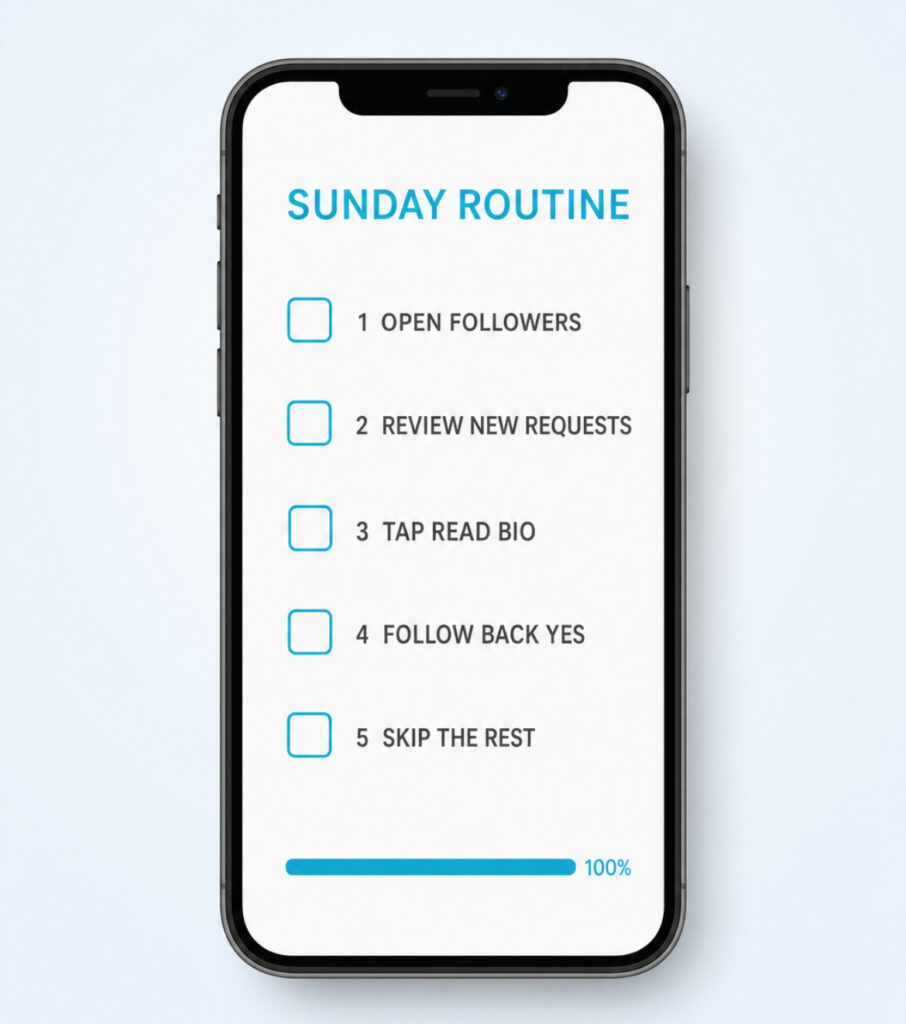
- Once a week, open your Activity tab and review the new followers from the past seven days.
- For each one, do the 30-second decision framework: bio, last six posts, ratio.
- Tap Follow Back only on the accounts that earn it. Skip the rest, no guilt.
- While you are there, open your Following list, sort by Least interacted with, and unfollow accounts you have not engaged with in months.
- Repeat every Sunday. Five minutes total.
FAQs
Is it rude to not follow back on Instagram?
No. Following back is not a rule, it is a choice. Many active users keep small, curated Following lists on purpose. If you skip a follow back, the other person can still see your public posts and DM you. The only thing that does feel rude is asking someone to follow back, then unfollowing them when they do not.
Why does Instagram say Follow Back on someone I thought I followed?
That label means the account follows you, but the follow from your side is gone. Either you unfollowed them (sometimes by accident or through a third-party app) or they removed you as a follower, which only breaks the link in their direction. Tap Follow Back to reconnect, or leave it alone if the disconnection feels intentional.
What is the difference between Follow and Follow Back?
Follow appears on accounts that do not follow you. Follow Back appears on accounts that already follow you. Same action under the hood, different signal. The button label is Instagram’s way of telling you a relationship already exists in one direction.
Does following back help me get more followers?
Indirectly, yes. People who feel acknowledged engage more with your content, which lifts your reach in the algorithm. But following back everyone, including bots and dead accounts, hurts more than it helps because it dilutes your engagement rate.
What is a good follow-back rate to aim for?
It depends on how you follow. Cold follows return 5 to 10 percent. If you like two posts and leave one comment before following, you land in the 25 to 45 percent range. Watching a story and reacting before following can push you to 40 to 60 percent.
Can someone see if I do not follow them back?
They can check, yes. Anyone can open their own Following list, find your handle, and see whether the row shows a Following label or a Follow Back button. The Follow Back button on your profile, from their side, signals that you have not reciprocated.
Is follow-for-follow against Instagram’s rules?
It is not explicitly banned, but Instagram’s algorithm penalizes the pattern. Accounts that follow and unfollow large batches get action-blocked, lose reach, and sometimes get warnings. Joining follow-for-follow groups is one of the fastest ways to wreck your engagement rate.
What does “Follows you” mean on a profile?
It is a small gray label that appears under a username when that account follows you. Combined with a Follow Back button, it confirms the one-way relationship: they follow you, you do not follow them yet.
How do I see who follows me but I do not follow back?
Open your Followers list. Any row that shows a cyan Follow Back button is an account that follows you while you do not follow them. Scroll to scan, tap Follow Back where it makes sense, ignore the rest.
Does following back work the same on private accounts?
The button looks the same, but tapping it sends a follow request rather than starting an immediate follow. The other account has to accept. Your follow does not activate until they approve, even though the button flips to Requested on your side.
Read the Button, Then Decide on Purpose
Follow Back is one of those tiny Instagram details that hides a lot of meaning. It tells you whether a new person showed up at your door, or whether a connection you used to have quietly broke. Tap when you genuinely want the content in your life, skip when you do not, and never let the polite version of growth drag your feed into a place you stop opening the app for. A small, intentional Following list almost always beats a big polite one.