Instagram gives users the power to control what they see and how they interact with others. But sometimes, you may want to stay connected with someone without constantly seeing their posts or stories. This is exactly when the mute feature becomes useful. So, what does it mean when you mute someone on Instagram?
Muting someone on Instagram means hiding their posts and stories from your Instagram feed without unfollowing or blocking them. It’s a way to maintain the connection while reducing unwanted content. You can still visit their profile, like photos, and even send messages, but their updates will no longer appear automatically when you scroll through your feed.
Let’s explore in detail what happens when you mute someone, how to do it, and the difference between muting and other actions like restricting or blocking.
Expand your reach with video views, reposts, and saves to ensure your content spreads across Instagram and attracts new audiences.
What Happens When You Mute Someone on Instagram
When you mute someone on Instagram, you’re essentially taking control of your viewing experience. You don’t have to see every post or story they share, yet you don’t cut ties with them entirely. Here’s what happens step by step:
- Posts and Stories Become Hidden: Once you mute someone, their posts and stories disappear from your Instagram feed. You won’t see their new uploads unless you manually visit their profile page.
- No Notification Sent: Instagram doesn’t notify the muted person. This means you can mute someone quietly without causing tension or awkwardness.
- Messages Stay Active: Muting doesn’t affect chat or messages. You can still send and receive DMs and mute messages separately if needed.
- You Still Follow Each Other: Muting is different from unfollowing. You remain followers, and they stay in your connections list.
- You Can Unmute Anytime: The action is completely reversible. Simply unmute when you want their posts and stories to appear again.
- Muting Doesn’t Affect Comments or Likes: You’ll still see their comments on mutual posts and can like or reply if you choose.
In short, muting someone allows you to hide posts, stories, or even mute call notifications while maintaining your digital connection.
Related: What Does ‘Followed By’ Mean on Instagram
How To Mute Someone on Instagram (Mobile)
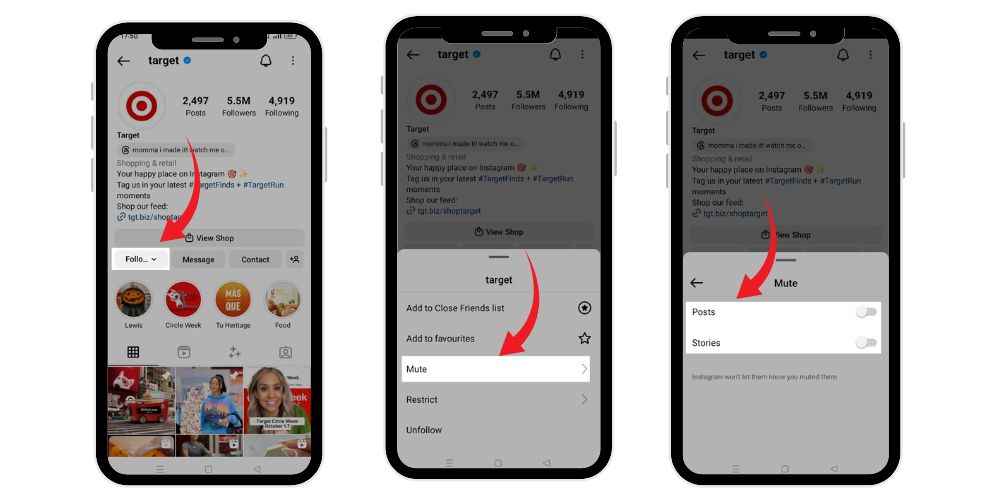
Muting someone through the Instagram app is quick and easy. Follow these steps on your phone:
Step 1: Open Their Profile: Go to the user’s profile you want to mute. You can find them by typing their username in the search bar or locating them in your followers list.
Step 2: Tap “Following”: Once on their profile page, tap the “Following” button under their profile photo.
Step 3: Tap “Mute”: A small menu will appear. Select “Mute” to access options for posts and stories.
Step 4: Toggle On “Posts” or “Stories”: Here you’ll see sliders for Posts and Stories. Use the toggle switch to mute either one or both. Once you toggle them off, the user’s updates will disappear from your feed.
That’s it—you’ve muted someone successfully. You can still visit their profile anytime to see what they’re posting.
How To Mute Someone on Instagram (Desktop)
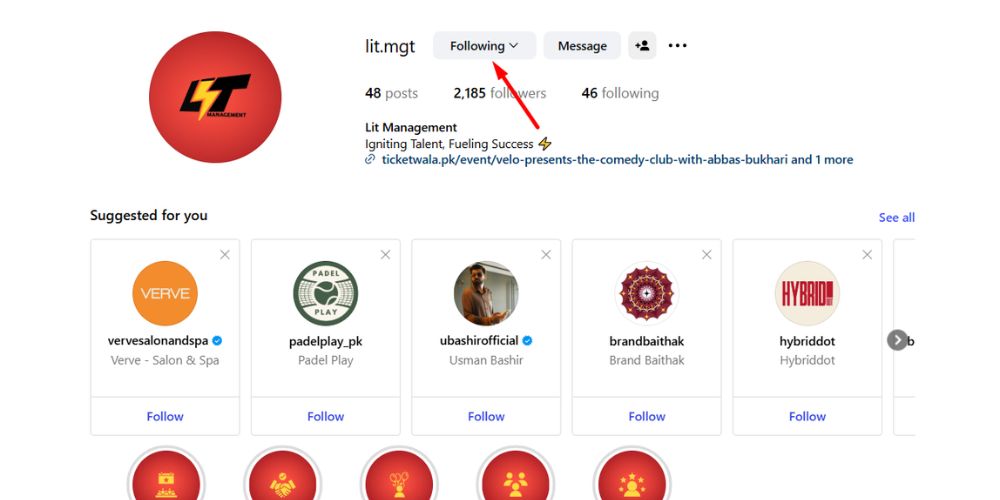
If you prefer using Instagram on your computer, the process is nearly identical:
- Go to instagram.com and log in to your account.
- Navigate to the profile of the person you want to mute.
- Click the “Following” button near their profile photo.
- Choose “Mute” from the dropdown menu.
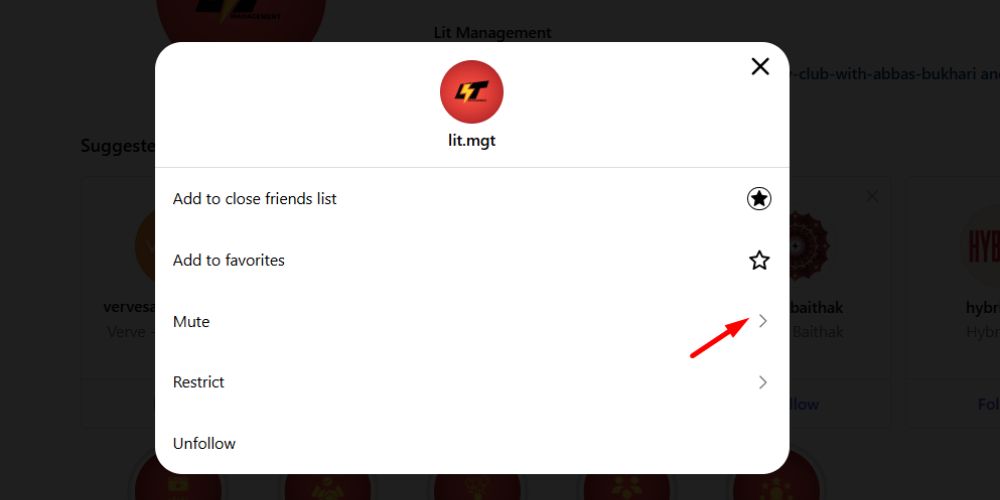
- Select whether you want to mute posts, stories, or both.
- Click Save.
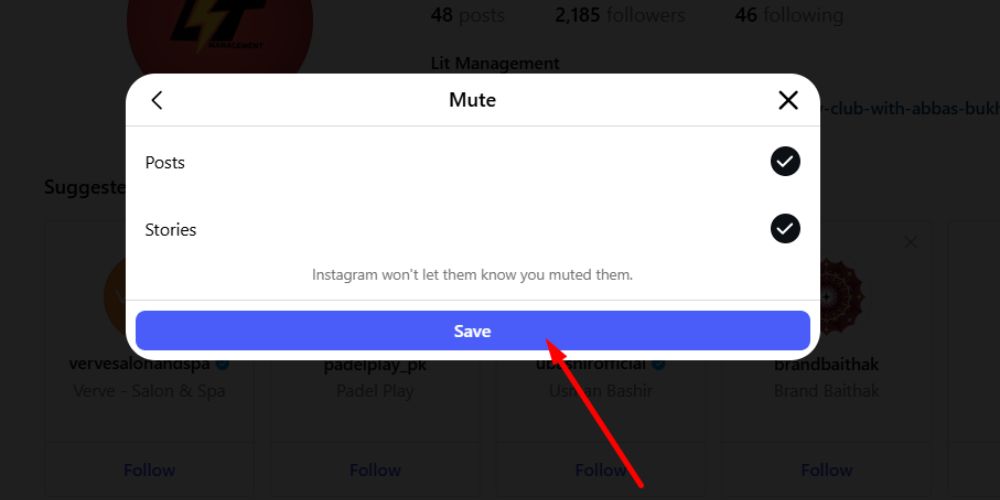
The muted user won’t know you’ve taken this action, and you can undo it anytime by following the same steps and turning off the mute option.
How To Mute Someone’s Comments on Instagram
Sometimes you may not want to hide someone’s entire account, just their comments. Instagram allows that too. There are two methods for this.
Method 1: Block Comments from a Specific User
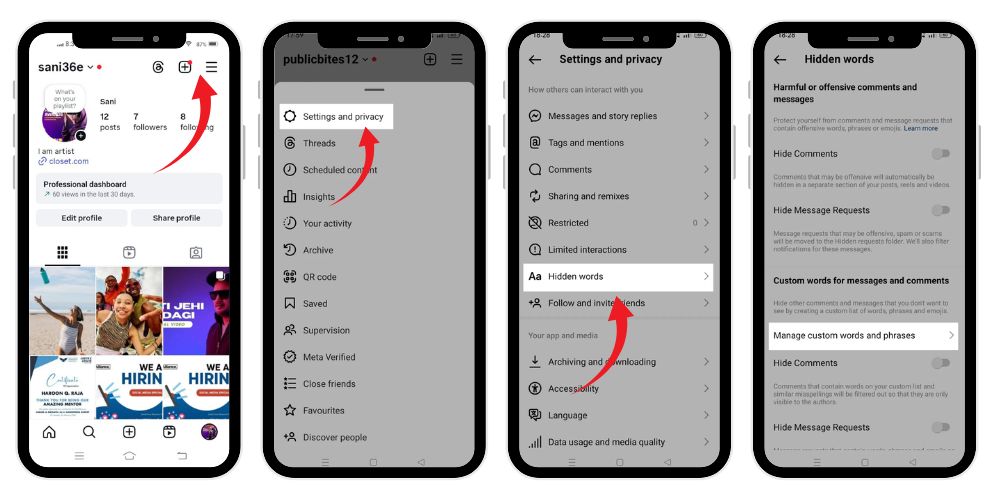
- Open your profile and tap the three dots in the top right corner.
- Go to Settings and privacy.
- Under “How others can interact with you,” select Comments.
- Tap “Block comments from”.
- Enter the username of the person.
- Tap Block.
This hides their comments from your posts permanently until you decide to unblock them.
Method 2: Use Hidden Words
- Go to Settings and privacy > Hidden words.
- Under “Custom words for messages and comments,” tap Manage custom words and phrases.
- Add the username or keyword you want to hide.
- Tap Add.
This automatically filters out unwanted comments and helps keep your space positive and clutter-free.
How To Mute Someone’s Posts on Instagram
Muting posts is perfect when you still want to remain connected but don’t want someone’s photos or videos showing in your feed.
- Go to the user’s profile.
- Tap Following.
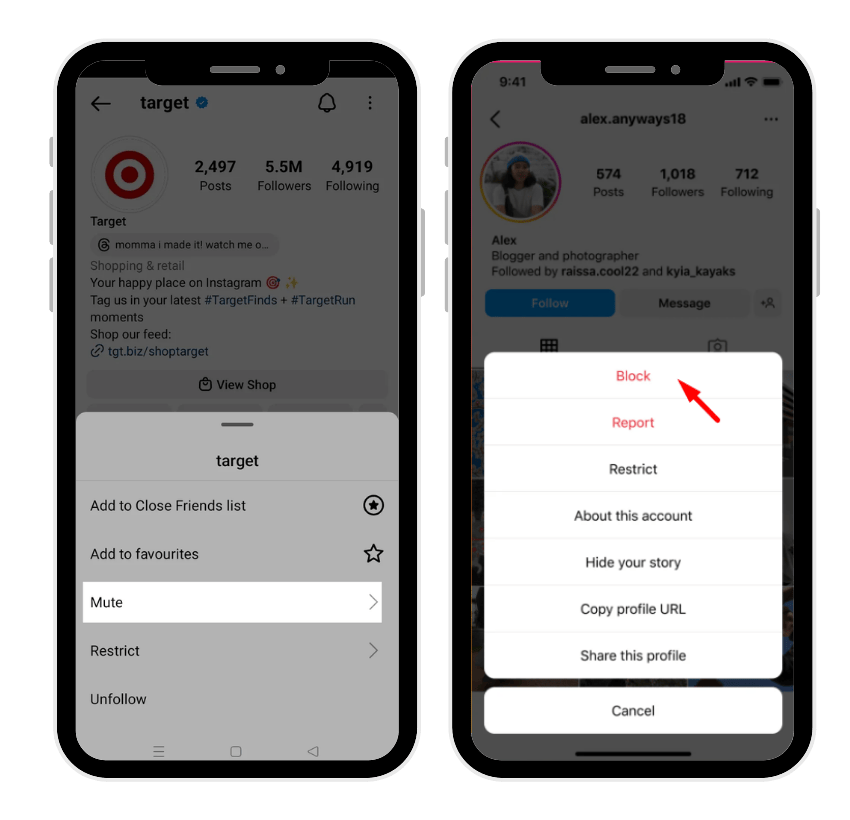
- Choose Mute.
- Toggle on Posts.
The muted posts will now disappear from your feed, but you can still visit their profile to view them manually.
How To Mute Someone’s Story on Instagram
If a person posts too many stories or you simply don’t find them interesting, muting is an ideal fix.
- Go to their profile.
- Tap Following.
- Choose Mute.
- Toggle on Stories.
Alternatively, you can press and hold the user’s story bubble on the top of your Instagram app feed, then tap Mute story.
Once muted, their stories will no longer appear in your story tray.
Mute Call Notifications or Messages
Apart from posts and stories, you can also mute messages or mute call notifications in your chat.
- Open your inbox and go to the conversation.
- Tap the profile photo or username at the top.
- Tap Mute messages or Mute call notifications.
- Choose how long you want them silenced—15 minutes, 1 hour, 8 hours, 24 hours, or until you manually unmute.
This is especially useful when you need to focus or want to avoid distractions without blocking someone.
Instagram Muting vs Blocking
Many people wonder about the difference between muting and blocking. Both limit interactions but work differently.
Muting
- Hides posts and stories from your feed.
- Keeps you connected as followers.
- The muted person can still see and comment on your content.
- The user is not notified.
- You can still message and interact in chats.
Blocking
- Removes the user entirely from your followers and following lists.
- They can’t view, comment, or like your content.
- They can’t message you or visit your profile.
- It’s a complete disconnection.
Which one is better?
Use mute if you want a break from someone’s updates but still wish to maintain a connection. Use block if you want to end all contact and visibility.
Muting vs Restricting
Another similar Instagram feature is Restrict. It’s designed to protect you from unwanted interactions without making it obvious.
| Feature | Mute | Restrict |
|---|---|---|
| Visibility of Posts/Stories | Hidden from your feed | Visible but with limited interaction |
| Messages | Not affected | Messages move to “Requests” |
| Comments | Still visible | Hidden until you approve |
| Notification | Not sent | Not sent |
| Connection Maintained | Yes | Yes |
In short, muting controls what you see, while restricting controls how they interact with you.
Managing Muted Accounts
You can easily manage all your muted accounts from your settings.
- Go to your profile page.
- Tap the three horizontal lines at the top right.
- Select Settings and privacy.
- Scroll to Connections > Muted accounts.
Here, you’ll see the list of all muted users. Tap any name to unmute or change settings for posts, stories, or notifications.
Why You Might Want to Mute Someone
The mute feature is a subtle yet powerful tool that lets you control your Instagram experience. People use it for different reasons:
- To focus on meaningful content.
- To hide posts that feel repetitive or negative.
- To avoid drama without confrontation.
- To maintain peace with friends or colleagues.
- To filter content without unfollowing.
For example, you might mute a friend who constantly shares work updates or a relative who posts too many vacation photos. You’re not being rude—just managing your attention and mental space.
What Happens When You Unmute Someone
When you decide to unmute someone, their posts and stories will start showing up in your feed again. To unmute:
- Go to their profile page.
- Tap Following > Mute.
- Toggle off the switches next to Posts or Stories.
The process is instant and doesn’t notify the user. It’s just as easy as muting in the first place.
Common Misunderstandings About Muting
Many users worry that muting is offensive or that the muted person will somehow find out. Here are a few clarifications:
- The person is not notified.
- They can still send messages and see your posts.
- You can still interact manually by visiting their profile.
- Muting doesn’t remove or affect followers.
- It’s not a permanent action—you can reverse it anytime.
Muting simply helps you create a healthier online environment without unnecessary interactions.
The Role of Muting in Digital Well-Being
Instagram can be overwhelming if your feed is flooded with content you’re not interested in. The mute tool lets you stay connected while maintaining a sense of peace.
By muting certain accounts, you can:
- Avoid scroll fatigue
- Limit exposure to negative posts
- Reduce push notifications
- Stay focused on what matters
- Manage social energy wisely
In a world where social media often demands constant engagement, muting offers a quiet way to take back control.
Goodbye to Unnecessary Posts
You don’t have to unfollow, block, or confront anyone to curate your Instagram feed. Simply use the mute feature. It’s private, simple, and completely within your control.
Whether you want to mute someone’s stories, posts, or even mute messages, Instagram gives you options to manage content your way. The muted user won’t be notified, and you can continue interacting if you wish.
So, next time someone’s updates feel a little too much, just tap mute, take a breather, and enjoy your customized feed without guilt.
FAQs
What does it mean when you mute someone on Instagram?
It means you stop seeing their posts and stories in your feed without unfollowing or blocking them. It’s a quiet way to manage your content.
Can someone see my stories if I mute them?
Yes. Muting only hides their stories from your feed. They can still see yours unless you specifically hide them through story settings.
Can you mute messages separately?
Yes. Go to your chat, tap the profile, and select mute messages or mute call notifications to silence their DMs.
How do I know if I’ve been muted?
You can’t see who has muted you. However, if someone no longer engages with your posts, comments, or stories, they might have muted you.
Can I see who I muted?
Yes. Go to Settings and privacy > Connections > Muted accounts. From there, you can unmute or adjust preferences anytime.