Instagram has become one of the world’s most powerful social networking platforms, allowing people to share stories, reels, and posts with millions of users worldwide. However, beyond public likes and comments lies a private communication system known as Instagram Direct. So, what does Instagram Direct mean? In simple terms, it is Instagram’s built-in messaging feature — a space where users connect privately with individuals or groups instead of engaging only in the public feed.
This detailed guide explores everything you need to know about Instagram Direct, including how it works, its features, and why it matters to both casual users and businesses.
Enhance credibility with comments, live views, and impressions that reflect real audience interaction and meaningful engagement on Instagram.
Understanding Instagram Direct
At its core, Instagram Direct provides a private channel for conversations between users. Unlike comments or likes that appear on posts in the Instagram feed, direct messages (DMs) are visible only to the sender and the recipient. This makes them the digital equivalent of whispering in a crowded room — personal, intimate, and often more impactful.
You can send Instagram messages to a single person, a group of friends, or even multiple Instagram accounts at once. It is the go-to space for building stronger connections, sharing photos, videos, gifs, or simply replying to story replies in real time.
Accessing Instagram Direct
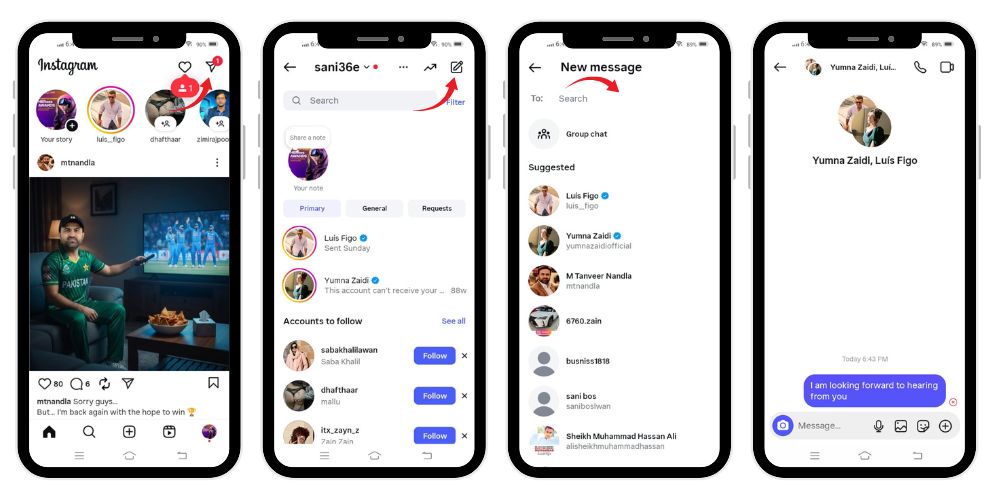
To access Instagram Direct, open the Instagram app (available for both iOS and the Android app). On the top right corner of your home screen, you will see the familiar paper plane icon. Tapping this icon opens your Instagram inbox, where all your ongoing chats, message requests, and group conversations are displayed.
Unread messages appear bold, often accompanied by a small number badge above the icon, helping you stay updated with active conversations.
Related: What Does CFL Mean on Instagram?
How to Send Messages on Instagram
Sending Instagram direct messages is simple and intuitive:
- Tap the Paper Plane Icon: On the top right corner, tap the paper plane icon to access your inbox.
- Create a New Message: Select the pencil icon or the “new message” option, then search for the username of the recipient.
- Compose and Send: Type your message, add emojis, gifs, or attach photos/videos, and then tap “Send.”
- Message Requests: If the recipient doesn’t follow you, your message will appear in their message requests, and they’ll need to accept it before replying.
Features of Instagram Direct
Instagram Direct has grown from a basic messenger to a feature-rich communication hub. Here are some of its core functionalities:
- Text and Media Sharing: Send texts, photos, videos, gifs, stickers, and location pins directly to your friends or groups.
- Disappearing Photos and Videos: Much like Snapchat, Instagram allows you to send disappearing content. Once the recipient views it, the media vanishes unless you choose to allow replay.
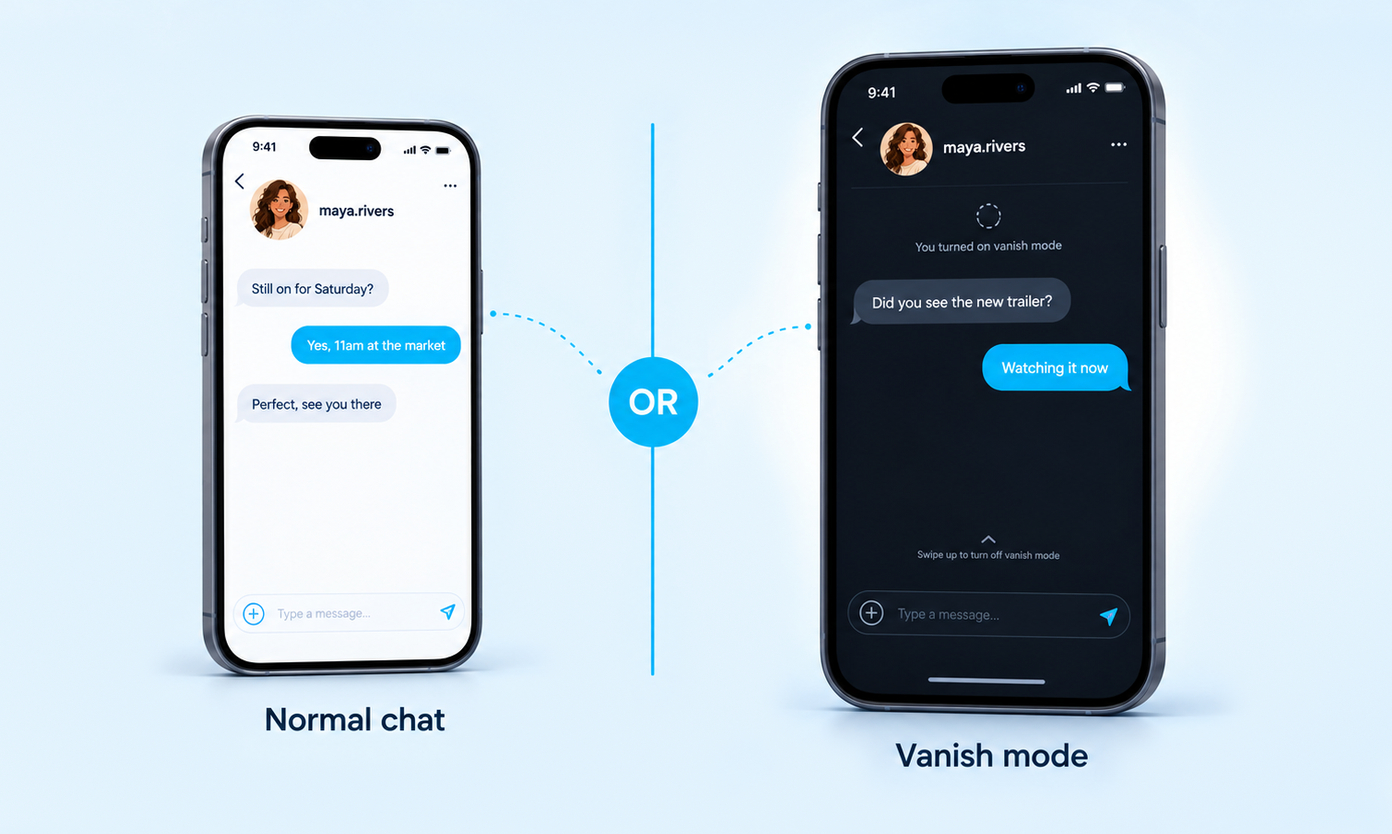
- Vanish Mode: For extra privacy, enable vanish mode, which deletes messages automatically once the chat is closed.
- Group Chats: You can create group conversations with up to 32 participants. This is perfect for sharing updates, planning events, or interacting with mutual connections.
- Story Replies and Reactions: Respond to someone’s stories directly through DMs. These quick replies help foster instant interaction.
- Voice and Video Calls: From the chat window, you can start private voice or video calls with individuals or groups.
- Message Requests: Messages from strangers are filtered into message requests. Users can accept, ignore, or delete these.
- Activity Status: Instagram shows whether a user is active, when they were last online, or whether they are currently typing in the chat.
- Custom Emojis and Reactions: Hold down a message to respond faster with custom emojis. This personalization helps make conversations fun and engaging.
- Notes: A newer feature allows you to post short text updates (up to 60 characters) at the top of your inbox, sparking casual chats with mutual connections.
💡 Pro Tip: Strengthen your profile by boosting reposts that showcase your content’s value and spread it to wider communities instantly.
Managing Instagram Direct Messages
Managing DMs can be overwhelming, especially for social media managers handling multiple accounts. Fortunately, Instagram has added features to make this process smoother:
- Search Function: Use the search bar in your Instagram inbox to find conversations by username.
- Filters: Sort chats into categories like “Primary,” “General,” and “Requests.”
- Delete or Unsend Messages: Long-press a message and tap Unsend to erase it for both users. Alternatively, delete entire chats from your inbox.
- Manage Multiple Accounts: Easily switch between multiple Instagram accounts without logging out.
- Use Tools: External tools like SocialPilot or Meta Business Suite help brands manage conversations across different profiles efficiently.
Instagram Direct for Personal Use
For everyday users, Instagram Direct provides a way to stay closer to friends, family, and mutual connections. You can:
- Share memes, reels, and posts privately.
- Use disappearing photo features for fun exchanges.
- Organize group chats for events.
- Send casual “welcome messages” to new followers.
- Stay connected with shared interests through personalized conversations.
Instagram Direct for Businesses and Creators
For brands, creators, and social media managers, Instagram Direct is an essential networking and customer service tool. Here’s how businesses leverage it:
- Build Trust with Followers: Quick, warm responses to DMs show your followers you care. A fast response helps build credibility and fosters customer loyalty.
- Engage with Most Engaged Followers: Identify your most engaged followers — those who regularly comment, like, and interact with your posts. Reward them with personalized DMs, exclusive promo codes, or insider news.
- Provide Customer Service: DMs serve as a private helpdesk where customers can inquire about services, products, data, or orders without posting publicly.
- Send Welcome Messages: New followers can receive a short, engaging welcome message to introduce them to your account, services, or offers.
- Leverage Story Replies: Every story reply opens up a potential sales conversation. Brands use these as entry points to connect more personally.
- Cross-Platform Messaging: Thanks to Meta’s integration, businesses can manage both Facebook and Instagram messages from one inbox.
- Networking with Influencers: Creators and brands use DMs for networking, pitching collaborations, or building professional relationships.
Related: What Does HYB Mean on Instagram?
Privacy and Control in Instagram Direct
Instagram provides several privacy options to ensure that users feel secure when using DMs:
- Message Requests: Decide who can message you directly.
- Mute or Restrict: Quiet down unwanted conversations without fully blocking a user.
- Delete or Ignore: Control which chats remain in your inbox.
- Data Management: Download or manage your data for transparency.
Why Instagram Direct Matters
The power of Instagram lies in its ability to balance public exposure with private intimacy. While posts, stories, and reels engage the masses, Instagram Direct messages allow one-on-one interaction. This balance makes Instagram more than just a visual platform — it’s a communication hub.
For users, it means staying connected with friends, mutual connections, and communities built on shared interests. For businesses, it means creating personalized conversations that drive sales, trust, and loyalty.
Final Thoughts
So, what does Instagram Direct mean? It’s more than just a chat function. It represents Instagram’s private layer — the ability to send messages, share personal photos/videos, respond to comments, and interact with your network in a deeper, more meaningful way.
Whether you’re reaching out to close friends, engaging with your most engaged followers, or managing multiple accounts as a social media manager, Instagram Direct remains one of the most powerful tools within the Instagram app. It’s where real connections happen, conversations turn into collaborations, and strangers become part of your online community.
At the end of the day, Instagram Direct is not just about messages — it’s about connection, trust, and building relationships in today’s digital world.
💡 Pro Tip: Impressions help content perform better. Boost them to attract more engagement and visibility.
FAQs
What’s the difference between Instagram and Instagram Direct?
Instagram is the main platform for sharing posts and stories, while Instagram Direct is its private messaging feature, allowing users to send texts, photos, videos, and share posts individually.
Why do people DM instead of text?
People DM instead of texting because it’s more convenient, free, directly connected to social activity, supports media sharing, and doesn’t require exchanging phone numbers like traditional texting does.
What determines the Instagram direct order?
Instagram direct order is determined by algorithms considering interaction frequency, recency of messages, mutual engagement, profile visits, and activity with users, ensuring the people you interact with most appear first.
What does the order of people on Instagram Direct mean?
The order reflects your closeness and interactions. Users you message, like, comment, or engage with often appear higher, as Instagram prioritizes relationships with people you connect with more frequently.
Does Instagram Direct really show who’s looking at your profile?
No, Instagram Direct doesn’t show profile viewers. Instagram never reveals who visits your profile; only interactions like messages, likes, comments, or story views are visible, not silent profile visits.
What does it mean if someone is at the top of my Instagram direct?
If someone appears at the top, it means you interact frequently—messaging, liking, visiting profiles. Instagram’s algorithm prioritizes them due to stronger engagement or consistent, recent communication with that person.
What does it mean when it says direct messages on TikTok?
On TikTok, direct messages refer to the private chat feature, allowing users to send texts, videos, or posts directly to friends instead of commenting publicly on their content.
Does Instagram Direct really show who looks at your profile?
No, Instagram Direct does not reveal profile visitors. Instagram doesn’t provide that feature, so no message or notification appears when someone views your profile silently without interacting.
What does mute on Instagram DM mean?
Mute on Instagram DM means you stop receiving notifications for messages or calls from that chat, without blocking or unfollowing the person. Messages still arrive silently in the inbox.
How to tell if someone has muted you on Instagram?
You cannot directly know if muted. Indicators include reduced responses, delayed replies, or ignored story views, but Instagram provides no notification or confirmation when someone mutes your account.
Why mute instead of unfollow?
Muting allows users to avoid seeing content or notifications without ending the connection. It’s useful to maintain relationships politely while reducing interaction visibility, unlike unfollowing, which removes updates completely.
How does the Instagram direct list work?
The direct list is organized using engagement algorithms. People you interact with most—messaging, liking, viewing stories—appear higher. Instagram personalizes it, reflecting your strongest connections and most recent conversations.