Instagram, a platform that thrives on visual engagement and real-time interaction, continues to introduce features that make staying connected more seamless. One such subtle yet powerful feature is the green dot—a small indicator that can spark curiosity, questions, and even concern among users.
You’ve probably seen it pop up next to a profile picture in your direct inbox, but what does it actually mean? Is the person chatting with someone? Are they just browsing the Instagram app? Let’s break down everything you need to know about the green dot, how it functions, and how to control its visibility.
For real-time engagement, try to get Instagram followers and buy Instagram views to complement your story strategy.
What is the Green Dot?
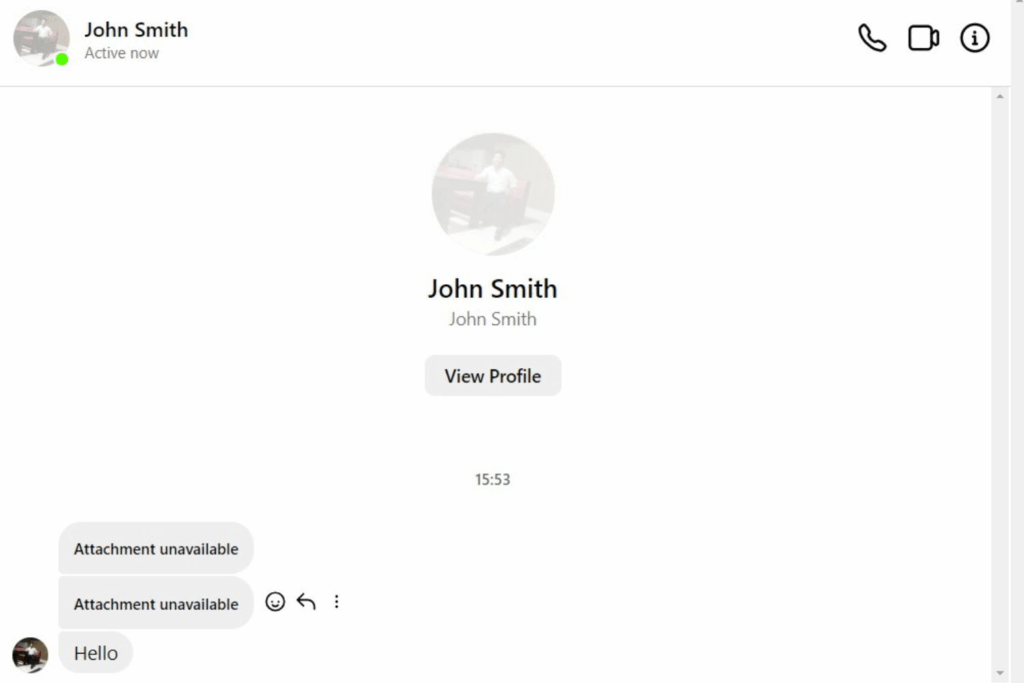
The green dot is an activity status tracker on Instagram that appears next to a user’s profile picture in various sections of the app, such as in direct messages, the story replies, or the friend’s profile picture when browsing suggested contacts. It signifies that the user is currently online and active on Instagram.
Related: What ‘Green Circle’ Means on Instagram? Close Friends Explained
Purpose of the Green Dot
- Indicates a user is currently active on the Instagram app.
- Encourages real-time communication and engagement.
- Helps users know when friends are available to chat or respond.
- Enhances the responsiveness of direct messages and story replies.
- Supports more spontaneous and timely social interactions.
- Gives users a clearer understanding of their friends’ online presence.
💡 Pro Tip: Looking to get more likes on Instagram? Buy Instagram Likes from BuySocialMediaMarketing today!
Visibility Control: Who Can See the Green Dot on Instagram?
The green dot isn’t visible to everyone. Only users you follow or have previously chatted with via direct messages can see your online status. This selective visibility protects your privacy, ensuring that strangers or inactive connections can’t monitor your activity. If someone you haven’t interacted with visits your profile, the green dot won’t appear, maintaining a boundary around your online presence.
Similarity to Other Platforms
Much like the online status indicators on WhatsApp, Facebook Messenger, or Snapchat, Instagram has adopted its own version with the green circle, offering real-time activity updates. This similarity makes it easier for users to interpret what the green dot means, especially if they use multiple social platforms.
Related: What Does ‘Archive’ Mean on Instagram?
What the Green Dot Does NOT Reveal
Despite what many believe, the green dot does not necessarily mean someone is actively chatting. It only indicates that the user is logged in and currently browsing the app. It does not show:
- Who the person is chatting with
- How long they’ve been active
- If they’ve read your message or not
This distinction is crucial for users worried about overanalyzing someone’s status.
Understanding Instagram Features: More Than Just a Dot
Instagram offers several privacy-oriented features to help users maintain better control over their visibility and activity. Here’s a breakdown of these features:
Activity Status
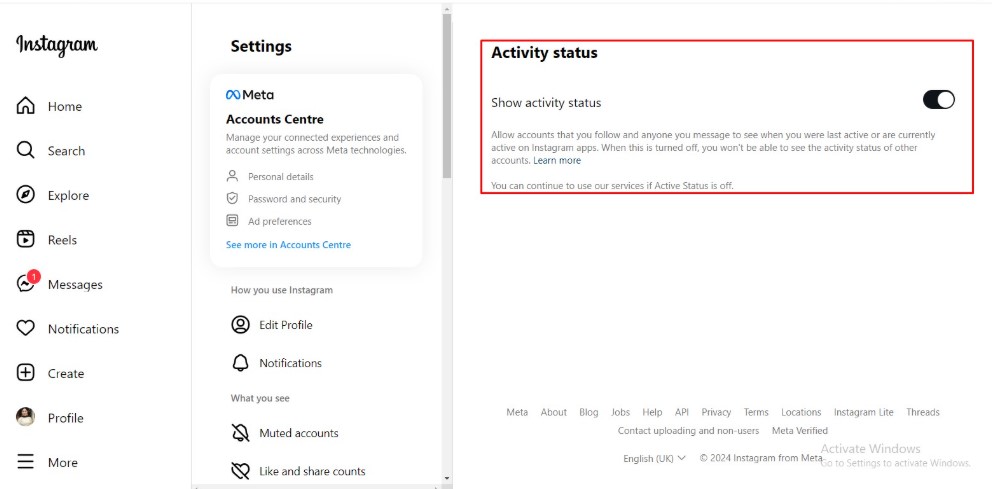
- Shows your online status (green dot) and last active time.
Close Friends List
- Lets you share stories with a selected group only.
- Useful for private content not meant for all followers.
To add users:
- Go to your profile.
- Tap the three-line menu > Close Friends.
- Search for and add people you trust.
- Tap Done to save.
Story Privacy Settings
- Choose who can view your Instagram story.
- Limit exposure to specific users or hide stories from certain people.
To adjust settings:
- Tap Settings > Privacy > Story.
- Use options like Hide Story From and Close Friends.
Message Controls
- Control who can send you message requests or chat directly.
To customize:
- Go to Settings > Privacy > Messages.
- Select who can message, reply to stories, or join group chats.
Profile Privacy (Private Account)
- Restrict your posts, followers, and stories to approved users only.
To enable:
- Go to Settings > Privacy > Account Privacy.
- Toggle on Private Account.
Each of these features, including the green dot, offers users more control, enhances security, and protects against unwanted visibility on the Instagram platform.
💡 Pro Tip: Want more eyes on your content Get 2500 Instagram impressions for $3.99 and boost brand awareness in minutes.
What’s the Difference Between ‘Active Now’ and the Green Dot?
Instagram’s activity status option can display two things: the green dot and an “Active Now” label. While the green dot simply shows the user is online, “Active Now” provides a more detailed snapshot, confirming the person is actively using the app at that moment.
In contrast, you might see “Active 1h ago,” which tells you when the user last interacted with the app—making the distinction clear between passive visibility and live interaction.
How Accurate is the Green Dot on Instagram?
The green dot is usually a reliable indicator of someone being online, but it’s not 100% accurate. At times, users may be active without the dot appearing due to weak internet, app running in the background, or customized privacy settings. Likewise, the dot might remain visible briefly even after someone logs off, making it a slightly delayed activity status tracker in some cases.
Why Does the Green Dot Disappear?
The green dot disappears in the following situations:
- The user logs out or closes the app.
- The user turns off the activity status.
- Instagram temporarily removes it due to app or server issues.
- You’re not among the people allowed to see their status.
Can You Turn Off the Green Dot on Instagram – And How?
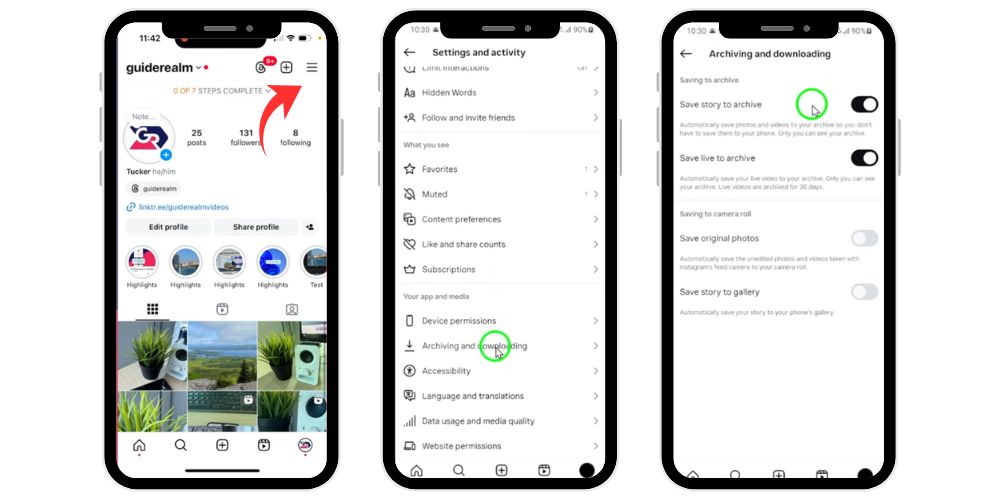
Yes, Instagram allows you to completely turn off the green dot (activity status) to maintain your privacy. Here’s how to do it step by step:
- Open the Instagram app on your device.
- ☰ Tap the three-line menu in the top right corner of your profile page.
- Select Settings from the menu.
- Go to Privacy > Activity Status.
- Toggle off “Show Activity Status.”
Once disabled:
- No one can see your online status or green dot.
- You also won’t be able to view others’ activity status.
- Helps in maintaining control and protecting your privacy.
Understanding the Green Following Button on Instagram
The green following button is a unique indicator that differs from the typical green dot. It appears when someone has added you to their Close Friends list on Instagram. This feature is designed for more private sharing, allowing users to post exclusive stories meant only for selected individuals. When such a story is shared, you’ll notice a green ring around the user’s profile picture instead of the standard purple/orange gradient. This green button confirms your inclusion in their inner circle, giving you access to content not visible to their regular followers, enhancing personalized interaction on the platform.
The Impact of the Green Following Button on Instagram’s User Experience
- Indicates you’re part of someone’s Close Friends list, making interactions feel more personal.
- Promotes private storytelling by allowing users to share selected content with a limited audience.
- Encourages authenticity and comfort, as users feel safer expressing themselves to trusted followers.
- Boosts direct engagement through exclusive content that invites more meaningful responses.
- Enhances user privacy by providing better control over who can view stories.
- Reduces the pressure of sharing with a broad audience, fostering genuine social connections.
- Meets the increasing demand for privacy-oriented features on social media platforms.
Common Issues and How to Resolve Them
While Instagram’s green following button and Close Friends features are user-friendly, you may occasionally face issues that prevent them from working properly. Below are some common problems along with practical solutions to get things running smoothly again.
1.The Green Button Doesn’t Appear
Possible reasons:
- The user hasn’t added you to their Close Friends list
- You are logged into a different account
- The Instagram app may need to be updated
Fix:
- Make sure you’re logged into the correct profile
- Update the app to the latest version
- Confirm with the user if they’ve added you to their Close Friends
2.Can’t Add People to Close Friends
Possible causes and fixes:
- Ensure you’re following the user
- Update your Instagram app
- Check your account settings for any restrictions
- Try restarting the app or device and attempt again
Related: What Does ‘Back’ Mean on Instagram Story? & Other Analytics
Relationship Between the Green Dot and Close Friends on Instagram
The green dot and the Close Friends feature serve different purposes but can overlap in creating a more connected experience on Instagram.
- The green dot shows a user is currently online or active on the app.
- The Close Friends feature lets users share stories privately with selected people.
- When someone on your Close Friends list is online, you may see the green dot next to their profile picture, especially in your direct inbox.
- This makes it easier to engage in real-time conversations with your closest contacts.
- Both features support privacy and intentional communication, offering better control over who sees what and when.
While the green dot indicates activity status, and Close Friends controls story visibility, together they help users interact more meaningfully with a trusted circle.
Final Thoughts
The green dot and the green following button may be small, but they carry big implications for how we communicate and interact on Instagram. From enabling real-time chats to allowing better control over private content, these features are thoughtfully designed to enhance the user experience while maintaining several privacy oriented features.
Whether you want to be seen, stay hidden, or share selectively with your close friends, Instagram gives you the ability to tailor your interactions and visibility on your terms.
FAQ’s
Does the green dot on Instagram mean someone is chatting?
No, the green dot only shows that a user is active on Instagram. It doesn’t mean they’re chatting or messaging anyone. It simply indicates they’re currently using the app or have it open in the foreground.
Why is someone’s circle green on Instagram?
A green circle around someone’s story means they’ve shared it with their Close Friends list. Only people on that list can see the story. It’s a way for users to post privately and selectively instead of sharing with all followers.
What does green mean on Instagram?
On Instagram, “green” can mean two things:
- A green dot shows the person is active.
- A green ring around a story means you’re on the user’s Close Friends list, and the story was shared privately.
What Does the Green Circle Around an Instagram Story Mean?
The green circle means the story is visible only to the user’s Close Friends. You’ve been selected to view exclusive content not shown to the general follower base, making it a more private and trusted interaction.
How do I get rid of the green dot on my Instagram?
To disable the green dot, go to Settings > Privacy > Activity Status and toggle off Show Activity Status. This hides your online status from others, and you won’t be able to see their status either.
How long do you stay green on Instagram?
The green dot or “Active Now” status can linger for up to five minutes after a user leaves the app. So, it may show someone as online even if they’ve already gone offline or closed Instagram recently.