Yes, Twitter, now X, keeps track of how often people open your profile, but it only ever gives you a number. The metric is called Profile visits, and it appears in two places: in the analytics for each of your posts and in the account analytics dashboard. Neither place shows the names of the people behind the visits, and no official feature does.
Which screen you need depends on the question you are asking. Use this as a quick map before you start tapping through menus.
| What you want to know | Where X shows it |
| How many profile visits came from one post | That post’s analytics |
| How many profile visits your whole account got | The account analytics dashboard |
| Who visited your profile | Not shown anywhere on X |
Supercharge X Engagement
Drive real interactions with high-quality reposts, likes, and followers.
What X Counts as a Profile Visit
On a single post, the figure counts taps that lead from that post to you. X’s Post Activity Dashboard help defines a profile click as “Clicks on the name, @handle, or profile photo of the post’s author.” So when someone reads your post, taps your picture or your name and lands on your profile, that post gets the credit.
The account-level Profile visits figure is broader. It adds up visits to your profile across the date range you choose, which can include people who arrived from search, from a link someone shared or by typing your handle. X does not publish a detailed definition of that total. It doesn’t say whether your own visits are left out or whether each person is counted only once, so treat it as a count of visits, not a head count of people.
Profile Visits vs Post Views
The views number under a post is a different metric, and mixing the two up is the most common mistake on this topic. According to X’s view counts help page, anyone logged in who sees a post counts as a view, wherever they see it, including Home, Search and profiles. If you are the author, looking at your own post also counts, and viewing it on your phone and then on the web can count twice. Embedded posts on other websites do not add to the total.
That means a post with 300 views has not sent 300 people to your profile. Most viewers read the post in their feed and keep scrolling. Only the ones who tap through show up in Profile visits, which is why that number is usually far smaller and far more telling.

How To See Profile Visits for One Post
The per-post figure is available on every account, with or without a paid subscription. It only works on posts you wrote yourself. X’s developer metrics documentation lists profile clicks as a private metric, so the figure is visible to the author and nobody else, and your followers can’t see it.
On the X App
- Open your profile and tap one of your own posts.
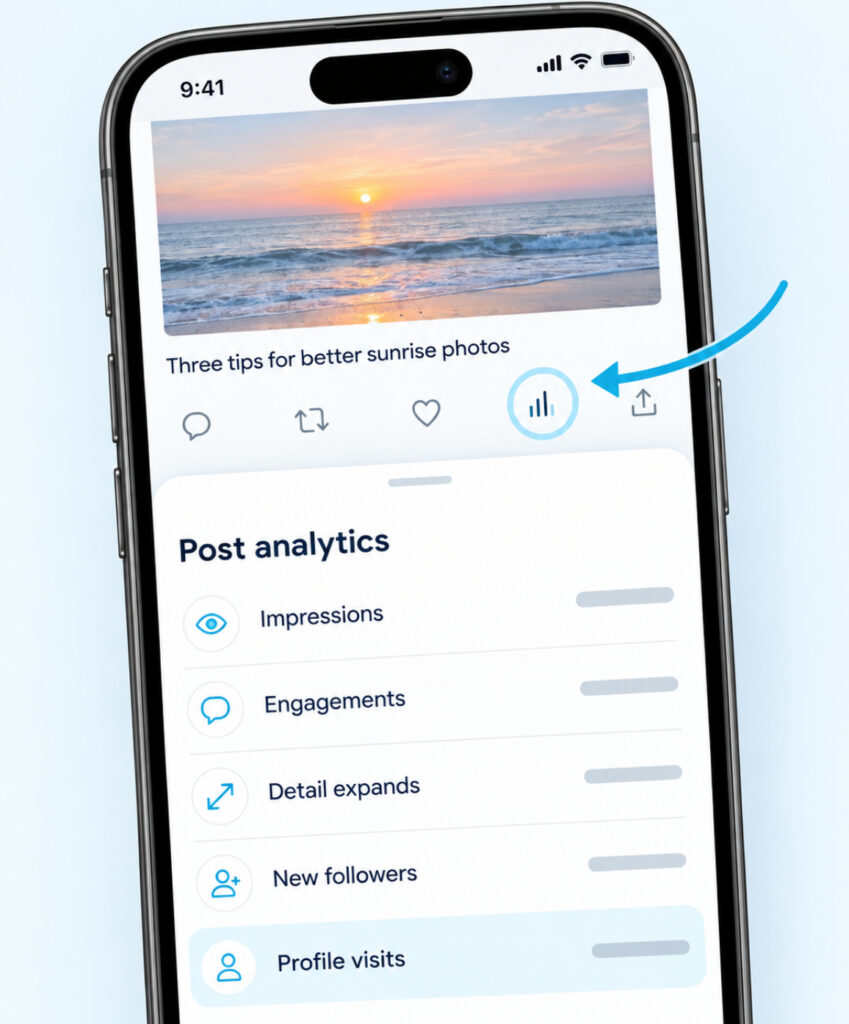
- Tap the small bar-chart icon under the post to open its analytics.
- Look for Profile visits in the list of metrics.
You’ll see it next to figures such as Impressions, Engagements, Detail expands and New followers. If the list is long, scroll down inside the panel rather than closing it.
On a Computer
Go to x.com, open your profile and click the post you want to check. Click the same bar-chart icon under the post, and the analytics open in a panel with the same metrics. This is the quickest way to compare several posts side by side, since you can keep your profile open in one tab and each post in another.
How To See Profile Visits for Your Whole Account
The account dashboard shows Profile visits across all of your activity, alongside impressions, engagement and follower changes. On a computer, go to x.com/i/account_analytics while signed in, or open Premium in the side menu and choose Analytics. On the app, open the Premium section from your profile menu and look for the same Analytics entry.
Pick a date range at the top of the dashboard, such as 7 days, 28 days, 3 months or a year. Keep the same range whenever you compare one period with another. A 28-day total set beside a 7-day total tells you nothing useful.
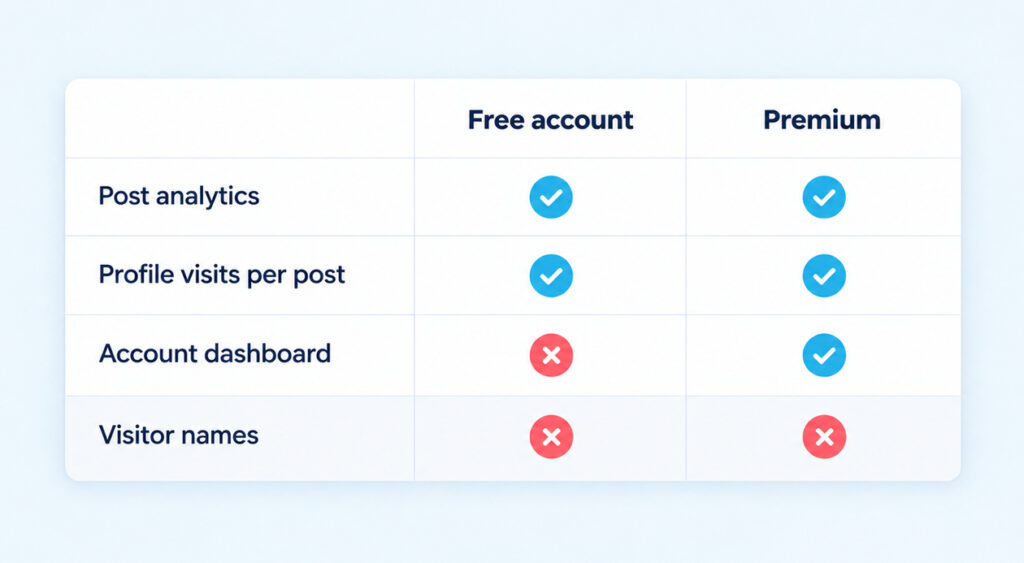
At the time of writing, the full account dashboard is open to X Premium subscribers, while free accounts keep the per-post analytics described above. X changes what each plan includes from time to time, so if you are deciding whether to subscribe, check what your own account shows before paying for it.
Why You Can’t Find the Number
When Profile visits seems to be missing, one of a few simple reasons is usually behind it. Work through them in this order.
- The post isn’t yours. Analytics only appear on posts you wrote. A repost of someone else’s post has no analytics for you.
- Your account doesn’t have the dashboard. Without Premium, the account-wide page won’t open, but each post’s analytics still will.
- You’re in the wrong account. If you manage more than one profile, check which one is active, because analytics belong to the account that wrote the post.
- The post is brand new. Figures take a little time to fill in, so check again later rather than assuming nobody tapped through.
- The value is zero. A post that nobody tapped through from can show nothing, or a zero, for Profile visits. That is a result, not an error.
Want your X account to actually break through?
Real accounts. Real engagement. No bots, no shadowbans, ever.
See our X servicesCreator Studio Steps No Longer Match
Many tutorials, including older versions of this one, still send readers through “More, then Creator Studio, then Analytics”, or to a monthly Account home page with a 28-day summary. X has since reorganized its analytics around the post panel and the account dashboard. If a guide shows screens you can’t find, it is probably describing the old layout rather than anything wrong with your account.
How To Read a Rise in Profile Visits
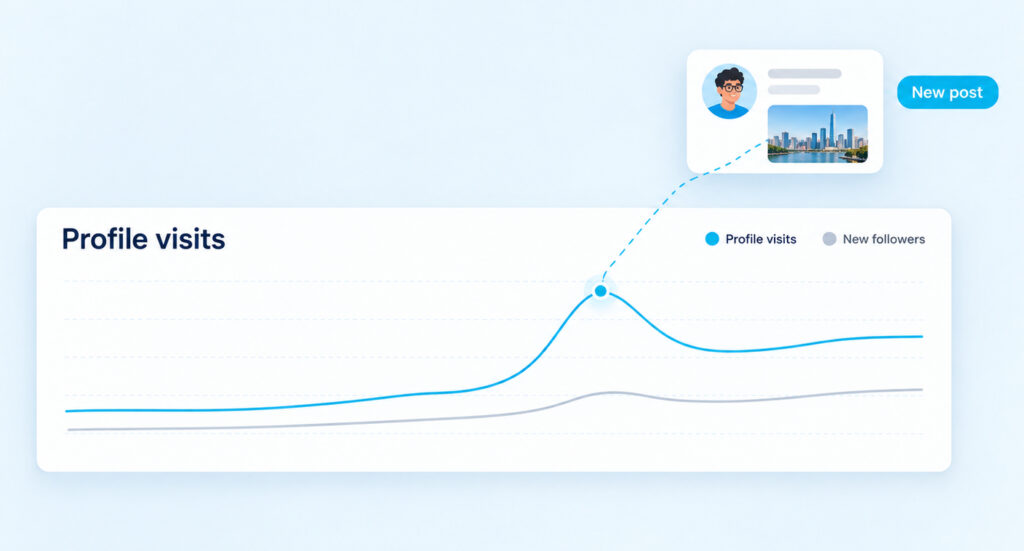
A jump in profile visits means more people were curious enough to find out who you are. The useful question is what caused it. Open the analytics of the posts you published around the same dates, and check whether one of them shows an unusually high Profile visits figure. If it does, you know which topic, format or reply brought people over. For example, if visits doubled in the week you posted a long thread, open that thread’s analytics first before looking anywhere else.
Reach sets the ceiling. A post can only send visits to your profile after people see it, which is why X impressions and profile visits tend to rise and fall together. When impressions climb but profile visits stay flat, the post was seen but didn’t make readers wonder about the person who wrote it.
Next, set the visits against New followers for the same period. Many visits and few follows usually means people liked the post but the profile didn’t convince them. A rise in both means the profile is doing its job. What the number cannot tell you is who the visitors were or why they came, so avoid reading a single spike as proof that a particular person has been checking your account.
Questions About Twitter Profile Views
Does X show who viewed my profile?
No. X gives you counts, not names, and no official screen lists the people who opened your profile. Our guide on whether you can see who views your Twitter profile explains why any app promising names cannot deliver them. Don’t connect one of those apps to your account in the hope of finding out.
Can someone tell that I looked at their X profile?
No. Viewing a profile is not one of the actions X sends a notification for, and it would only ever add to that account’s anonymous visit total. Replying, liking, reposting or following are visible actions, so those are the moments when the person finds out you were there. TikTok works differently, with an optional view history, so check how to turn off profile views on TikTok if you use both apps.
Do my own visits count toward my profile visits?
X doesn’t say either way for the profile visits metric. It does say that your own views of your post count toward that post’s views. Rather than refreshing your profile to test it, compare periods with the same date range so that any effect stays constant.
Is a profile visit the same as a unique visitor?
Not necessarily. X doesn’t describe Profile visits as a count of unique people, and it openly says that post views are not all unique, since one person can be counted more than once. Read the figure as visits, and treat any tool that turns it into “unique visitors” with caution.
Turn More Profile Visits Into Follows
A profile visit is a second look, and it lasts a few seconds. The person arrives from a post they liked and decides almost at once whether to follow. Check your profile the way a stranger would see it: the name and photo, the one-line bio, the pinned post and the three or four posts right below it.
Make the bio say plainly what you post about, and pin the post that best shows why someone should stay. Replace a pinned post that is months old or no longer matches what you share now. A profile with a clear bio, a strong pinned post and a steady base of X followers gives a curious visitor a reason to stay. After you change something, compare New followers against Profile visits for the next few weeks, using the same date range as before, to see whether more of those visits turn into follows.