Instagram Live is a powerful feature within the Instagram app that allows users to broadcast videos in real time to their followers. This interactive tool helps individuals, brands, and creators connect with their audience through unfiltered, authentic content. Whether you’re promoting a new product, hosting a Q&A, or sharing a behind-the-scenes look at your day, Instagram Live provides an opportunity for real-time interaction and engagement.
When someone mentions you on Instagram Live, it means they’ve referred to your username during their live broadcast. This could happen in several ways — by typing @yourusername in the live chat, verbally calling you out during the session, or inviting you to join their live video. Either way, it triggers notifications that make your account visible to more people, potentially expanding your target audience.
Being mentioned during a live session not only boosts your visibility but can also help you build credibility, connect with communities, and gain valuable insights about how others perceive your content.
Drive engagement through impressions, likes, and saves that keep your content visible and relevant in the Instagram algorithm longer.
Understanding Instagram Mentions
To understand what it means when someone mentions you on Instagram Live, you first need to grasp what Instagram mentions are in general. A mention occurs when a user types the “@” symbol followed by your username — for example, “@alex_music.” This can happen in posts, comments, stories, or videos.
When someone mentions you:
- You receive notifications in the app.
- You can tap the mention to visit their profile.
- You can reply or respond directly to engage with the mention.
Mentions are essentially Instagram’s way of linking people together. They make your account clickable, allowing others to discover your profile quickly. If your privacy settings allow, these mentions become a gateway for new followers and potential customers.
Mentions in Different Instagram Features
- Posts: When someone tags you in a post caption using “@,” your handle becomes visible to anyone who views the post.
- Stories: When mentioned in a story, you’ll get a DM (direct message) notification with a preview of the story and an option to add it to your own story.
- Comments: If mentioned in a comment, you can see it immediately under the post and respond directly.
- Live Videos: During a live broadcast, mentioning a person works as a shoutout, invite, or acknowledgment — increasing mutual engagement.
Related: What Does IMS Mean on Instagram?
Using the Instagram App for Live Interactions
The Instagram app provides several tools to make your live videos interactive. You can use these features to create, control, and manage your broadcasts effectively.
When someone mentions you in a live session, it typically appears as a notification or as a highlighted comment. Depending on the settings of your account, you can accept, ignore, or reply to the mention.
Steps to Mention Someone During a Live:
- Start a live video by tapping the “+” button and selecting Live.
- As you stream, type “@” followed by the username of the person you want to mention.
- Choose the correct account from the dropdown list that appears.
- Tap send, and the mention will be visible in the chat.
Once mentioned, that person will receive a notification saying that they’ve been mentioned in a live video. They can then join the live, view, or comment in real time.
Benefits of Being Mentioned on Instagram Live
Being mentioned on Instagram Live offers several benefits, both for individual users and brands:
1. Increases Visibility
When you’re mentioned in a live stream, your username becomes visible to everyone watching. This exposure helps you reach a larger target audience, potentially gaining new followers and engagement.
2. Builds Credibility
Mentions act as a public endorsement. If a popular creator or brand mentions you, it boosts your credibility and positions you as someone worth following.
3. Drives Traffic
Mentions encourage others to click on your profile, explore your content, and possibly follow or interact with your posts.
4. Provides Valuable Insights
Tracking when and where you’re mentioned can offer valuable insights into what others think about your content, brand, or personality. It also helps you understand your data and audience engagement.
5. Strengthens Connections
Being mentioned live allows real-time communication. You can discuss, reply, or join the conversation, making interactions feel more personal and authentic.
In short, being mentioned during an Instagram Live is like receiving a public “hello” in front of a crowd — a moment of visibility that strengthens relationships.
💡 Pro Tip: Drive organic traffic with reposts that help your content travel beyond your page and reach untapped audiences.
What Happens When Someone Mentions You on Instagram Live
When someone mentions you on Instagram Live, here’s what typically happens:
- You’ll receive a notification in your Direct Messages.
- If you follow the person, the notification appears directly in your inbox.
- If you don’t follow them, it will show as a message request.
- You can tap the notification to view the live broadcast or watch the replay (if it’s saved).
- Depending on your privacy settings, you can accept or ignore the interaction.
If your account is private, only approved followers can see your posts or stories. However, being mentioned publicly may still help increase your exposure, as users might visit your profile or send you a follow request.
How to Hide or Control Mentions on Instagram
If you prefer not to be mentioned on Instagram Live or other parts of the platform, you can easily manage or hide mentions using privacy settings.
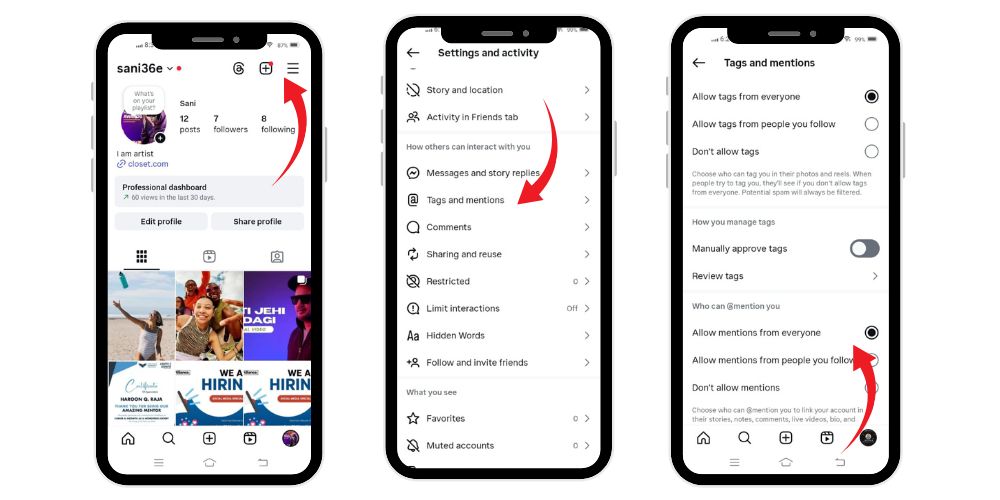
Steps to Update Mention Settings:
- Open the Instagram app.
- Go to your profile by tapping your photo at the bottom right.
- Tap the three-line icon at the top right.
- Select Settings > Privacy.
- Tap Mentions.
- Choose who can mention you:
- Everyone
- People You Follow
- No One
If you block someone, they cannot tag or mention you in any posts, stories, or videos. This gives you complete control over who can publicly refer to your account.
How to See When Someone Mentions You in Their Stories or Live
When you’re mentioned in someone’s story or Instagram Live, you’ll always get a notification. You can track these interactions by:
- Checking your Activity Feed under the heart icon.
- Opening your Direct Messages to see mention notifications.
- Viewing the “Mentions” tab (if available in your settings).
- Searching your username in comments or stories using the app’s search feature.
You can also use third-party monitoring tools to collect data on how often and where you’re mentioned, though it’s important to protect your privacy and ensure you comply with Instagram’s terms.
Related: What Does Flagged for Review Mean on Instagram?
Why Do People Mention You in Instagram Live?
There are several reasons someone might mention you during their live broadcast:
1. Collaboration or Partnership
Creators often mention collaborators or brands they’re working with. It’s a promotional gesture to acknowledge your participation or product.
2. Guest Appearance
Sometimes, a host might mention you to invite you to join the live. This helps bring in fresh perspectives and keeps the conversation dynamic.
3. Engagement and Interaction
Mentions can prompt you to respond, comment, or discuss during the live session — making it more engaging for both hosts and viewers.
4. Product Promotion
If someone’s promoting your product, service, or content, they’ll likely mention your account to drive traffic your way.
5. Community Building
Mentions can also serve as a friendly acknowledgment. It’s a way to appreciate followers, customers, or supporters during a live broadcast.
In essence, being mentioned shows you matter to the person hosting the live. It reflects acknowledgment, respect, or partnership — all of which strengthen your digital relationships.
Tagging vs. Mentioning on Instagram
Both tagging and mentioning are ways to include someone on Instagram, but they serve different purposes.
| Aspect | Tagging | Mentioning |
|---|---|---|
| Where Used | Posts, Reels, Photos | Captions, Comments, Stories, Live Videos |
| Purpose | Attach a person directly to content | Acknowledge or reference someone |
| Visibility | Visible on the tagged person’s profile | Appears in text only |
| Notification | The tagged person receives a notification | The mentioned person also receives a notification |
| Effect | Content appears under “Tagged” tab | Mention appears in notifications only |
Which Is More Effective?
- Tagging is more impactful for visibility and association. It ensures the content is permanently linked to the tagged profile.
- Mentioning, however, is more conversational and works better for real-time engagement, such as in Instagram Live or comments.
Your choice depends on what you’re trying to achieve — if your goal is exposure, go for tagging; if it’s engagement, use mentions.
Managing Mentions and Notifications
You can fine-tune how you receive notifications for mentions:
- Open your Instagram app.
- Go to Settings → Notifications.
- Select Posts, Stories, and Comments.
- Under Mentions, choose whether to receive alerts from Everyone, People You Follow, or No One.
This control ensures you only get notifications that truly matter, helping you manage your digital space effectively.
Why Does It Say Someone Mentioned You in Their Live on Instagram?
If you see a message like “Someone mentioned you in their live on Instagram,” it means that your username was referenced during their live session. This might have been through:
- A verbal mention (spoken on camera),
- A comment using “@username,” or
- An invite to join the live.
It’s Instagram’s way of alerting you that you were acknowledged in a live broadcast. You can then view, join, or ignore the live as you prefer. This system encourages interaction and helps maintain active engagement between followers and creators.
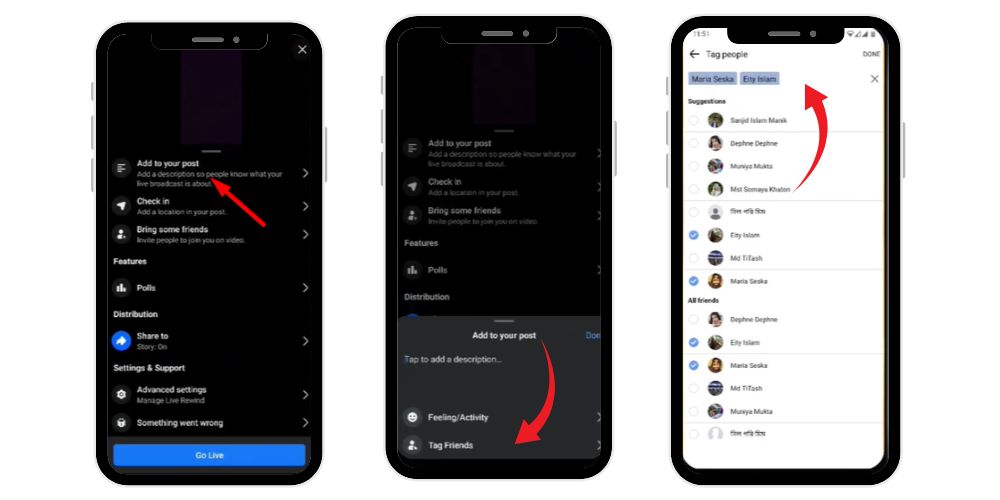
How to Mention Someone During Instagram Live
If you want to mention someone during your live broadcast:
- Go live from your profile.
- While streaming, type “@” followed by their username in the comment bar.
- Tap their name when it appears.
- Post your comment, and they’ll receive a notification.
Alternatively, you can invite them to join your live by:
- Tapping the two faces icon.
- Selecting their username.
- Sending an invite.
They can then accept or decline the invitation.
Protecting Your Privacy on Instagram Live
If you want to maintain control over how and when your name is used, Instagram’s privacy settings give you multiple options:
- Restrict mentions from unwanted people.
- Adjust your visibility settings.
- Block or report users who abuse the mention feature.
- Monitor who mentions you and where.
These steps help you protect your account and keep your digital reputation positive.
💡 Pro Tip: Buy Instagram impressions to make your content stronger, more visible, and highly recognized.
Final Thoughts
Being mentioned on Instagram Live is a form of recognition that helps strengthen your social presence. It increases visibility, drives engagement, and connects you with new followers and communities. Whether it’s for collaboration, appreciation, or discussion, a live mention can significantly enhance your reach and profile growth.
At the same time, Instagram gives you complete control over who can mention or tag you — so you can choose how public or private your interactions are. Use the settings wisely to balance exposure with privacy.
Ultimately, when someone mentions you on Instagram Live, it’s a sign that your presence matters — both to the person going live and to the wider audience watching.
FAQs
What does it mean when a live video says mentioned you?
It means the host or a viewer referred to your username during their live broadcast. You’ll receive notifications prompting you to watch or join the live session.
What does it mean when someone mentions you on Instagram?
It means they typed “@” plus your username in a comment, story, or post, linking directly to your profile for others to view or follow.
What’s the difference between tagging and mentioning on Instagram?
Tagging attaches your account to content like a photo or video, while mentioning simply references you in text, without linking the post to your profile.
How to see who mentioned you on Instagram Live?
Check your notifications or DMs — Instagram will alert you whenever someone mentions you during a live session.
How do I mention someone in Instagram Live?
While hosting a live, type “@” followed by the person’s username in the comment box. They’ll instantly receive a mention notification.