The 30-second answer
- On mobile: open Facebook, tap your profile photo at the top, tap Details or See your About info, then scroll to Followers and tap See All.
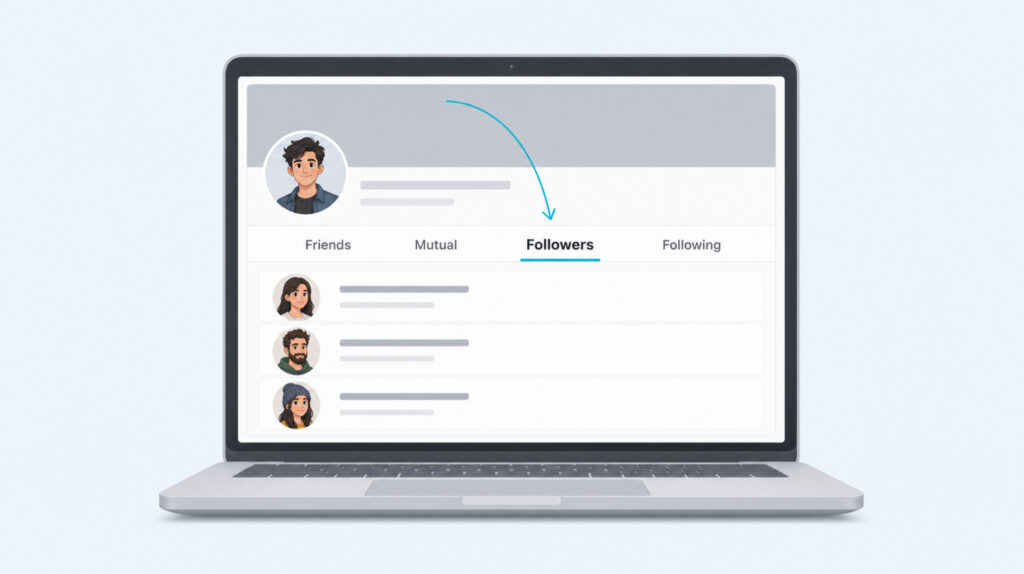
- On desktop: open your profile, click Friends in the tab row, then click the Followers sub-tab to load the full list.
- Direct URL shortcut: type facebook.com/yourusername/followers into any browser address bar. If your followers are public, the list loads instantly.
- For a Page: switch to your Page, then use the Followers tab under the cover photo, or open Professional Dashboard and click Insights for the Net Followers count.
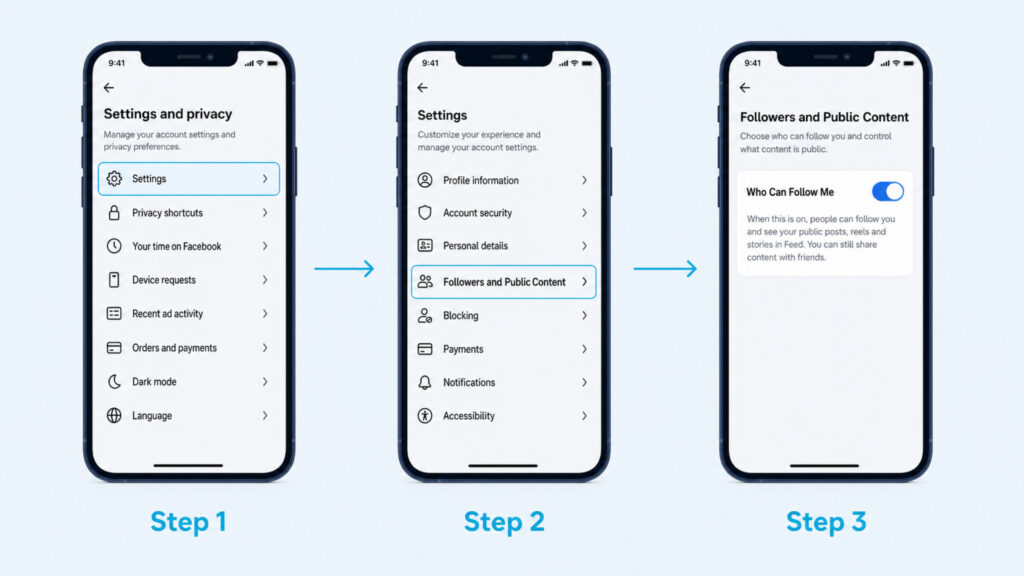
- If Followers is missing entirely, you probably never enabled it. Settings and privacy, Settings, Followers and Public Content, set Who Can Follow Me to Public.
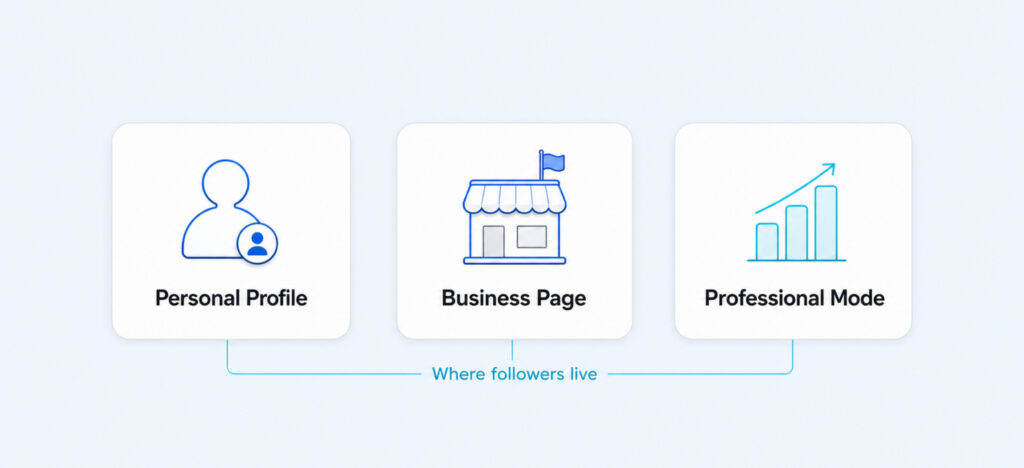
Facebook hides the follower list in a slightly different place depending on whether you use a personal profile, a business Page, or Professional Mode. The exact path also shifts between iPhone, Android, and the desktop web, and Facebook renames the section every few years. That is why the same simple question gets so many wrong answers online.
This guide walks through every surface currently in use, adds the direct URL shortcut that skips the menus, explains the Net Followers metric on Pages, and covers what to do when the Followers section is missing from your profile entirely. Nothing here needs a third-party tool.
Want your Facebook page to actually get seen?
Real likes. Real shares. No bots, no shadowbans, ever.
See our Facebook servicesWhy Facebook Hides Followers Behind Three Different Doors
Facebook keeps three different follower models running at the same time, and each one lives in its own corner of the app. Understanding which one applies to your account decides where you will look and what you will find.
A personal profile has followers only if you have turned that on. By default a personal profile has friends, not followers, and the follower slot is hidden from your own view and from visitors. Once you flip the follower switch, a public Followed by X people badge appears on your profile and a Followers section appears in the About area.
A Facebook Page always has followers by design because a Page is meant for one-to-many broadcasting. The follower count sits directly under your cover photo, and detailed follower data lives inside Professional Dashboard and Insights. The relationship between Page likes and Page followers is one-way: every Page like now also creates a follow, but a follow does not create a Page like.
Professional Mode is a third path Facebook rolled out for creators who want Page-style features on a personal profile. When you enable it, your personal profile keeps its friends but gains a Professional Dashboard with the same follower analytics a Page gets. The follower list itself still opens from your regular profile, but the deep analytics only appear once Professional Mode is on.
Finding Your Follower List On The Mobile App
The mobile app is where most people look first, and Facebook has moved the exact tap sequence twice in recent years. As of now, the working path on both iPhone and Android sits inside the profile details area, not the friends tab.
The Current iPhone Path
- Open the Facebook app and tap your profile photo in the top left of the news feed.
- On your own profile, tap Details just below the friend and follow counts, or tap See your About info if Details is not shown.
- Scroll down the About panel until you reach a row labeled Followers with a count next to it.
- Tap See All on that row to open the full follower list. From there you can search a specific name or scroll the whole list.
The Current Android Path
- Open the Facebook app and tap the menu icon at the top right, then tap your name at the top of the menu.
- On your profile, tap the three-dot menu below your cover photo and choose View As Yourself, then close the preview to return to your own view.
- Tap Details in the profile header row. On some Android builds this is labeled About instead.
- Scroll to the Followers row and tap See All to load the full list.
When The Followers Section Is Missing
If you tap Details and there is no Followers row anywhere in the About panel, followers are turned off for your profile. That is the default for new personal accounts. Enabling followers is one setting change and is covered later in this guide. Once you flip the setting, the Followers row appears immediately, though the count sits at zero until people start following you.
The Desktop Route And A Faster URL Shortcut
The desktop path is faster than the mobile one once you know it exists. Facebook keeps the same follower list on the web but reaches it through the Friends tab, which is a naming choice that trips people up. There is also a direct URL that skips every menu.
Standard Profile Tab Method
- Open facebook.com in a browser and click your profile photo at the top right, then Profile.
- On your profile, look at the row of tabs beneath your cover photo. Click Friends. If Friends is hidden inside a More dropdown, click More first, then Friends.
- Inside the Friends tab, look for the secondary tab row and click Followers. Facebook lists the sub-tabs left to right as Friends, Mutual, Followers, and Following.
- The full follower list loads. Use the search field inside the list to jump to a specific name, or click any follower to open their profile in a new tab.
The /followers Direct-Link Trick
If your profile is public and you know your Facebook username, there is a permanent URL that opens the same follower list without any menu navigation. It looks like facebook.com/yourusername/followers. Type it into any browser address bar on any device and the list loads directly.
The trick is worth learning because it is the same URL structure other people can use to see your public follower list if you share your profile widely. That is what makes the badge that reads Followed by X people so visible on a public account, and part of why some people prefer to buy more social credibility on their strongest channel first before flipping their Facebook followers list to fully public. The URL only works when you have public followers enabled. On a friends-only profile the direct URL returns a not-authorised message.
Facebook Pages And The Net Followers Metric
If your account is a Page rather than a personal profile, the follower list works differently. Pages always have followers turned on, the count is visible to everyone, and Facebook shows you a set of analytics that a personal profile never gets.
The fastest way to see who follows your Page is to open the Page itself, then click the Followers tab in the row directly under the cover photo. That tab shows the count on the label and opens the full follower list, sorted by most recent first. You can scroll or search inside the list exactly like on a personal profile.
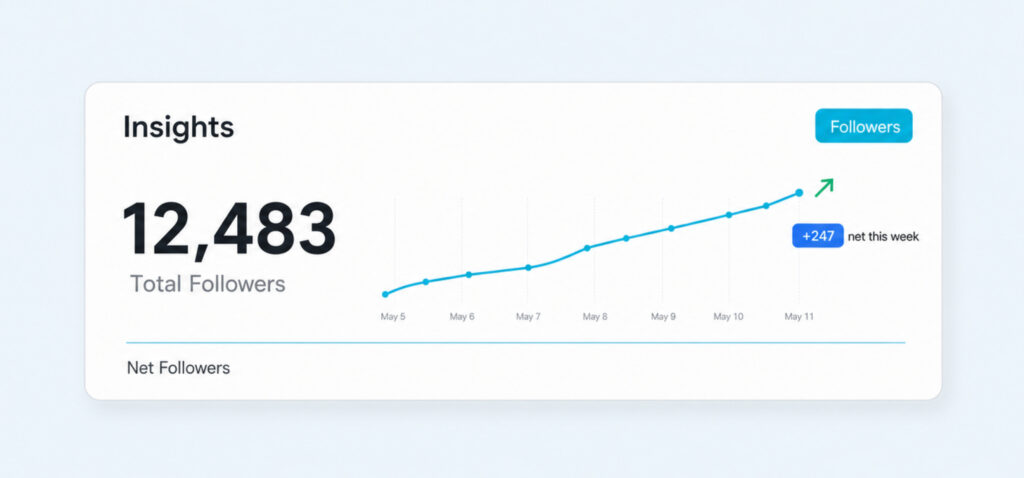
The more useful path is Professional Dashboard. Open your Page, click Professional Dashboard in the left sidebar, then click Insights. Scroll down to the section labeled Followers. From there you get a total count, a Net Followers line that adds new follows and subtracts new unfollows for the period you choose, and a small graph showing follower growth. Net Followers is the metric that matters once your Page is above one thousand followers, because Facebook rounds the headline count in that range and only Net Followers exposes the exact number of gains and losses.
A subtle point most guides miss is that Page likes and Page followers are no longer the same number. Facebook decoupled them a while back, and every fresh Page starts with a follower slot that grows even when nobody clicks Like. When you check your Page follower list, expect a larger number than your like count, and expect the two to drift over time.
Turning On Public Followers If The Option Is Gone
If you open Details on your profile and the Followers row simply is not there, the fix is a single setting. Facebook keeps the follower switch inside privacy settings on both mobile and desktop, and the label has been the same for several years now.
- Open Settings and privacy, then Settings. On mobile that is the menu icon then the gear icon. On desktop it is your profile photo then Settings and privacy.
- Tap or click Followers and Public Content in the left sidebar.
- Set Who Can Follow Me to Public. That is the only mandatory setting. Save the change.
- Under the same panel, review Public Post Comments, Public Post Notifications, and Public Profile Info if you want granular control over who can interact with the public side of your profile.
Once Public is selected, the Followers section appears on your profile immediately, and the Followed by X people badge starts appearing under your name once at least a small handful of people follow you. Facebook does not show the badge for zero followers, which is why brand new followers-enabled profiles look identical to friend-only ones from the outside.
One recent caveat that catches creators off guard: some features that used to require just public followers now require Professional Mode. If you want the full follower analytics on a personal profile, not just the follower list, you now need to switch on Professional Mode from your profile menu after enabling public followers. Turning on Professional Mode also gives you Reels-specific insights and monetisation eligibility that a plain follower-enabled profile does not.
Turning Follower Numbers Into Real Reach
Knowing where the follower list lives is only half the point. The list itself is a snapshot of who has opted into your public feed, and it becomes useful only when the number lines up with content people actually want to see. That is why creators who care about their Facebook follower count also pay attention to follower-count psychology on adjacent platforms, since a Facebook follower who never sees your posts is not different from an unfollow, only quieter.
If your Followers section looked empty because followers were off, expect a slow climb once you flip it on. Most Facebook follower growth on personal profiles comes from mutuals of your friends who spot your public posts in feed, from Reels that land on the wider recommendation surface, and from cross-promotion where you point people from another platform back to your Facebook profile. Follow-back etiquette matters more than it did five years ago, because Facebook now surfaces mutual-follow suggestions inside the Friends tab, and refusing to reciprocate a follow is more visible than it used to be.
On a Page, the follower list is a directory more than a scoreboard. The people in it are the ones Facebook is most likely to show your next post to, and the Net Followers number is the honest read on whether your Page is gaining ground or losing it. If Net Followers stays flat while your reach climbs, you are entertaining strangers and not building an audience. If Net Followers climbs while your reach dips, you are collecting silent followers who no longer see you, which is a signal to change what you post rather than how often.
Whichever surface you are on, the follower list is a starting point rather than a destination. Open it once a week, notice the pattern of who joined and who left, and let that shape the next thing you publish. That is the whole reason Facebook makes the list available in the first place.
Expand Your Facebook Page
Grow your business or personal page with high-quality likes, shares, and followers.
Common Follower Questions People Ask
Why does the Followed by X people line only sometimes appear on my profile?
Facebook only shows that badge once you have public followers turned on and at least a small number of people actually following you. Below that threshold the badge is hidden. Turn on Who Can Follow Me and give it a few follows before you expect it to appear. If the badge disappeared after being there, someone probably unfollowed you back below the threshold, or you flipped the follower switch off in privacy settings.
Can someone tell that I looked at my own follower list?
No. Facebook does not send any notification, insight, or activity log entry when you open your own follower list. The same is true when you view a public follower list belonging to someone else, since the follower list is treated as a public directory rather than a private activity feed.
What is the exact URL to jump straight to my Facebook followers page?
facebook.com/yourusername/followers is the direct URL. Replace yourusername with your custom Facebook username, which you can find in Settings under General Profile Settings. If you never set a custom username, Facebook uses a numeric ID and the URL still works, but it is much longer. The direct URL only loads for people who are permitted to see your follower list, so a friends-only profile returns a not-authorised message.
Why does my Page show a rounded follower count instead of the real number?
Facebook rounds the public follower count on Pages above one thousand followers to keep the headline number easy to read. The exact number is not hidden from you, it just does not appear on the public tab. Open Professional Dashboard, click Insights, scroll to the Followers section, and use the Net Followers line for the precise current count and the change over your chosen period.
Do Facebook followers show up in the same order every time?
No. Facebook orders follower lists using a mix of recency, mutual friend signals, and interaction history. The list you see is not strictly newest-first, and the order shifts as those signals change. If you need a stable list for an audit or a spam check, use the search field inside the follower list to look up specific names rather than trusting the visible order.