Creating Reels is one of the most effective ways to grow on Instagram, reach new audiences, and boost engagement even if you are starting from scratch. If you want to make your profile stand out, attract real followers, and create content that captures attention within the first few seconds, mastering this format is essential.
In this complete guide, you will learn how to make a Reel on Instagram step by step, from recording to publishing, with practical tips for beginners, common mistakes to avoid, and simple strategies to increase your videos’ reach. These are the same proven approaches used by creators who grow consistently with professional support, such as the services offered by BuySocialMediaMarketing.
Key takeaways
- Making a Reel on Instagram is a simple process, but structure and editing play a major role in performance.
- In 2026, Reels remain the best format for reach and discovery on Instagram.
- The first few seconds of your Reel are critical for stopping the scroll and improving watch time.
- Using trending audio, captions, and vertical formatting increases the chances of your Reel performing well.
Stay visible longer with saves, impressions, and automatic likes that help your content perform better in the Instagram algorithm.
How to Make a Reel on Instagram: Step by Step
This Instagram Reels tutorial is designed specifically for beginners who want to start creating content with confidence and clarity. Follow these simple step-by-step instructions to create your first Reel, learn how each tool works, and build a solid foundation for consistent growth, stronger engagement and better visibility on Instagram.
Step 1 – Open the Reels Camera
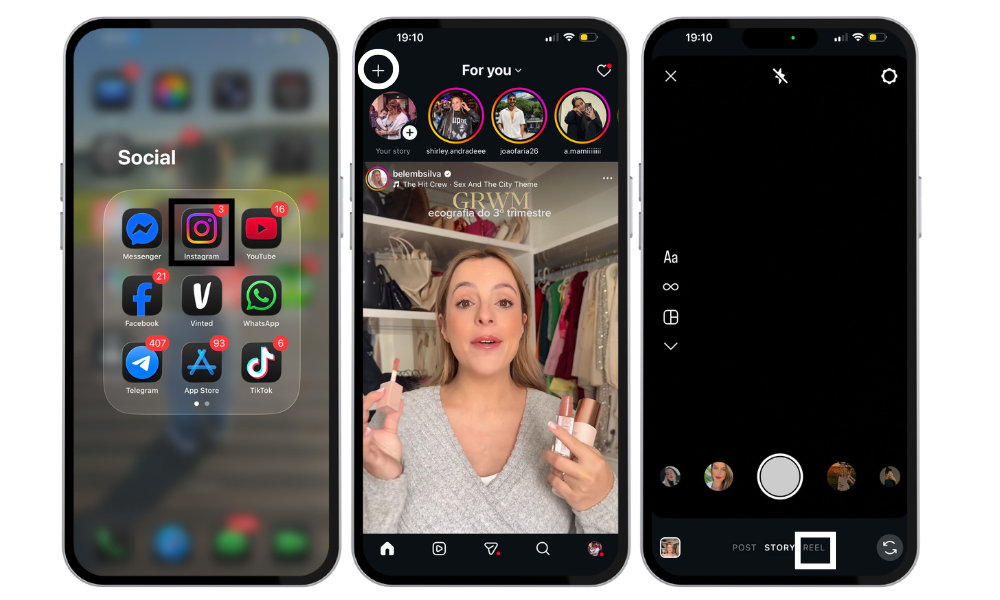
Open the Instagram app and tap the “+” icon at the top of the screen. Then, select “Reel.”
You can also access it by swiping right from your feed and choosing the Reels mode at the bottom of the camera screen.
Despite frequent app updates, this workflow remains straightforward. Mastering these first steps is essential for any successful Instagram Reels tutorial.
Step 2 – Record or Upload a Video
Here, you have two main options:
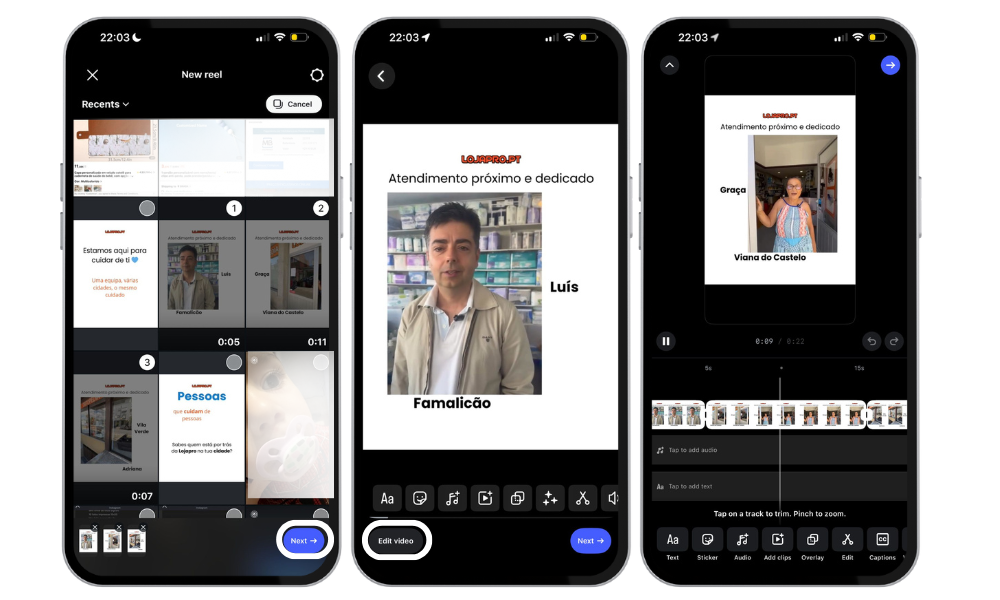
- Record directly within the app by holding down the capture button
- Upload videos from your gallery, which is ideal if you edit your content in advance
You can record multiple segments, trim unnecessary parts, and adjust the length of each clip. Creators who closely analyze retention metrics, such as those using tools and services from BuySocialMediaMarketing, tend to prioritize shorter, more focused videos, especially when growing newer accounts.
Related: Does Instagram Notify When You Screenshot a DM? Guide 2026
Step 3 – Add Effects, Music, and Text
This is the most creative stage of the process, it is where your Reel truly comes to life:
- Add audio: Tap the audio icon to add music or sound. Search Instagram’s music library for trending tracks, and select which part of a song you want to feature in your Reel. You can also use the ‘add audio’ feature to upload your own original audio, which will be attributed to you and can be reused by others.
- Record a voiceover: Enhance your video content by recording a voiceover directly in the app.
- Use creative tools and effects: Tap the three-star icon above the record button to browse and apply AR effects, filters, and transitions. Instagram tools also let you add stickers, GIFs, and adjust video speed from 0.3x to 3x.
- Insert text: Use the text editor, similar to Instagram Stories, to add captions, annotations, or on-screen messaging. Adding text increases engagement and accessibility. Instagram’s closed caption sticker can automatically generate subtitles for your Reels.
- Add stickers: Emojis, questions, or polls help boost interaction.
- Hands-free recording: Use the timer for a 3-2-1 countdown and record clips hands-free.
- Edit and preview: Record and edit clips up to 3 minutes long, import from your camera roll, and use Instagram’s editing tools for audio, speed, and more. Once you’re happy with your video content, tap ‘play’ to preview and add additional AR effects or text before sharing.
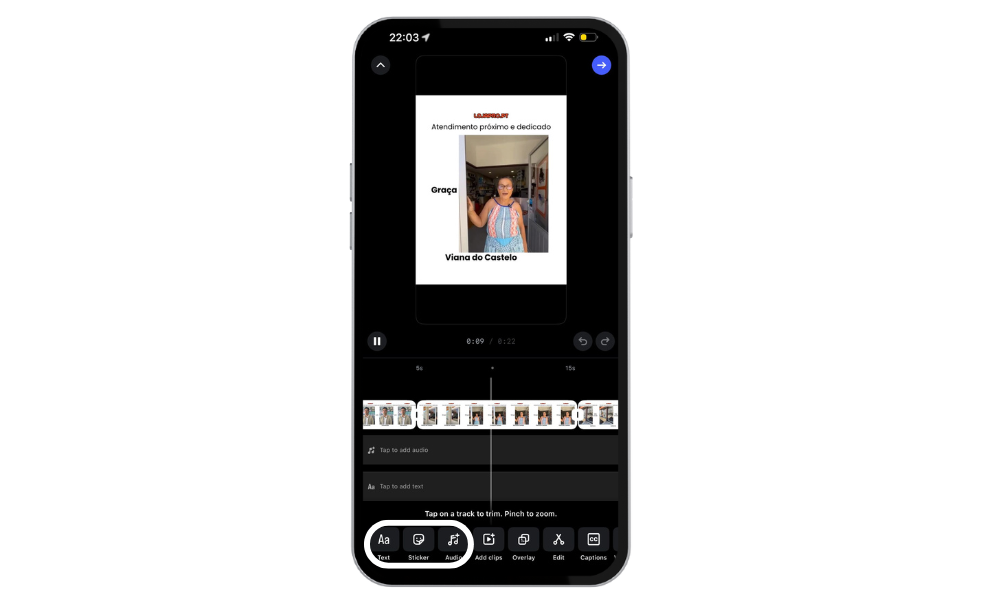
Audio is one of the main factors influencing Reel distribution. Using trending sounds can significantly increase reach, especially when paired with clear, well-placed on-screen text.
Many creators rely on external tools to identify trends and adapt their content to the algorithm – a common practice among users of BuySocialMediaMarketing services.
Step 4 – Adjust Clips and Timing
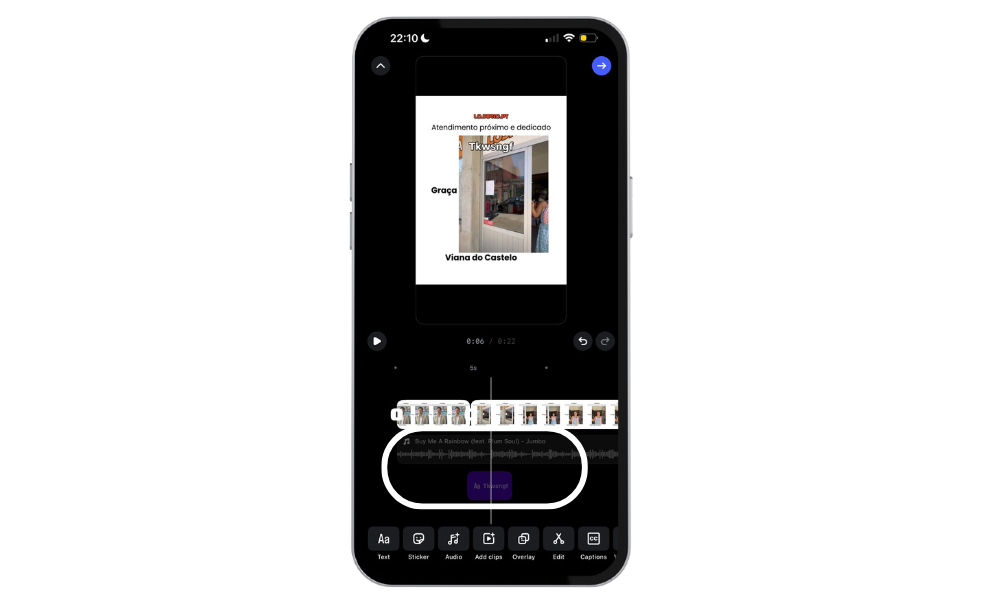
After adding the visual elements, adjust the timing of each clip. You can trim, rearrange, speed up, or slow down specific sections to fine-tune the rhythm of the video.
Smooth transitions and a well-paced flow help keep viewers engaged until the end, which is one of the most important signals for the Instagram algorithm. This step makes a significant difference for anyone looking to create Instagram videos that perform above average.
Step 5 – Share Your Reel
Before publishing your Reel, take a moment to review a few key details that can significantly impact its performance:
- Write a clear, concise caption that explains the value of the video and encourages interaction
- Use relevant hashtags that match your niche and the topic of the Reel
- Choose an eye-catching cover image that looks good both in the feed and on your profile grid
- Make sure the audience is set to public to maximize reach
Always include a simple call to action, such as “Follow for more tips” or “Save this Reel,” to guide viewers toward engagement.
Creators who align content, copy, and timing with structured growth strategies like those applied by BuySocialMediaMarketing tend to generate more interactions within the first minutes after posting, which helps boost overall reach.
Related: 30 Best Instagram Filters and Effects for Stories and Reels (with Comparison)
What is an Instagram Reel?
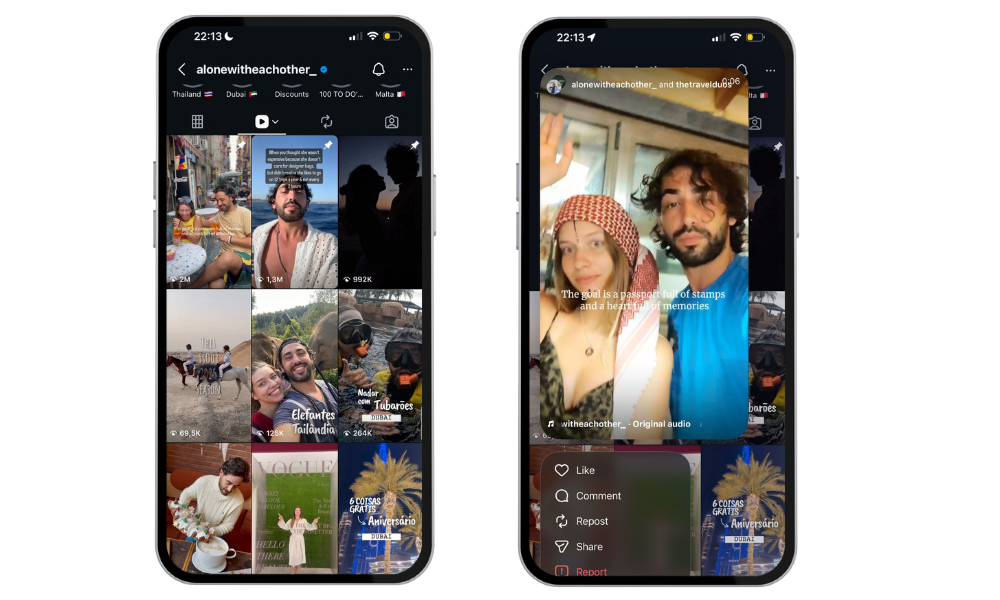
An Instagram Reel is a short vertical video typically between 15 and 90 seconds long designed for quick entertainment, education, or inspiration.
This format is built to maximize reach and engagement as Reels are promoted both in the main feed and the Reels tab and often shown to users who do not yet follow your profile.
For content creators, brands, and small businesses, Reels represent a genuine opportunity for organic growth. The algorithm tends to favor dynamic videos with strong retention and meaningful interactions.
That is why many creators pair consistent Reel production with data-driven growth strategies, something specialized platforms like BuySocialMediaMarketing help structure from the very beginning.
Planning and Preparation
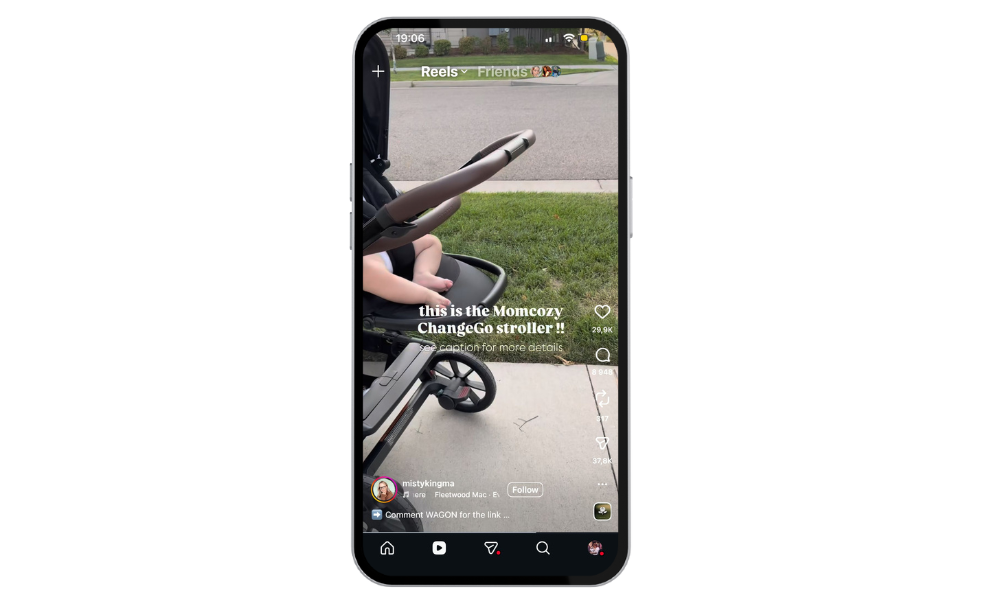
Before you dive into creating Instagram Reels, taking time to plan and prepare can make all the difference in the impact of your content.
Start by defining the purpose of your Reel, what message do you want to share, and what action you hope your audience will take. Knowing your target audience is key; think about what type of content, audio, and style will resonate most with them.
Explore the Instagram app to get inspired by trending audio, popular hashtags, and creative formats that are currently performing well. Keep your Instagram Reels concise, ideally between 8-15 seconds, to hold attention and deliver value quickly.
Tips for Making Reels That Go Viral
Although there is no guaranteed formula for success, these practices can significantly increase your reach and improve overall performance on Instagram:
- Use trending audio adapted to your niche, ensuring it feels natural and relevant to your content
- Keep videos under 30 seconds to maintain attention and encourage full watch time
- Start with a strong hook in the first few seconds to immediately capture interest
- Use captions or on-screen text so your message is clear even when the video is watched without sound
- Test different formats, such as tutorials, POVs, behind-the-scenes content or quick value-driven lists
Creators who consistently analyze performance metrics and adjust their content based on data often with professional support, are far more likely to replicate positive results and achieve sustainable growth over time.
Common Mistakes to Avoid When Making Reels
Some common mistakes can drastically limit the reach and performance of your Reels, even if the content idea itself is strong:
- Poor lighting or low-quality audio can make videos feel unprofessional and hard to watch
- Videos that are too long or lack proper pacing cause viewers to drop off early
- Ignoring captions and hashtags, which reduces accessibility and discoverability
- Posting inconsistently makes it harder for the algorithm to recognize and prioritize your content
Avoiding these mistakes is the first essential step toward sustainable growth, especially for Reels beginners who are still learning how the platform rewards quality, consistency, and engagement.
Final Thoughts
Learning how to create Reels is an essential skill for anyone looking to grow on Instagram in 2026, whether you are a content creator, brand, or small business. With consistency, creativity, and close attention to detail, it is entirely possible to achieve strong results even without large budgets or advanced equipment.
Take advantage of Instagram tools such as editing options, music integration, and automation features to enhance your Reels. For even more control and creative options, consider using external editing apps before uploading your content to Instagram.
Additionally, you can repurpose your successful Reels for other platforms like TikTok or YouTube Shorts to reach a wider audience.
If your goal is to accelerate that growth, improve key performance metrics, and apply proven data-driven strategies, exploring the services offered by BuySocialMediaMarketing, such as Instagram Followers, Instagram Likes, and Instagram Commments can be a strategic step.
FAQ
What is the ideal length for an Instagram Reel?
Most high-performing Reels are between 7 and 30 seconds long because they help maintain viewer attention until the end. Short, direct videos tend to achieve higher retention, which increases the likelihood of the algorithm distributing the content to more users.
Is it possible to grow on Instagram using Reels as a beginner?
Yes, Reels are currently the most favorable format for new accounts or profiles with fewer followers. The algorithm prioritizes relevant content regardless of account size as long as the video achieves strong retention and engagement.
Are hashtags still important for Reels?
Yes, hashtags remain relevant when used strategically. It is best to choose hashtags that are closely related to the video’s topic and your niche rather than using generic or overly long lists.
Is it mandatory to use trending audio to get good results?
No, it is not mandatory, but using trending audio can significantly increase a Reel’s reach. When combined with clear content and real value for the viewer, trending sounds make it easier for videos to appear in recommendations.
How can BuySocialMediaMarketing help with growth through Reels?
BuySocialMediaMarketing supports creators and brands with strategies focused on real growth performance analysis, and content optimization. Instead of posting randomly, it helps structure Reels based on data, trends, and clear reach and engagement goals.