Going through Instagram reels and posts, you often find catchy tunes and interesting remixes you want to save from Instagram’s music library.
Whether it’s the melody or vibe that caught your attention, saving the right music on Instagram is key for future listening or content creation. Sometimes, these songs aren’t available on other music apps, making saving them within Instagram essential.
Luckily, Instagram’s music feature lets you save songs directly from posts and reels, building your personal music library easily.
In this article, we’ll guide you on how to save songs from Instagram posts and reels with simple steps, focusing on the most effective methods. Let’s dive in!
Quick Answer
To save songs on your Instagram, follow these simple steps:
- Open the desired reel or post.
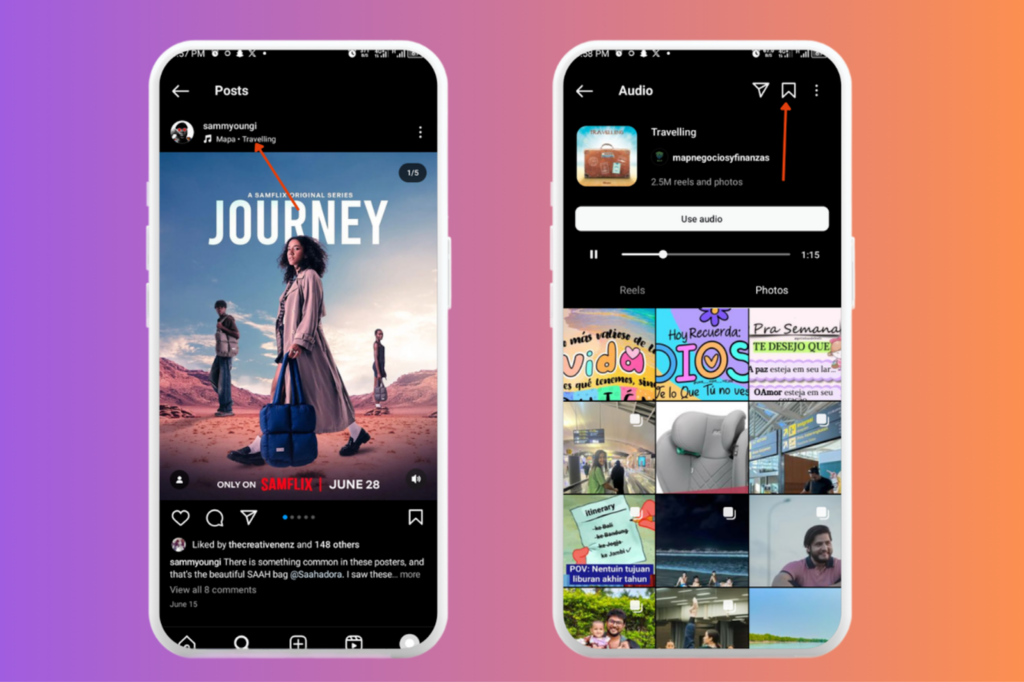
- Click on the song title, usually located just below the username of the content creator.
- A new screen will appear showing the song and other content using the same track.
- Tap the save option (bookmark icon) at the top right corner of the screen.
The song is now saved to your Instagram music library for easy access later.
How to Save Songs from Instagram Stories, Posts and Reels
With the feature that allows Instagram users to save songs from posts and reels, it’s entirely possible to have a compendium of interesting songs and tunes you come across on Instagram posts. You can use the search bar to search for specific tracks or trending sounds before saving, making it easier to find the perfect audio for your content.
Saving songs from Instagram posts and reels is easy. Below are the steps to follow to save songs on Instagram:
Step 1: Click on the desired reel, post, or story.
Step 2: Click on the “Song Title” (also known as the audio title). The audio title is usually just below the username of the content creator and it’s clickable. Tapping it will take you to the audio page.
Step 3: A new screen pops up, which is the audio page. Here, the song and other content using the same track are visible.
On the audio page, you can use the play button to listen to the track before saving.
Step 4: Click on the “Save” option at the top right corner of the screen. The save option is the “bookmark icon” at the top right corner. The song is now saved.
(Note: The song is only saved within your Instagram app, and not on your device)
Tip: You can also save audio directly from an Instagram reel by tapping the save audio option or bookmarking it in the Reel editor.
The music sticker and add music features are available when creating stories or reels, and your saved audio can be accessed for future use to enhance your Instagram content.
Accessing Saved Songs from Instagram Posts and Reels
After you might have saved different songs and tunes, it’s important to know how to find them for quick and easy use, when you need them.
Accessing your saved songs on Instagram is also easy. Below are the steps to follow to access saved songs on your Instagram:
Step 1: Open your Instagram application.
Step 2: Click on the “profile icon” at the lower right corner of your screen.
Step 3: After clicking on your profile icon, click on the “menu icon” at the upper right corner of the screen.
Step 4: Scroll to the “Saved” option to see all your saved content.
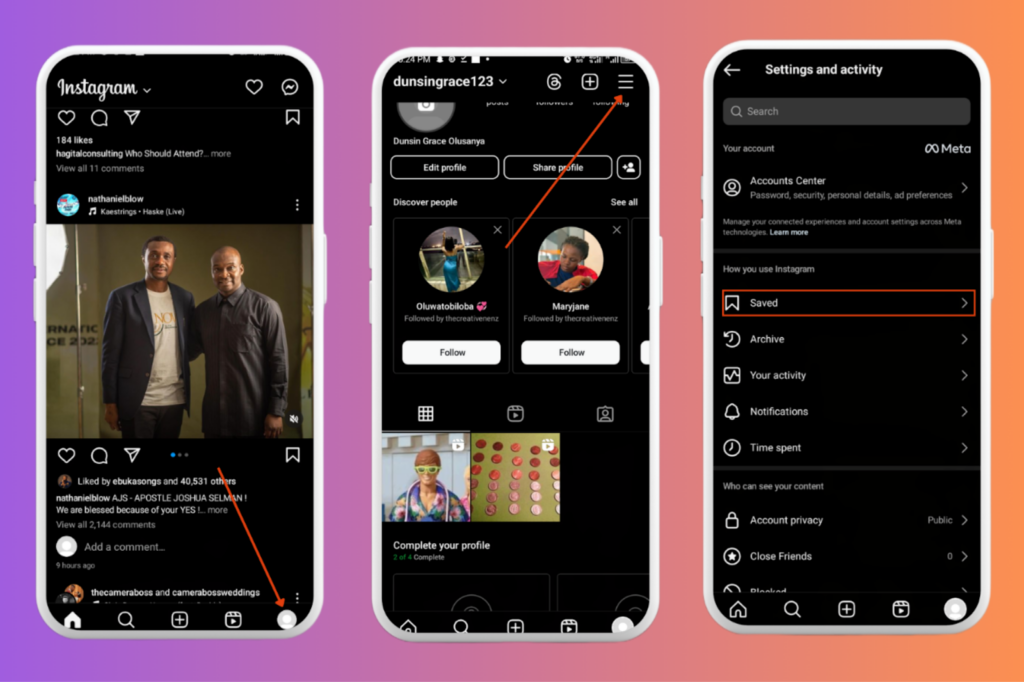
Step 5: You would see all the different types of content you’ve saved in different folders. Locate the Audio folder and click on it.
Step 6: On opening the audio folder, you’ll find the list of all the saved audio you’ve saved on your Instagram. You can tap on any saved audio to open its page, where you can listen to it by clicking the play button.
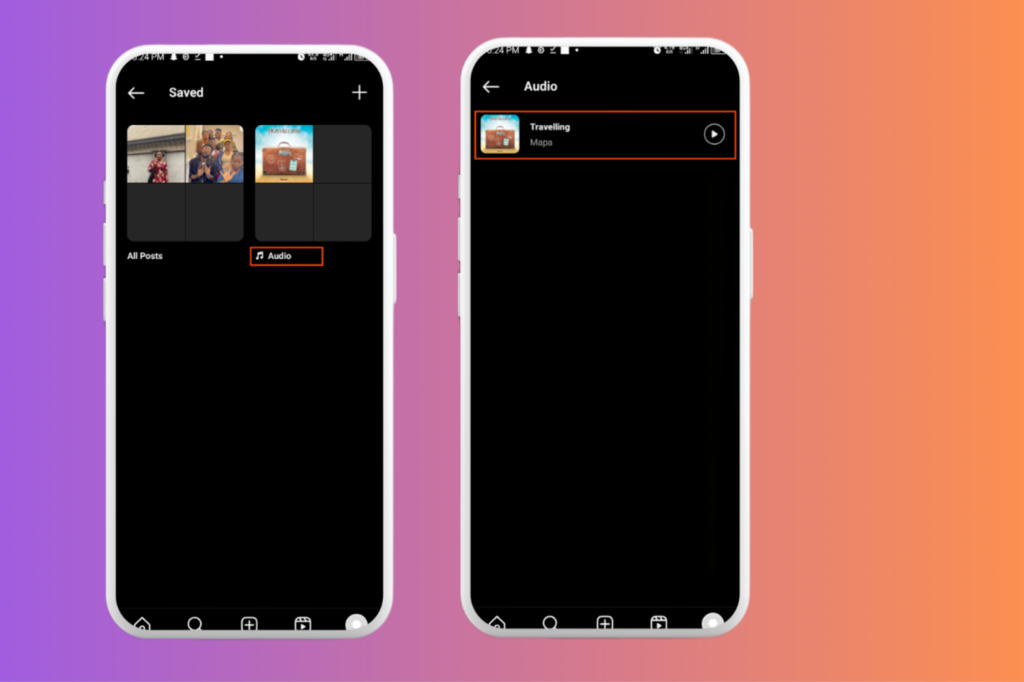
You can organize your favorite songs in your saved audio and easily reuse the same songs in future Stories or Reels without searching for them again.
Unsaving Songs from Instagram Posts and Reels
Unsaving a particular song or tune on your Instagram is possible. Due to personal reasons, you might wish to remove a particular song from the list of your saved songs on Instagram.
To do this, follow the steps below:
Step 1: Go to your profile by clicking on the “Profile icon”.
Step 2: Tap the “Menu icon” on your profile.
Step 3: Scroll to the “Saved” option and click on it.
Step 4: Tap the “Audio” folder and click on the song you wish to unsave.
Step 5: Click on the “Save” icon again, at the upper right corner of your screen. The song is now removed.
Why Can’t I Save Songs On My Instagram?
Currently, the saved songs feature is available for most Instagram users. However, some users might encounter difficulty while trying to use the feature due to certain reasons.
Below are possible reasons you might not be able to save songs on your instagram:
After 4.2, note that iPhone and Android devices may have different methods for saving Instagram stories with music. For example, iPhone users can use the built-in screen recording feature to save stories with audio, while Android devices may require different steps or third-party apps to achieve the same result.
After 4.5, mention that at the moment, if the save music feature is not available in your region, you may need to rely on third-party services to save Instagram stories with music. Make sure to choose reputable services to ensure your privacy and security.
1) Regional Constraints:
Regional constraints can be a reason you might encounter difficulty while trying to save a song on Instagram. Geo-restricted songs might only be available for saving in specific regions.
If you’re unable to save a particular song on your Instagram, it could be that the song is not savable in your region.
2) Poor Internet Connection:
Poor or unstable internet connection can be another factor, as regards why you’re unable to save songs on your Instagram.
If your internet connection is poor or unstable, you can try to get a stable connection and then retry.
3) Outdated Software:
If your Instagram app is not up-to-date, you might not be able to access the saved songs feature.
To address this, you can check for and install app updates from the App Store or Google Play, and then retry.
4) Low device storage:
Low device storage is another factor to consider, if you’re experiencing difficulty while trying to save songs on your Instagram.
If you have low device storage, you might not be able to use the saved songs feature efficiently. Freeing up your space can help solve this hindrance.
5) Account Restrictions:
Instagram might temporarily restrict your account, disabling features like song saving. Though this situation is rare, you can contact instagram support for clarification if you think this is the case.
FAQs on How to Save Songs on Instagram
1)How do I save songs on Instagram?
Click on the desired reel, post, and click on the song title. Tap the save option at the top right corner of the screen. The song is now saved.
2) Why can’t I save songs on my Instagram?
You might encounter difficulty while trying to save songs on your Instagram due to different reasons. Such reasons include low device storage, unstable internet connection, account restrictions, and regional constraints.
3) Where can I find my saved music on Instagram?
To find your saved music, open your Instagram app and click on the profile icon at the lower right corner of your screen. Afterwards, click on the menu icon at the upper right corner and scroll to the saved option to see all your saved content. You would see all the different types of content you’ve saved in different folders. Locate the Audio folder and click on it. You’ll find the list of all the songs you’ve saved on your Instagram.
4) Can I download songs from Instagram stories or reels?
Instagram does not provide a direct option to download songs from stories or reels to your device due to music licensing restrictions. However, you can save songs within the Instagram app using the “Save Audio” feature, which adds the song to your saved music library for easy access and use in your own reels or stories later.
If you want to keep a copy of the actual song outside of Instagram, you would need to use third-party screen recording tools or apps that capture both video and audio while the reel or story plays. For iPhone users, the built-in screen recording feature accessed via the Control Center can be used to record reels or stories with sound. Android users might need to install a reliable screen recording app if their device does not have this feature built-in.
Keep in mind that downloading or sharing music outside Instagram without permission may violate copyright laws, so it’s best to use Instagram’s saved music feature to stay compliant and still enjoy your favorite tracks within the app.
Wrapping Up
With the saved songs feature that allows users save songs within instagram, you’ll never have to miss out on having a favorite tune or song in your Instagram folder.
By using this feature, you can easily create a compendium of your favorite tunes and songs for later use, without worries.