Instagram lingo evolves rapidly, and new acronyms pop up almost every week. One term that’s been gaining traction across many social media platforms is CLFS. If you’ve ever come across someone posting about “CLFS only” or seen a green circle around someone’s Instagram Stories, you might be wondering — what does CLFS mean on Instagram?
In short, CLFS stands for Close Friends — a feature Instagram introduced in November 2018. But there’s more to it than just a shortened term. This feature has reshaped the way Instagram users share content, build closer connections, and manage online interactions in a more private and meaningful way.
Let’s break it down in detail.
Want to Go Viral on Instagram? Boost your reach and engagement instantly with our Reel Views, Comments & Likes service! Whether you’re a creator or brand, get the attention your content deserves.
CLFS Means ‘Close Friends’ on Instagram
CLFS is the abbreviated form of “Close Friends” on Instagram. It refers to a select group of people with whom a user chooses to share private updates, intimate content, or behind the scenes glimpses of their life.
Related article: What ‘Green Circle’ Means on Instagram? Close Friends Explained
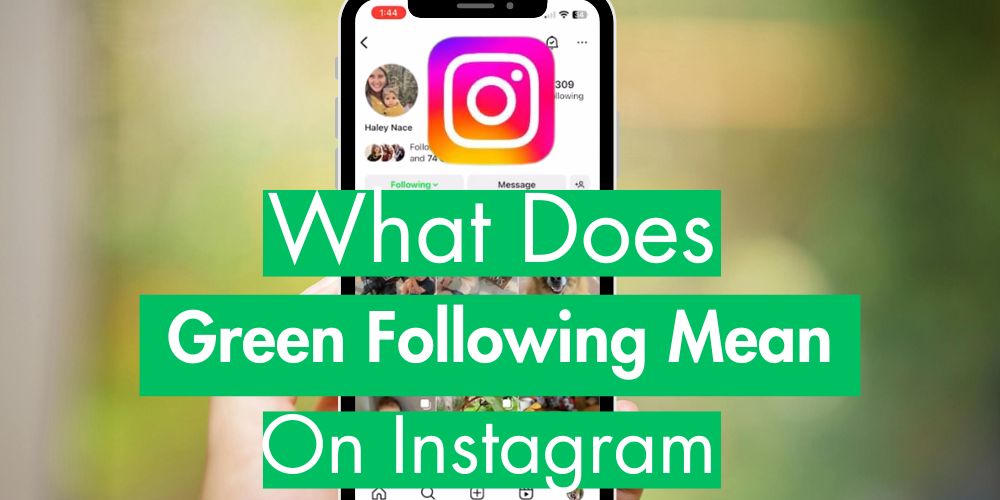
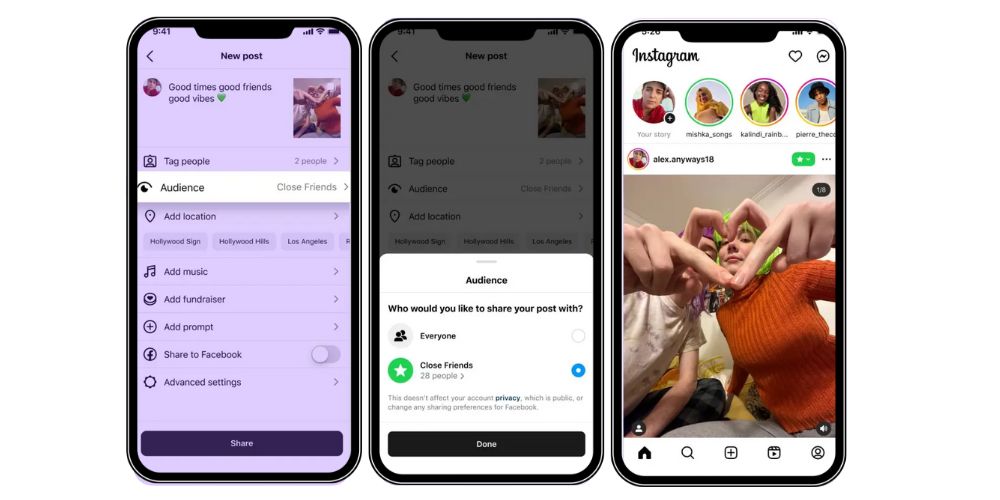
When someone shares a Close Friends Story (or CLFS Story), only the people included in their Close Friends List (CLFS list) can view it. These stories are visually marked with a green circle instead of the usual gradient circle, indicating they’re meant for a more intimate setting.
CLFS is not just a casual acronym — it’s become part of the Instagram lingo, widely understood among active users who crave more control over how they share personal moments.
Related: What Does Forward Mean On Instagram Story?
The Origin of ‘CLFS’
The Close Friends feature was rolled out by Instagram in response to a growing demand for more privacy within the Instagram community. With millions of Instagram users posting daily, the need for controlled visibility and exclusive content grew. Users wanted a way to:
- Share sensitive content without broadcasting it to all their followers
- Post inside jokes and personal moments to a select audience
- Offer special promotions or sneak peeks to their inner circle
Thus, in late 2018, Instagram introduced the CLFS feature, allowing users to create their Close Friends List and share stories visible only to that list.
Unlike regular stories, CLFS Stories are designed for complete control, where users decide exactly who sees what — without worrying about public exposure.
How to Create a Close Friends List on Instagram
Creating your own CLFS list is simple and intuitive. Whether you’re a casual user or a content creator aiming to build meaningful connections, here’s how you can set it up.
Step-by-Step Guide
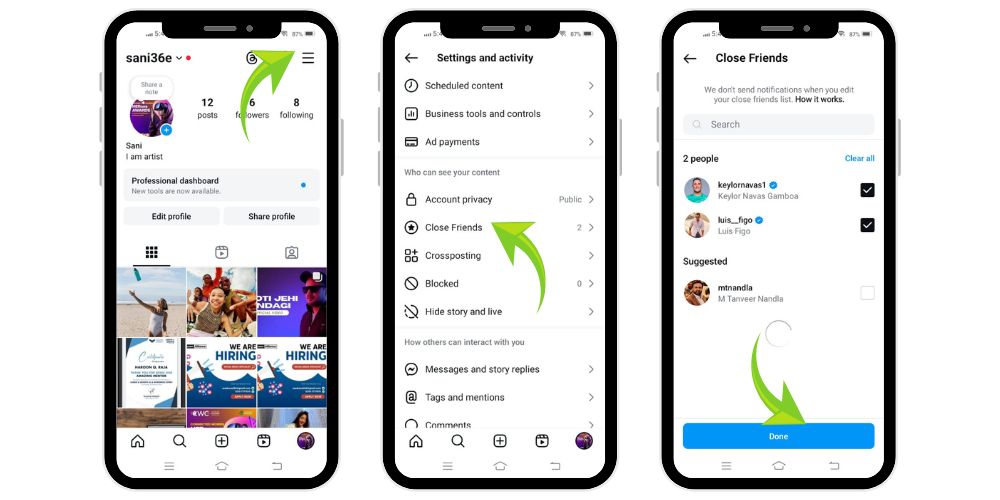
- Open Instagram: Tap on your profile picture at the bottom right of the screen.
- Access Menu: Tap the three horizontal bars (also known as the three lines) at the top right corner.
- Go to Settings: Scroll down and access the settings of your Instagram account.
- Select ‘Close Friends’: You’ll find this under the “Your Activity” section or search it using the search bar.
- Add People: Tap the circles next to the usernames you want to include in your list. You can use the search bar to find other Instagram users.
- Save Changes: After selecting your close pals, simply tap “Done” to save your list.
Additional Tips
- You can update your CLFS list at any time — add or remove users as your preferences evolve.
- People won’t be notified if you add or remove them, which allows you to curate your CLFS list freely.
- This list remains private; Instagram does not notify users if they are part of your CLFS.
Whether you’re sharing a private story, an intimate content piece, or exclusive stories for fans and friends, the CLFS tool empowers you with control.
💡 Pro Tip: Want to boost your post instantly? Buy 1,000 Instagram Follower for just $12.99 from a trusted service provider and increase your visibility.
5 Ways CLFS is Used on Instagram for Engagement Strategy
While many view Instagram’s CLFS feature (Close Friends) as a tool for private updates among friends, its use has expanded significantly in the realm of content creation, brand marketing, and audience engagement. Instagram users, especially creators and influencers, now leverage this feature as a strategic asset to build stronger relationships and drive user engagement. Here are five effective ways the CLFS list is being used across the Instagram community to connect more authentically and creatively.
1. Behind the Scenes Content
One of the most popular uses of CLFS is sharing behind the scenes content. Whether it’s the making of a video, the early stages of a product, or bloopers from a photoshoot, creators often use their Close Friends list to show what goes on beyond the polished Instagram post. This kind of intimate content fosters transparency and gives followers an inside look at the creative process. Not only does it humanize the creator, but it also builds trust and loyalty, showing fans what happens behind the curtain.
2. Sharing Stories with Inner Circle
Many Instagram users curate a select group of individuals — such as family members, colleagues, or collaborators — and reserve their CLFS for updates meant only for them. From life milestones to personal achievements, or even venting frustrations, CLFS enables users to share these moments in a private story format. This helps users avoid oversharing with a wider audience while maintaining meaningful connections with those in their inner circle. The green circle around the profile picture instantly signals that the story is intended for a closer connection.
3. Special Discounts and Promotions
Many brands and influencers use CLFS for marketing purposes by offering special promotions, exclusive stories, or early access to new products. For instance, a fashion brand might share a “CLFS-only” promo code or a sneak peek at a limited edition item. This creates a sense of exclusivity and makes followers feel like VIPs. It’s a smart tactic to reward loyal fans and drive engagement without cluttering the main feed with promotional content.
4. Testing New Content
Before launching new content to a wider audience, influencers often use their CLFS as a safe testing ground. They might try out a new editing style, caption format, or even get feedback on upcoming ideas. Since the CLFS audience is typically smaller and more trusted, it allows creators to gather authentic reactions without the pressure of public scrutiny. This approach not only sharpens content strategy but also makes followers feel involved in the content creation journey.
5. Sharing Private Moments
At its core, CLFS serves as a space for personal moments — photos from a quiet trip, emotional reflections, inside jokes, or lighthearted rants. Many active users find this more comfortable than sharing such content through direct messages or public stories. It preserves authenticity and offers a safe space for vulnerability, a refreshing contrast in a landscape often dominated by curated perfection.
Using CLFS this way turns Instagram into a more personalized experience, aligned with the users’ desire for selective sharing and closer connections.
Related: What Does It Mean When It Says “Instagram User”?
Using CLFS Responsibly: 7 Important Tips
Using Instagram’s CLFS feature wisely helps build trust, respect boundaries, and foster genuine, positive connections within your close circle.
- Understand the Purpose: CLFS stands for “Close Friends” and is meant for sharing content with a select audience. Use it to build genuine connections, not to boost ego or create exclusivity for attention’s sake.
- Respect Privacy: Only post content that respects both your and others’ boundaries. Avoid sharing sensitive or personal material that could make someone uncomfortable.
- Be Selective: Carefully choose who you add to your CLFS list. Adding people just for status or aesthetics can dilute the intimacy of the feature.
- Stay Authentic: Avoid feeling pressured to curate a perfect image. Be yourself, and share moments that genuinely reflect who you are.
- Avoid Gossip or Shade: Don’t use CLFS to indirectly target or gossip about others. This breaks trust and promotes negativity.
- Engage Thoughtfully: Respond to CLFS stories with kindness and care. Remember, these are personal moments shared in trust.
- Spread Positivity: Use CLFS to uplift, inspire, and strengthen your connections with meaningful, light-hearted, or supportive content.
Final Thoughts
The CLFS feature is one of the most impactful additions to Instagram in recent years. In a world where many Instagram users struggle to balance visibility with privacy, CLFS delivers the best of both worlds. It offers a space to share personal moments, foster closer connections, and support user engagement without compromising control.
If you haven’t started using your Close Friends List, now is the time. Your Instagram experience will become more focused, engaging, and authentic — exactly what the platform was meant to be.
FAQs
Can Others See Your Close Friends List on Instagram?
No. Your CLFS list is completely private. Only you can view or modify it. Even people you add won’t know unless they spot a green circle around your Instagram story.
How Can I Tell if I’m on Someone’s Close Friends List?
If someone shares a CLFS story, it appears with a green ring around their profile picture. That’s the only way to tell you’ve been added to their Close Friends list.
Can Instagram Notify Users if Their Close Friends Story is Screenshotted?
Currently, Instagram doesn’t notify users when someone takes a screenshot of their Close Friends Story. Still, always consider the sensitive content shared and respect user privacy.
How Can I View Someone’s Close Friends Story Discreetly?
You can’t. Instagram shows all viewers, even for CLFS stories. If you view a story, your name will appear in the list. Attempting to view discreetly violates platform trust and ethics.
How Many People Can I Add to My CLFS?
There’s no strict limit — but it’s designed for a small group. Most people add 10–30 people, but you can go higher if needed. Just ensure it remains meaningful and curated.