In today’s digital world, Instagram is a platform millions rely on to share their moments, connect with friends, and express themselves. But sometimes, users take a break or step away by deactivating their accounts. So, what does a deactivated account on Instagram mean, and how can you tell if someone has truly left the app—or if they’ve blocked you? This article dives deep into the signs, differences, and best practices for understanding and managing deactivated Instagram accounts.
📈 Ready to revive your profile? Buy Instagram Followers and Boost Instagram Views from BuySocialMediaMarketing to build instant momentum!
What Is a Deactivated Instagram Account?
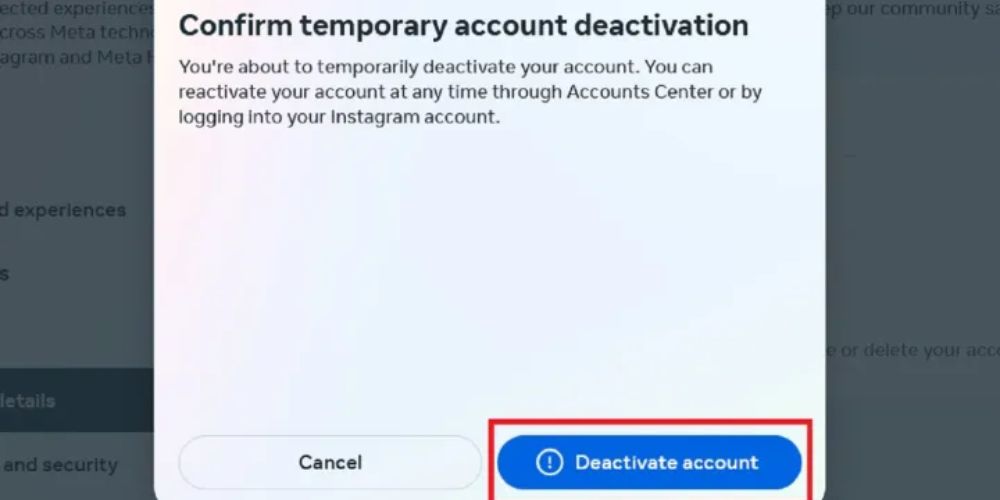
A deactivated Instagram account is one that a user has temporarily disabled. When someone taps Deactivate Account from the Account Ownership section within the Accounts Center, their profile, photos, likes, and comments become hidden from everyone else. However, their data is preserved, meaning they can reactivate the account later simply by logging back in.
This feature is helpful for users who want to take a break from social media without permanently deleting their profile and all personal details.
Differences Between Deactivated, Deleted, and Blocked Accounts
It’s easy to get confused when a profile suddenly disappears from your Instagram. Did they block you, delete their account, or just deactivate it for a while? Understanding the difference between these actions can help you figure out what’s really going on.
1. Deactivated Accounts
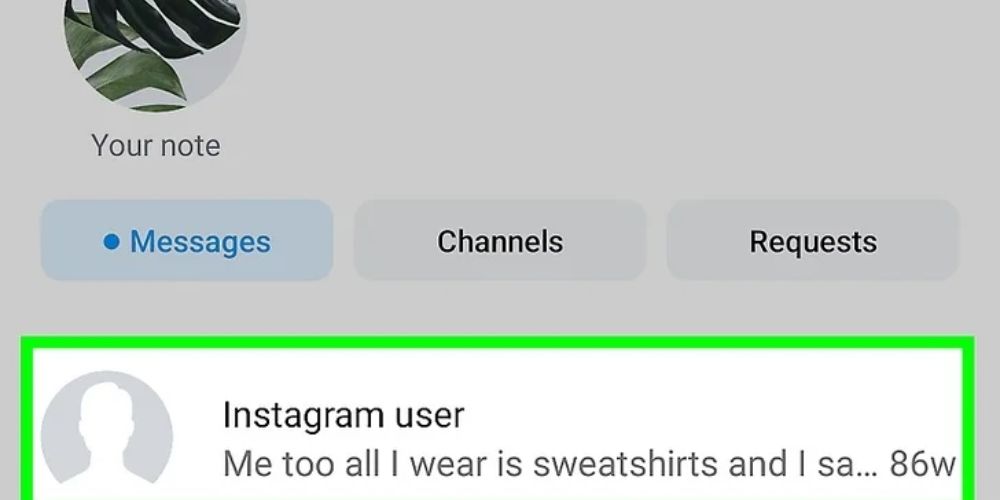
When someone deactivates their Instagram account, their profile becomes invisible, their posts and comments disappear, and you won’t be able to search for their username. However, if you had a chat with them in Direct Messages, their name will change to “Instagram User”, and you can still read your past conversations. The account is not gone forever—it can be reactivated anytime just by logging in.
2. Deleted Accounts
A deleted account is permanently removed from Instagram. Just like deactivation, the profile, posts, likes, and comments vanish, and their username won’t show up in searches. But unlike deactivation, you won’t even see their name in old DMs—they will be completely erased from your chat history. Once deleted, the account cannot be recovered.
3. Blocked Accounts
When someone blocks you, their profile becomes invisible to you only—others can still see it. You won’t be able to search their username or view their content. However, your previous DMs with them may still be visible under their old name or as “Instagram User.” The key difference is that their account is still active, just hidden from you, and blocking can be reversed anytime by the person who blocked you.
5 Steps to Check If Someone Has Deactivated Their Instagram Account:
Want to know if someone deactivated their Instagram? These simple steps will help you confirm whether they’ve left the platform, deleted their account, or possibly blocked you.
1. Profile Search
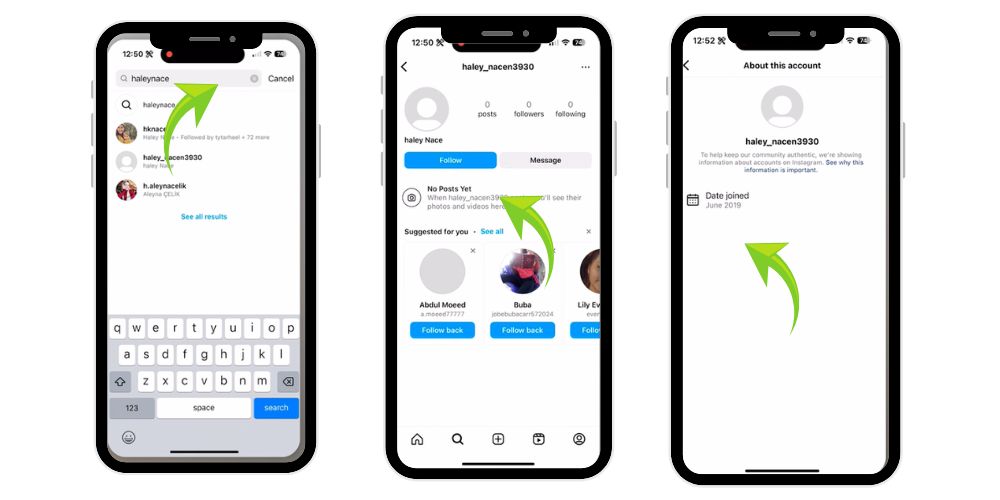
Start by searching for the person’s username directly in the Instagram app or browser. If the profile picture, posts, and account do not appear and you’re sure of the correct username, it may be deactivated, deleted, or you may be blocked.
Tip:Use a friend’s account or a browser in incognito mode to search. This removes the guesswork if you’ve been blocked.
2. Direct Messages (DMs)
Visit your Direct Messages. If their account was once in your DMs but now shows as Instagram User, and the profile picture is gone with no active messages, chances are the account has been deactivated or deleted.
3. Comments and Likes
Look for any old comments or likes on your posts from that person. If the username now reads “Instagram User” and the profile photo is missing, it may indicate that the account is temporarily disabled.
4. Ask a Friend to Check
Ask a trusted friend to look up the same profile. If the friend can still access the profile, but you can’t, it likely means you’ve been blocked. If no one can find it, the person probably deactivated or deleted the account.
5. Review Their Tag or Mentions
If you’ve ever tagged the person in your photos or stories, tap on their username in that tag. If the link leads nowhere or says “User not found,” it adds weight to the theory that the account is deactivated.
💡 Pro Tip: Give your post the jumpstart it needs! Grab 100 real Instagram likes for only $2.99 and boost your visibility instantly.
What Are the Signs That Someone Has Deactivated Their Instagram Account?
Here are some key signs that may indicate someone has deactivated their account on Instagram:
- Username Disappears from Search: When you search their exact username and it no longer shows in search results, the account may be deactivated or deleted.
- DM Name Changes to “Instagram User”: In your chat list, their name appears as “Instagram User,” and you can’t open their profile from the conversation anymore.
- Missing Profile Picture: Their profile photo is gone, replaced with a blank icon, suggesting the account is no longer active or visible publicly.
- No Visible Activity: All their posts, likes, and comments are no longer visible anywhere on Instagram, indicating the profile may be hidden.
- Profile Link Shows “Page Not Found”: Visiting their profile link leads to a “Page Not Found” or “User Not Available” screen, often meaning the account is deactivated.
How to Block Someone on Instagram?
Blocking someone is easy. Here’s how to do it:
- Go to the person’s profile.
- Tap the three dots in the top right corner.
- Scroll down and select “Block.”
- Tap Block again to confirm.
Blocked users cannot view your posts, stories, or message you anymore. Their presence will be completely hidden from you, and vice versa.
How to Confirm If You’ve Been Blocked?
If you suspect a block, here’s how to be sure:
- Try to visit their profile from another Instagram account.
- Search for their username from a non-logged-in browser.
- If you can see their profile from other sources but not yours, you’ve likely been blocked.
- Use the “three dots” on a profile and tap “Report” or “Block” to test visibility.
Managing Your Own Account Visibility
If you’re planning to take a break from Instagram, you have two clear options: Deactivation or Deletion.
Deactivate Your Account
To temporarily hide your activity without losing data:
- Go to Accounts Center > Personal Details > Account Ownership and Control.
- Tap Deactivation or Deletion.
- Select Deactivate Account and tap Continue.
- Choose a reason, enter your password, and confirm.
Your profile, posts, and comments will be hidden but saved for when you decide to return.
Delete Your Account
To permanently remove your Instagram presence:
Follow the same steps, but choose Delete Account instead.
This will erase all your content, including posts, comments, messages, and followers.
Note: Instagram may take up to 30 days to permanently remove all your data.
Why Bother Removing Deactivated Followers?
At first glance, you may suppose that having inactive or deactivated followers doesn’t really matter. After all, they’re not doing any harm—right? But in reality, these silent, non-participating users can significantly impact the performance and growth of your Instagram account.
Here’s why it’s worth cleaning them out:
1. They Don’t Interact with Your Posts
When someone deactivates their account, they’re no longer able to like, comment, view stories, or engage in any way with your content. This means your posts are receiving fewer real-time interactions, which weakens your overall engagement rate. Engagement—such as likes, saves, comments, and shares—is one of the top signals Instagram uses to push content forward in the algorithm.
2. They Lower Your Overall Reach and Visibility
Instagram’s algorithm favors accounts with high engagement ratios. If you have a large followers list full of deactivated or inactive accounts, your content may be shown to fewer real followers. This lowers your chances of being seen on the Explore Page, in hashtag feeds, or even within your own followers’ timelines.
In short, inactive accounts are “dead weight” that drag down your profile’s performance.
3. They Make Your Profile Appear Less Active to Instagram’s Algorithm
The algorithm is designed to detect user behavior patterns. If your content is consistently ignored by a big chunk of your audience, Instagram assumes your content isn’t interesting or relevant—and as a result, it becomes less likely to be promoted.
How to Remove Deactivated Followers
- Go to your Followers list: Open your Instagram profile and tap on the “Followers” count to see the full list.
- Tap on the suspected account: Select the follower you think is inactive or deactivated.
- Check for signs of deactivation: If their profile shows “User Not Found,” no profile picture, or zero posts, the account is likely deactivated.
- Remove the follower: Tap the three dots in the top-right corner of their profile and choose “Remove Follower.”
- Use Instagram’s built-in cleanup tool: Go to your Following list and tap “Least Interacted With” to find and remove users who don’t engage with your content.
Instagram’s Deactivated Users Feature
Many users hope for a simple way to track who has deactivated their Instagram accounts—but unfortunately, Instagram doesn’t offer any such feature.
There’s no tool inside the followers list that identifies inactive accounts or those who have disabled their profiles.
Some third-party apps claim to do this, using signs like:
- Missing profile pictures
- Zero activity
- No recent posts or interactions
⚠️Warning:These apps may require full access to your account and can lead to being flagged or even banned by Instagram.
“A Thoughtful Pause, Not a Goodbye”
Taking a temporary break from Instagram can be helpful, especially when life feels overwhelming. Whether you’re cleaning your space, looking to grow your brand, or just need time away—Instagram allows you the freedom to pause without losing everything.
So, the next time you notice a profile disappear, don’t panic. There’s a good chance they’re just recharging offline—just like you might someday too.
💡 Pro Tip: More views = more chances to go viral. Start strong with 100 Instagram Reel views for only $0.99.
Wrapping Up
Deactivating an Instagram account is a personal decision, often made for mental health, productivity, or simply taking a break from social media. Whether it’s you or someone else who’s stepped back, understanding the signs and knowing how to handle these accounts is crucial.
By learning how to detect, manage, and remove deactivated users, you gain more control over your Instagram presence. Whether you’re trying to guess if you’ve been blocked, or you’re cleaning up your followers list, this guide provides the tools and clarity you need.
FAQs
What happens when you deactivate an Instagram account?
When you temporarily deactivate your Instagram account, everything linked to it—your profile, photos, comments, and likes—becomes hidden from public view. Your account won’t appear in searches, and others can’t interact with your content. Once you log back in, all your information and activities are fully restored, just like before.
How do you know if someone deactivated Instagram or blocked you?
If a profile is completely gone and cannot be found from any account, it likely means the user deactivated or deleted their Instagram. However, if the profile still appears without posts or is only inaccessible from your account, chances are you’ve been blocked. Use another account to confirm the situation.
What does it mean when someone deactivates their account on Instagram?
Deactivating an Instagram account means the user has temporarily taken themselves off the platform. Their profile and content become invisible, and they won’t appear in searches or messages. This break is reversible—once they log back in, everything is restored, allowing them to pick up right where they left off.
What do people see when you deactivate Instagram?
When you deactivate your Instagram account, others won’t be able to see your profile, posts, likes, or comments. Your username becomes unsearchable, and your digital footprint temporarily disappears. To others, it’s as if your account no longer exists—until you choose to return and reactivate your presence.
Q5: Can you reactivate a deactivated Instagram account?
Yes, reactivating a deactivated Instagram account is simple. Just log in using your existing username and password. All your previous content, followers, comments, and likes will reappear instantly. It’s a seamless way to resume your Instagram activity whenever you’re ready to return to the platform after a break.