Ever looked someone up on Instagram and noticed they’re no longer there? No posts, no profile, like they just slipped off the radar overnight? Then comes the question — did they block you, deactivate their account, or delete it completely?
It’s easy to misread the signs. Being blocked feels personal. Deactivation usually isn’t. But knowing the difference between the two saves you from unnecessary confusion and helps you understand what’s really happening behind that “Instagram User” tag in your DMs.
This guide explains everything you need to know about what deactivated accounts mean on Instagram, how to tell if someone deactivated or blocked you, what happens when an account goes inactive, and how to check it step by step.
More followers, more saves, and automatic likes create long-term growth that helps you build authority and attract organic engagement faster.
Deactivated Accounts Mean on Instagram
When someone deactivates their Instagram account, they are temporarily hiding their profile, photos, videos, followers, and interactions from everyone. It’s like switching your Instagram presence to “invisible mode.”
Their profile disappears, and no one — not even mutual friends — can access their page, posts, or stories. However, all the account’s data (like messages, comments, and photos) remain safely stored on Instagram’s servers until the person decides to log back in again.
This action is different from deleting or blocking:
- Deactivation = Temporary break. The user can return any time.
- Deletion = Permanent removal of the account and data.
- Blocking = Restricting a specific user’s access while keeping your profile visible to others.
So when an account is temporarily deactivated, it doesn’t mean the person is gone forever. It usually means they’re taking a social break, dealing with privacy concerns, or resolving an issue such as being flagged or restricted by Instagram’s algorithm.
Related: What Does DPMO Mean on Instagram?
What Happens When Someone Deactivates Their Instagram Account?
When a user deactivates their Instagram account, everything related to their profile becomes hidden from public view. Let’s break down what actually happens:
1. Profile Disappears
Their username, profile picture, bio, and posts vanish from search results. If you try visiting their profile link, Instagram shows an error message such as “Sorry, this page isn’t available.”
Even if you were following them, their name will no longer appear in your followers list.
2. Content Is Hidden
Their posts, stories, highlights, and reels are temporarily removed from Instagram’s feed and tagging sections. Any previous comments and likes they made remain in the count but their name disappears until they log in again.
3. DMs Remain, But Details Don’t
If you had previous conversations in Direct Messages (DMs), the chat remains in your inbox. However, instead of their real name and profile photo, you’ll see “Instagram User” with a blank avatar.
You can still read past messages, but you can’t send new ones until they reactivate.
4. Stories Vanish
Any Instagram Stories, including saved highlights, become inaccessible during the deactivation period. Once they reactivate, stories don’t automatically return since they’re time-limited.
5. Tags and Mentions Get Hidden
Their username will be removed from old tags and mentions. In posts or comments where they were tagged, the username becomes unclickable until they reactivate.
6. All Data Stays Safe
Deactivation doesn’t delete anything. Their photos, followers, messages, and profile details remain stored safely on Instagram’s servers. When they log back in using their username and password, everything returns exactly as before.
Note: Instagram allows deactivation only once per week. If they log back in and deactivate again too soon, they’ll see an error and need to wait.
How To Check if Someone Deactivated Their Instagram Account
Instagram doesn’t notify you when someone deactivates their account. But you can still find out using a few easy checks inside the Instagram app, browser, or your DMs.
1. Check “Deactivated Accounts” in Your Followers List
Instagram’s latest versions (2024–2025) now show a small section for Deactivated Accounts in your followers or following list.
Steps:
- Open your Instagram app.
- Go to your profile and tap Followers.
- Scroll and look for the section titled Deactivated Accounts.
- If their profile appears there with a grayed-out profile picture with no post yet, it confirms they’ve deactivated their account.
This method works only if you’re connected (they followed you or vice versa). If not, try other methods below.
Search in the Instagram App or Browser
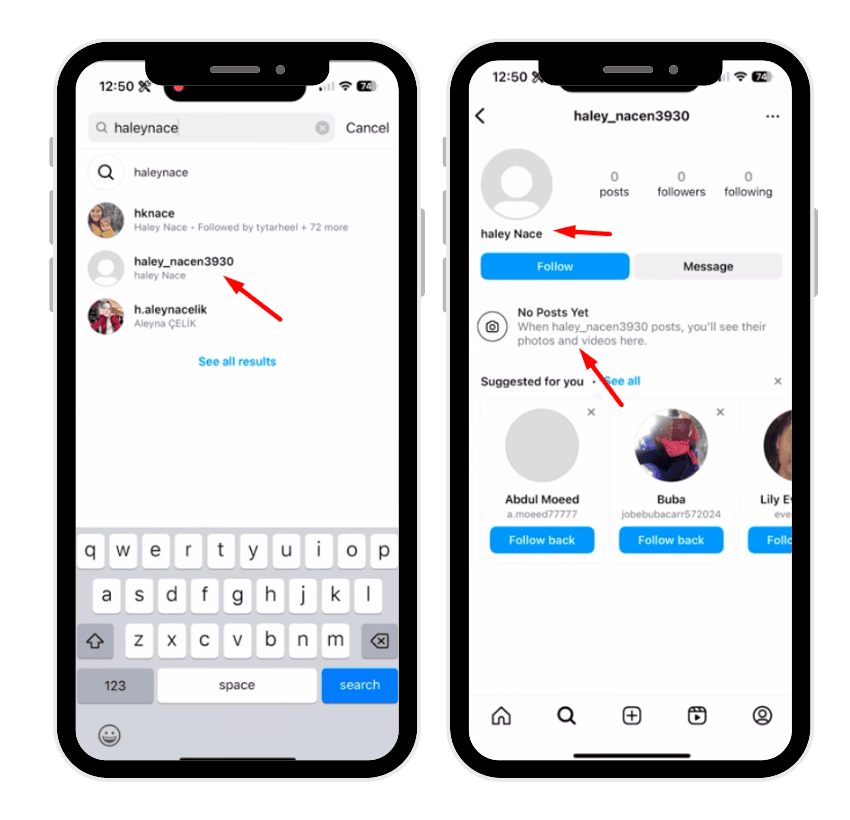
Type their exact username in the Instagram search bar.
- If nothing shows up, it could mean they’ve deactivated, deleted, or blocked you.
- To confirm, search their username from another Instagram account (a friend’s or a second account you own).
Possible outcomes:
- The account doesn’t appear for anyone → they deactivated or deleted it.
- The account appears for others but not for you → you’re blocked.
You can also check using a browser:
- Open https://instagram.com/username in Incognito mode.
- If you get a “Page not available” message even when logged out, it’s either deactivated or deleted.
Check Your DMs (Direct Messages)
If you’ve chatted with that person before, the chat history can reveal what happened.
- Open Instagram Direct Messages.
- Search their old chat.
You may see one of the following:
- Their name replaced with “Instagram User” → account temporarily deactivated.
- No profile picture and can’t click their name → also deactivated.
- Chat completely disappeared or says “deleted” → permanently deleted account.
Ask a Mutual Friend
Sometimes the simplest way to check is to ask a mutual friend to search the profile.
- If they can see it → you’re likely blocked.
- If they can’t → the person probably deactivated or deleted their account.
Differences Between Blocked vs. Deactivated Instagram Accounts
The primary difference between being blocked and someone deactivating their account lies in visibility and intent.
| Feature | Blocked Account | Deactivated Account |
|---|---|---|
| Visibility | Profile visible to others but hidden from you | Profile invisible to everyone |
| Messages | Old DMs remain but you can’t send new ones | DMs show “Instagram User” |
| Search Results | Only you can’t find them | Nobody can find them |
| Mutual Friends’ View | Others can still visit their profile | No one can see the profile |
| Tagged Posts | Your tags may vanish only for you | Tags vanish for everyone |
| Reason | User intentionally blocked you | User took a break or hid their profile |
| Duration | Permanent until unblocked | Temporary until reactivated |
In short:
- Blocked → Personal and selective.
- Deactivated → Universal and temporary.
So, if you suddenly can’t access someone’s profile, don’t assume the worst. They might just be taking a digital break.
How to Deactivate Your Own Instagram Account
If you want to take time off social media without losing your data, you can easily temporarily deactivate your Instagram account.
Here’s how to do it:
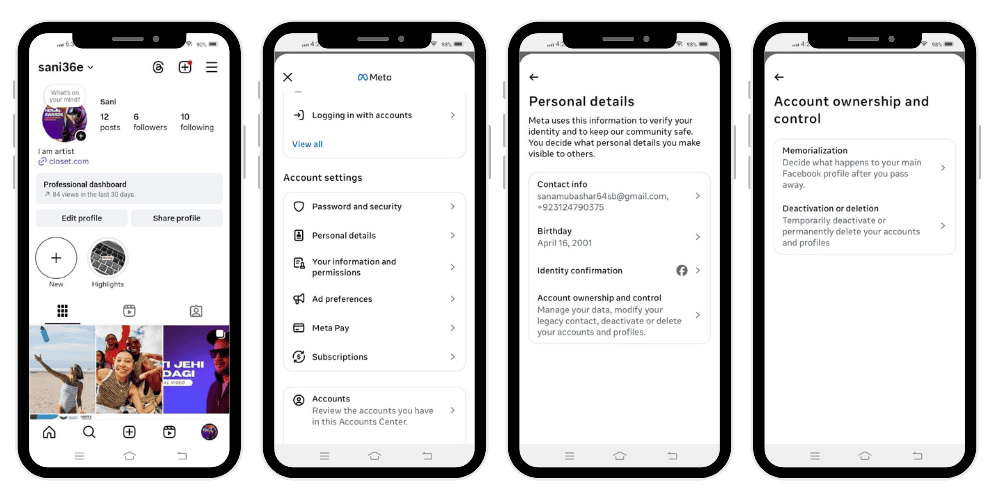
- Log in to your Instagram account from a computer or mobile browser (not the app).
- Visit your profile page.
- Click the account centre from setting.
- Go to personal details.
- Now go to Account ownership details.
- Scroll down and select Temporarily deactivate my account.
- Choose a reason from the drop-down menu and enter your password.
- Tap Temporarily Deactivate Account to confirm.
Once you do this:
- Your profile, photos, comments, and likes become hidden.
- You can reactivate anytime simply by logging back in.
This is perfect for users who want to step away from the app without losing followers, posts, or memories.
💡 Pro Tip: Improve Instagram growth by boosting comments that help your posts gain trust and interaction.
How To Tell if Someone Deleted Their Account (Not Just Deactivated)
While deactivation is reversible, deletion is not. Here’s how to tell the difference:
1. Search for Their Username
If the account is permanently deleted, the username becomes available for reuse (after some time).
Try searching again after a few days — if the handle is now available or used by someone else, it means the account was deleted.
2. Check From Multiple Accounts
If the person’s profile is invisible to everyone, it could be either deactivated or deleted. But if several weeks pass and the profile never returns, deletion is the likely scenario.
3. Look at Old Messages
In your DMs, if the chat shows “Instagram User”, it might be deactivated.
If the chat completely disappears or shows an error when loading, that usually means permanent deletion.
4. Profile Link Behavior
Try visiting https://instagram.com/username.
- If it shows “Page not available” for months — probably deleted.
- If it comes back after a week — it was deactivated.
Reasons Why People Deactivate Their Instagram Accounts
There are plenty of reasons someone might temporarily deactivate their Instagram account:
- Taking a Break: They might want to disconnect from social media noise or focus on personal life.
- Mental Health: Many users deactivate to reduce anxiety, comparison, or social burnout.
- Privacy Concerns: People often hide their profiles during sensitive times (like job searches or relationship issues).
- Account Maintenance: Some deactivate temporarily to manage content or fix issues.
- Algorithm Reset: Influencers sometimes pause their accounts to “reset” how Instagram’s algorithm delivers their posts.
- Flagged or Restricted Accounts: Instagram may temporarily deactivate accounts that are flagged for suspicious activity or spam.
Can You Message a Deactivated Instagram Account?
No. Once someone deactivates, you cannot send new messages to them.
You’ll still see your old chat history, but the message bar will be disabled. The person’s name changes to “Instagram User,” and their profile photo disappears.
When they reactivate, your messages will reappear normally, and they’ll receive any pending DMs you sent before deactivation.
How Long Can an Instagram Account Stay Deactivated?
Instagram doesn’t set a time limit for how long you can stay deactivated. You can leave your account inactive for months or even years.
However, Instagram may permanently remove inactive accounts after extended inactivity (especially if they’re empty or flagged as bots).
To keep your account safe:
- Log in once in a while.
- Keep your email and password updated.
- Avoid violating Instagram’s terms of service.
What Happens When You Reactivate?
When you log back into a temporarily deactivated Instagram account, everything returns to normal instantly.
You’ll get:
- All your followers and following lists back.
- Posts, reels, stories, and comments restored.
- Access to messages and likes.
- Your username and hashtags re-linked.
It’s like hitting the unpause button — no data lost, no penalty applied.
Troubleshooting Common Instagram Deactivation Issues
Sometimes, users experience errors like “Something went wrong” when trying to deactivate or reactivate their accounts. Here’s what to check:
- Update the app before attempting.
- Use a web browser (not the app) for deactivation.
- If Instagram flags your account, wait 24–48 hours.
- Clear cache and cookies if the “page not available” error persists.
- Check email verification — unverified emails may prevent access.
Related: What Does “Unexpected Exception” Mean on Instagram?
How to Reactivate a Deactivated Instagram Account
When you temporarily deactivate your Instagram account, all your data (photos, followers, messages, etc.) stays safely stored. To reactivate, all you need to do is log back in.
Here’s how 👇
Step 1. Open Instagram
- Launch the Instagram app on your phone or go to instagram.com in your web browser (on a computer or mobile).
- Make sure you’re using the latest version of the app if you’re on Android or iPhone.
Step 2. Log In With Your Credentials
- Enter your username, email, or phone number, and password.
- Tap “Log In.”
✅ Once you log in successfully, your Instagram profile will automatically be reactivated.
All your:
- Photos
- Followers
- Comments
- Likes
- Reels
- DMs (Direct Messages)
will return exactly as before — nothing lost.
Step 3. (If You See an Error or Can’t Log In)
Sometimes users face an issue that says “Something went wrong” or “Error, try again later.”
Here’s what to do if that happens:
- Wait at least 24 hours.
- Instagram only allows one deactivation per week.
- If you deactivated and reactivated too soon, you might get a temporary login restriction.
- Use a web browser instead of the app.
- Go to instagram.com on Chrome, Safari, or Firefox.
- Try logging in there.
- Reset your password.
- Tap “Forgot password?” on the login page.
- Enter your email or username to get a password reset link.
- Clear app cache (on mobile).
- Go to Settings → Apps → Instagram → Storage → Clear Cache.
- Then reopen Instagram and try again.
- Check if your account is suspended or disabled by Instagram.
- If your account was flagged or restricted, you’ll see a message when trying to log in.
- In that case, follow the on-screen appeal instructions.
Step 4. Verify Your Account (if asked)
If Instagram suspects suspicious activity, it might ask for:
- Email or phone verification, or
- 2-step authentication (if enabled).
Simply follow the on-screen prompts to confirm your identity.
💡 Pro Tip: Never worry about slow engagement. Automatic likes make sure your content gets attention and trust immediately.
Final Thoughts
Understanding what deactivated accounts mean on Instagram helps clear confusion when someone’s profile suddenly disappears.
A deactivated Instagram account means the user has stepped away for a while — not blocked you or deleted their presence. You can confirm it through your followers list, search results, or chat history.
The key takeaway:
- If you see “Instagram User” — they likely deactivated.
- If others can see the profile but you can’t — you’re blocked.
- If everything’s gone permanently — it’s deleted.
So next time a profile vanishes from your feed, don’t jump to conclusions. Maybe they just hit pause to take a break — something we all need once in a while.
FAQs
1. What does “Instagram User” mean in my DMs?
It usually means the person has temporarily deactivated or deleted their account. If their messages remain but their profile photo is blank, it’s likely a deactivation.
2. Can I still tag a deactivated Instagram account?
No. Deactivated accounts are invisible to everyone. Tags, mentions, and hashtags linked to their username become inactive until they reactivate.
3. Can I see a deactivated Instagram profile through mutual friends?
No. Once deactivated, the account is hidden from all users, including mutual friends. Only after reactivation will it reappear.
4. Will I lose followers if I deactivate my Instagram account?
No. Your followers list remains intact. Once you log back in, all your followers and following will be restored automatically.
5. What’s the difference between temporarily deactivated and permanently deleted?
- Temporarily deactivated = Account hidden, recoverable anytime.
Permanently deleted = Account removed forever with all data erased.