Instagram Reels continue to dominate the platform in 2026, becoming one of the most popular formats for entertainment, education, and marketing. From viral trends to valuable tutorials, it’s no surprise that many users want to download Reels from Instagram to watch offline, save for inspiration, or reuse in content planning.
However, downloading Instagram Reels isn’t always straightforward. In this updated 2026 guide, you’ll learn how to download a Reel from Instagram, the safest methods available, legal considerations, and tips to save Reels without losing quality, whether for personal use or business purposes.
Key takeaways
- Instagram does not offer a direct way to download other users’ Reels inside the app.
- In 2026, you can only officially save Reels to your account using the bookmark feature for later viewing.
- To download a Reel to your device, most users rely on third-party tools or apps.
- You should always respect copyright and creator rights when downloading or reusing Reels.
BuySocialMediaMarketing boosts Instagram reel views so your videos appear more engaging and attract followers who value your content.
Can You Download a Reel from Instagram?
Short answer: not directly from the Instagram app, at least not Reels posted by other users.
Instagram does not currently allow users to download other people’s Reels to their devices. The platform offers a Save feature (the bookmark icon) that lets you save Reels to a private collection in the app. However, this does not store the video offline or on your phone.
Most Instagram Reels downloaders do not require users to log in or provide login details, and you can download Instagram Reels videos without an Instagram account. This means you can easily download Instagram Reels videos using online tools without needing to log into Instagram or share any personal information.
If you want to download Instagram Reels for offline viewing, reposting, or editing, Instagram limits downloads mainly to protect creator rights and prevent unauthorized reuse of content, but it is possible, and I will show you!!
How to Download Reels from Other Accounts
Before downloading any Reel, it’s important to respect copyright and creator ownership. Downloading for personal use is generally acceptable, but reposting or commercial use requires permission or proper credit.
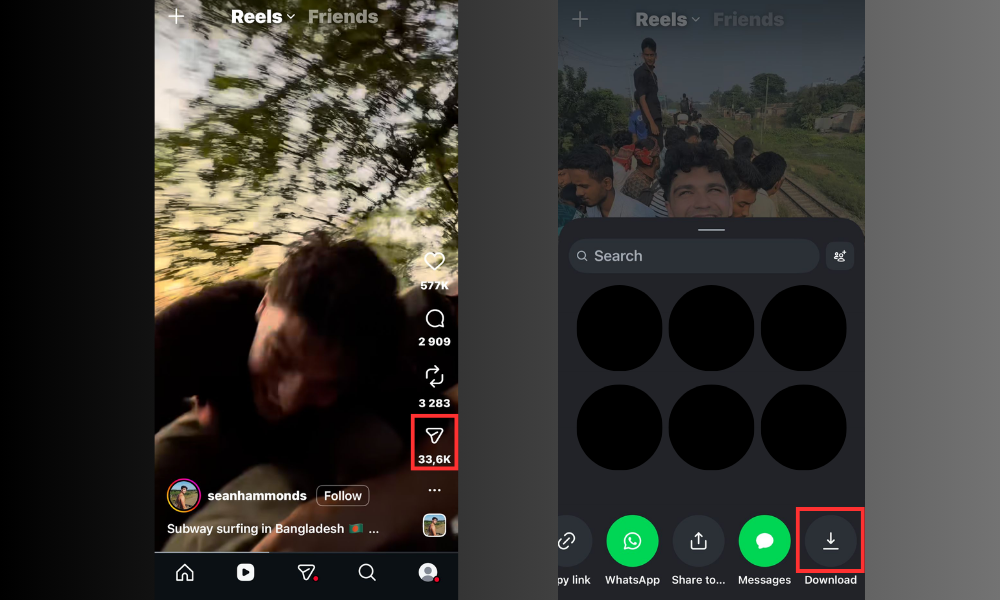
Official Workarounds
Instagram allows you to:
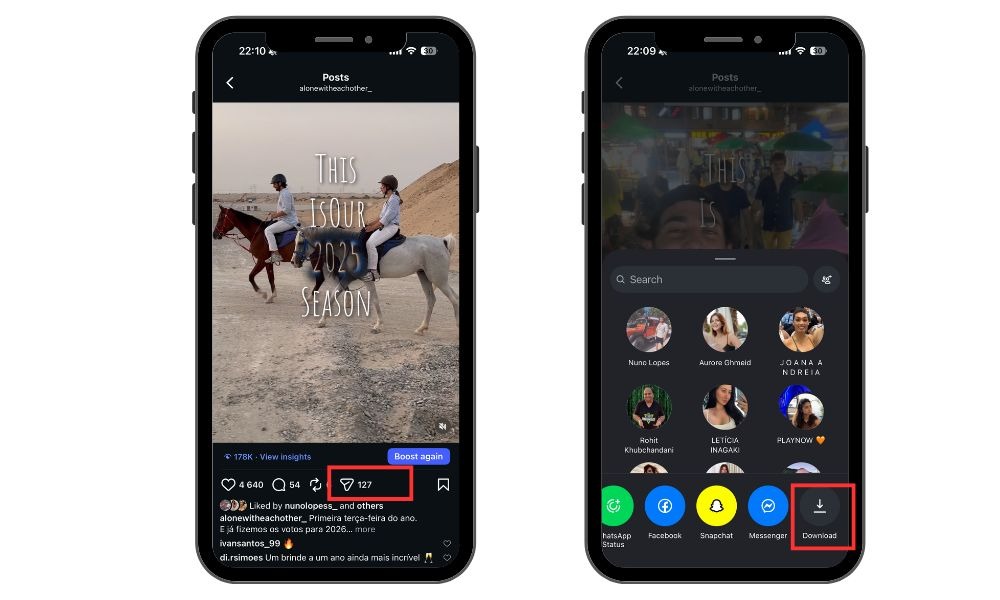
- Go to your Reel
- Tap the Arrow
- Select Download
Using Third-Party Instagram Reel Downloaders
To actually download a Reel from Instagram, many users rely on browser-based tools or mobile apps known as Instagram Reel downloaders. An Instagram downloader is a web-based service that allows you to easily save Instagram Reels, videos, and photos without watermarks by simply entering the content URL.
General steps:
- Open Instagram and copy the link of the Reels video you want to save.
- Paste the copied link into the input field of a trusted Reel downloader website or app, such as SnapInsta or SaveInsta, and click the download button.
- Choose video quality (if available).
- Download and save the video to your device.
This process can be completed in just three simple steps. Downloaded Instagram Reels videos are typically saved to the default downloads folder of your device.
Many Instagram Reels downloaders automatically remove watermarks from downloaded videos, providing a clean viewing experience.
Always avoid tools that:
- Ask for your Instagram login
- Require unnecessary permissions
- Compress videos heavily or add watermarks
Related: Does Instagram Notify When You Screenshot a DM? Guide 2026
Removing Watermarks
One of the most requested features when downloading Instagram Reels is the ability to save videos without watermarks. Many Instagram Reels video downloaders now offer this option, allowing users to download high quality reels videos that look clean and professional.
By choosing a completely free tool that supports high-quality downloads, you can easily save Instagram Reels without any distracting watermarks, making your downloaded content perfect for personal use or further editing. This feature is especially valuable for creators who want to repurpose reel videos or use them in new projects.
Related: What Does Sticker Taps Mean on Instagram Story
Downloading Reels for Business Use
Businesses often download Instagram Reels for marketing research, inspiration, or reposting across platforms. However, this comes with extra responsibility.
When supporting campaigns, it’s important to use high-quality images and photos in campaign briefs to streamline collaboration with influencers. High-quality downloads ensure the best viewing experience for business use.
Legal Considerations
- Downloading for internal analysis or inspiration is usually fine
- Reposting requires crediting the original creator
- Commercial use may require explicit permission
Best Practices for Brands
- Use downloaded Reels for trend analysis
- Repost only with permission or proper attribution
- Avoid altering content in misleading ways
When done correctly, downloaded Reels can support campaigns, Stories, or educational content.
Benefits of Downloading Instagram Content
There are plenty of reasons why users choose to download Instagram Reels and other Instagram content. First, downloading Reels videos lets you access your favorite moments offline, so you can watch without worrying about internet speed or data limits.
For content creators, using an Instagram Reels downloader is a great way to build a personal library of inspiring reels, track trends, and gather ideas for future posts. Brands and businesses can also benefit by downloading reels from competitors to analyze what’s working in their niche, helping them create more engaging Instagram content.
With a reels downloader, you can download Instagram Reels directly to your device’s gallery, making it easy to organize, review, and share videos whenever you need. Whether you’re looking to create, learn, or simply enjoy, downloading Instagram content puts you in control of your reels experience.
If your Instagram Reels aren’t getting enough reach, use BuySocialMediaMarketing trusted Instagram services. Their safe, algorithm-friendly methods help boost real followers, views, and likes, giving your content the visibility it deserves.
Tips to Save Instagram Reels Without Losing Quality
If you want to save Instagram Reels offline without sacrificing video quality, follow these tips:
- Choose downloaders that support HD or the original resolution
- Avoid apps that re-encode or compress videos
- Download over a stable Wi-Fi connection
- Store files in original formats (MP4 preferred)
When downloading multiple Reels, organize them by theme or trend to make content planning easier.
Related: How to Add Captions to Instagram Reels: 4 Steps
How to Save Your Own Reels
Saving your own Reels is much easier and fully supported by Instagram.
Before Posting
- Create your Reel
- Enable “Save to device” in advanced settings
- Post the Reel
After Posting
- Go to your Reel
- Tap the Arrow
- Select Download
iOS vs Android differences:
Some Android devices allow more direct saving options, while iOS may require screen recording in certain cases. Always check your device settings for video quality preferences
Growing Your Instagram with Saved Reels
Saved Reels aren’t just for offline viewing—they’re powerful tools for growth. By using a free, user-friendly service to download and analyze Reels, you can easily study top-performing content and connect with creators for inspiration.
You can:
- Analyze trending formats and audio
- Plan future content based on high-performing Reels
- Repurpose ideas while keeping originality
When combined with analytics and posting strategies, saved Reels help you stay ahead of trends.
To accelerate results, many creators pair this strategy with engagement tools. BuySocialMediaMarketing helps boost visibility through real likes, views, and followers, making sure your Reels reach the right audience faster. Saving, analyzing, and reposting smartly works even better when your content already has momentum.
Related: What Does External Link Taps Mean on Instagram?
Final Thoughts
Downloading Instagram Reels in 2026 is still possible, but it requires the right tools and responsible usage. While Instagram doesn’t allow direct downloads for other users’ content, third-party tools and official saving options offer practical solutions. Ads support some free Instagram Reels download services, but these ads do not intrude on the user experience.
Always prioritize safety, legality, and respect for creators. When used strategically, downloaded Reels can support content planning, trend research, and business growth. Combine these methods with smart posting strategies and engagement tools to maximize your Instagram presence, such as Instagram views, comments, and likes.
FAQ
How can I download a Reel from Instagram?
Instagram doesn’t allow direct downloads, but you can use trusted third-party tools or save Reels inside the app for later viewing.
Can I download Reels from other users?
Yes, using external tools. However, always respect copyright and credit the original creator when reposting.
Is it legal to download Instagram Reels?
Downloading for personal use is generally fine. Reposting or commercial use requires permission or proper attribution.