When managing an Instagram account, especially a business account or creator account, understanding how your audience interacts with your content is crucial. Among the many Instagram metrics available, one of the most telling is External Link Taps. This metric gives valuable insight into how effectively your Instagram profile, stories, and posts are driving website traffic outside the Instagram app.
So, what exactly does “External Link Taps” mean on Instagram, how do you find it, and how can you use it to improve your Instagram strategy? Let’s break it down in detail.
Expand your reach with video views, reposts, and saves to ensure your content spreads across Instagram and attracts new audiences.
Understanding External Link Taps on Instagram
External link taps represent the number of times users click a link that directs them outside Instagram. This could be the link in your bio, a link sticker in your stories, or other external call-to-action buttons like “Email,” “Call,” or “Directions.”
Simply put, this key metric tells you how many users were interested enough in your content to leave Instagram and visit your external link — a clear sign of engagement and conversion intent.
There are several categories under External Link Taps in Instagram Insights:
- Profile Link Taps: The number of times users click the website link in your Instagram profile bio.
- Link Sticker Taps: The number of times users tap a link sticker in your Instagram story.
- Other External Taps: Includes clicks on buttons like “Call,” “Email,” or “Get Directions” on your business account.
Why External Link Taps Matter
For brands, creators, and marketers, external link taps are one of the most valuable insights within Instagram analytics. They measure action-oriented engagement — users aren’t just scrolling; they’re clicking, showing real interest in what you’re offering.
Here’s why this key metric is important:
- It measures intent: A user tapping your link is likely interested in your product, blog, or offer.
- It drives conversions: The goal of many social media strategies is to convert followers into customers, and this is the first step.
- It reflects content performance: If your posts or stories generate high link taps, your content is resonating with your audience.
- It complements Google Analytics: You can compare data between Instagram Insights and Google Analytics to accurately measure referral traffic.
Related: What Does the Dotted Circle Mean on Instagram DM?
Where to Find External Link Taps in Instagram Insights
To see External Link Taps, you’ll need a professional account — either a Business Account or Creator Account. Personal accounts don’t have access to advanced Instagram analytics.
Here’s how to access Instagram Insights:
- Switch to a Professional Account (if you haven’t already):
- Go to your Instagram profile.
- Tap the menu (☰) → Settings and Privacy → Account type and tools → Switch to professional account.
- Access Insights:
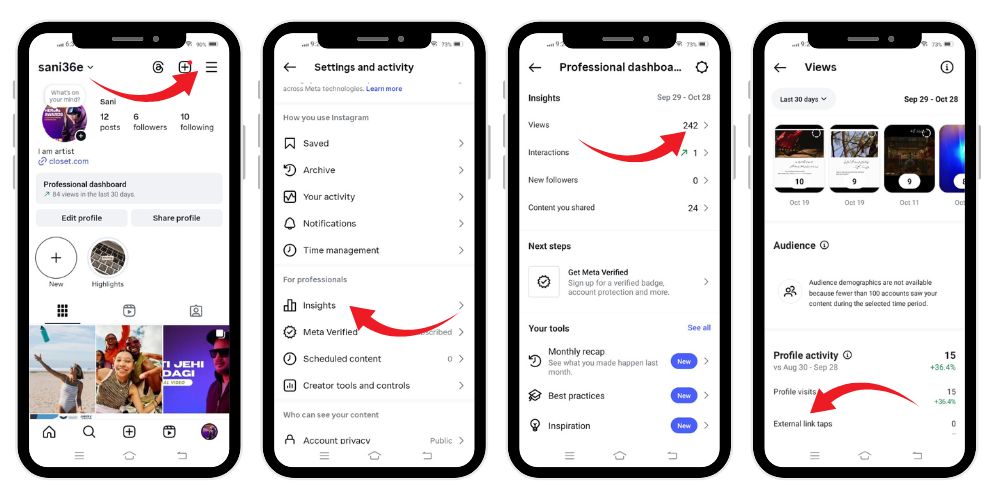
- Open your profile and tap Professional Dashboard or View Insights under a specific post or story.
- Locate External Link Taps:
- For your profile: Go to Profile setting→ look for “Insights→go to “views” scroll and find “external link taps”.
- For stories: Open the story → swipe up → under Interactions, check Link Sticker Taps.
- For posts or reels: Tap View Insights to see overall performance metrics like accounts reached, content interactions, and profile visits.
Breakdown of External Link Tap Metrics
Let’s look closer at the different types of link taps and what they reveal:
a. Profile Link Taps
This shows how many users clicked the link in your bio. It’s one of the most reliable ways to measure website traffic generated directly from your Instagram profile.
If you use tools like Linktree, Beacons, or Shorby, you can also track how many users clicked specific external destinations.
b. Link Sticker Taps
If you post regularly on Instagram stories, this metric is vital. It shows how many people tapped the link sticker you added.
Since stories disappear after 24 hours (unless saved as highlights), tracking this helps you understand which active stories generate the most audience interactions.
c. Business Address Taps and Contact Buttons
For business accounts, Instagram also tracks business address taps, call button taps, and email taps. These external link taps show users are interested in connecting directly — a key sign of conversion potential.
Interpreting External Link Taps
The raw number of external link taps only tells part of the story. To get real valuable data, you must interpret it in the context of your other Instagram metrics such as:
- Profile Visits: How many users visited your profile before clicking your link?
- Follower Growth: Did your new followers contribute to an increase in link clicks?
- Accounts Reached: How many unique accounts viewed your content?
- Engagement Rate: High engagement but low link taps might indicate strong content but weak call-to-actions.
- Content Interactions: Comparing likes, saves, comments, and link taps gives a full picture of how your audience interacts with your posts.
For instance, if you had 500 profile visits and 50 link taps, your conversion rate from profile visits to external link clicks is 10%. This kind of valuable insight helps you adjust your content strategy and optimize your bio to drive more clicks.
Comparing External Link Taps with Other Instagram Metrics
External Link Taps work best when analyzed alongside other Instagram Insights data. Here’s how they compare:
| Metric | Purpose | Helps You Understand |
|---|---|---|
| Profile Visits | Number of users visiting your profile | Interest in your account |
| Accounts Reached | Total unique Instagram accounts reached | Reach and visibility |
| Content Interactions | Likes, comments, saves, shares | Overall engagement |
| External Link Taps | Clicks on external links | Traffic and conversion potential |
| Follower Growth | Change in follower count | Audience retention and growth |
| Average Watch Time (Reels) | Duration users watched your video | Content engagement depth |
| Business Address Taps | Clicks on your address | Local discovery effectiveness |
Combining these key metrics gives you a complete picture of how your Instagram efforts perform and how your audience interacts with your content.
💡 Pro Tip: More reposts equal more recognition. Improve your Instagram presence by making your content appear widely shared.
Using External Link Taps to Improve Instagram Strategy
Knowing your external link tap count is just the start. The real power comes from applying this Instagram data to strengthen your social media strategy.
Here’s how:
- Optimize Your Bio Link: Make sure your Instagram profile link leads users to a meaningful destination — your latest offer, a new blog post, or your main website page. Update it regularly and use tracking tools to see what performs best.
- Create Stronger Call-to-Actions: Encourage users to “Tap the link in bio” or “Swipe up” in stories. A clear call-to-action (CTA) increases link taps and drives traffic.
- Use Engaging Story Stickers: Use Instagram story stickers effectively — polls, questions, and link stickers can increase story interactions and encourage clicks.
- Analyze What Works: Compare individual Instagram posts and stories. Check which specific post or active story drove the highest link taps. Use historical data to identify trends.
- Post Consistently: Scheduling and maintaining a consistent posting rhythm helps boost visibility. Tools like Meta Business Suite or Later let you schedule posts strategically to reach your target audience.
- Combine With Google Analytics: By comparing Instagram Insights with Google Analytics, you can accurately measure how many visitors came from Instagram and what actions they took after leaving the platform.
How to Access External Link Taps for Different Content Types
Here’s a quick guide to accessing Instagram Insights for each content format:
a. For Individual Instagram Posts
- Tap the post → View Insights
- Scroll down to see Profile Visits, Accounts Reached, and Interactions.
- If users clicked your bio link after viewing that post, the data will reflect in overall External Link Taps.
b. For Instagram Stories
- Open your story → Swipe up → Tap View Insights
- Check metrics like Link Sticker Taps, Next Story, Exits, and Replies.
- These story interactions reveal which stories are most effective in driving website traffic.
c. For Instagram Reels
- Tap the Reel → View Insights
- You’ll see Plays, Likes, Shares, Comments, and Average Watch Time.
- While reels don’t have direct clickable links, they indirectly drive profile visits and eventually external link taps through curiosity or interest.
d. For Your Profile Overall
- Go to your Professional Dashboard → Account Insights
- Tap Profile Activity to view Website Taps, Email Taps, and Business Address Taps.
Using External Link Taps to Understand Your Audience
Analyzing external link taps also helps you learn more about your audience demographics and preferences. You can identify:
- What type of content creation leads to more clicks
- Which demographic groups (age, gender, location) engage most with your links
- Whether your non followers or unique users are converting
- How your total followers interact versus unique Instagram accounts reached
This insight allows you to refine your content performs analysis and target the right audience more effectively.
External Link Taps vs. Engagement Rate
While engagement rate measures likes, comments, shares, and saves, external link taps focus on actions beyond Instagram.
Both are essential — engagement shows content resonance, while link taps reveal conversion intent.
An ideal Instagram performance strategy balances both: creating posts that encourage interaction and motivate users to click through.
Tips to Increase External Link Taps
Before diving into practical strategies, it’s essential to focus on proven techniques that can effectively increase your external link taps on Instagram.
- Add a Compelling Hook: Use captions that naturally guide users to your bio link.
- Leverage Reels and Stories: Use Reels metrics and Story Insights to identify what drives most clicks.
- Highlight Offers: Exclusive discounts, freebies, or new launches encourage external link engagement.
- Keep Links Updated: Regularly change your bio link to reflect your latest campaign.
- Use Visual CTAs: Arrows, emojis, or “Tap Here” stickers draw attention in stories.
- Pin Key Posts: Pin posts that mention your link in bio to maintain visibility.
Related: What Does Deactivated Accounts Mean on Instagram?
Tracking Long-Term Instagram Performance
One of the biggest advantages of using Instagram Insights is the availability of historical data. Over time, you can track:
- Growth in external link taps
- Fluctuations in follower count
- Changes in engagement rates
- Patterns in accounts reached and profile visits
This helps you see whether your Instagram efforts are paying off and if your content strategy aligns with your digital marketing goals.
Common Reasons for Low External Link Taps
If your link clicks seem lower than expected, consider these issues:
- Weak Call-to-Action: You’re not asking users clearly enough to click.
- Irrelevant Link: The external page doesn’t match your content theme.
- Limited Reach: Low accounts reached or poor visibility of posts.
- Inactive Followers: Your total followers may not represent an engaged audience.
- Algorithmic Drop: Temporary Instagram breaks or algorithm changes can reduce reach.
Solving these problems requires tweaking your content strategy, experimenting with formats, and continuously monitoring post insights.
How Businesses Use External Link Taps
Brands use external link taps to measure marketing performance, especially for campaigns aiming to drive traffic or boost conversions.
For example:
- E-commerce stores track taps to product pages.
- Bloggers monitor clicks leading to their latest articles.
- Local businesses watch business address taps and call button clicks for in-store visits.
These valuable insights help brands allocate resources efficiently and measure ROI from social media activities.
Final Thoughts
Understanding what external link taps mean on Instagram goes beyond numbers — it’s about understanding how your audience engages with your brand beyond the app.
By studying this key metric alongside accounts reached, profile visits, follower growth, and engagement rates, you can fine-tune your content creation and digital marketing strategies.
External Link Taps are more than clicks; they’re proof that your audience trusts your content enough to explore further. When analyzed through Instagram analytics and combined with Google Analytics, they become a powerful indicator of success in your social media strategy.
Keep tracking, keep testing, and keep creating — because every tap tells a story of interest, engagement, and connection beyond Instagram.
💡 Pro Tip: Impressions boost discoverability. Increase them to make your content appear more active and engaging.
FAQs
1. Can you see who taps your link on Instagram?
No, Instagram doesn’t show exactly who tapped your link. You can only view the total number of external link taps through Instagram Insights, helping you measure engagement without revealing specific users’ identities or personal information.
2. What is add external link in Instagram?
Adding an external link on Instagram means placing a clickable URL in your bio, story, or post that directs users outside the app—commonly to websites, online stores, or blogs for traffic and conversion tracking.
3. What is external link tap in Instagram?
An external link tap occurs when someone clicks a link in your bio, story, or button leading outside Instagram. It’s tracked in Instagram analytics to measure how well your profile or content drives external traffic.
4. What does external link taps mean on Instagram reels?
Instagram reels themselves don’t contain clickable links, but they can influence external link taps indirectly. When users enjoy a reel, they may visit your profile and tap the bio link, increasing overall external link clicks.5. What does external link taps mean on Instagram story?
External link taps on an Instagram story refer to the number of times viewers tap the link sticker you added. This metric shows how effectively your story drives traffic to websites or external platforms.