If your Instagram account is suspended, you’re not alone. Many users wake up one morning, try to log in, and see an error message saying their account has been disabled or temporarily suspended. This can feel frustrating and confusing, especially if you don’t know why it happened.
When your Instagram account is suspended, it means the platform has temporarily restricted access to your profile due to suspected violations of Instagram’s Community Guidelines or Terms of Service. The suspension may also occur because of suspicious activity, use of third-party apps, or automated tools that mimic spam-like behavior.
This guide explains everything about Instagram account suspension—why it happens, how long it lasts, how to recover your account, and how to avoid future issues.
Drive engagement through impressions, likes, and saves that keep your content visible and relevant in the Instagram algorithm longer.
Quick Answer
When you see a message that your Instagram account is suspended, it means the platform has detected something unusual or a potential violation. Instagram suspends accounts either temporarily or permanently, depending on the severity of the issue.
A temporary suspension usually lasts a few hours to several days, while permanent bans or permanent suspensions happen when there are repeat violations or severe breaches of Instagram’s guidelines.
The platform relies heavily on automated systems to detect unusual activity or content that may go against community guidelines. Sometimes, this can result in your account being suspended for no reason, even if you haven’t knowingly broken any rules.
Common Reasons for Instagram Account Suspension
Instagram takes platform integrity seriously. Whether you’re a business, influencer, or casual user, violating platform policies can lead to your account being suspended. Below are the most frequent reasons.
1. Violating Instagram’s Community Guidelines
Instagram’s community guidelines are the foundation of the platform’s trust. Posting content that promotes hate speech, graphic violence, or misinformation can lead to an account suspension.
Examples include:
- Sharing violent or offensive Instagram posts
- Using abusive or harassing language in comments
- Spreading false or harmful information
If Instagram decides your posts or stories violate its standards, your account may be temporarily suspended or even permanently disabled.
2. Copyright Infringement
Using someone else’s music, photos, or videos without permission can result in copyright infringement claims. Instagram often disables or suspends accounts that repeatedly share copyrighted content without proper rights.
This applies even if you credit the creator—Instagram requires either explicit permission or licensed usage rights.
3. Suspicious Activity and Unauthorized Logins
If Instagram detects suspicious activity, such as multiple login attempts from different countries or devices, your account may be temporarily suspended to protect it.
This security measure prevents hackers from gaining control of your social media accounts.
To restore access, Instagram may ask you to verify your identity, reset your password, or enable two-factor authentication.
4. Using Third-Party Apps or Automated Tools
Many Instagram users try to grow their followers or engagement through third-party apps or automated tools that like, comment, or follow accounts automatically.
While these services seem harmless, they violate Instagram’s guidelines. Using them can trigger account suspension because they mimic spam behavior.
If detected, your account may face a temporary suspension, and repeated offenses can result in permanent bans.
Related: What Does FNF Mean on Instagram?
5. Spam or Bot-Like Activity
Posting or commenting excessively in a short time can look suspicious. Instagram’s automated systems monitor accounts for spam-like behavior, such as:
- Posting the same comment on multiple posts
- Following or unfollowing hundreds of accounts in one day
- Sending repetitive messages or sharing content aggressively
Such automated behavior can lead to your account being suspended.
6. Hacked or Compromised Accounts
Sometimes, Instagram suspends accounts that appear to be hacked or compromised to prevent further misuse. If your account is behaving strangely—posting unfamiliar content or messaging unknown users—it could be flagged automatically.
7. Inauthentic or Fake Behavior
Creating a fake profile, buying fake followers, or impersonating someone else violates Instagram’s community guidelines. The platform is strict about authenticity, and inauthentic behavior often leads to account suspensions.
What to Do If Your Instagram Account Is Suspended
When your account is suspended, stay calm and follow these steps carefully. The review process can take a few days, but following the correct procedure increases your chance of recovery.
1. Check Your Email and App Notifications
Instagram usually sends an email to the registered address explaining why your account is suspended.
This email may include:
- The reason for the suspension
- The duration of the restriction
- A link to submit an appeal
You may also see an on-screen message when you attempt to log in.
2. Follow the On-Screen Instructions
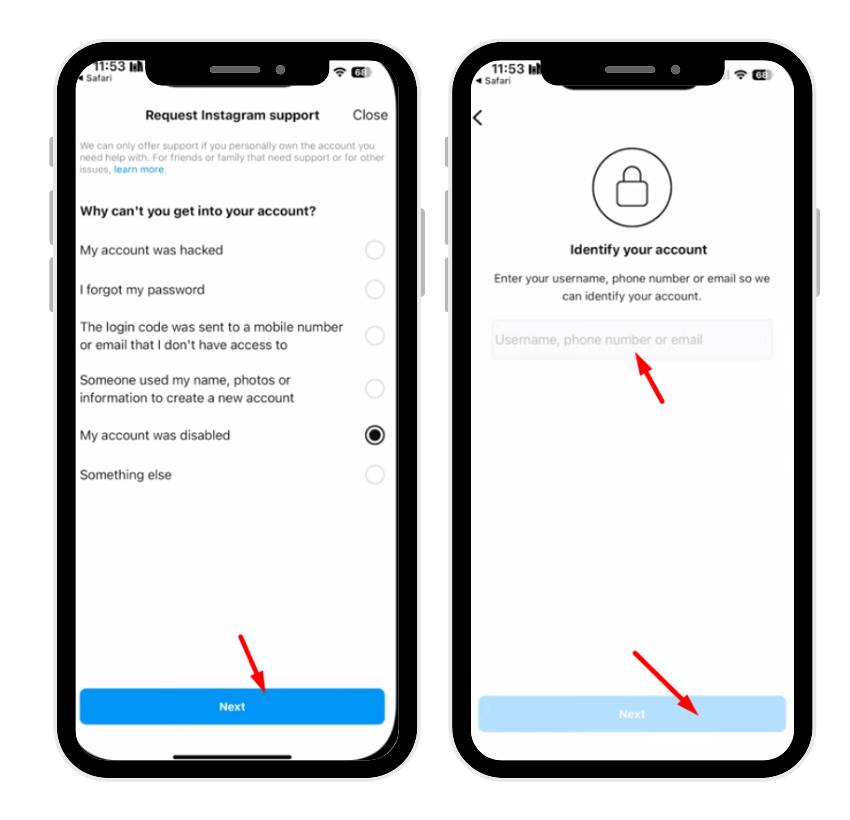
If you see a notice saying your account has been disabled, follow the on-screen instructions to appeal the decision. Instagram might guide you through steps to verify your identity or provide feedback on the suspension.
💡 Pro Tip: More impressions equal more reach. Increase them to grow faster and keep your posts performing well consistently.
3. Submit an Appeal
If you believe your account suspension was a mistake, you can submit an appeal using the Instagram Help Center.
Steps:
- Visit the Help Center on a browser.
- Go to the “My Instagram Account Was Deactivated” form.
- Fill in your username, email, and an explanation.
- Upload identification if requested.
- Wait for Instagram support to respond.
Be polite and factual when describing your case—avoid emotional or defensive language.
4. Secure Your Account
If your account was suspended because of suspicious activity, take immediate steps to secure it:
- Change your password to a new, strong one.
- Enable two-factor authentication for added security.
- Avoid third-party apps that access your Instagram account.
This ensures your account stays protected against future issues.
5. Be Patient
Once you’ve submitted an appeal, the review process may take a few days to a few weeks, depending on case complexity. Avoid multiple appeals, as they can slow down the process.
How Long Does an Instagram Suspension Last?
The duration of an Instagram suspension depends on the type of violation:
- Temporary suspensions: usually last from 24 hours to 30 days.
- Permanent suspensions: occur after repeat violations or serious offenses like impersonation or hate speech.
You’ll typically regain access after the restriction period ends—unless the account is permanently disabled.
How to Recover a Suspended Instagram Account
Here’s a step-by-step guide to recovering a suspended Instagram account:
- Step 1: Check Your Email: The suspension notice usually contains a link to recover or appeal. Carefully read it before proceeding.
- Step 2: Visit the Help Center: Go to the Help Center via your browser and open the “My Instagram Account Was Deactivated” page. Fill out the form with correct details.
- Step 3: Verify Your Identity: Instagram may ask for proof of identity, such as a government-issued ID. This helps confirm that you’re the legitimate user of the suspended account.
- Step 4: Wait for a Response: After submission, the review process begins. You may get updates via email. Avoid logging into your account repeatedly—it doesn’t speed up recovery.
- Step 5: Appeal Again if Necessary: If your first appeal fails, you can try multiple appeals (spaced a few days apart). Sometimes, Instagram support re-evaluates cases with new information.
Instagram Account Suspended Appeal Process
The appeal process is designed to give users a fair chance to explain their situation. If your first appeal doesn’t succeed:
- Provide more details or documents proving your identity.
- Reference specific parts of Instagram’s guidelines that support your argument.
- Stay professional in tone.
In rare cases, if your account holds business value (linked to a Facebook Page or brand), you can contact Meta Business Support directly.
Instagram Account Suspended for No Reason
Many users face the frustrating situation of finding their Instagram account suspended for no reason. This usually happens because:
- Automated systems mistakenly flagged your posts or behavior.
- You logged in from a new device or unusual location.
- Temporary technical errors occurred.
In such cases:
- Review platform policies to ensure compliance.
- Secure your account immediately.
- Use the appeal form to explain the situation clearly.
- Be patient; Instagram often resolves false suspensions within a few days.
How to Appeal Instagram Account Suspension: 5 Simple Steps
- Check If You Can Log In: Some temporary suspensions allow you to log in but limit actions.
- Submit an Official Appeal: Use the provided link or Help Center form.
- Verify Your Identity: Upload an ID if requested.
- Follow Up If You Hear Nothing: Wait a few days before resubmitting.
- Accept the Outcome: If the appeal fails, you may need to create a new account.
Related:What Does BMS Mean on Instagram?
How Long Do Instagram Appeals Take?
Typically, Instagram appeals take between 2 days and 2 weeks. However, response times vary depending on:
- Volume of appeals
- Type of violation
- Whether identity verification is required
Avoid submitting multiple appeals within short intervals—it can confuse the system and delay results.
Tips to Avoid Instagram Account Suspension
Protecting your Instagram account from suspension requires consistent care and responsible use. Below are nine practical tips to keep your account safe and compliant.
- Follow Instagram’s Rules: Always follow Instagram’s community guidelines and platform policies. Avoid posting hate speech, graphic content, or misinformation, as these are common causes of suspension.
- Avoid Automated Tools: Do not use third-party apps or automated tools for likes, follows, or comments. These violate Instagram’s terms and often trigger automated account suspensions.
- Use Strong Passwords: Create unique and complex passwords that include letters, numbers, and symbols. Regularly updating your credentials reduces the risk of hacking and suspicious activity.
- Enable Two-Factor Authentication: Adding two-factor authentication provides extra security by requiring a verification code during login, protecting your account from unauthorized access.
- Limit Repetitive Actions: Avoid spam-like behavior such as posting too frequently, repeating the same comments, or following and unfollowing accounts in bulk.
- Manage Multiple Accounts Safely: If you handle several profiles, use different devices or browsers. Managing too many accounts from one IP address can raise flags.
- Avoid Sharing Copyrighted Content: Only post photos, music, or videos you own or have permission to use. Reposting copyrighted material can lead to account suspension.
- Stay Authentic: Do not buy fake followers or impersonate others. Instagram prioritizes authenticity and removes inauthentic behavior.
- Review Instagram’s Guidelines Regularly: Instagram updates its rules periodically. Staying informed helps you avoid repeating violations and ensures your account remains active and secure.
Following these tips consistently protects your Instagram account from unnecessary suspensions and ensures long-term, safe engagement on the platform.
Recovering Access After a Temporary Suspension
Once the temporary suspension ends, you’ll regain access automatically. Before posting again:
- Review your past posts for potential violations.
- Delete content that may break community guidelines.
- Avoid repeating the same actions that led to suspension.
If your account is permanently disabled, the only option may be to create a new account and rebuild your audience organically.
The Role of Instagram Support
Instagram support handles millions of inquiries daily. While it can be slow, being respectful and precise in your messages improves your chances of recovery. Always communicate through official channels—avoid unofficial “recovery services,” as they often scam users.
💡 Pro Tip: More live views create stronger trust. Make your broadcasts look popular, engaging, and worth staying tuned to.
Final Thoughts
A suspended Instagram account can feel devastating, especially if you’ve spent years building your presence. But most suspensions are temporary and reversible if you act promptly.
By following Instagram’s community guidelines, using two-factor authentication, and steering clear of third-party apps, you can reduce the risk of losing access to your account again.
Always remember: Instagram suspends accounts not to punish users, but to protect the platform’s integrity and ensure a safe space for everyone.
If your account is suspended, take it as an opportunity to review your activity, learn from the mistake, and avoid repeating it in the future. With patience, the right steps, and consistent compliance, your Instagram account can be restored—and kept secure for good.
FAQs
1. Why is my Instagram account suspended again and again?
Repeated suspensions happen when you unknowingly violate Instagram’s community guidelines or use third-party apps that mimic spam activity. It can also result from automated systems mistakenly flagging your behavior. Review your activity, stop automation tools, and follow platform policies to prevent future suspensions.
2. How to recover a suspended Instagram account?
To recover, check your email for Instagram’s suspension notice, then follow the on-screen instructions or submit an appeal form through the Help Center. Verify your identity if required, wait a few days for review, and enable two-factor authentication after recovery to protect your account.
3. What to do if your Instagram account is suspended for no reason?
If your account is suspended for no reason, it may be a technical or automated system error. Review your posts for compliance, secure your account, and submit an appeal explaining the issue. Stay patient—Instagram support typically resolves false suspensions within a few days.
4. Why did Instagram suspend my account for 180 days?
A 180-day suspension usually occurs for repeat violations or serious offenses like hate speech, copyright infringement, or inauthentic behavior. Instagram may impose a long-term restriction before permanent disabling. You can appeal through Instagram support, but recovery depends on the severity of your violation.