Instagram frequently suggests accounts under the section “Who You Might Know”, leading many users to wonder how these suggestions appear and what they mean. Contrary to popular belief, this feature doesn’t indicate that someone has viewed your profile — instead, it’s a reflection of Instagram’s algorithm analyzing mutual friends, synced contacts, linked Facebook profiles, and your activity patterns.
This comprehensive guide explores what “Who You Might Know” means on Instagram, how these suggested accounts appear, what factors influence them, and how to control your visibility in such recommendations.
Expand your reach with video views, reposts, and saves to ensure your content spreads across Instagram and attracts new audiences.
Understanding the “Who You Might Know” Feature
“Who you might know” on Instagram refers to suggested users generated by Instagram’s suggestion engine. The platform uses complex algorithms powered by machine learning to identify potential connections based on your social network, shared interests, behavioral data, and mutual followers.
Instagram’s goal is to enhance your social media experience by connecting you with people you’re likely to know — whether they are old friends, colleagues from the same company, classmates from the same school, or people who share similar online behavior.
These suggestions appear in different areas:
- Under your Followers list as “Who you might know”
- In your Explore page
- Through push notifications suggesting you follow certain people
- On the Suggested for You section after following or unfollowing an account
So, when Instagram shows “Who you might know,” it’s not about profile visits or people stalking your account. Instead, it’s about fostering connections and engagement through data-based suggestions.
Related: What Does TTY Mean on Instagram?
How Instagram’s Algorithm Chooses Suggested Accounts
Instagram’s algorithm focuses on fostering meaningful interactions and building social circles. It analyzes different data points to generate personalized content and account suggestions. Below are the main factors that shape who you might know on Instagram.
1. Mutual Followers and Mutual Friends
One of the strongest signals comes from mutual followers. If you and another user share multiple mutual friends, the algorithm assumes you may know each other.
For instance, if many people you follow also follow a certain account, Instagram considers that a key influence for suggesting that person. This helps the platform expand your social network naturally, connecting you with potential connections through shared circles.
2. Synced Contacts and Connections from Your Phone
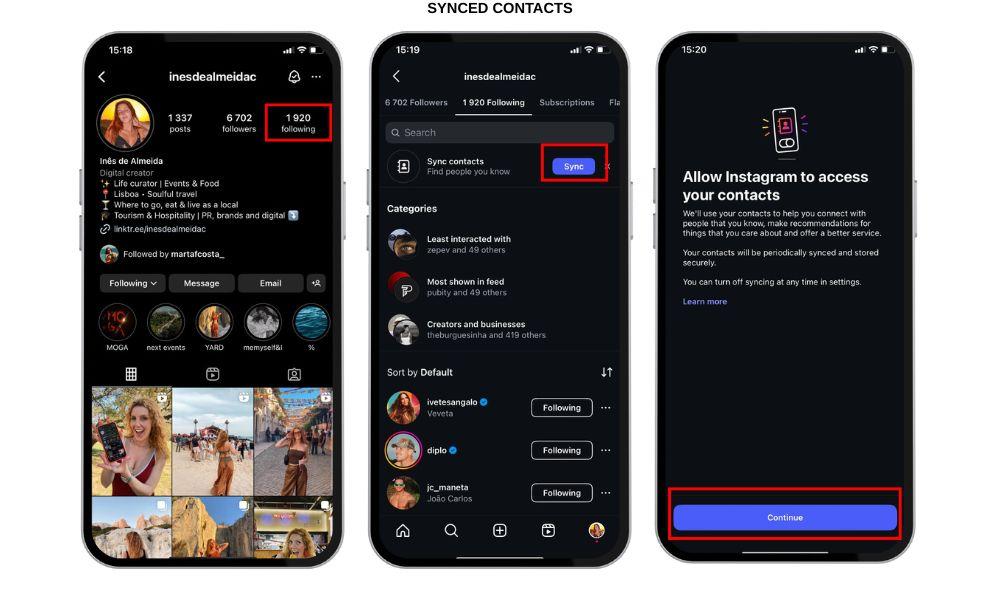
When you enable contact syncing on Instagram, the app gains access to your phone’s contacts. It then cross-references that data with registered social media accounts.
If someone from your phone contacts creates or uses an Instagram account, you may see them under “Who you might know.” Similarly, if they sync their contacts and your number is saved in their phone, your profile could appear in their suggested list.
Tip: If you don’t want Instagram to use your contact info, you can disable syncing in Instagram Settings > Account Center > Manage Contacts.
3. Linked Facebook Friends and Shared Meta Data
Since Instagram and Facebook operate under Meta, there is active data sharing between the platforms.
When your Facebook profile is linked to your Instagram account, the algorithm pulls information from both platforms — such as Facebook friends, group memberships, or pages you interact with.
That’s why you might see people you know from Facebook appearing in Instagram’s “Who you might know” list — even if you’ve never interacted with them on Instagram.
4. Shared Interests and Hashtag Behavior
Instagram analyzes your activity to find similar accounts — for example, people who like the same posts, use the same hashtags, or engage with content in similar niches.
If you regularly interact with fitness-related posts, the Instagram algorithm may suggest other users who also follow fitness accounts, creating a web of mutual connections through shared interests rather than direct relationships.
This process helps in building new connections beyond your immediate circle, fostering an ecosystem where users with similar interests can discover each other.
5. Behavioral Data and Engagement Patterns
Your Instagram activity— likes, comments, profile visits, follows, DMs, and saves — all play a role in shaping the suggestions you receive.
If you often check a particular person’s profile or like their posts, Instagram’s machine learning system notes that interaction. It may then show that person under “Who you might know.”
However, that doesn’t mean they’ve visited your profile. The system simply notices a pattern of content engagement and recommends other accounts with similar traits.
6. Same School, Workplace, or Company
Instagram identifies connections based on education or work networks. When multiple users list the same school or company in their Edit Profile section, the algorithm infers a shared environment.
This makes Instagram more efficient at connecting complete strangers who might have a real-world association but haven’t interacted online yet.
7. Interactions Across Other Platforms
Sometimes, the Instagram algorithm leverages your presence on other platforms under Meta’s ecosystem or even other linked apps. For example:
- Logging into Instagram using your Facebook credentials
- Connecting a business Instagram to a Facebook Page
- Using the same contact email or phone number on multiple social media accounts
These small integrations allow Instagram to build a broader picture of your social graph, helping it suggest possible connections.
💡 Pro Tip: Drive organic traffic with reposts that help your content travel beyond your page and reach untapped audiences.
What the “Who You Might Know” Feature Does Not Mean
Many users misunderstand this feature, assuming that “Who you might know” implies someone viewed their Instagram account or is “searching” for them.
Let’s clarify what it doesn’t mean:
- Not Profile Views: Instagram does not use profile visits as a factor for these suggestions. There is no public feature that reveals who viewed your account.
- Not Profile Stalking: A person appearing in your suggestions doesn’t mean they are stalking or searching for you.
- Not Third-Party App Data: Apps claiming to show who viewed your profile are unreliable and violate Instagram’s privacy policy.
According to Reddit discussions and sources like Stormlikes, Instagram’s algorithm focuses on connections and data patterns, not voyeuristic behavior.
How to Control or Limit “Who You Might Know” Suggestions
Although you cannot completely turn off Instagram’s account suggestions, you can reduce how often you see them and limit how frequently you appear in others’ suggestion lists. Here’s how to manage this feature for better Instagram privacy.
1. Turn Off Contact Syncing
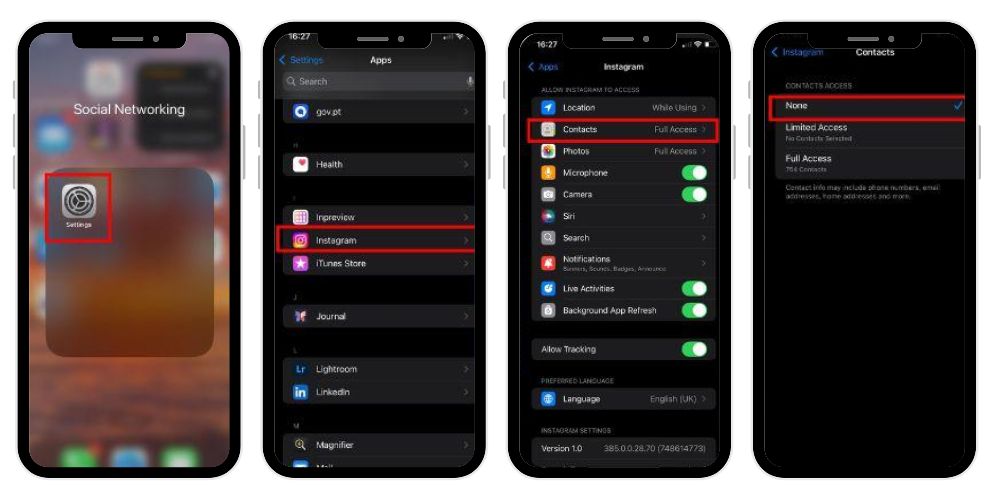
Contact syncing allows Instagram to access your phone’s address book to suggest connections. To stop this:
- Open your iPhone Settings and scroll down to find Instagram.
- Tap on it to open the permissions menu.
- Locate Contacts and switch the toggle Off.
- This stops Instagram from accessing your phone’s contact list and using it for friend suggestions.
Once disabled, Instagram stops accessing your synced contacts and removes contact-based recommendations from your suggestion list.
2. Unlink Your Facebook Account
If your Instagram account is connected to Facebook, you’ll see more Facebook friends under “Who you might know.” To reduce this:
- Open Settings → Accounts Center → Accounts.
- Remove or unlink your Facebook account.
This limits data sharing between platforms and reduces cross-platform suggested users.
3. Adjust Interactions and Search History
Your Instagram’s suggestions are shaped by how you interact with others. To minimize unwanted recommendations:
- Avoid following or engaging with accounts you don’t want suggested.
- Regularly clear your search history.
- Log out and back in to refresh the suggestion algorithm.
This helps the system reset and prioritize relevant connections over random ones.
4. Make Your Account Private
Switching to a private account gives you more control over your visibility. With a private profile:
- Only approved followers can see your posts.
- Your profile becomes less likely to appear in others’ suggested accounts.
To set your account to private:
- Tap your profile icon (bottom right).
- Tap the three lines.
- Go to Settings and Privacy → Account Privacy → Enable Private Account.
You can also turn off “Show similar account suggestions” from your Edit Profile screen. This stops Instagram from recommending your account to others as a “similar profile.”
5. Manage Push Notifications
Instagram sometimes sends push notifications suggesting people to follow. If you find them intrusive, you can turn them off:
- Go to Settings and Privacy → Notifications → Following and Followers.
- Locate “Suggested Accounts” or “Who you might know.”
- Toggle them off to stop such alerts.
This will make your Instagram experience calmer and less cluttered.
6. Use a Second Account for Separation
Creating a second account helps you manage your online presence. You can maintain one personal account for friends and another for professional or public use.
Having multiple accounts affects the algorithm’s account suggestions, allowing you to separate social circles and reduce unwanted recommendations.
Tips to Improve Privacy and Manage Suggestions
If you want more control over your Instagram algorithm focus, try the following:
- Review permissions: Regularly check what information you’ve granted access to (contacts, Facebook data, etc.).
- Limit linked accounts: Disconnect apps or services that feed extra data into Instagram.
- Avoid unnecessary engagement: Don’t interact with random suggested users you don’t wish to follow.
- Use privacy settings wisely: Keep personal information (phone number, email, workplace) private if you don’t want algorithmic suggestions from those categories.
These measures help fine-tune your social media experience and minimize unwanted exposure.
Related: What Does It Mean When Your Instagram Account Is Suspended?
Factors Influencing Instagram’s “Who You Might Know” Suggestions
Instagram’s “Who You Might Know” list is shaped by several interconnected factors that help the platform suggest people you may recognize or want to connect with:
- Mutual Followers: When multiple people you follow also follow someone, Instagram assumes you might know that person and suggests their account.
- Synced Contacts: If your phone contacts are synced, Instagram cross-references them with existing users, suggesting people saved in your phone.
- Linked Facebook Accounts: Since both platforms are owned by Meta, your Facebook friends often appear in Instagram’s suggestions through shared data.
- Activity & Engagement: Likes, comments, DMs, and profile visits help the algorithm detect interaction patterns and suggest related users.
- Shared Interests: Using similar hashtags, following similar pages, or engaging with comparable topics increases the chances of being connected.
- Data Sharing Across Platforms: Instagram integrates limited information from other Meta services to refine suggestions.
- Machine Learning Adaptation: The algorithm constantly evolves, learning from user behavior to personalize future recommendations.
Together, these factors ensure Instagram’s suggestions remain accurate, relevant, and aligned with your evolving social interactions, creating a dynamic and connected experience for every user.
The Goal Behind “Who You Might Know”
Instagram’s ultimate goal with this feature is to enhance community building. By introducing you to potential connections, it strengthens engagement and keeps users active.
From a content strategy perspective, the feature also helps creators, businesses, and influencers grow organically by reaching people in the same social graph or interest network.
So, when you see someone in your Who you might know list, it’s simply Instagram’s algorithm trying to help you expand your social reach, not indicating hidden activity on your profile.
Common Myths About Instagram’s “Who You Might Know”
Let’s bust some frequent misconceptions:
| Myth | Reality |
|---|---|
| “They viewed my profile.” | False. Instagram doesn’t reveal profile viewers or use views for suggestions. |
| “They searched for me.” | Not true. Suggestions are based on mutual connections, not search activity. |
| “It’s a random feature.” | Incorrect. Instagram’s algorithm is data-driven and personalized. |
| “Private accounts can’t appear in suggestions.” | False. Even private users can appear if mutual connections exist. |
| “It’s spying on my phone.” | Misleading. Contact syncing is optional and can be turned off anytime. |
Understanding these facts can help you interpret Instagram’s meaning of suggestions correctly and protect your privacy effectively.
How Instagram Identifies Connections Through Contacts
When connections contacts are synced, Instagram stores hashed versions of your phone numbers and email addresses. These hashes are then matched with existing Instagram accounts.
For instance:
- If your friend’s number exists in your contacts and they’ve used that number for their Instagram registration, you might see them as a suggested friend.
- Likewise, they may see you as a suggested user if your number is saved in their phone.
This process helps Instagram’s suggestion engine accurately connect people who already know each other offline, ensuring the social media presence reflects real-world networks.
Why You See Complete Strangers in Suggestions
Sometimes, you might notice complete strangers in your “Who you might know” list. This can happen because:
- You share mutual followers with them.
- They’ve interacted with similar posts or accounts.
- You both follow users from the same city, school, or workplace.
- Instagram is testing machine learning patterns for broader suggestions.
This diversity keeps the Instagram algorithm flexible and helps users discover new content and communities beyond their immediate circle.
The Role of Machine Learning in Instagram’s Suggestions
Instagram’s machine learning system continually refines the “Who you might know” feature. It observes content engagement, follows, likes, and even how long you spend on posts or profiles.
Every interaction contributes to a dataset that defines what kind of accounts you’re likely to find relevant. Over time, the algorithm becomes smarter — reducing irrelevant suggestions and focusing more on personalized content and meaningful interactions.
Can You Stop Instagram from Suggesting You to Others?
While you can’t fully remove yourself from Instagram’s recommendation system, you can reduce visibility:
- Go to Edit Profile.
- Scroll down to find Show similar account suggestions.
- Toggle it off.
This prevents your account from being promoted in others’ Suggested for You lists, though you may still appear due to mutual follower networks or synced data from others’ contact lists.
Balancing Discovery and Privacy
The Who You Might Know feature aims to balance discovery and privacy. It connects users to enrich the Instagram experience, but it also gives tools for more control.
You can enjoy new connections without compromising your privacy by regularly managing:
- Contact syncing
- Linked accounts
- Push notifications
- Interaction habits
- Privacy settings
Taking these steps ensures a safer, more personalized social experience while maintaining visibility only where you choose.
💡 Pro Tip: Stronger impressions equal faster growth. Increase them to expand your reach and build consistent trust.
Final Thoughts
The “Who You Might Know” section on Instagram is powered by data-driven algorithms designed to connect you with relevant users, not to expose your activity. It relies on mutual friends, synced contacts, Facebook connections, and shared interests rather than profile visits or stalking.
While you can’t disable it entirely, managing your Instagram settings, limiting contact syncing, and adjusting privacy options can help you control who appears in your suggestions — and where you appear in others’.
In essence, the feature represents Instagram’s continuous evolution toward smarter, more connected social media experiences, where machine learning and behavioral data enhance how users build communities.
If used wisely, “Who You Might Know” can become a valuable tool for fostering connections, reconnecting with old friends, or discovering meaningful new interactions — while keeping your privacy concerns under control.
FAQs
1. Does Instagram suggest people who viewed your profile?
No, Instagram does not suggest people based on profile views. The “Who You Might Know” feature relies on mutual followers, synced contacts, shared interests, and linked Facebook data—not profile visits. Instagram does not share or track who views your account or profile activity.
2. Do “people you may know” mean they’ve been on your profile?
No, “People you may know” doesn’t mean someone visited your profile. These suggestions are algorithm-based, generated from mutual followers, contact syncing, and shared networks. Instagram clearly states that profile views don’t influence suggestions, and the feature isn’t linked to stalking or viewing behavior.
3. How can you tell who is looking at your Instagram?
Instagram doesn’t allow users to see who views their profile. Only story views and reel insights show limited viewer data. Third-party apps claiming to reveal profile visitors are inaccurate and unsafe. Instagram values user privacy and doesn’t share this information with anyone.
4. “Who you might know” is on Instagram turn off?
You can’t fully disable the feature, but you can limit it. Turn off contact syncing, unlink Facebook, make your account private, and disable “Show similar account suggestions” in Edit Profile. These steps reduce your visibility in other users’ “Who You Might Know” lists.