Instagram Stories have transformed the way brands, creators, and influencers engage with their audiences. With over 500 million daily story viewers, tapping into this feature for traffic redirection, content promotion, and lead generation is a strategic must. Adding a link to your Instagram story using the Instagram link sticker is one of the most effective ways to increase website visits, promote offers, and share external content directly with your audience.
Whether you’re managing a business profile, influencer account, or a creator page, this detailed guide walks you through everything—from using Instagram link stickers to exploring ways to drive traffic and grow user engagement using this simple yet powerful interactive element.
Real growth starts here. Whether you’re looking for likes, followers, or video views, our complete package gives your Instagram the edge it needs. Stand out in your niche now.
How To Add a Link to Your Story Using Instagram Link Stickers
Previously, only accounts with over 10,000 followers or verified accounts could use the swipe up feature. But now, Instagram link stickers have replaced the swipe-up and are available to all Instagram users. Here’s a step-by-step guide to get started.
1. Open the Instagram App
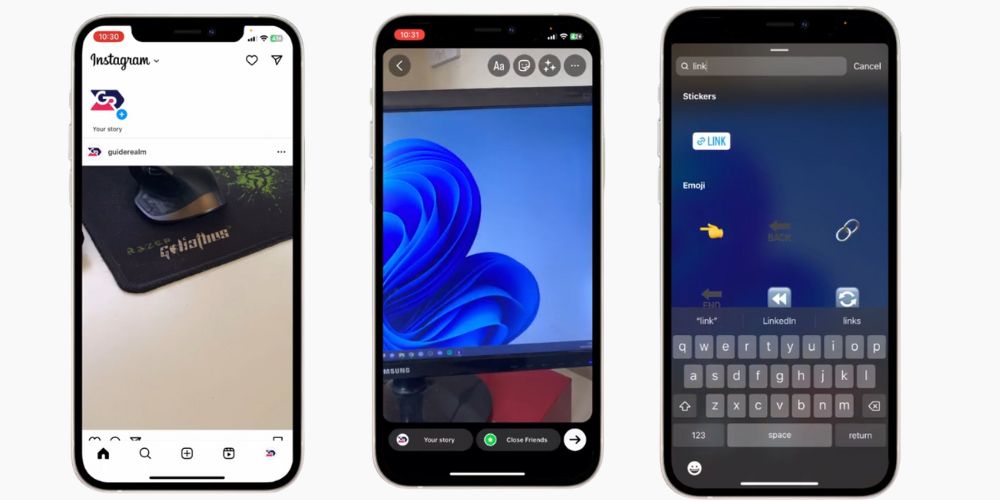
Ensure your Instagram app is updated to the latest version. Open the app and tap your profile photo at the top-left corner or hit the “+” to create a new story.
2. Upload or Create a Story
You can choose to upload an image, shoot a quick video, use Boomerang, or even create a post with text. Add your media from your gallery or take a photo on the spot.
3. Tap the Sticker Icon
After creating your content, tap the sticker menu at the top of your screen. It looks like a smiley face post-it note.
4. Select the “Link” Sticker
From the sticker tool, choose the one labeled “Link.” If you don’t see it, make sure you’re using the updated version of Instagram.
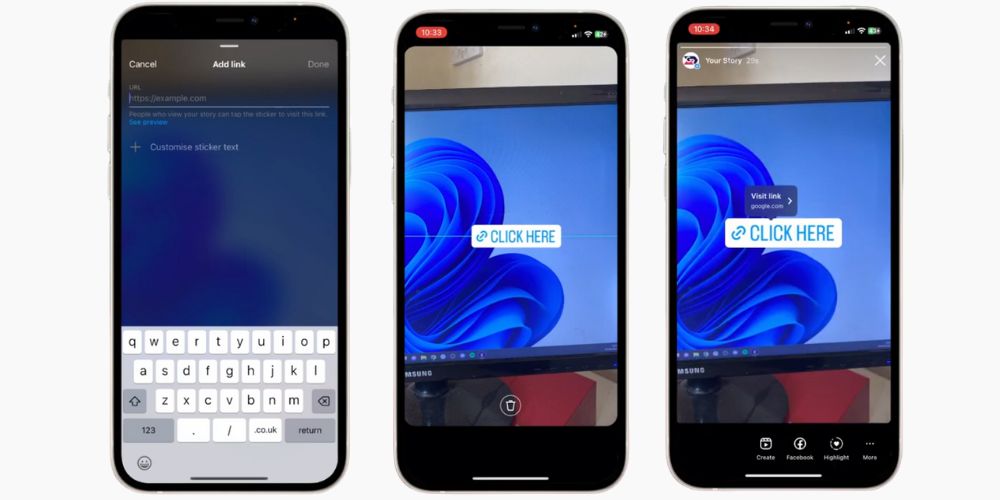
5. Paste Your URL
In the popup, paste the URL you want your audience to visit. It could be a custom sticker link to your online store, newsletter, booking page, or any other external site. Always make sure the URL type is correct (HTTPS recommended).
6. Customize Your Sticker Text
Instagram allows you to edit the link text that appears in the sticker. Instead of showing the raw URL, change it to something eye-catching like “Shop Now,” “Read More,” or “Tap Here.”
7. Place the Sticker on Your Story
Drag and drop the sticker anywhere on your story canvas. You can resize it and even align it with your brand’s aesthetic to ensure it stays on brand.
8. Publish Your Story
Once everything looks great, hit “Your Story” to publish. Your followers will now be able to click the clickable link sticker to access your chosen destination.
What Makes Instagram Story Links So Valuable?
The Instagram story link sticker is more than just a clickable add-on—it’s a powerful marketing tool that turns passive views into meaningful actions. Whether you’re a business profile, influencer, or content creator, embedding links into your stories helps funnel your audience straight to your most important destinations.
- Redirect visitors effortlessly to your store, landing page, or sign-up form
- Highlight limited-time promotions, contests, or latest blog updates
- Reach beyond the feed to increase visibility through multiple stories
- Strengthen your social media strategy with creative interactive elements
Compared to placing a single link in the bio section, using the link sticker provides a dynamic, real-time way to share updates, drive clicks, and maintain momentum across your Instagram traffic funnel. It’s a must-have for those aiming to convert viewers into site visitors and engaged fans.
Related: What Does “Green Following” Mean on Instagram?
Creative Ways to Use Instagram Story Link Stickers
While many brands use Instagram link stickers for basic promotions, the real power lies in creative storytelling. Here are some fresh and impactful ways to integrate Instagram story link stickers into your content strategy:
1. Behind-the-Scenes Access
Give your audience an exclusive peek into your workspace, process, or event preparation. Add a link sticker that leads to a full BTS video, blog post, or YouTube channel for deeper engagement.
➡ Example: “Tap to Watch the Full Behind-the-Scenes!”
2. Interactive Educational Series
Break down a complex topic across multiple stories and use the sticker icon to direct followers to a complete tutorial, guide, or landing page.
➡ Example: “Need the full checklist? Tap here!”
3. Feature User-Generated Content
Repost customer reviews or tagged stories, then add a link sticker that routes viewers to the product or service page featured in the content.
➡ Example: “Shop the Look”
4. Drive Traffic to Limited-Time Offers
Create a sense of urgency by using countdown stickers in combination with Instagram story links for flash sales or expiring discounts.
➡ Example: “24 Hours Only – Tap to Claim Offer!”
5. Promote Events or Webinars
Use the sticker to redirect to event registration, Zoom sign-up forms, or ticket purchase pages. Include CTAs like “Join Us Live” or “Reserve Your Spot.”
➡ Example: “Swipe up was cool, but this tap is smarter”
6. Bundle Stories With One Link
Want to share a whole product line, service package, or blog series? Curate the visuals into one engaging story and use the Instagram link to lead viewers to the full collection.
➡ Example: “Explore the Full Series Here”
💡 Pro Tip: Improve your profile’s visibility with high impressions that support better performance across posts and stories.
Best Practices to Maximize Engagement with Instagram Story Links
Knowing how to add Instagram story links is only half the battle. To truly harness the power of Instagram link stickers, you need to implement smart techniques that capture attention and encourage action.
- Incorporate strong calls-to-action: Use animated sticker text, bold fonts, or visual cues like arrows and “Tap Here” icons to guide viewers.
- Keep your visual branding consistent: Match sticker placement, fonts, and colors with your existing Instagram account style to maintain a cohesive look.
- Explain the value: Let viewers know what they’ll gain by clicking—be it access to a discount, helpful tips, or a new blog post.
- Try different types of links: Share everything from external content, sign-up pages, to latest product releases and see what sparks the most interest.
- Track your results: Use link shorteners or UTM-tagged URLs to monitor performance and improve your social media strategy based on data.
- Avoid overloading your story: One or two well-placed links per story sequence is enough. Prioritize user engagement over pushing too many post links.
Following these Instagram best practices helps you maintain an on-brand experience while getting measurable results from your story link stickers.
Tips to Use Instagram Link Stickers Effectively
Here are a few extra techniques for optimizing your link strategy using story stickers:
1. Use Multiple Stories
Spread your message across multiple stories to create a narrative and place the link at the most compelling part of the sequence.
2. Create FOMO With Limited-Time Offers
Add countdowns or emphasize urgency like “24-Hour Offer” or “Today Only” to create curiosity and prompt clicks.
3. Combine With Polls & Interactive Elements
Mix link stickers with polls, quizzes, and questions to encourage interaction and keep users engaged longer.
4. Schedule Instagram Posts & Stories
Use social media management tools to plan and schedule Instagram posts and Stories in advance. This helps maintain consistency and optimize posting times.
5. A/B Test Different Link Placements
Try placing stickers in different parts of the screen (top, bottom, center) and test sticker design formats to see which leads to higher link taps.
How to Leverage Your Instagram Story Links to Drive Traffic
Adding a link is just the beginning. The real challenge is driving more traffic and increasing user engagement.
Promote Blog or Video Content
Link to your latest blog post or YouTube upload directly from your story. Tease the content with a summary or highlight to pique interest.
Feature New Product Launches
Use Stories to showcase a new arrival or launch. Include the product URL and add “See It First” or “Limited Stock” to build hype.
Host Giveaways and Contests
Direct followers to your website or Google Form where they can enter a giveaway. Boost visibility by tagging collaborators and using branded hashtags.
Collect Email Sign-Ups
Use link stickers to route followers to a lead magnet or freebie offer to grow your mailing list.
Drive Traffic to Sales & Promotions
During promotional periods, use link stickers to showcase exclusive deals and discounts. Example: “Tap for 20% OFF Today Only!”
How Instagram Story Links Fuel Business Growth
While often seen as casual and fun, Instagram Stories are also a goldmine for business accounts aiming to drive conversions and build brand trust. By using the Instagram link sticker purposefully, businesses can guide their followers to take real, trackable actions.
- Highlight customer reviews with direct links to detailed case studies or testimonials
- Post bite-sized tutorials, then direct viewers to the full version via a story link
- Create buzz by linking to exclusive previews or product drops for loyal fans
- Make it easy to book consultations or appointments using a clickable sticker icon
- Curate themed product collections and guide users to explore them in a single tap
These kinds of interactive elements not only build trust and engagement but also integrate seamlessly into your broader marketing strategy. Whether you’re launching a campaign or boosting seasonal offers, using Instagram story links effectively can result in more traffic, better leads, and stronger brand loyalty.
💡 Pro Tip: Boost your video’s reach and credibility by buying story views that help your content get discovered and shared more often.
Story Link Sticker vs. Swipe-Up Feature: What’s the Difference?
Instagram’s transition from the swipe-up feature to the Instagram link sticker introduced major improvements in flexibility, accessibility, and visual design. Here’s a breakdown of how the two compare:
Eligibility
- Swipe Up: Limited to verified accounts or profiles with 10,000+ followers
- Link Sticker: Available to all Instagram users, regardless of follower count
Call-to-Action Style
- Swipe Up: Used a swipe gesture at the bottom of the screen
- Link Sticker: A tappable sticker icon that can be placed anywhere on the story
Custom Text Options
- Swipe Up: No ability to customize sticker text
- Link Sticker: Allows users to add custom CTA phrases like “See More” or “Shop Now”
Analytics and Engagement Tracking
- Swipe Up: No built-in interaction insights
- Link Sticker: Supports engagement tracking, including link taps and story views
Visual Placement
- Swipe Up: Always fixed at the bottom of the screen
- Link Sticker: Fully movable—adapt placement to suit your Instagram story design
The Instagram link sticker offers a far more dynamic and customizable experience, making it easier to add links, maintain your brand’s aesthetic, and drive targeted Instagram traffic.
Optional but recommended extra step: add a creative call to Action
As you can see from the example above, Redbull have added arrows and a massive sign saying “swipe up” to their story page. You don’t have to do this, but it’s definitely a good idea if you want to maximize your traffic.
Here’s how. Before you tap on the + story icon that we talked about in step 5, you can choose to edit your story.
At this point you can add any call-to-action you like. You could try something like “swipe up to learn more” or to find out, “swipe up to see this discount”, “learn more”, “find out how”… you get the idea.
The only limit to the possibilities here is your imagination! So why not get creative and have some fun with it?
Need inspiration? Let’s take a look at some of the best Instagram stories campaigns and see how they use the swipe up feature creatively.
Related: What Do ‘Impressions’ Mean on Instagram Analytics?
Final Thoughts
The Instagram link sticker is one of the most underrated tools for boosting traffic, converting leads, and growing your online presence. Whether you’re an influencer promoting affiliate products or a brand sharing a new post, mastering the sticker icon can give you a clear edge.
Follow the tips and best practices shared above, combine creativity with strategic CTAs, and always keep your audience experience in mind.
FAQ’s
How to add link in Instagram story without 10k followers?
You no longer need 10k followers to add a link. Just create a story, tap the sticker icon, and select the “Link” sticker. Add your URL and place the sticker where it’s clearly visible. This simple method is now available to all users, regardless of follower count.
Why can’t I post a link on an Instagram story?
In the past, link sharing was limited to larger accounts. Now, anyone can add links via the “Link” sticker. If you still can’t, try updating the app. Ensure you’re entering a valid URL. Instagram restricts link sharing to prevent spam or abuse, especially from suspicious accounts.
What does it mean to swipe up?
“Swipe up” refers to the upward finger motion on a touchscreen, often used to trigger actions like unlocking a phone or accessing more content. On Instagram, it used to open links in stories, but has now been replaced with a tappable “Link” sticker that offers greater customization.
Why won’t my Instagram let me add a link?
If Instagram won’t let you add a link, it might be due to a recent profile update, app glitch, or a banned URL. Try using a full, valid URL instead of a shortened one. Also, make sure your app is updated and your account is in good standing.
Why do Instagram links not work?
Instagram links may not work due to incorrect formatting, a broken destination URL, or if the site you’re linking to is down. Additionally, Instagram blocks URLs that violate its community guidelines. Always double-check the URL, use a reliable source, and ensure it follows Instagram’s policies.