Instagram Stories are a powerful way to engage with your audience, whether you’re an influencer, brand, or everyday user. However, the analytics Instagram provides can sometimes be confusing, and one of the most frequently misunderstood metrics is “Exited”. If you’ve been wondering what the ‘Exited’ metric means on Instagram Stories, you’re not alone.
In this post, we’ll break down what “Exited” means, how it affects your Instagram Story performance, and ways to reduce high exit rates.
“Exited” Metric on Instagram Stories Explained
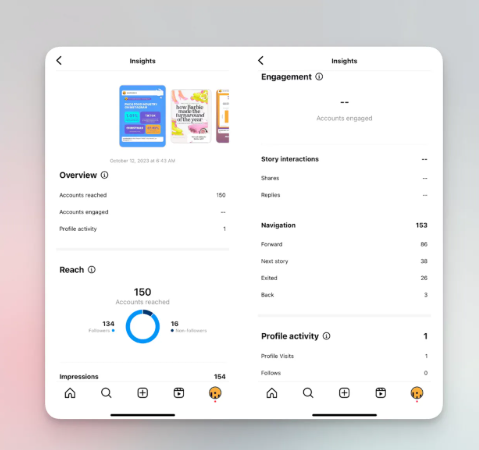
The “Exited” metric in Instagram Stories refers to the number of times a user left your story sequence before finishing it—in other words, it shows how many people exited your story. This metric helps you see how many people left at each point in your story sequence. This can happen for various reasons, such as:
- Closing the Instagram app
- Swiping down to exit Stories entirely
- Navigating back to their main feed
- Tapping on another person’s story before finishing yours
💡 Pro Tip: Buy Instagram Story Views from BuySocialMediaMarketing to lower your “Exited” rate and keep viewers engaged until the end!
Where to Find the “Exited” Metric
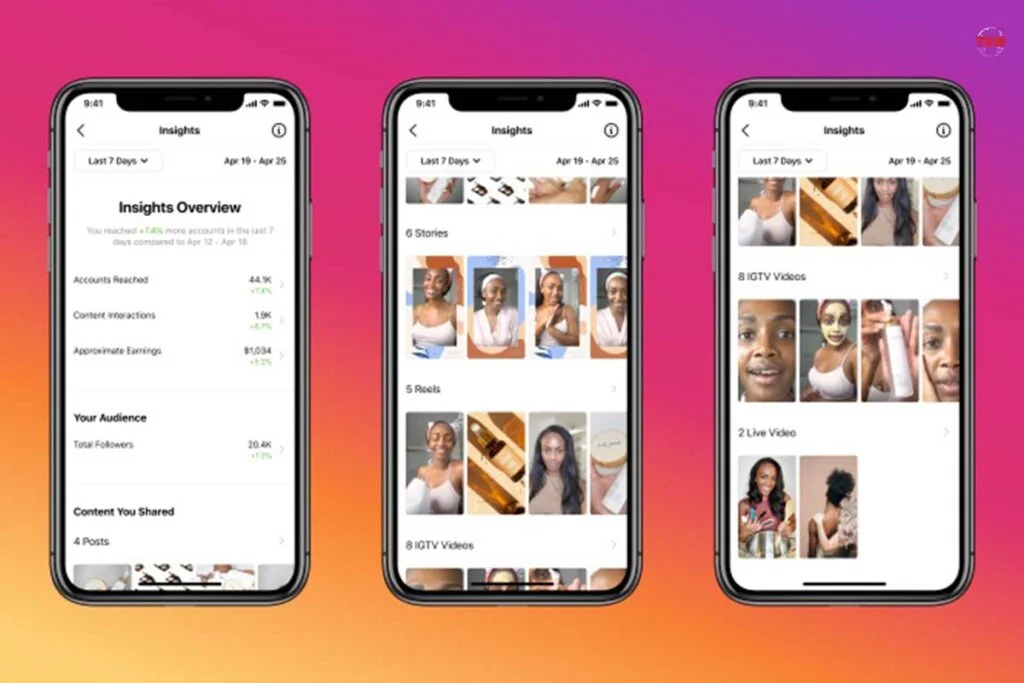
To track your Instagram Story exits and access Instagram Story Insights, follow these steps:
- Open Instagram and go to your profile.
- Tap on the three horizontal lines in the top-right corner.
- Select “Insights.”
- Navigate to the “Content You Shared” section and tap “Stories.”
Note: Use the filter icon at the top to sort and view analytics for your most recent stories or filter by specific metrics. This helps you quickly access data for your recent stories and analyze Instagram Story insights more efficiently.
- Choose a specific Story you want to analyze, including your most recent stories.
- Swipe up to see detailed metrics, including “Exited.”
By regularly checking this data and reviewing your recent stories, you can understand audience behavior, analyze performance trends, and adjust your content accordingly.
Why Do People Exit Instagram Stories?
Exits happen for many reasons and are a normal part of how users interact with Instagram Stories.
Not all exits mean that your content is bad. Users might exit due to a variety of reasons, such as:
1. Story Fatigue
- Long sequences (more than 5-7 slides) may cause users to lose interest, and many viewers may not have watched the entire story if it feels too long.
- People tend to skip when they feel overwhelmed by too much content.
- Too much text in a single Story slide can make users disengage.
- Frequent posting without engaging visuals can lead to audience burnout.
2. Irrelevant Content
- If your content doesn’t match your audience’s expectations, they may leave, especially if they aren’t interested.
- Make sure you’re posting engaging, high-quality, and valuable content.
- Content that looks promotional without real value can lead to higher exit rates.
- Avoid repetitive content that doesn’t offer new insights or entertainment.
3. Poor Timing
- Posting when your audience is inactive can lead to higher exit rates.
- Use Instagram Insights to determine the best posting times by analyzing your audience’s active times and most active times.
- Peak engagement times vary by niche—analyzing your audience’s behavior is key.
- Experiment with different posting times and analyze exit trends.
4. Unappealing Visuals or Sound
- Blurry images, unprofessional graphics, or annoying sounds can drive users away.
- Use high-quality images and ensure your content is visually appealing.
- Overuse of filters or excessive stickers can make content look cluttered.
- Adding a location sticker can enhance discoverability and potentially reduce exits by making your story more visible in Explore and larger story feeds.
- Poor audio quality in videos can reduce engagement and increase exits.
5. Accidental Exits
- Some users might leave unintentionally while multitasking or navigating Instagram.
- Story transitions that don’t align well can make users unintentionally exit.
- If a user is watching multiple stories quickly, accidental story swipes can cause unintentional exits without the user realizing.
How to Reduce Instagram Story Exits
If you notice high exit rates on your Instagram Stories, start by analyzing exit data to determine what content works best for your audience. Here are some strategies to keep viewers engaged:
1. Create Short & Engaging Stories
- Keep your Stories concise and to the point.
- Avoid unnecessary filler content.
- Limit your Story to 5-7 slides for better retention.
- Start with a hook to capture attention immediately.
- End with a CTA (Call-To-Action) to guide users to the next step, encouraging viewers to continue to the next part of your story.
2. Use Interactive Features
Instagram provides various engagement tools, such as:
- Polls to encourage participation and track how many times users have tapped on poll options.
- Questions & quizzes to spark interaction and measure how often viewers have tapped to submit answers.
- Sliders & countdown timers to create anticipation.
- Emoji reactions to boost quick engagements.
- Swipe-up links (if available) to drive traffic without losing engagement, with insights into how many times users have tapped the link.
3. Post at Optimal Times
- Analyze your Instagram Insights to see when your audience is most active.
- Posting at the right time can lead to higher engagement and lower exits.
- Test different posting schedules and compare results.
- Consider time zones if your audience is international.
4. Improve Story Quality
- Use clear, high-resolution images and well-edited videos.
- Add captions to videos for better accessibility.
- Avoid overloading Stories with too much text.
- Use consistent branding (fonts, colors, and themes).
5. Tell a Cohesive Story
- Plan your Stories in a logical sequence.
- Avoid abrupt transitions that might confuse viewers.
- Use a hook at the beginning to grab attention and keep viewers watching.
- Structure your Stories to build anticipation and curiosity, encouraging viewers to take a second look at your content.
6. Add a Call-to-Action (CTA)
- Encourage users to swipe up (if applicable), reply, or visit your profile. Tracking profile visits can help you measure how effective your CTA is at driving audience interest.
- Clear CTAs help guide users to engage with your content rather than exit.
- Use action-oriented words like “Tap Here,” “Swipe Up,” “Reply Now.”
- Link to a related Instagram growth strategy blog post.
How Does “Exited” Compare to Other Instagram Story Metrics?
In addition to “Exited,” Instagram provides several other important Story metrics:
| Metric | What It Measures |
|---|---|
| Impressions | Total number of views (including multiple views by the same user). |
| Reach | Number of unique users who viewed your Story. |
| Unique Accounts | Number of individual users (unique accounts) who viewed your Story. |
| Replies | Number of direct messages sent in response to your Story. |
| Link Clicks | Tracks how many users clicked on links in your Story, such as swipe-up links or clickable elements. |
| Taps Forward | Number of times users skipped to the next Story slide. |
| Taps Backward | Number of times users went back to the previous Story. |
| Next Story | Number of times users skipped your Story entirely to another user’s Story. |
How They Relate:
- A high number of exits combined with low reach may indicate uninteresting content.
- High taps forward suggest users are quickly skipping through your Story.
- More replies & interactions indicate engaging content.
- Analyzing the actions people take, such as link clicks and profile visits, helps you get a fuller picture of engagement.
Can “Exited” Impact Instagram’s Algorithm?
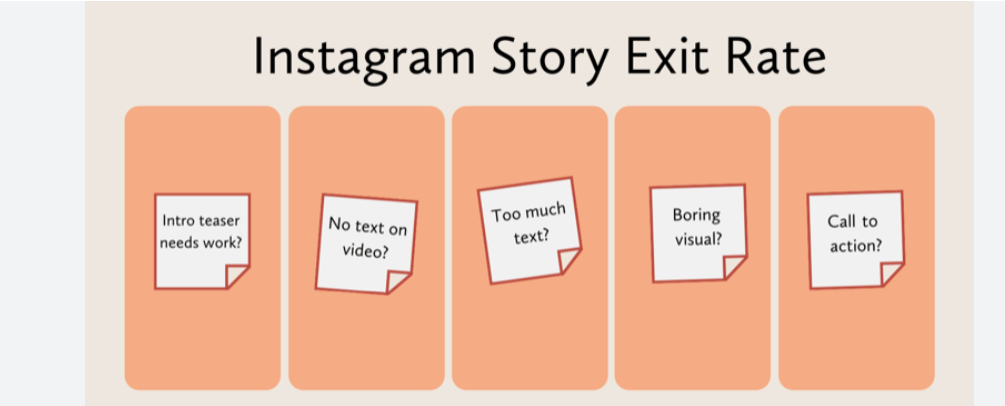
Yes! Instagram’s algorithm considers user behavior when determining how to rank Stories in the feed. User engagement, such as how often users move forward within your Stories or advance to the next story, is a key factor in story ranking. If users frequently exit your Stories, Instagram may assume your content isn’t engaging and show it to fewer people over time.
How to Boost Your Story Ranking:
- Get more interactions (polls, replies, reactions).
- Keep viewers watching longer.
- Post high-quality and engaging content.
- Avoid high exit rates by improving storytelling.
For more ways to boost your engagement, check out our Instagram growth guide.
How Do Instagram Story Exits Impact Your Brand or Business?
If you’re using Instagram for business, understanding the “Exited” metric is crucial because it can directly impact your brand’s reach, engagement, and conversion rates.
Having a business account or creator account unlocks advanced analytics, including tracking business address taps and website clicks, which are essential for measuring how users interact with your profile and external website. Connecting your Instagram business account to Facebook is also required for some analytics features, allowing you to manage and analyze your audience more effectively.
Monitoring exits, along with total followers, should be part of your overall analytics strategy to optimize your content and business performance. Here’s why it matters:
1. Reduced Engagement Rate
- A high exit rate means fewer people are staying engaged with your content.
- If users frequently exit your Stories, Instagram may show your future Stories to fewer followers.
- Engagement (taps, replies, shares) is a positive signal, while exits can be a negative one.
2. Poor Conversion Rates
- If your Stories include product promotions or links, exits reduce the chances of conversion.
- Users leaving before reaching a Call-To-Action (CTA) means lost potential sales or sign-ups.
- Reducing exits can improve click-through rates (CTR) on promotional links.
3. Impact on Instagram Algorithm
- The more people engage with your Stories, the more Instagram will prioritize your content.
- Frequent exits signal a lack of interest, making Instagram less likely to push your Stories to new viewers.

Hidden Factors That Could Be Causing High Exits
Beyond basic reasons like poor content or irrelevant posts, some hidden factors might be contributing to your high exit rate. Exploring Instagram’s features and analytics can help you uncover these hidden factors and better understand what drives users to exit.
1. Instagram App Issues
- Sometimes, Instagram crashes or glitches, causing accidental exits.
- Users may exit due to lagging Stories, especially if they are heavy in graphics or animations.
2. Viewer Preferences and Behavior
- Certain types of audiences prefer shorter content and may exit long sequences.
- Younger audiences tend to have shorter attention spans, leading to quicker exits.
- If your audience follows many accounts, they may quickly tap through Stories without watching fully.
3. Competitor Distractions
- If users see more engaging Stories right before yours, they may swipe away quickly. With the abundance of social media options competing for users’ attention, it’s even more challenging to keep your audience engaged.
- Analyzing your competitors’ Story strategies can help you understand what’s working in your niche.
4. Device Differences
- Stories might load differently on Android vs. iOS devices.
- Older phones may have trouble loading high-quality Stories, leading to exits.
Advanced Strategies to Keep Viewers Watching
Once you identify potential reasons for high exit rates, you can implement these advanced tactics to keep users engaged. Applying advanced strategies can also help strengthen your Instagram presence, ensuring your profile remains active and visible to your target audience.
1. Hook Viewers in the First 3 Seconds
- The first slide is crucial—make it eye-catching and intriguing.
- Start with a question, bold statement, or teaser.
- Example: Instead of “Here’s my new blog post,” say “Want to triple your Instagram engagement? Here’s how!”.
2. Use Instagram Story Ads Smartly
- If using Instagram Story Ads, ensure they don’t feel too promotional.
- Keep ads under 5 seconds and include a strong CTA.
3. Leverage User-Generated Content
- Feature followers’ content in your Stories to increase retention.
- Encourage audience participation by asking them to tag you.
4. Add Interactive Stickers in Every Story
- Polls, Q&A, Emoji sliders, and quizzes increase engagement.
- Interactive elements make users feel involved, reducing exits.
5. Test Different Content Styles
- Experiment with videos, text-based slides, behind-the-scenes clips, memes, and product demos.
- Analyze which types of content lead to fewer exits, and review your top performing posts for insights into what resonates most with your audience.
6. Optimize Story Length Based on Data
- Try posting 3-5 slides instead of 10+ and compare exit rates.
- Keep complex information broken into easy-to-digest slides.
What To Do If Your Exit Rate Is High?
If you notice that your Instagram Stories consistently have a high exit rate, don’t panic! Compare your Instagram Story performance with other social channels to identify trends and see if similar patterns appear elsewhere. Here are steps to troubleshoot and improve:
1. Audit Your Past Stories
- Go to Instagram Insights and analyze your top and worst-performing Stories.
- Identify patterns—did certain content styles cause more exits?
- Did exits spike at a specific time of day?
2. Improve Story Pacing
- Make sure your Stories have a clear flow.
- Avoid dragging out content across multiple slides.
- Ensure each slide leads naturally into the next one.
3. Add More Visual Variety
- If you mostly post static images, try adding videos or GIFs.
- Break up text-heavy slides with engaging graphics.
- Use animated text effects sparingly to draw attention.
4. Include Story Highlights
- Some users exit because they don’t have time to finish.
- Adding valuable content to Story Highlights lets users come back later.
- Create category-based Highlights (e.g., “Tips,” “Behind the Scenes,” “FAQs”).
5. Engage Viewers With Mini-Series
- Instead of random Story posts, create a themed Story series. Review your previously posted stories to see which ones kept viewers engaged.
- Example: “Instagram Growth Challenge – Day 1” (and continue for a week).
- Users will be more likely to return and complete the sequence.
Do Instagram Exited Exits Affect Follower Growth?
A high exit rate alone won’t cause you to lose followers, but it can contribute to lower overall engagement. Here’s how:
- If followers frequently exit your Stories, they might eventually mute your account.
- Lower engagement in Stories can also lead to less visibility in the main feed.
- If users find your content irrelevant, they may unfollow you over time.
How to Turn Story Viewers Into Followers
- Cross-promote your Stories on your posts.
- Share exclusive content only in Stories to keep users engaged.
- Tease upcoming posts in your Stories to build anticipation.
- Use features like hashtags or stickers in your Stories to increase their chances of appearing in the Explore section, helping new viewers discover and explore your content.
Should You Worry About Exits If Other Metrics Are High?
Not necessarily! If your replies, interactions, and impressions are high, a few exits won’t harm your overall performance. Using insight from analytics helps you understand the significance of exits in relation to other engagement metrics, so you can interpret your content’s performance in context.
Compare “Exited” With These Key Metrics
| Metric | Good Sign If… | Bad Sign If… |
| Replies | High replies mean strong engagement. | No replies may signal low interest. |
| Taps Forward | Users are engaged but skipping quickly. | Too many taps forward = boring content. |
| Next Story | If low, users are staying with your Story. | If high, people are skipping your content. |
Key takeaway: Balance matters. A few exits are normal, but if they spike while engagement drops, it’s time to tweak your content.
Final Tips to Keep Instagram Story Exits Low
To wrap things up, here are quick-fire tips to ensure your audience stays engaged with your Stories:
DOs
- Start with a strong hook
- Use high-quality visuals & engaging text
- Post at peak audience times
- Encourage user participation with polls & stickers
- Keep Stories short and to the point
DON’Ts
- Post too many slides in one go
- Overload slides with too much text
- Use low-quality or blurry images
- Ignore Instagram Insights data
- Be too promotional without offering value
Conclusion
While exits shouldn’t be ignored, they aren’t the only factor that determines Instagram Story success. A good strategy includes:
- Tracking all engagement metrics, not just exits.
- Experimenting with different content formats to see what works best.
- Encouraging interactions to increase engagement.
- Improving storytelling techniques to keep viewers watching.
The key to lowering exits is to make Stories that people want to watch until the end! Try implementing these strategies, track your analytics, and see how your engagement improves.For more expert Instagram growth tips, check out our blog. 🚀
FAQs
What does “exited” specifically mean in Instagram Story analytics?
“Exited” indicates that a user has swiped away from your Story to the next account’s story, closed the app, or returned to their feed. It reflects the point where the user stopped engaging with your content.
Does an exit mean the user disliked my Story?
Not necessarily. An exit could result from various factors, such as accidental swipes, external distractions, or a lack of time. While exits might hint at disinterest, they aren’t always negative feedback.
How can I track exits for my Stories?
You can view exit data through Instagram’s Insights. Navigate to your Story, swipe up on the screen, and check the analytics section to see metrics like views, replies, and exits.
Can I prevent users from exiting my Stories?
While you can’t prevent exits entirely, you can reduce them by creating engaging, relevant, and high-quality content. Understanding your audience’s preferences and experimenting with different formats can also help.
Are exits more common for longer Stories?
Yes, longer Stories may result in higher exit rates, especially if the content isn’t engaging. Keeping your Stories concise and visually appealing increases the likelihood of retaining viewers.