In recent years, Instagram has evolved far beyond just a photo-sharing app. It’s now a complete social platform filled with features like Stories, Reels, Direct Messages, and live notifications that keep users constantly updated. Among these updates, many iPhone users have noticed something new: Time Sensitive notifications. You may have seen Instagram asking for permission to “Allow Time Sensitive Notifications” — but what does that really mean, and how does it affect your experience on the app?
This detailed guide will explain what “Time Sensitive” means on Instagram, how it connects with iOS Focus Mode, how to control or disable it, and why understanding it can help you manage your notifications better.
Elevate trust with live views, comments, and saves that highlight genuine audience interest and make your Instagram activity look stronger.
Understanding “Time Sensitive” on Instagram
The phrase “Time Sensitive” refers to notifications that carry higher priority compared to normal ones. Introduced with iOS 15, this feature allows certain apps — like Instagram, Snapchat, or Messages — to deliver important alerts even when your phone is on Do Not Disturb (DND) or Focus Mode.
When Instagram marks a notification as Time Sensitive, it means that the platform considers that alert important enough that you shouldn’t miss it — even if your phone is blocking other notifications. For instance, Instagram might send you a security alert, a login attempt notification, or an important message from someone you follow.
In simple terms:
A Time Sensitive notification is an alert that can break through your phone’s silenced or blocked state to ensure you see it in time.
How “Time Sensitive Notifications” Work on iPhone and iPad
On iPhone and iPad, Time Sensitive notifications are part of Apple’s Focus system — a smarter version of “Do Not Disturb.” Focus lets users create custom modes for work, sleep, driving, or personal time. However, Apple realized that some notifications are too important to block, which is why they introduced this higher-priority class.
When enabled, Time Sensitive notifications can:
- Bypass Focus Mode or Do Not Disturb.
- Stay on your Lock Screen for one hour.
- Alert you instantly, even if other notifications are blocked.
This ensures you don’t miss something urgent, like a friend request, security alert, or message that requires immediate action.
Related: What Does Remove Follower Mean on Instagram?
How Instagram Uses Time Sensitive Notifications
Instagram can use Time Sensitive notifications for multiple reasons, depending on what the app developers decide qualifies as “important.” While users can’t directly decide which Instagram alerts are time sensitive, the app’s developers set the parameters.
Here are examples of how Instagram might use them:
- Login or Security Alerts: If someone logs into your account from a new device or location, Instagram may send a Time Sensitive notification to alert you instantly.
- Direct Messages (DMs): A message from someone you follow closely or a new message request could be delivered as Time Sensitive if Instagram’s system considers it urgent.
- Story or Reel Mentions: When someone tags you in a Story or mentions you in a comment that may expire soon (like a 24-hour Story), Instagram might send you a time-sensitive alert.
- Live Broadcasts or Events: If a friend starts a live video or an event you’ve interacted with begins, the app can push it as a Time Sensitive notification so you can join before it ends.
Essentially, Instagram’s Time Sensitive system ensures that notifications related to your interactions or account safety get delivered immediately — even when you’re blocking general notifications.
Time Sensitive vs. Normal Notifications
| Feature | Normal Notifications | Time Sensitive Notifications |
|---|---|---|
| Priority | Standard | Higher Priority |
| Bypass Focus Mode | ❌ No | ✅ Yes |
| Lock Screen Duration | 5–10 minutes | 1 hour |
| User Control | Fully controllable | Can be toggled in Settings |
| Typical Use | Likes, comments | Security, urgent messages |
| Developer Control | App decides | App developers define “urgent” |
Unlike standard alerts, Time Sensitive notifications are specifically designed not to get lost among less important updates like new likes or story views.
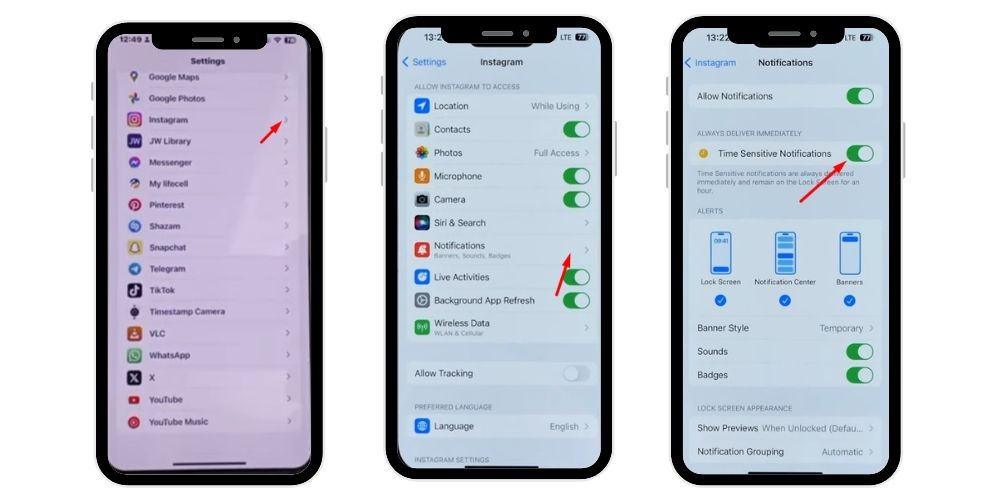
How to Allow “Time Sensitive” Notifications on iPhone
If you want to ensure you receive Time Sensitive notifications from Instagram (or any other app), you can manage this in your Settings app.
Here’s how to do it step-by-step:
- Open the Settings app on your iPhone or iPad.
- Scroll and tap “Notifications.”
- Find and select “Instagram.”
- You’ll see a toggle for “Time Sensitive Notifications.”
- Turn it ON (the switch should be green).
This allows Instagram to deliver urgent alerts even when Focus or DND is active. It’s especially useful if you rely on Instagram for business, communication, or content sharing.
How to Turn Off Time Sensitive Notifications
If you find these notifications distracting or spammy, you can turn them off anytime. Sometimes apps might misuse this feature by marking unimportant alerts as urgent, which can get annoying.
To turn off Time Sensitive notifications for Instagram:
- Open the Settings app on your iPhone or iPad.
- Tap Notifications.
- Scroll down and select Instagram.
- Find the “Time Sensitive Notifications” toggle.
- Switch it OFF.
After this, Instagram will no longer bypass Focus or Do Not Disturb. You’ll only get notifications when your phone allows them by default.
Why “Time Sensitive” Matters on Instagram
Instagram is a social app where timing can make a difference — whether it’s replying to a message, responding to a collaboration, or seeing a Story before it disappears. That’s why Time Sensitive notifications exist: to help users stay updated on what’s most relevant right now.
Here are a few examples of time-sensitive moments on Instagram:
- Stories: Stories disappear after 24 hours — making them inherently “time sensitive.” If someone tags you or replies to your Story, Instagram might push that alert immediately so you can see it before it’s gone.
- Disappearing Messages: Instagram’s Vanish Mode and disappearing photo messages are also examples of time-sensitive content since they vanish after being viewed or after a set time.
- Security Alerts: Getting a login attempt notification right away can prevent account hacking or unauthorized access.
- Important DMs or Mentions: For creators and business accounts, messages about collaborations, promotions, or urgent customer questions could be classified as time sensitive.
So while you may think of “Time Sensitive” as an iPhone feature, it fits naturally into Instagram’s fast-moving environment where posts, Stories, and interactions have short lifespans.
💡 Pro Tip: Reposts extend your Instagram influence. Increase them to maximize visibility, attract new users, and grow faster.
How App Developers Define “Time Sensitive”
One crucial point about this feature is that users don’t decide what qualifies as time sensitive — app developers do.
Instagram’s developers determine which notifications are urgent enough to be labeled as “Time Sensitive.” For example:
- Login warnings = ✅ Time Sensitive
- Likes or comment notifications = ❌ Normal
- Direct Messages = ✅ Sometimes Time Sensitive (depending on context)
This system depends heavily on how responsibly developers use the feature. If apps abuse it (sending unnecessary notifications as urgent), users can disable the option manually.
Managing Focus Mode with Time Sensitive Alerts
Focus Mode is designed to reduce distractions, but you can still allow exceptions like Time Sensitive alerts. For instance, you might allow them for Instagram and Messages, but not for games or shopping apps.
Here’s how to manage this in Focus settings:
- Open Settings on your iPhone.
- Tap Focus.
- Select the Focus mode you want (e.g., Do Not Disturb, Sleep, or Work).
- Tap Apps under “Allowed Notifications.”
- Make sure Time Sensitive Notifications is enabled.
This setup ensures that when Focus Mode is active, only truly important Instagram notifications will reach you — keeping you productive without missing urgent updates.
Time Sensitive Notifications on Android Devices
While Time Sensitive notifications are primarily an iOS feature, Android users have similar control through their notification channels and priority settings.
On Android:
- You can open Settings → Notifications → Instagram.
- Choose Notification Categories.
- Set certain notifications (like DMs or login alerts) as High Priority.
- You’ll get a similar experience, with urgent alerts overriding DND.
Though not branded “Time Sensitive,” Android’s system allows users to achieve nearly the same result.
What Happens If You Ignore or Block Time Sensitive Notifications
If you block or ignore these notifications, you might:
- Miss important account updates.
- Lose time-sensitive content like messages or Story tags.
- Delay reacting to collaboration requests or urgent DMs.
However, if you’re overwhelmed by constant notifications, disabling them might improve focus and reduce stress — it’s about finding a balance that fits your needs.
Common Issues and Troubleshooting
You’re not receiving Time Sensitive notifications.
- Check if the feature is enabled under Settings → Notifications → Instagram.
- Make sure Focus Mode isn’t blocking Instagram.
- Restart your iPhone or update iOS if necessary.
Instagram sends too many “urgent” alerts.
- Turn off Time Sensitive notifications (Settings → Notifications → Instagram → toggle off).
- You can also use the App Notification Settings inside Instagram to limit push alerts.
You receive delays in notification delivery.
- Ensure background app refresh is enabled.
- Check if Instagram has permission to use mobile data.
- If you’re on Android, allow high-priority notifications manually.
Related: What Is Instagram Handle Mean?
Should You Keep Time Sensitive Notifications On?
The decision depends on how you use Instagram.
✅ Keep them ON if:
- You use Instagram for work or business.
- You want instant security alerts.
- You frequently receive messages or mentions that matter.
❌ Turn them OFF if:
- You find the constant alerts distracting.
- The app sends too many unnecessary updates.
- You prefer to check Instagram manually during your downtime.
For most users, enabling Time Sensitive notifications improves experience without overwhelming them — as long as they’re used sparingly by the app.
How to Identify a Time Sensitive Notification
When you receive one, you’ll notice a few differences:
- The alert appears on your lock screen with a “Time Sensitive” label (on iPhones).
- It stays visible for an hour unless you dismiss it.
- It can bypass Do Not Disturb or Focus Mode.
This makes it clear that the message or alert is intended to grab your attention quickly — not to be ignored.
Final Thoughts
“Time Sensitive” notifications are not just a trendy feature — they’re a technological solution for the constant overflow of digital information. Instagram users can now enjoy a balance between staying connected and maintaining focus.
By default, apps like Instagram want to keep users engaged. But features like Focus Mode and Time Sensitive alerts give you the control to decide what’s truly important. You can fine-tune these settings to stay informed about your friends, followers, or business messages, while keeping less important alerts silent.
Ultimately, understanding and customizing your Time Sensitive notification settings ensures that you never miss crucial updates — and at the same time, you can enjoy peace of mind knowing your phone won’t disturb you unnecessarily.
💡 Pro Tip:Video views improve content ranking. Buy them to ensure your Instagram videos gain stronger exposure quickly.
FAQs
1. What does it mean when a notification is time sensitive?
A time sensitive notification means it’s a high-priority alert that bypasses Do Not Disturb or Focus Mode, ensuring you see important updates—like messages, security alerts, or mentions—without missing them, even when other notifications are blocked.
2. How to get rid of time sensitive on Instagram?
Go to Settings → Notifications → Instagram, then toggle off Time Sensitive Notifications. This stops Instagram from sending high-priority alerts that bypass Focus or Do Not Disturb, keeping all notifications under your normal delivery settings.
3. Can you tell if someone is checking you out on Instagram?
No, Instagram doesn’t show who views your profile or checks your account. You can only see who views your Stories or Reels, not who frequently visits or searches your profile.
4. How to send Time Sensitive message on Instagram
Instagram doesn’t let users manually mark messages as “Time Sensitive.” The app itself decides which alerts qualify as urgent. However, you can enable message notifications under Settings → Notifications → Messages to ensure quick delivery.
5. What does time sensitive mean on Snapchat
On Snapchat, “Time Sensitive” means certain notifications—like messages or snaps—are treated as urgent and can appear even if Do Not Disturb is on, ensuring you don’t miss disappearing snaps or important chat alerts.