Vanish Mode is a setting inside a one-to-one Instagram chat that makes new messages temporary. Anything you send while it is on, including text, photos, videos and stickers, disappears once someone leaves the chat or switches the mode off. It does not touch the messages you sent before, and it does not delete anything from your account.
What you might be seeing: the chat suddenly turned dark, a line says someone “turned on vanish mode”, or messages you just read were gone when you opened the conversation again. All three usually mean the same thing, and none of them means your account has a problem.
Boost Your Instagram Presence
Make your Reels go viral. Get premium followers, likes, and comments in minutes.
What Vanish Mode Actually Does
Instagram’s vanish mode help page describes it simply: content sent in vanish mode “disappears when someone leaves the chat or turns vanish mode off.” Until then, both of you can read the conversation normally. Once either person closes the chat and comes back, the temporary messages are no longer there.
It works in one chat at a time and only with another Instagram account, so you can’t use it with someone who messages you from Facebook. It is a phone feature, not something you’ll find on a computer. Instagram also notes that it “may be unavailable in Japan and for countries located in Europe”, which explains why a friend abroad may never see the option.
While the mode is on, you can’t copy, save or forward the messages. The other person still gets a normal notification when you write to them, and tapping it opens the chat in Vanish Mode. When you switch back, the older regular messages are still there, because they were never part of the temporary thread.
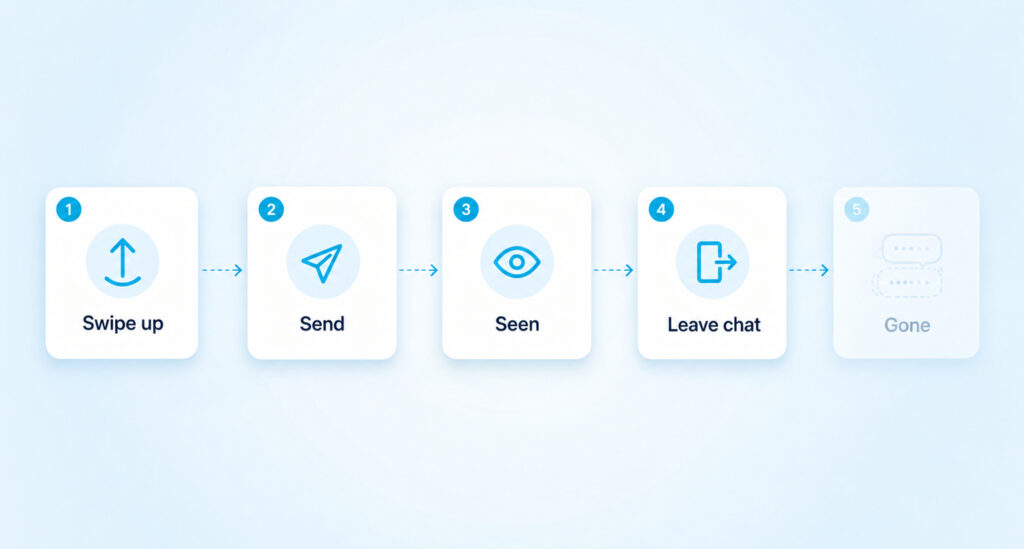
How To Turn Vanish Mode On and Off
The gesture is the same on iPhone and Android.
- Open Messages in the Instagram app.
- Tap a one-to-one chat.
- Swipe up from the bottom of the chat and let go when the prompt appears.
The screen turns dark and a short notice confirms the change, and the other person sees it too, so it can’t be switched on secretly. To turn it off, swipe up again in the same chat. Messages that have already vanished will not come back when you do this.
If Swiping Up Turns On Disappearing Messages Instead
In some locations Instagram has replaced this gesture with a newer feature called disappearing messages. The swipe is the same, but the rule is different. Messages stay in the chat for a set time instead of vanishing the moment you leave. According to Instagram’s disappearing messages help page, you can tap and hold a message to see how long it has left, and tap “Change timer” below a message to pick a different length.
A few details work differently in this version. You can forward or save only the disappearing messages you sent yourself, and a reaction can keep a message around until everyone has seen both the message and the reaction. Like Vanish Mode, it works only in one-to-one chats, not in groups.
Why You Can’t Find Vanish Mode
The swipe does nothing in a group chat, on a computer or in a chat with a Facebook account. Some professional accounts can’t receive vanish messages, and accounts you’ve never connected with can’t start a message request in the mode. Region matters as well, since the classic version is missing in parts of Europe and Japan.
If you’ve updated the app and the swipe still does nothing in a one-to-one chat, clear the Instagram cache and try again. On Android that clears temporary files without logging you out.
Want your Instagram to actually take off?
Real accounts. Real engagement. No bots, no shadowbans, ever.
See our Instagram servicesVanish Mode vs Disappearing Messages vs Disappearing Photos
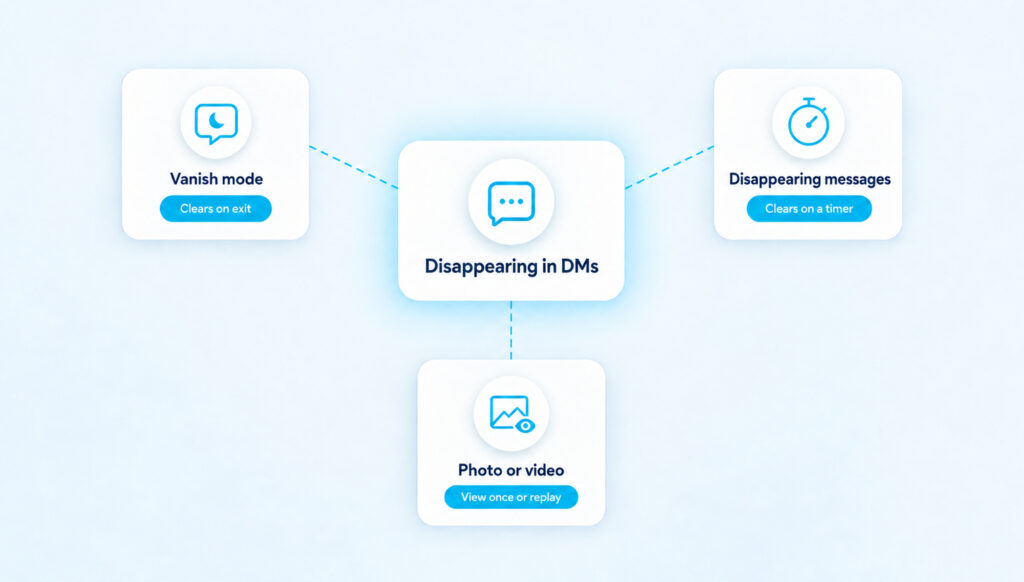
These three features get mixed up constantly, and most confusion about “why did my message disappear” comes from treating them as one thing.
Classic Vanish Mode clears the temporary thread when someone leaves the chat. Disappearing messages clear each message after a timer runs out. Disappearing photos and videos are a separate option you pick while sending a single photo or video, not a chat setting at all.
That third feature has its own choices, according to Instagram’s messaging overview. View Once lets the person open the photo one time, Allow Replay gives them one extra viewing and Keep in Chat leaves a preview in the thread. Unlike Vanish Mode, a disappearing photo can be sent to a group, but only to people who follow you or have already accepted your messages.
What Vanish Mode Can’t Stop
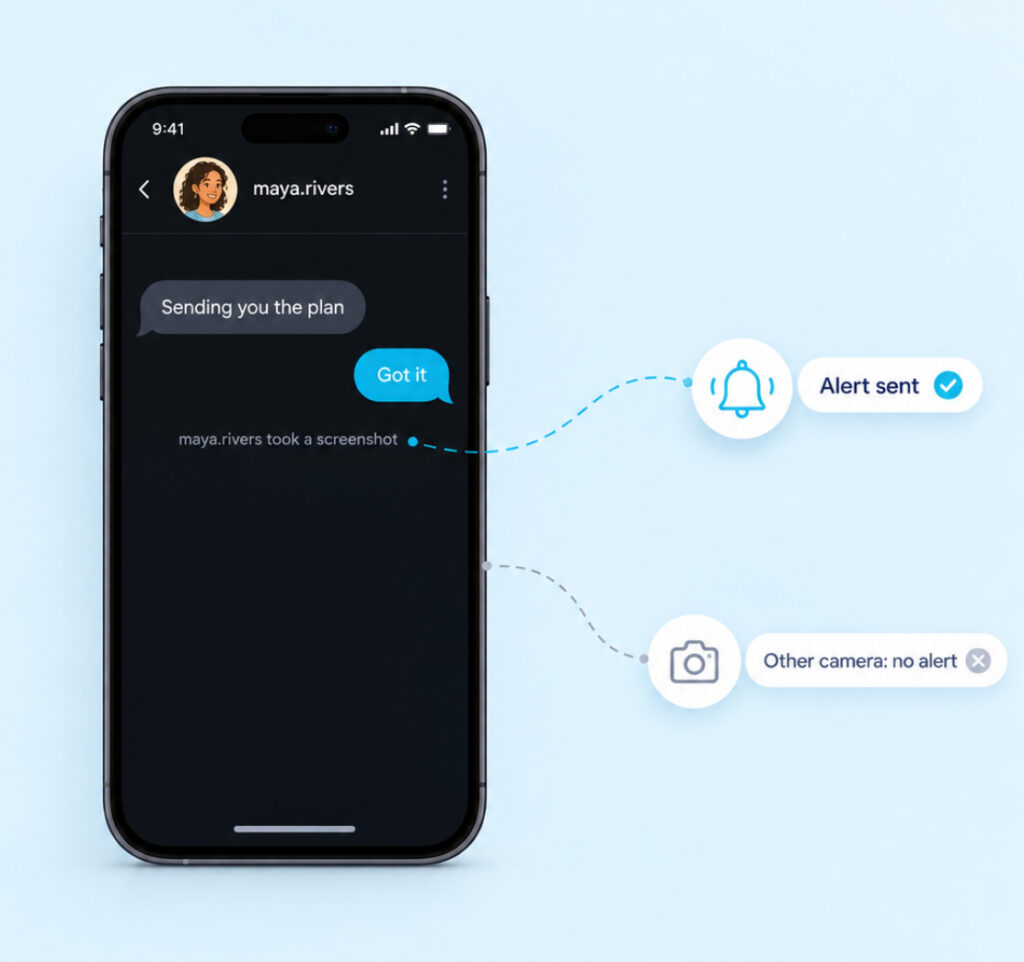
Temporary does not mean unrecordable. Instagram’s own advice is to “only use vanish mode with people you trust”, because the other person can still take a screenshot or screen recording before the messages go. You’ll get a notification if Instagram detects a screenshot, but there is no guarantee every capture is caught. Nothing at all stops someone from photographing the screen with a second phone.
It also isn’t a privacy vault. On 8 May 2026 Instagram ended end-to-end encryption for chats, so messages now use standard encryption that protects them in transit but doesn’t lock Meta out. A message that disappears from your screen has not been hidden from the company.
Reporting a Vanish Mode Chat
Disappearing messages can still be reported. Instagram’s reporting help page says you can report a vanish mode message or chat for up to 14 days after it disappears, even though you can no longer see it.
- To report one message, tap and hold it, tap Report, choose a reason and tap Submit Report.
- To report the whole chat, tap the username at the top, tap Options, then Report.
The same screens offer Restrict and Block, so you can limit the account straight away. Reports are anonymous, and the other person is not told who made them.
Vanish Mode Questions
Does the other person know when I turn on Vanish Mode?
Yes. A notice appears in the chat for both of you when the mode starts and when it ends. The other person also gets a notification when you send them a message in Vanish Mode, so it is never a hidden setting.
Can you get Vanish Mode messages back?
No. Once they have vanished, neither of you can scroll back to them, and turning the mode off does not restore them. The only trace left is the 14-day window in which the chat can still be reported to Instagram.
Does Vanish Mode work in group chats?
No. Both Vanish Mode and disappearing messages are limited to chats with one other Instagram account. In a group, you can still send a single disappearing photo or video, but the text in the thread stays.
Is Vanish Mode safe for teens?
It can be used for harmless chatter, but it leaves no history a parent can check later. The limit on message requests helps, since accounts a teen has never connected with can’t open a conversation in the mode. It is still worth agreeing that anything upsetting gets reported within the 14-day window instead of simply being left to vanish.
When a Normal Chat Is the Better Choice
Vanish Mode is good for jokes, reactions and quick plans you won’t need tomorrow. It is a poor place for anything you might need later, such as an address, a meeting time, a payment detail or a login code, because once the chat closes there is no copy to go back to. If you need a reminder to come back to a conversation, flag a chat in Instagram DMs instead of relying on messages that will be gone.
Pay attention to patterns, too. Someone who keeps moving you into Vanish Mode right before asking for photos, money or secrets is using the feature to avoid a record, and that’s worth taking seriously. You can restrict or block that account, or quietly remove them as a follower if you only want less contact. Report anything that crosses a line while the 14-day window is still open.