Instagram doesn’t give you a list of people who don’t follow you back, and it never has. You can still find them in two reliable ways. For one person, check their profile or search your own Followers list in the app. For everyone at once, request your Followers and Following lists from Instagram’s own export and compare the two, which takes a few minutes in a spreadsheet and never needs your password in an outside app.
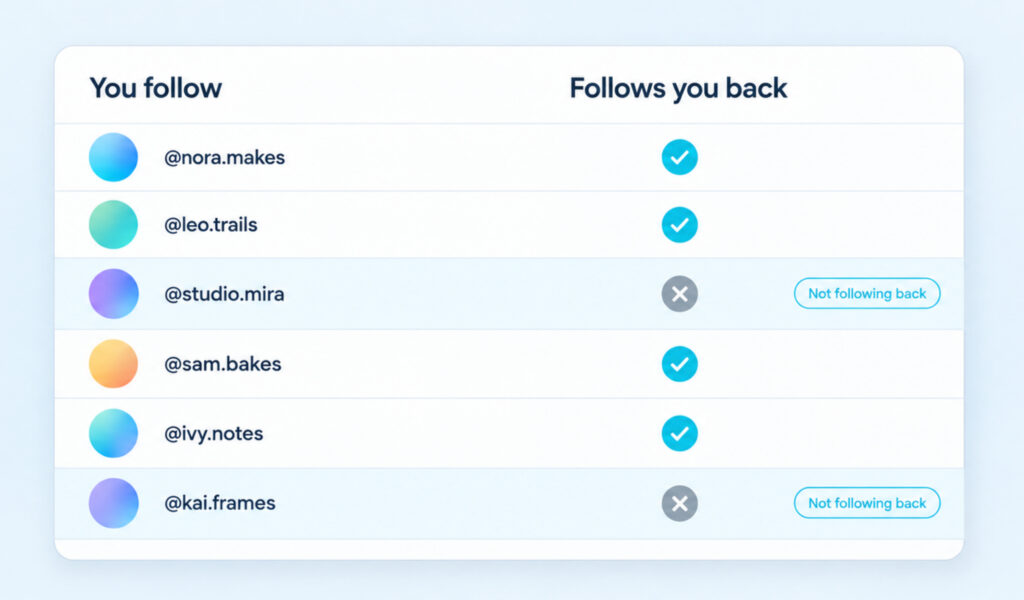
| The follow-back formula Accounts you follow minus accounts that follow you = accounts that don’t follow you back. Your Following list is the first group and your Followers list is the second. The app shows both, and Instagram’s export gives you both in full. |
Check One Account in the App
For one or two people, you don’t need an export. The app answers it in seconds, as long as you look in the right place. Most mistakes happen because people search the wrong list.
Look for the Follows You Label
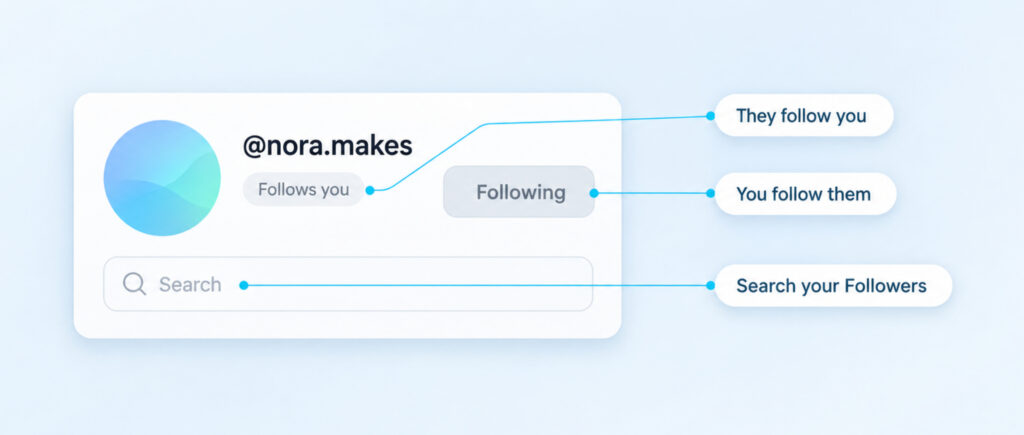
Open the person’s profile from your Following list or from search. If they follow you, Instagram shows a small grey “Follows you” label under their username, close to the Following button. If the label isn’t there, they don’t follow you back. The placement can shift a little between app versions.
A blue Follow Back button tells you the reverse, that they follow you and you don’t follow them, and it’s worth knowing what Follow Back means on Instagram before you tap it. Seeing Following on the button only confirms that you follow them, so it tells you nothing about their side.
Boost Your Instagram Presence
Make your Reels go viral. Get premium followers, likes, and comments in minutes.
Search the Right List
The fastest check is your own Followers list. Go to your profile, tap Followers and type their username into the search bar. If they don’t appear, they don’t follow you. This works for any account, public or private, because it’s your own list.
You can also open their profile, tap their Following list and search for your username. If you’re in it, they follow you. Don’t search their Followers list instead, which some guides suggest. You follow them, so your name will always be there, and it proves nothing about whether they follow you.
Private accounts add one limit. Instagram only lets approved followers see a private account’s followers and following lists, so if they haven’t approved you, stick to searching your own Followers list.
Find Everyone Who Doesn’t Follow You Back
Checking profiles one at a time stops being practical once you follow a few hundred accounts. The complete answer comes from comparing both lists in full, which Instagram’s own export tool gives you.
Request Your Followers and Following Lists
These steps follow Instagram’s guide to exporting your information. The menu names may read Meta Account instead of Accounts Center on some accounts, but the route is the same.
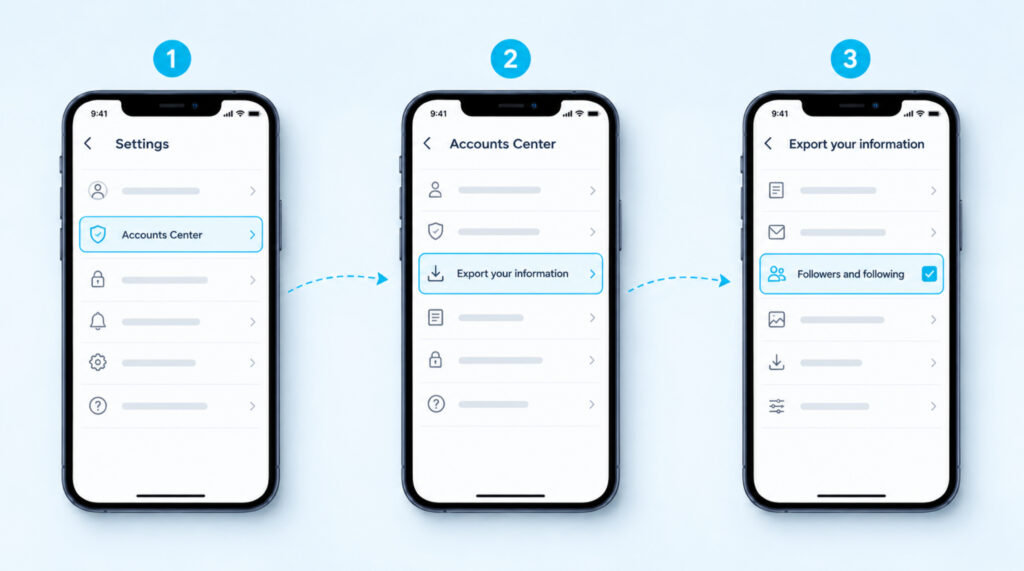
- Go to your profile and tap the menu icon in the top-right corner.
- Tap Accounts Center, then Your information and permissions.
- Tap Export your information, then Create export.
- Select your Instagram profile, tap Next, then tap Export to device.
- Under Customize information, keep only Followers and following, set the date range to All time and choose HTML or JSON.
- Tap Start export.
Instagram says it can take up to 30 days to email you the export link. Once it’s ready, you have 4 days to download it from Available downloads. The process is password-protected and happens inside your own account, so no app or website ever sees your login.
Compare the Two Lists
Unzip the download and open the followers and following folder. You’ll find one file listing the accounts you follow and one or more files listing your followers, and HTML is easier to read if you’re copying names by hand. The exact file names can change between exports, so go by the folder rather than a fixed name.
Paste the usernames you follow into column A of Google Sheets or Excel, and your followers into column B. In cell C2, type this formula and fill it down to the last row of column A.
=IF(COUNTIF(B:B,A2)=0,”not following back”,””)
Every row that shows “not following back” is an account you follow that doesn’t follow you. Filter column C to see them as one list. A browser-based list comparison tool does the same job, as long as it only asks you to paste text and never asks you to log in to Instagram.
Two Filters That Look Like the Answer
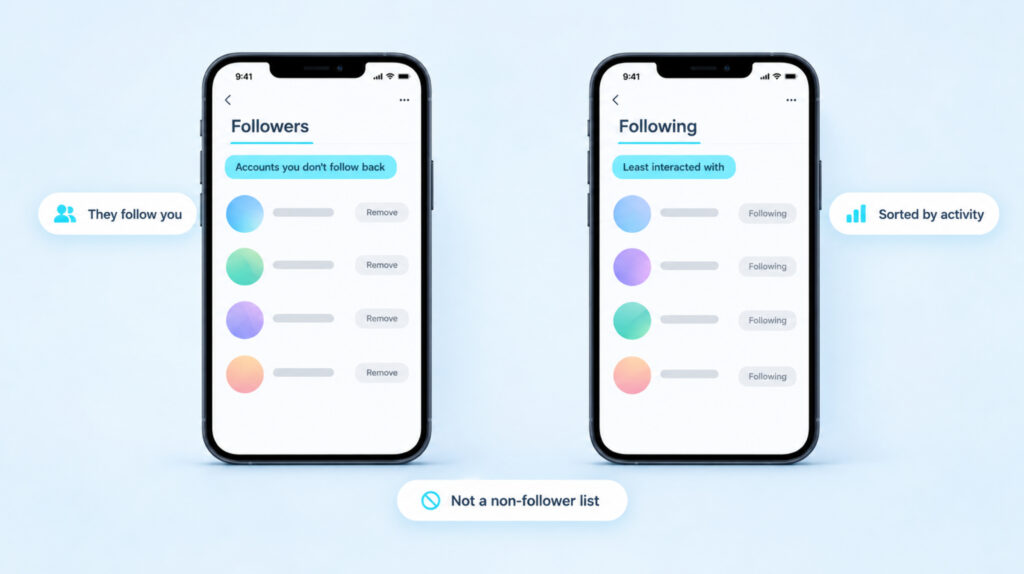
Instagram does sort your lists in a few ways, and two of those filters often get mistaken for a non-follower list. Both are useful, but neither one tells you who doesn’t follow you back.
The first sits in your Followers tab, under Categories, and it’s called Accounts you don’t follow back. It shows people who follow you that you haven’t followed, which is the opposite direction. Every name in that list follows you, which is why each row has a Remove button, so it’s the place to remove a follower quietly rather than find people who don’t follow you back.
The second sits in your Following tab, with categories such as Least interacted with and Most shown in feed. These sort accounts by how much you engage with them, not by whether they follow you. An account you never interact with can still be a loyal follower, so don’t unfollow anyone based on this filter alone.
What the Friends Count Can Tell You
Instagram has been running a small test that shows a Friends count on some profiles. Here Friends means mutual follows, so it only counts accounts that you follow and that also follow you. On some accounts it replaces the Following number, and on others it sits next to Followers and Following as its own tab.
If your profile has it, your Following number minus your Friends number is roughly how many accounts don’t follow you back. Tapping Friends shows the mutuals, but it doesn’t list the missing names, so you’ll still need the export to see exactly who they are. Because it’s a test, it may not appear on your account at all.
Why Unfollower Apps Put Your Account at Risk
Unfollower apps promise the same list in one tap, but most of them want your Instagram username and password first. Instagram’s Help Center warns that if you give apps your login information, they “can gain complete access to your account”, including your messages and the ability to post on your behalf.
There’s also a direct penalty. Instagram’s page on restrictions for data scraping lists giving your password to a third-party app and collecting information in an automated way among the reasons an account gets restricted.
The rule is simple. No app or website needs your Instagram password to compare two lists of names, so if one asks for it, stop there. If you’ve already shared it, change your password and turn on two-factor authentication. It’s the same login trap that sits behind Instagram stalker apps, which ask for your account in exchange for data they can’t actually get.
Want your Instagram to actually take off?
Real accounts. Real engagement. No bots, no shadowbans, ever.
See our Instagram servicesWho Doesn’t Follow You Back on Instagram: FAQs
Does Instagram tell someone when you unfollow them?
No. Instagram’s guide to unfollowing someone says people won’t be notified when you unfollow them. Their follower count drops by one, but there’s no alert.
Can I see who unfollowed me on Instagram?
Not inside the app. Save an export today, request another one later and compare the two Followers lists with the same formula. Names missing from the newer list stopped following you, or they deactivated or renamed their account.
Can I check if a private account follows me back?
Yes. Search your own Followers list for their username, which works whether their account is public or private. Their own Following list only opens if they’ve approved you as a follower.
How long does the Instagram export take?
Instagram allows up to 30 days to send the link. Once it arrives, the file stays in Available downloads for 4 days, so download it promptly.
Can I unfollow everyone who doesn’t follow me back at once?
There’s no bulk option. You open each profile, tap Following and confirm Unfollow, one account at a time. Tools that do it automatically need your login and act like automated activity, which is the risk covered above.
Decide Who Stays on Your Following List
A name on your not-following-back list isn’t automatically someone to cut. Brands, creators, news pages and public figures were never going to follow you back, so filter those out first and look at the people you actually know.
Unfollowing is silent, so you can tidy the list without starting a conversation. If someone doesn’t follow you back but unfollowing would feel awkward, you can mute them instead and keep the follow while their posts leave your feed. Before you change anything, keep today’s export somewhere safe. It becomes your baseline, and the next time you compare, you’ll see exactly who has changed.