- You can identify a song in an Instagram Reel directly from the audio label when the creator uses Instagram’s music library.
- In 2026, third-party apps such as music recognition tools are still the fastest way to identify songs used in Reels without visible credits.
- Some Reels use original audio, which means the song cannot always be identified automatically.
- The accuracy of song identification depends on audio quality and background noise.
- Saving the Reel first can help you find the song later if you cannot identify it immediately.
Instagram Reels have become one of the most powerful discovery tools for music, helping songs go viral in days and introducing users to new artists, remixes, and trending sounds. Every day, millions of people scroll through Reels and hear catchy audio clips that instantly grab their attention. The problem is that the song name is not always easy to find.
If you have ever watched a Reel and wondered how to identify a song in an Instagram Reel, you are not alone. Whether the audio is original, edited, or simply not labeled, finding the music can feel frustrating. This guide explains multiple proven methods to identify songs in Instagram Reels quickly and reliably, using both built-in features and external tools. Let’s dive in!
Discover the songs behind your favorite Instagram Reels in 2025 effortlessly. Boost your engagement and grow your social media presence by using buySocialMediaMarketing services to enhance your content reach and audience interaction with Instagram Automatic Likes, Instagram Comments and Instagram Reposts.
Can You Identify the Song Directly in Instagram?
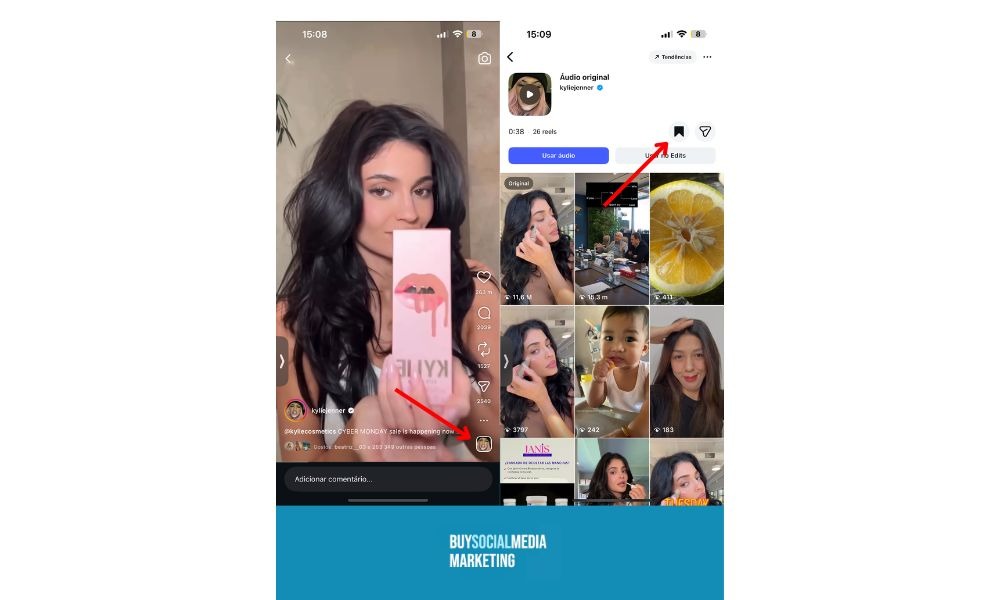
In many cases, Instagram makes it easy to identify the song in a Reel directly within the app. When a Reel uses licensed music, the song title, track name, and artist name usually appear just below the creator’s username.
Tapping on the song name opens the audio page, where you can see additional details, including the artist, the official track title, and other Reels using the same sound. Most Reels have the music listed directly in the interface, but if not, you can check the creator’s comments or description for clues.
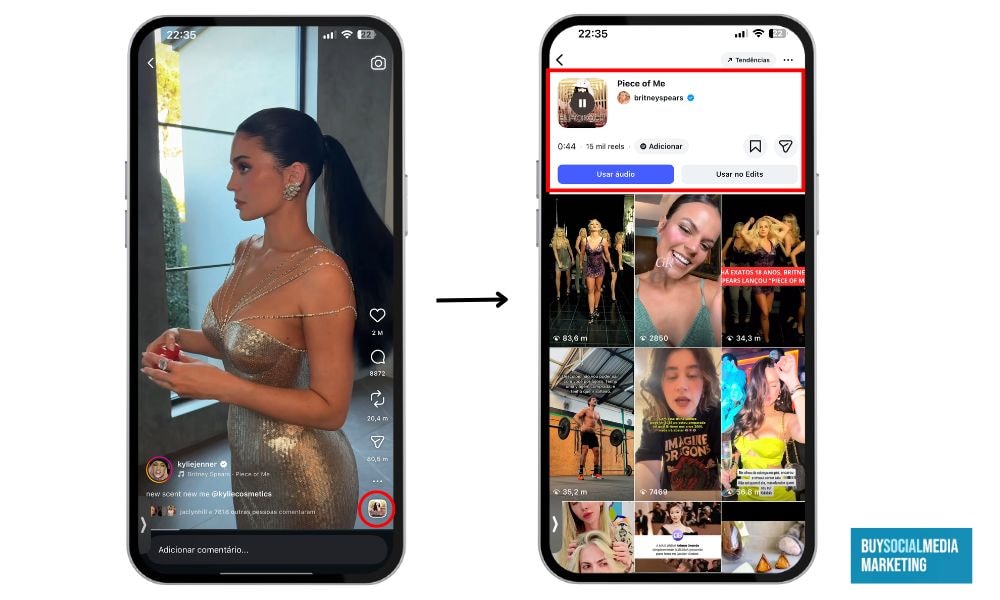
This audio page is one of the fastest ways to find music used in an Instagram Reel, especially for trending songs. It also allows users to save the sound or reuse it for their own content.
However, there are limitations. If the Reel uses original audio, the music may not be labeled at all. Edited, remixed, or sped-up sounds can also make identification difficult. In some cases, creators upload audio that is not licensed through Instagram’s music library, meaning the song name will not appear. When this happens, you will need to use additional methods to recognize the song on Instagram Reels.
Related: Does Instagram Notify When You Screenshot a DM? Guide 2026
How to Find a Song Using Instagram’s Built-In Features
Even when the song name is not immediately visible, Instagram still offers several built-in ways to help with Instagram Reels music identification. The first step is always to tap the audio section of the Reel, if available, and explore the sound page. Sometimes the song name is hidden deeper within the audio details.
You can also try searching inside Instagram’s music library. If you recognize part of the song or know the genre, searching related keywords may help surface the audio. Captions and hashtags are another useful clue. Many creators include the song name or artist in the caption, especially when using trending music.
Comments are often overlooked but extremely helpful. Viewers frequently ask, “What song is this?” and creators or other users often reply with the answer. Scanning the comments can quickly help you identify the song in an Instagram Reel without leaving the app.
Use Music Recognition Apps to Identify the Song
When Instagram’s built-in tools are not enough, music recognition apps are the most reliable solution.
Simply play the Instagram Reel and activate Shazam on another device, or switch apps quickly if your phone supports background listening. For even better accuracy, use a second device to play the Reel while running a music identification app on another device.
1. Shazam
Shazam is one of the most popular tools to identify songs and is available for free on both iPhone (iOS) and Android devices.
On iPhone and other iOS devices, you can quickly access the Shazam app by swiping to open the Control Center and tapping the Shazam icon (button). This allows you to identify a song playing in an Instagram Reel or any other app without needing to open the full Shazam app. When you hold the Shazam icon in Control Center, you can view your recent song history (log) and all the songs you have tagged.
When you use Shazam, the system automatically analyzes the audio and displays the song match on your screen. If a match is found, Shazam provides links to listen to the song on Spotify and Apple Music. The Shazam app is completely free to download and use, and it keeps a log of all songs you tag for easy access later.
Simply play the Instagram Reel and activate Shazam on another device, or switch apps quickly if your phone supports background listening. Shazam works best when the music is clear and uninterrupted.
2. SoundHound
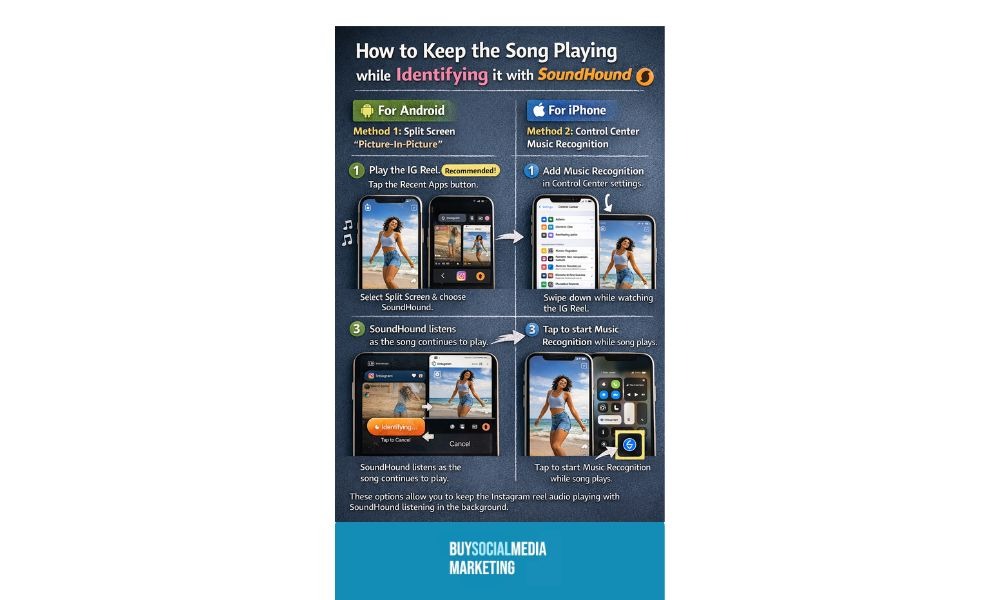
SoundHound functions similarly to Shazam but offers an additional advantage. If the audio quality is low or mixed with voiceovers, SoundHound allows you to hum or sing the melody to identify the track. This is useful for remixes or instrumental-heavy sounds.
3. Google Assistant and Siri
Both Google Assistant and Siri support the “What song is this?” feature. On Apple devices, you can play the Reel and say, “Hey Siri, what’s this song?” to identify the music. When using Siri to identify songs playing on Instagram, you may need to take additional steps compared to identifying music playing in the background.
After using Siri, you might need to return to the Instagram app, and sometimes the audio may not resume automatically. If the sound remains muted, try troubleshooting to fix the issue. Siri and Google Assistant can often identify a song within seconds if the audio is clear and audible. This method works well for clean audio clips and popular tracks.
For best results, increase your volume, pause dialogue-heavy sections of the Reel, and try more than one tool if the first attempt fails.
Related: 30 Best Instagram Filters and Effects for Stories and Reels (with Comparison)
What to Do If the Song Still Can’t Be Identified
Sometimes, even music recognition apps fail. In these cases, manual methods can still help you find the music used in an Instagram Reel. If you recognize any lyrics, try searching them on Google. You can also check specialized sites like Genius by typing a few lines of lyrics. Even a short phrase can lead you to the correct song.
Keep in mind that if the Reel is private, deleted, or the music is not available in the recognition tool’s database, identification tools may not work. Always check if the Reel is accessible and public before using these services.
Another effective approach is to ask directly in the comments. Creators often respond, and engaging with the Reel can also increase your visibility on the platform. Sending a polite direct message to the creator is another option, especially if comments are disabled.
Boost your Instagram posts and videos by using the services of BuySocialMediaMarketing as Instagram followers, likes, and views, and follow our blog articles to know more about social media!
Bonus Tip: Save Instagram Sounds for Later
Once you successfully identify a song in an Instagram Reel, saving the sound is a smart move. On the audio page, tap the save icon to store it for later use. This is especially helpful for creators and marketers who want to track trending sounds.
Saving audio allows you to quickly reuse popular music when creating your own Reels. It also helps you stay ahead of trends, which can significantly improve engagement and reach when combined with timely content creation.
Related: What Does Sticker Taps Mean on Instagram Story
Conclusion
Learning how to identify a song in an Instagram Reel is easier when you know where to look and which tools to use. From Instagram’s built-in audio features to powerful music recognition apps, there are multiple reliable ways to find the music behind any Reel. When all else fails, manual methods like searching lyrics or engaging with creators can still deliver results.
Once you discover the right music, turning that audio into high-performing Reels is the next step. Platforms like SocialMediaMarketing help creators grow faster by providing real Instagram views, likes, and followers that increase reach, engagement, and visibility.
FAQ
How can I identify a song in an Instagram Reel quickly?
The fastest way is to tap the song name under the username if it’s visible. If the song isn’t listed, you can use music recognition apps like Shazam or SoundHound.These apps listen to the audio and provide the song title, artist, and sometimes links to streaming platforms.
Why doesn’t Instagram always show the song name?
Instagram cannot display official song information for audio created by users, such as remixes or non-official sounds. Audio that has voice-overs, background effects, or heavy editing may also keep the app from recognizing it. Use music recognition apps or community hints to identify these tracks.
Can I find music used in Instagram Reels without leaving the app?
Yes, you can often find the song directly within Instagram. Start by checking the audio page linked to the Reel, which sometimes shows related clips using the same sound. Captions, hashtags, and comments can also provide hints if other users mention the track.
Do music recognition apps work on all Reels?
These apps are most effective when the audio is clear, without too much background noise or voiceover. Highly edited tracks, remixes, or low-quality audio can make recognition more difficult. Trying multiple apps, such as Soundhound or Shazam, can improve your chances of correctly identifying the song.
Why is saving to Instagram sound useful?
Saving sounds allows you to track trending audio over time and easily access it later. You can reuse viral sounds in your own Reels to increase engagement and reach. Popular sounds can boost discoverability because Instagram often promotes content using trending audio.