When you receive a notification saying someone wants to follow you on Threads Instagram, it means that person is interested in your Threads account and wants to see your posts, photos, videos, and replies on the new social media app developed by Meta.
Depending on your privacy settings, they may either follow you instantly or send a follow request that you can accept or ignore.
Understanding what this notification truly means involves knowing how the Threads app works, how it connects with your Instagram account, and what the following represents in the context of this new social platform. Let’s explore everything you need to know.
Make your content unforgettable with video views, story views, and comments that improve visibility, boost activity, and attract organic attention.
What Is Threads?
Threads is a social media app created by the Instagram team at Meta. It allows users to share text updates, join conversations, and post photos, videos, and links in a fast, conversational way.
Essentially, it takes the best parts of Instagram and Twitter, blending them into a single app designed for text-based communication and community interaction.
When you join Threads, you can log in using your Instagram username and automatically import your bio, profile picture, and verified badge if you already have one.
The app lets you post messages — called Threads — up to 500 characters long, which can include links, media, or quotes from other users’ posts.
Mark Zuckerberg described Threads as “a friendly place for conversation.”
So, when someone wants to follow you on Threads, they’re basically saying: “I want to see what you’re talking about.”
Why People Follow You on Threads
The reasons people choose to follow you on Threads can vary. Here are some common possibilities:
- They already follow you on Instagram: When you first sign up, the app lets users automatically follow the same accounts they follow on Instagram. So if someone you know from Instagram joins Threads, they might automatically connect with you here too.
- They like your posts: People who see your Threads, quotes, or replies might find your content interesting or relatable and decide to follow to see more.
- They share similar interests: Since Threads revolves around conversations, users tend to follow accounts that talk about topics or ideas they care about — from humor to business insights.
- They want to interact: Followers might be looking to comment, quote, or reply to your Threads and become part of your growing online community.
- They’re curious: Sometimes people follow accounts to check what kind of content others are posting — especially if your profile looks new or intriguing.
So, when you get a notification that someone wants to follow you, it’s a good sign that your presence on the Threads app is attracting attention and engagement.
Related: What Is Instagram Handle Mean?
How Threads Following Works
The follow system on Threads mirrors Instagram, but with a few twists.
Here’s a breakdown of how it functions:
1. Follow Requests and Approvals
When you sign up, you can choose between a public or private profile.
- Public profiles: Anyone can view and follow your account without permission.
- Private profiles: Users must request to follow you, and you can approve or deny them.
This gives you full control over who sees your Threads posts.
2. Followers from Instagram
If you and another person both use Instagram, and they join Threads, they can follow you automatically if they were already following you on Instagram.
This helps you quickly rebuild your audience on the new platform without starting from scratch.
3. Unified Profiles
Your Threads profile is linked directly to your Instagram account, sharing the same username, name, and profile picture.
However, your Threads feed, posts, and followers are managed separately.
That means someone might follow you on Threads but not necessarily on Instagram — and vice versa.
4. Cross-Platform Visibility
Followers can see your Threads inside the app and even share them on Instagram stories or other platforms like Facebook and WhatsApp.
This integration is one of the biggest strengths of Meta’s ecosystem.
💡 Pro Tip: Make your Instagram posts go further by boosting reposts that improve credibility and expand audience reach quickly.
What Happens After Someone Follows You
Once someone starts following you on Threads, a few things occur:
- They’ll see your Threads posts in their feed: Every time you post text, photos, or videos, your followers can see and engage with them.
- They can reply or quote your posts: Depending on your settings, followers can reply to your Threads or quote them (similar to retweets on Twitter).
- They can interact with your profile: Followers can view your profile, check your previous posts, and even share them externally.
- You can follow them back: If you choose to follow them in return, you’ll start seeing their content as well, which opens the door for mutual interaction.
This creates a two-way communication experience that many users find more authentic than other social media apps.
Understanding Threads Notifications and Requests
When someone wants to follow you, you’ll get a notification under the “Activity” tab.
Here’s what each type of notification means:
- Follow Request: Someone wants to follow your private Threads account. You can approve or deny it.
- New Follower: Someone has followed your public account. No action is required.
- Mention or Reply: Someone interacted with one of your Threads posts.
You can manage these notifications in your settings, allowing you to pause, filter, or limit notifications for certain actions.
Privacy Settings: Control Who Can Follow You
Threads gives users flexibility in who can follow or interact with them.
Here’s how to manage your privacy:
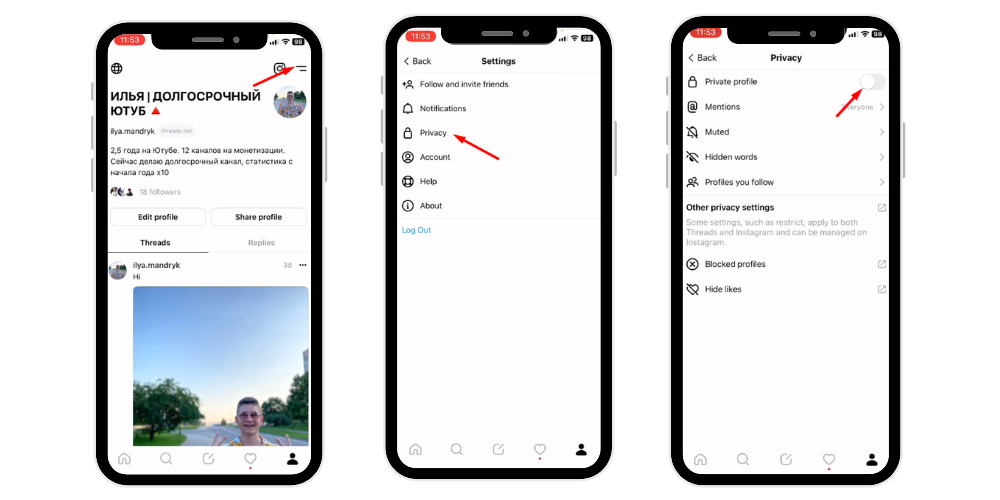
- Go to your Profile and tap the two-line icon (≡).
- Select Privacy.
- Choose Private Profile if you want to approve followers manually.
- Use the Blocked list to restrict unwanted accounts.
- Under Replies, decide who can reply to your posts — everyone, followers you follow back, or mentioned accounts only.
This ensures you only connect with people you’re comfortable engaging with.
What If You Don’t Know the Person Following You?
If a stranger wants to follow your Threads account, here are some possible scenarios:
- They discovered your post through the search page or the feed algorithm.
- They saw your quote or reply to another user’s Thread.
- They follow your Instagram, and the app automatically connected them.
- They’re genuinely interested in your content or ideas.
If you’re unsure, simply view their profile. You can check their username, bio, and Threads activity to see if the account looks real.
If it seems suspicious, you can ignore, restrict, or block them.
Remember, fake accounts still exist across all platforms, even on new ones like Threads. Always stay cautious when accepting new followers, especially if you share personal information.
What It Means for Your Account Growth
When more people start to follow you on Threads, it indicates that your content is resonating. This is a great opportunity to expand your audience and strengthen your digital presence.
Threads is still relatively new, meaning there’s less competition and more room to grow quickly.
Engaging posts, active replies, and consistent participation in public conversations can help attract more followers who value what you share.
Every follow request is an invitation to connect, exchange thoughts, and build visibility on a platform that values real-time discussion and human interaction.
Related: What Does Profile Visits Mean on Instagram?
Threads vs. Twitter: Why Followers Matter More Here
Unlike Twitter, Threads is tightly integrated with Instagram, making your audience more cohesive.
When someone follows you on Threads, they often already know you from Instagram — meaning your relationship starts with trust and familiarity.
Here’s a quick comparison of follower interaction across both apps:
| Feature | Threads | |
|---|---|---|
| Text Limit | 500 characters | 280 characters |
| Video Length | Up to 5 minutes | 2 minutes 20 seconds |
| DMs | No | Yes |
| Ads | None (for now) | Yes |
| Verification | Linked with Instagram | Paid (X Premium) |
| Cross-posting | Yes (Instagram Stories) | Limited |
Because Threads removes the clutter — no ads, no trending tab, and no limits on post viewing — followers here engage more genuinely and focus on actual conversation instead of algorithmic noise.
So if someone follows you on Threads, that person is likely interested in you, not just your content.
How to Respond When Someone Wants to Follow You
Here are some thoughtful ways to handle a follow request on Threads:
- Check their profile before accepting: This helps you avoid spam or bot accounts that might clutter your followers list.
- Follow them back if relevant: If you share interests or know them from another platform, follow back to build connection.
- Send a welcome reply or quote: If they engage with your Threads posts, reply warmly or acknowledge their interest.
- Adjust your settings: You can modify who can follow or reply anytime in Settings → Privacy → Followers and Replies.
- Stay authentic: Threads thrives on genuine conversations. Be yourself — share your thoughts, experiences, and ideas freely.
Benefits of Having Followers on Threads
Having followers on Threads isn’t just a vanity metric — it offers real advantages:
- Increased visibility: More followers mean more engagement and reach across the feed.
- Community building: Threads encourages authentic dialogue, helping you connect with like-minded people.
- Cross-promotion: Followers can discover your Instagram, Facebook, or other Meta services.
- Feedback loop: Followers reply to your posts and share thoughts that can help improve your ideas.
- Networking: You can interact with professionals, brands, and creators directly.
Every follower brings new opportunities for collaboration and meaningful engagement.
Things to Remember About Threads Followers
- Followers sync across Meta platforms: Threads and Instagram are closely connected. Changes to your name or picture on Instagram automatically update your Threads profile.
- You can’t change usernames in Threads directly: You must edit them on Instagram.
- Deleting your Threads profile doesn’t affect your Instagram account — but it removes your Threads data, including followers and posts.
- No ads for now: Threads currently offers an ad-free experience, keeping follower interactions clean and uninterrupted.
- Threads may expand soon: Meta plans to make the app compatible with other open platforms, allowing cross-network connectivity in the future.
How to Grow and Engage Your Followers on Threads
If you want to attract more people to your Threads account, use these strategies:
- Post regularly: Consistency keeps your content visible in the feed.
- Reply often: Respond to comments and interact with other users’ posts.
- Mix your content: Combine text, photos, videos, and links to keep followers interested.
- Ask questions: Encourage engagement with simple prompts like “What do you think?” or “True or false?”
- Quote popular Threads: Add your opinion to trending discussions to increase visibility.
- Stay authentic: Threads rewards honesty and personality more than polish. Share real thoughts instead of staged content.
- Connect across apps: Share your Threads on Instagram Stories or Facebook, inviting your audience to join Threads and follow you there too.
Why This Matters for the Future of Social Media
Threads is Meta’s biggest step toward blending conversation, creativity, and connection.
When someone follows you on Threads, it’s a signal that they value authentic communication — something many users feel is missing from other apps.
As Threads continues to evolve, followers will become more than numbers; they’ll represent active participants in your ideas, discussions, and community.
Each follow request reflects someone’s decision to join your world, share in your thoughts, and contribute to meaningful online dialogue.
💡 Pro Tip: Impressions help content perform better. Boost them to attract more engagement and visibility.
Final Thoughts
So, what does it mean when someone wants to follow you on Threads Instagram?
It means someone wants to connect, listen, and talk with you in a space built for human conversation — not noise.
They’re choosing to see your Threads posts, engage with your content, and maybe even share your ideas across platforms.
Whether it’s an old friend, a loyal follower, or a new connection, each follow is an opportunity to grow your presence and expand your network on a platform shaping the future of online communication.
Use your Threads account wisely — stay active, share your thoughts, interact with people, and continue building a community that values authenticity and respect.
That’s what following truly means on Threads Instagram — connection, communication, and real conversation.
FAQs
Why am I getting follow requests on Threads?
You’re getting follow requests on Threads because users connected to your Instagram or new people on Threads want to follow your profile there.
What does it mean to join Threads on Instagram?
Joining Threads means you’re linking your Instagram account to Meta’s text-based app, allowing you to share posts, connect, and interact using your Instagram identity.
Does someone need to invite you to follow them on Threads on Instagram?
No, Threads doesn’t require an invite. Anyone can follow you if your profile is public, or send a request if your account is private.
Why use Threads instead of Instagram?
Threads focuses on text-based conversations, real-time discussions, and community engagement, while Instagram emphasizes visual content like photos and videos.