Probably you will be among the first to know about what business chat means on Instagram?. We all have been on Instagram for a while now, but we never noticed that there are different accounts for a normal person and for brands and businesses. Most of the brands use a certain type of Instagram account that we normal users don’t.
In fact, most of the time when we slide into a brand’s DMs, we find a word, business chat, which makes us wonder, what is exactly a business chat?
Nowadays businesses and brands often prefer more effective conversation with their customers. For that, Instagram has introduced a feature called business chat. This significantly improves how businesses deal and interact with their customers. So the question is, what does business chat mean on Instagram?
Also Read: 1000+ Best Instagram Captions To Boost Engagement
What is Business Chat on Instagram?
It is an advanced tool designed by Instagram for businesses and brands to facilitate efficient and errorless communication between sellers and buyers via direct messages, or what we call DMs. With over a billion monthly active users, Instagram offers businesses an unparalleled opportunity to reach and engage a vast audience. The business chat feature is available on Instagram for all business accounts and is more than just a platform for messaging—it is a comprehensive business communication tool that offers diverse features to streamline communication and customer service, improve overall response time, and foster stronger customer relationships.
In simple words:
- Instagram Business Chat is a chat feature that is designed to communicate between businesses and customers.
- It improves the interaction, especially with potential buyers and existing ones.
- Instagram provides support, answering queries and tackling other issues.
- Personal accounts are intended for individual use, focusing on sharing experiences and connecting with friends and family, and do not have access to business chat features.
Quick Answers:
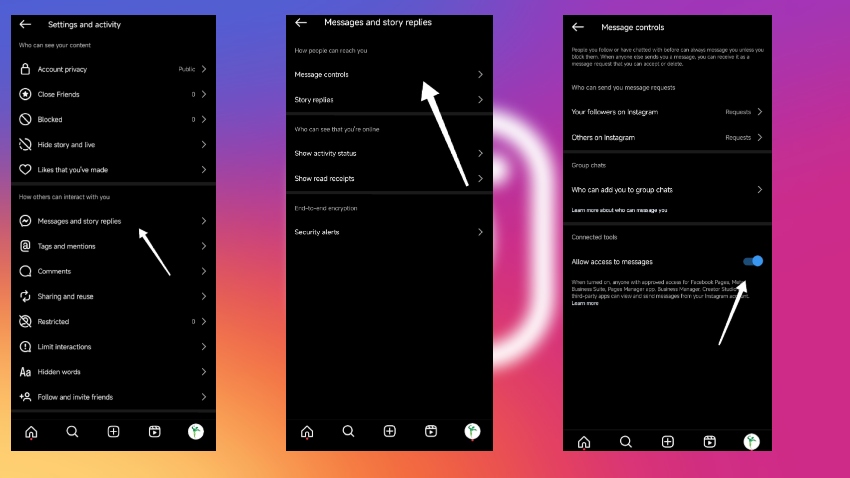
How do I enable messaging for my business account?
Step 1: Go to Settings.
Step 2: Click Messages and Story Replies.
Step 3: Click on Message Control.
Step 4: Allow access to messages.
You can also manage which message requests you accept from customers, giving you control over your business communications.
How do I switch to a business account?
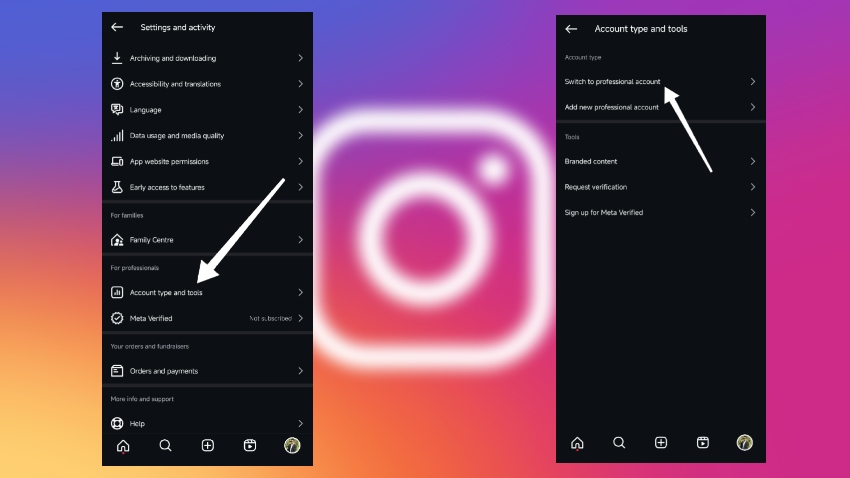
Step 1: Go to Settings.
Step 2: Tap Account
Step 3: Then tap on Switch to Professional Account.
Step 4: Select the appropriate category for your business.
After selecting your category, make sure to add your contact details to your business profile to enable direct communication with customers.
How do I set up Quick Replies?
Instagram also provides pre built response templates, allowing businesses to respond quickly and consistently to common inquiries. This feature helps streamline communication and ensures a personalized experience for customers.
Step 1: Go to Settings.
Step 2: Tap Business
Step 3: Tap on Saved Replies.
Step 4: Create a message.
Step 5: Then add a shortcut.
Step 6: Click on save.
Step 7: Use these shortcuts to quickly respond to common inquiries.
Take Your Instagram Business to the Next Level
Now that you understand how powerful Instagram Business Chat can be, it’s time to make sure your profile stands out, attracts the right audience, and builds serious engagement. Whether you’re just starting out or scaling an existing brand, these services from BuySocialMediaMarketing.com can help you grow faster and smarter:
- 🔥 Buy Instagram Followers – Instantly boost your profile credibility and attract real attention.
- 💬 Buy Instagram Comments – Spark conversations and show engagement that matters.
- ❤️ Buy Instagram Likes – Increase post visibility and reach more potential customers.
- 📈 Buy Instagram Views – Enhance the exposure of your reels, videos, and stories.
- ✅ Buy Instagram Saves – Improve your post ranking and drive long-term engagement.
👉 Ready to grow your brand? Start now with BuySocialMediaMarketing.com and watch your Instagram business account transform.
How can you set up an Instagram business chat?
Now if you want or looking to set up a business account for your business then you can just simply engage with your audience in a better way. Switching to a business account also unlocks business messaging features that help you engage with customers more efficiently. This is the perfect way you can set up or convert your existing account to a business chat. For that, there are some simple steps you need to follow.
Switching to a Business Account
Now, if you haven’t already converted your Instagram account to a business profile, you should do that first. Afterwards it will unlock all the business features that Instagram gives you, including the direct messaging services.
There is no rocket science in setting up Instagram business chat. All you have to do is create an account on Instagram, and then once you are done with setting up your account, you can switch to business by following steps.
Step 1: Open Instagram login and then go to settings.
Step 2: Then scroll down, or it will be right there, and click on account.
Step 3: Then there you will see “Switch to professional account.” You can click on that to convert.
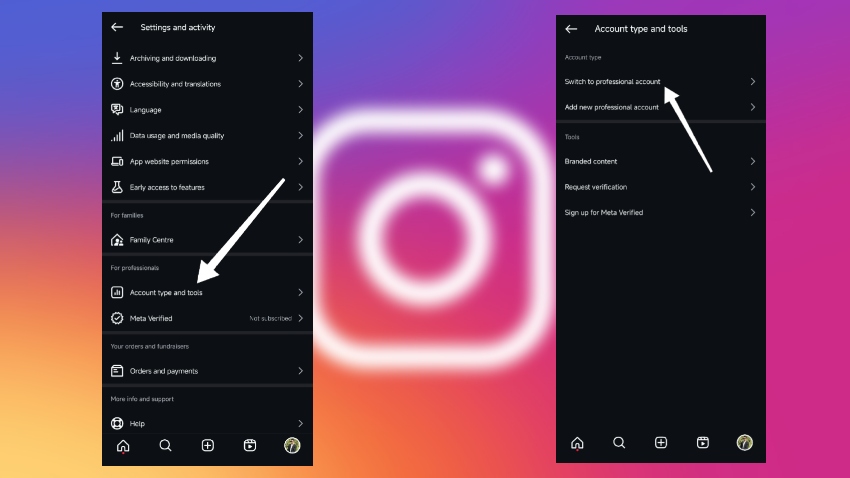
Once you are done, then certain options will appear where you have to choose a category for your business account. Afterwards, you will be able to access direct messaging business interactions. Moreover, this will allow you to engage with your customers using all the features Instagram provides to business accounts.
How to enable Messaging on Instagram
You can easily enable the messaging on your business account. All you have to do is navigate account settings, and there you will see whether messaging is enabled or not. So this will allow you to send DMs to your business profile and will facilitate direct communication with your audience. So the following are the steps you can take to enable messaging on Instagram.
Step 1: Open Instagram and then tap on the three lines in the top right corner.
Step 2: Now go to settings and then scroll down to see “messages and story replies.”
Step 3: Now tap on the “Messages and Story Replies” option.
Step 4: Afterwards, click on “Message control” and check on the “All Access to message” option.
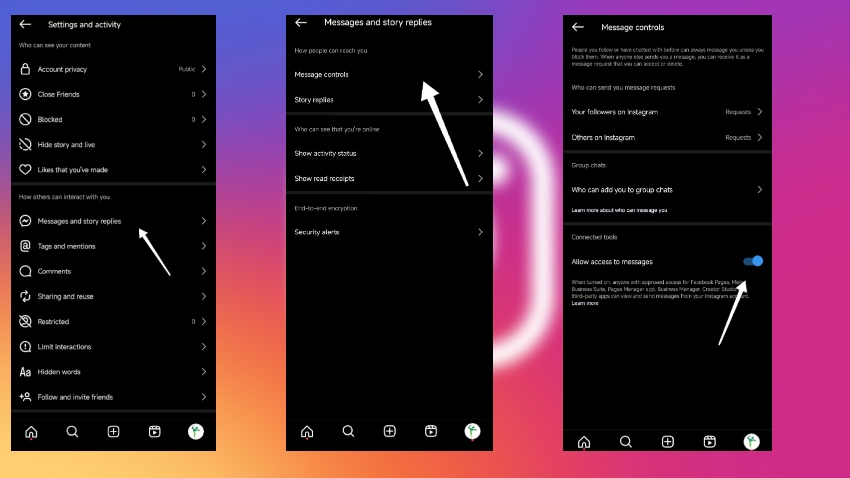
Once messaging is enabled, all your business messages will appear in your Instagram inbox, where you can manage and respond to customer inquiries efficiently.
So this is how it is done; these are some simple steps you need to follow, and it will not take more than 2 minutes.
How do I set up quick replies on Instagram?
One of the important features of an Instagram business account is the quick replies. It creates prewritten responses for frequently asked questions or some set standard greetings. We often get a quick reply when we send a message to a brand; that is the very quick replies feature on Instagram you will get. This tool is very important as it saves time and makes sure your client does get a message or a question the client is looking for.
So follow the following steps to know how to set up Quick Replies on Instagram.
Step 1: Open the Instagram app and go to settings.
Step 2: You will see business options. Tap on it and then tap on saved replies.
Step 3: There it will give you an option to create a reply; you can tap the + option in the top right corner to create a new one.
Step 4: There you will write your message and then add a shortcut in the box above.
Step 5: To save the answer to the previous question, open the message thread and then click and hold the message and edit before saving.
Step 6: For sending quick replies, tap on the quick reply icon on your screen and select a saved response or type the shortcut.
This way you will create multiple saved replies for frequently asked questions to streamline your responses to your customers.
By following these steps, you can effectively set up Instagram Business Chat, enhancing your ability to interact with customers promptly and efficiently. Using quick replies helps you respond promptly to customer inquiries, improving their experience.
Types of Instagram Accounts:
For us, we always thought there was only one account that we often used, especially for personal use. However, Instagram users can choose from different account types based on their needs, such as personal, business, or creator accounts. There are types of accounts available on Instagram, including the business account, where you will get all the incentives and features like Instagram Business chat.
1. Personal Account
So basically there is a personal account that we all use for our personal use. In this account, we look to connect with friends and family. Personal accounts primarily use chats on Instagram for private conversations with friends and family, making it easy to stay in touch in a casual and private way. We post our daily feeds and share them with friends and family. There are some basic features a personal account has, and there are no such business features in this account that we mentioned above. Moreover, this type of account is simple and easy to use, making it an ideal type of account for your personal use. Moreover, you can focus on your own growth in this account rather than brand growth.
2. Business Account
Here comes the account we have been talking about throughout the blog. Business accounts are made specifically for businesses and brands, including access to analytics, advertising options, and likewise, direct messaging services. Business accounts can use Instagram DM to communicate directly with customers and manage inquiries efficiently. This account is made specially to meet all the requirements of online business and to promote products and services, give high-quality customer support, and improve the overall business.
3. Creator Account
Now this accounts for creators like influencers, artists, and content creators. We often see accounts with millions of followers. Those are the creator accounts on Instagram. In creator accounts, there are additional insights and growth tools mostly made specifically for the creator’s needs. Moreover, the account comprises some detailed analytics on content performance and other audience engagement. This helps the creators to know how their strategies are working, and they act accordingly to improve it.
Features you will get using Instagram Business Chat
Now Instagram Business Chat offers a powerful messaging feature that enables businesses to manage direct, personalized communication with customers. These features help businesses engage with customers at every stage of the customer journey, from initial awareness to final conversion. Some of the key features are all you need to run your business efficiently.
1. Automatic Responses:
One of the new features we witnessed is the automated replies. You can set up automated replies to every frequently asked question, which will improve the response of your business. In fact, those responses come in very handy outside the business hours, helping manage customer expectations by ensuring timely replies even when your team is unavailable.
2. Fast replies:
Another feature enables businesses to save a lot of time by reusing some common responses to frequently asked questions. It will make your business service more consistent, and your clients won’t need to wait long for your replies, which can significantly improve customer satisfaction.
3. Integrated with Instagram:
The Instagram business chat is directly integrated into its app. There is no need to download an extra app for it. You can access that easily while staying on Instagram. This way you can manage your business conversation within the platform with your clients, allowing you to manage conversations directly within the Instagram app for streamlined and efficient customer interactions.
4. Labeling and categorizing:
Another great feature is you can label your clients and organize them for better understanding. For instance, you can organize them categorically and label them as new customers, pending orders, loyal customers, and more. Making such labels will help you keep up with the business, and in this way, you can provide great customer service by efficiently managing multiple conversations with different customers.
5. Using Facebook Business Suite
The best part about the Instagram business account is you can manage your messages via Meta Business Suite as well. The Meta Business Suite Inbox allows you to organize, automate, and analyze your Instagram messages efficiently, making it easier to categorize conversations, automate replies, and track analytics for improved customer engagement. Moreover, if you want to make it more professional, then you can integrate it with a third-party customer relationship management (CRM) as well. This way, your entire business-related stuff will be easily accessible.
6. Integration of Product Catalog
Instagram Business Chat enables all businesses to share any of the product details, links, and even the pricing directly while in conversation with the clients to make it easier for customers to shop. You can also link your Instagram Shop to showcase products and enable direct purchases within the chat. It streamlines the business, and you can make more business out of it.
7. Easy payment:
Furthermore, it will also allow your customers to purchase directly within the chat. However, it is not available in many regions, but if it is yours, then you can use it. It streamlines the buying process, and customers can pay while staying in your chat.
Benefits of Using Instagram Business Chat for Businesses
If you are running a business or planning to run a business online, integrating and making a business on Instagram is the best way to start. Features like Instagram business chat help your business grow by streamlining customer interactions and providing efficient support, which enhances the overall customer experience and strengthens customer relationships.
Here are some of the benefits you can get while using Instagram business chat for your business.
1. Better customer engagement:
Of course, Instagram business chat is all about improving your customer service for your clients. It allows businesses to interact more with their clients, especially in real time. The engagement you will get will be far better than it ever was before. Furthermore, the relation between client and seller will also improve that way, giving your business a competitive edge in the market.
2. Better customer support:
One of the best benefits you will get is improved customer support, as your support team can use Instagram Business Chat to address client inquiries promptly. The instant messaging will help your business to address clients promptly without making them wait. It reduces the response times and enhances customer satisfaction.
3. Improved sales
No doubt after the business Instagram account integration, the business has improved a lot in sales. Especially using some of its features, like integrating product catalogs and payment options in chat, has made it easier for customers to buy things. All of the processes can be done without leaving the Instagram app, which is pretty awesome in terms of doing online shopping, to be honest. Additionally, integrating Instagram campaigns with chat features can further boost your sales by combining targeted advertising and interactive content with seamless customer interactions.
4. Improves Loyalty
To make customers loyal, you have to provide the best service; it is a simple term used around the world. Now here, when you do personalized interactions and quick responses, that surely makes every customer feel valued. Moreover, it leads to gaining more loyal and repeat customers.
5. Effective communication:
Choosing the perfect labels and then an automated response, as well as CRM integration that we mentioned above, can help businesses manage their communication more effectively using these tools. In fact, if you have a load of volume to manage, still all the customers inquired will be dealt with without compromising any of your business quality.
6. Multiple platforms:
You can use more than one platform for your business, like Facebook Business Suite, which can manage your Instagram and Facebook messages. All you have to do is integrate Instagram with Facebook Business Suite, and then support teams can efficiently handle messages from both Instagram and Facebook in one place.
7. Best for Long Term:
Online businesses, when established properly, can run for a longer term. Likewise, Instagram Business accounts have made it possible thanks to their amazing features, like the business chat, which helps capture leads of potential customers. When you provide the best services and customer support using all of these features, your business will run for a longer term for sure.
How you can use Instagram Business Chat effectively:
It’s not only creating a business account on Instagram; you have to follow everything in order to make everything organized. Instagram Business Chat provides a direct line of communication between your business and customers, allowing for immediate and personal interactions. In fact in this way you will effectively implement all the strategies that will help grow your business.
1. First, Set Up Automated Responses
Automated Responses is one of the important features that you have to make active all the time. So first set up all the automating common inquiries of your customers so they receive prompt replies, even if the business is not available at the moment. While automated responses handle common questions, complex inquiries can be directed to a human agent. This will streamline your business on Instagram at its very best.
2. Make use of Quick Replies.
The best way to make great use of quick replies is to create a set of pre-written responses. These responses will help your business not only save time but also maintain consistency in providing good customer service.
3. Organize all questions and answers with labels.
Instagram business gives you an opportunity to categorize your messages properly. It will help your business stay on track to respond efficiently and exactly to what the customer wants to know. Labeling your responses is the best way to do that, and you can also organize business chat message requests to prioritize and respond efficiently.
4. Make use of CRM tools.
Another way to make good use of an Instagram business account is by using its CRM tools. You can engage with customer data and can manage it efficiently; in fact, all the conversation will be tracked for any future references, and by tracking customer behavior, you can tailor your communication and improve service.
5. Make sure to give personalized assistance.
Another way forward to win your customer’s heart is to address them by their names. You can use a reference to their past interaction; that way, it can enhance the chat experience, and you can build more trust. Moreover, the conversion to loyal customers will increase.
6. Taking advantage of Instagram Shopping
Another feature you might not have heard of is the Instagram shopping feature. This allows businesses to share their product links while styling in the chat; in fact, the buyers can buy it again while staying in the chat. So it is another top-notch Instagram feature for businesses to take advantage of.
7. Always prefer customer engagement.
It is very easy to engage with customers using all the features of an Instagram business account. Engaging with post comments is another effective way to connect with customers and encourage conversations. Simply prompt customers to start chats all by using call-to-action buttons. These buttons are on Instagram posts, stories, and even in the bio section, so this makes it pretty easy for customers to check out what you are selling.
8. Analytics
Last but not least, Instagram business accounts help you track your business analytics, with Instagram Insights providing detailed analytics on your business account’s performance. You can check the response times, customer satisfaction, and other chat conversations, while messaging analytics and inbox messaging analytics help you track response times and engagement rates. Reporting features allow you to monitor marketing performance and identify customer trends. Using all these analytics, including instagram inbox messaging analytics, you gain valuable insights into customer behavior and can optimize your strategies for improvement.
FAQs:
1. What is Instagram Business Chat?
Instagram Business Chat is a feature that allows businesses and brands to interact with their customers. It enables customer support and answers customer inquiries. Moreover, it is used at its best to increase sales within the Instagram messaging system, or in other words, you don’t have to use any other app for it.
2. How is Instagram Business Chat different from regular Instagram DMs?
It is different from the rest of the Instagram DMs because you can use features like automated responses, quick replies, labels for organizing messages, and integration with business tools. Taking advantage of all these features, you can build your online business efficiently.
3. Do I need a business account to use Instagram Business Chat?
Yes, you need an Instagram business account to get features with Instagram business chat. Moreover, you can also get this feature if you are using a creator account, though it is better to only use a business account if you are running a business.
4. Can I automate responses in Instagram Business Chat?
Of course you can automate responses in Instagram business chats. You can set that for frequently asked questions and use quick replies to streamline communications. Moreover, this will help your customers to build trust in your business, and it will improve day by day.
5. Is Instagram Business Chat free to use?
Yes, Instagram Business Chat is free to use; there are no paid subscriptions for it. Although if you intend to use any third-party integration like the CRM tools, then you might need to pay for that before you integrate your Instagram into it.
6. Can customers make purchases directly through Instagram Business Chat?
Yes customers can make purchases directly through instagram business chats thanks to the in chat purchase feature. Instagram allows you to integrate this feature with payment options, which further makes the transactions simple for businesses, especially customers.
7. Can I use Instagram Business Chat for customer support?
Yes, the Instagram business chat is all for providing better, fast, and improved customer support. You can handle customer inquiries, you can simply solve their issues, and you can also provide personalized support, which is the best strategy to win customers.
8. How can I reduce spam messages in Instagram Business Chat?
To reduce spam messages in Instagram business chat, you can use Instagram spam filters. You can also manage message requests to filter out unwanted messages and focus on genuine customer inquiries. Additionally, you can block or report unwanted messages and then set up automated replies to manage the true customers efficiently.
9. Can I integrate Instagram Business Chat with other platforms?
Yes, you can use third-party tools as well. Moreover, you can use Instagram Business Chat on other apps like Facebook Business Suite, WhatsApp Messenger, and other CRM tools. All you have to do is integrate your Instagram business chat with these apps, and you are good to go. Additionally, you can integrate an Instagram chatbot to automate customer interactions, support, and streamline your engagement processes.
10. How can I manage multiple Instagram conversations efficiently?
Managing multiple Instagram conversations is simplified with tools like the Meta Business Suite Inbox. It allows businesses to categorize, label, and prioritize messages, ensuring timely responses and organized communication. Additionally, integrating third-party tools can further enhance your ability to manage high volumes of customer inquiries efficiently.
11. Can Instagram Business Chat help in building a professional image?
Yes, using Instagram Business Chat helps maintain a professional image by enabling prompt, personalized interactions with customers. Features like quick replies, automated responses, and organized messaging demonstrate your commitment to excellent customer service, reinforcing trust and credibility in your brand.
12. Is Instagram Business Chat a cost-effective solution for small businesses?
Absolutely! Instagram Business Chat is a cost-effective solution that allows small businesses to engage customers directly without expensive infrastructure. Automation and pre-built response templates reduce the need for large support teams, helping businesses save time and resources while improving customer satisfaction.
13. How does Instagram Business Chat improve customer engagement?
By providing a direct line of communication, Instagram Business Chat encourages real-time interactions, personalized support, and quick problem resolution. This leads to enhanced customer engagement, stronger relationships, and increased loyalty, which are essential for business growth on the platform.
14. Can I send direct messages to customers using Instagram Business Chat?
Yes, Instagram Business Chat enables businesses to send direct messages to customers, facilitating personalized conversations, promotional offers, and timely support. This direct messaging feature helps businesses connect with their audience effectively and nurture leads through meaningful interactions.
Conclusion:
If you are looking for a good business opportunity online, then an Instagram business account is the best strategy for it. Later when you do that
You will get all the Instagram business features, like the business chats, which you can take full advantage of and improve your business. You can also use Instagram Business Chat to send promotional messages to your audience and boost engagement. For that instance above, here are some of the ways you can make full use of Instagram business chats and other supporting content.